Written by Metin KARAL – Computer Engineer with 25+ years of experience in internet technologies. Some products here are tested directly, while others are evaluated through detailed research, specifications, and verified customer feedback. This article may contain affiliate links; as an Amazon Associate we earn from qualifying purchases at no extra cost to you.
Keeping an eye on your home, baby, or pets shouldn’t break the bank. With so many indoor security cameras on the market, it can be overwhelming to choose one that balances video quality, smart features, and affordability. That’s why we’ve reviewed the top 9 indoor cameras under $100 for 2026, covering everything from 2K and 4K video clarity to AI-powered motion tracking, night vision, and two-way audio. Whether you need a reliable baby monitor, a pet camera, or an all-around home security solution, this guide will help you find the perfect option for your needs.
Best Indoor Security Cameras Under $100
| Camera | Why |
|---|---|
| Tapo 2K Pan/Tilt (2‑Pack) | Best overall/value: 2‑pack price, 360° pan/tilt, 2K video, smart alerts, subscription‑free local storage. |
| eufy E220 | Perfect for pets: AI human/pet detection, smooth motion tracking, 360° coverage, smart home compatible. |
| Kasa EC71 | Best for babies/family: Baby cry detection, local/cloud storage, 1080p video, easy-to-use app. |
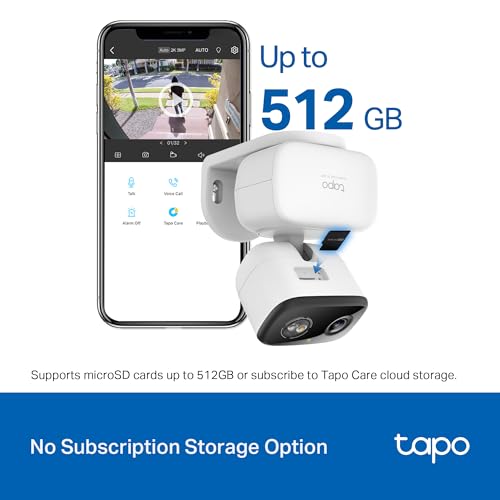
| Tapo 2K C216 | Local storage/no subscription: 2K clarity, AI detection, weather-resistant indoor/outdoor flexibility. |
| REOLINK E1 | Local storage option alternative: 4MP HD, 360° auto-tracking, baby/pet detection, multiple local storage paths. |
| Cinnado D1 | Best budget: 2K video, 360° coverage, motion alerts, SD card recording at ultra-low price. |
| aosu 2K | Compact/small spaces: Lightweight, 2K clarity, smart motion tracking, one-touch 2-way audio. |
| eufy E30 | Feature-rich/premium <$100: 4K ultra-clear, AI auto-tracking, color night vision, subscription-free local storage. |
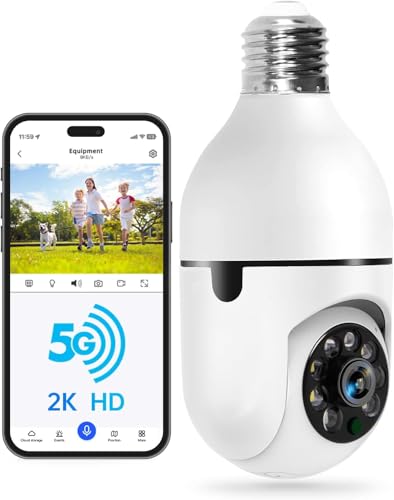
| WESECUU Bulb | Innovative/easy install: Light bulb form factor, dual-band Wi-Fi, 2K video, PTZ motion tracking, human detection. |
Best Indoor Cameras Under $100 — Comparison Table
| Camera | Video | Key Features | Storage |
|---|---|---|---|
| Tapo 2K Pan/Tilt (2‑Pack) | 2K | 360° pan/tilt, motion alerts | Local/Cloud |
| eufy E220 | 2K | AI pet/human detection, tracking | Local |
| Kasa EC71 | 1080p | Baby cry alerts, 2‑way audio | Local/Cloud |
| Tapo 2K C216 | 2K | AI person/baby detection, color night | Local/Cloud |
| REOLINK E1 | 4MP | Auto tracking, cry detection | Local (microSD/NVR) |
| Cinnado D1 | 2K | 360° pan/tilt, motion alerts | SD / Cloud |
| aosu 2K | 2K | Motion tracking, 2‑way audio | Local |
| eufy E30 | 4K | AI auto tracking, color night | Local |
| WESECUU Bulb | 2K | Bulb form factor, PTZ, detection | SD / Cloud |
Tapo 2K Pan/Tilt Security Camera (2-Pack) – Best Overall / Best Value

Quick Facts
- 📦 2-pack value — one of the lowest cost-per-camera options
- 🎥 2K (3MP) resolution — sharper detail than 1080p
- 🔄 360° pan & tilt — full room coverage (114° tilt)
- 🌙 Night vision up to 30 ft — reliable low-light monitoring
- 🎙️ 2-way audio + siren — communicate or deter intruders
- 💾 Local storage (up to 512GB) — no subscription required
- 📱 Smart detection — motion, person & baby cry alerts
Editor’s Note
The Tapo C210P2 is one of those rare products that hits the perfect balance between price, features, and real-world usability. Instead of focusing on flashy extras, it delivers what most buyers actually care about: reliable monitoring, wide coverage, and zero ongoing costs.
What stands out most is the 2-pack pricing strategy. Many competitors sell a single camera at a similar price, but here you’re effectively covering multiple rooms for the same budget, which significantly increases perceived value.
From user feedback and general market behavior, this model is widely considered a “safe choice” camera—not necessarily the most premium, but consistently dependable. Some users mention minor app quirks or notification sensitivity, but overall sentiment is that it “just works” for everyday monitoring, especially for pets and indoor security.
Pros
- Excellent price-to-performance ratio (especially as a 2-pack)
- Full 360° coverage with smooth pan & tilt tracking
- Reliable local storage with no mandatory subscription
- Solid 2K clarity for the price segment
- Very versatile (pets, baby, general home monitoring)
Cons
- 2.4GHz Wi-Fi only (no 5GHz support)
- Basic build quality (plastic, budget feel)
- App notifications can be sensitive in some setups
Why We Liked It
What makes this camera stand out is how well it aligns with actual buyer intent. Most users don’t need advanced AI ecosystems or expensive cloud plans—they want something that is easy to set up, reliable, and affordable.
The pan & tilt tracking works surprisingly well for this price range, keeping pets or moving subjects in frame without needing multiple cameras. Combined with local storage support (up to 512GB), it removes the biggest friction point in this category: ongoing subscription costs.
Another major advantage is flexibility. Whether you’re using it as a baby monitor, pet cam, or general indoor security camera, it adapts well without feeling limited. Real-world users often highlight that 2K resolution is noticeably sharper than 1080p, especially for identifying small details like objects or movements.
Yes, it’s not perfect—occasional app quirks or overly sensitive alerts can happen—but at this price point, it delivers far more value than expected, which is exactly why it earns the “Best Overall” spot.

Tapo 2K Pan/Tilt Security Camera (2-Pack)
Best For: Anyone looking for a reliable, budget-friendly indoor camera with full-room coverage and no subscription fees.
Summary
The Tapo C210P2 delivers everything most users actually need—clear 2K video, full 360° coverage, smart alerts, and local storage—at an unbeatable price, especially as a 2-pack. It’s not the most premium option, but it’s easily one of the smartest and safest buys in the under-$100 category.
eufy Security Indoor Cam E220 – Best for Pets

Quick Facts
- 🐶 AI pet detection — distinguishes pets vs humans for smarter alerts
- 🎥 2K resolution — sharp, detailed indoor footage
- 🔄 360° pan & tilt — full-room coverage with auto tracking
- 🎯 Motion tracking — automatically follows moving pets
- 🌙 Night vision — clear monitoring in low light
- 🎙️ 2-way audio — talk to pets remotely
- 🏠 Smart home support — works with HomeKit, Alexa & Google Assistant
Editor’s Note
The eufy Indoor Cam E220 stands out as one of the most pet-focused indoor cameras in this price range. While many cameras claim to support pet monitoring, eufy’s on-device AI detection is noticeably more refined, reducing false alerts and making notifications actually useful.
What makes this model particularly strong is its ability to track movement smoothly across the room. For pet owners, this means you’re not just seeing a static angle—you can actively follow your dog or cat as they move, which adds real value compared to fixed cameras.
From user feedback across marketplaces, this camera is often praised for its reliability and privacy-focused approach. Since AI processing happens on-device, users feel more comfortable using it indoors, especially in living rooms or bedrooms. The HomeKit integration is also a big plus for Apple users, although it comes with a slight resolution limitation (1080p in HomeKit mode).
Overall, it’s not just a general-purpose camera—it’s one of the few in this price range that feels intentionally built for pet monitoring, which is why it earns this category.
Pros
- Accurate AI pet detection reduces false alerts
- Smooth motion tracking that follows pets in real time
- Sharp 2K video quality for clear indoor monitoring
- Strong smart home integration (HomeKit, Alexa, Google)
- Privacy-friendly design with on-device AI processing
Cons
- No built-in battery (requires constant power)
- HomeKit limits resolution to 1080p
- No physical privacy shutter (software-based instead)
- Cloud features require subscription (optional)
Why We Liked It
What really makes the E220 shine is how well it handles real-world pet monitoring scenarios. Instead of flooding you with constant alerts, the AI system filters events more intelligently—so you’re notified when something meaningful happens, not every minor movement.
The motion tracking is another highlight, keeping pets in frame as they move around the room. This is especially useful for active animals, as many cheaper cameras either lag behind or lose track entirely.
Another underrated strength is its ecosystem flexibility. Whether you’re using Apple HomeKit, Alexa, or Google Assistant, it integrates smoothly, making it a great fit for different smart home setups. Users also consistently mention that setup is quick and straightforward, which lowers the barrier for first-time buyers.
Combined with strong video quality and reliable performance, it delivers a well-rounded experience that feels slightly more premium than its price suggests.

eufy Security Indoor Cam E220
Best For: Pet owners who want accurate motion tracking and smart alerts to monitor pets in real time.
Summary
The eufy Indoor Cam E220 combines smart AI detection, smooth motion tracking, and strong ecosystem support to deliver one of the best pet monitoring experiences under $100. It’s a purpose-built choice for pet owners, offering more intelligent alerts and better tracking than most competitors in this range.
Kasa 1080p Indoor Pan/Tilt Camera (EC71) – Best for Baby / Family Monitoring

Quick Facts
- 👶 Baby cry detection — get alerts when your baby needs attention
- 🎥 1080p Full HD — clear everyday monitoring quality
- 🔄 360° pan & tilt — full-room coverage with patrol mode
- 🎯 Motion tracking — follows movement automatically
- 🌙 Night vision (30 ft) — reliable monitoring in the dark
- 🎙️ 2-way audio — talk to baby or family remotely
- 💾 Local + cloud storage — flexible recording options
Editor’s Note
Kasa (by TP-Link) is one of the most established and trusted brands in the smart home space, known for delivering reliable, budget-friendly devices with a stable app ecosystem. That reputation shows here—the EC71 is designed to be a simple, dependable camera for everyday family use, rather than an overcomplicated gadget.
One key feature worth understanding here is cloud storage vs local storage. This camera supports both: you can record footage to a microSD card (no monthly fee) or subscribe to Kasa Care cloud storage, which stores video securely online.
👉 Why this matters:
- Local storage = no ongoing cost, but limited by card capacity and tied to the device
- Cloud storage = access recordings anytime, from anywhere, even if the camera is damaged or stolen
For family and baby monitoring, cloud storage can be especially useful since it allows parents to review past events (like sleep patterns or crying alerts) without worrying about losing data.
Combined with features like baby cry detection, motion tracking, and easy app controls, this camera focuses on peace of mind and accessibility, which is exactly what most families need.
Pros
- 👶 Reliable baby cry detection for real-time alerts
- 💰 Very affordable pricing (one of the cheapest quality options)
- 🔄 Full 360° coverage with smooth pan & tilt
- 💾 Flexible storage options (local + cloud)
- 📱 Easy-to-use app ideal for non-tech users
Cons
- 📶 2.4GHz Wi-Fi only (no 5GHz support)
- 🧱 Basic design/build quality
- ☁️ Cloud features require subscription
Why We Liked It
The EC71 stands out because it focuses on what actually matters for families: simplicity, reliability, and useful alerts. The baby cry detection feature is particularly valuable, turning the camera into a functional baby monitor without needing a separate device.
The pan & tilt + motion tracking combo ensures you don’t miss anything happening in the room, which is important when monitoring a baby or child who moves around. Parents also appreciate how easy it is to set up and use the app, with minimal configuration required.
Another strong point is flexibility. Whether you prefer no monthly fees (local storage) or want the added convenience of cloud recording, the camera adapts to different needs and budgets.
Overall, it delivers a practical, stress-free monitoring experience, which is exactly what most households are looking for.

Kasa 1080p Indoor Pan/Tilt Camera (EC71)
Best For: Parents and families who want an affordable, easy-to-use camera with baby monitoring features and flexible storage options.
Summary
The Kasa EC71 offers reliable baby monitoring, flexible storage, and easy everyday use at a very affordable price, making it one of the best choices for families who want simple, effective indoor surveillance without overpaying.
Tapo 2K C216 Indoor/Outdoor Camera – Best with Local Storage / No Subscription

Quick Facts
- 💾 True local storage — record to microSD with no mandatory subscription
- 🚫 No monthly fees — core features work without cloud plan
- 🌧️ Indoor & outdoor ready — IP65 weather resistance
- 🎥 2K (3MP) resolution — clear detail for everyday monitoring
- 🔄 360° pan & tilt — full room/area coverage
- 🧠 AI detection — person, motion, and baby crying alerts
- 🌙 Color night vision — built-in spotlight enables full-color footage at night
Editor’s Note
The TP-Link Tapo ecosystem has quickly built a strong reputation for budget-friendly, reliable smart home devices, and the C216 is a great example of that approach. What really stands out here is the no-subscription model—something many buyers actively search for.
Most indoor cameras today push users toward cloud storage subscriptions, where footage is stored on remote servers and accessible from anywhere. While convenient, that usually means monthly fees and potential privacy concerns. The C216 flips that model by offering full functionality with local storage (microSD card), meaning your footage stays in your control, with zero ongoing cost.
This is especially valuable for users who want a one-time purchase camera without long-term commitment. Combined with AI detection (without fees) and flexible indoor/outdoor usage, it hits a sweet spot between privacy, cost-efficiency, and functionality—which is rare in this price range.
Pros
- No subscription required — full functionality without monthly fees
- Local storage support (microSD) gives full control over recordings
- Indoor + outdoor versatility (IP65 rated) adds flexibility
- Color night vision with spotlight is rare at this price
- AI detection without extra cost (person, motion, baby crying)
- Wide 360° coverage with tracking for full-area monitoring
Cons
- Cloud features still limited compared to premium ecosystems
- App experience is good but not premium-tier
Why We Liked It
The biggest win here is true independence from subscriptions. While many cameras advertise low upfront prices, they quickly become expensive with monthly plans. The C216 avoids that completely, offering local recording, AI detection, and alerts without extra cost.
We also liked the added flexibility—it’s not just an indoor camera. With IP65 weather resistance and color night vision, it can cover entryways, garages, or even semi-outdoor areas, making it more versatile than most competitors in this price range.
Tapo 2K C216 Indoor/Outdoor Camera
Best For: Users who want a one-time purchase indoor/outdoor camera with zero subscription costs.
Summary
The Tapo C216 is one of the best “buy once, use forever” security cameras in the budget segment. With local storage, no subscription, AI detection, and even outdoor capability, it delivers exceptional value for users who want to avoid ongoing costs.
If your priority is privacy, cost control, and flexibility, this is easily one of the strongest picks in the entire list.
REOLINK E1 – Best For Local Storage Alternative / No Subscription

Quick Facts
- 💾 Local storage friendly — supports microSD up to 512GB, NVR, or Home Hub for full control
- 🚫 No subscription needed — all core features available without cloud plan
- 🎥 4MP HD resolution — sharper image for monitoring babies, pets, and small details
- 🌙 Enhanced night vision — clear IR footage even in total darkness
- 🔄 360° coverage & auto tracking — follows motion across full room
- 🧸 Cry & motion detection — instant notifications for babies or pets
- 🗣️ Two-way audio — communicate remotely with family or pets
- 🔒 Privacy mode & multi-user support — control who can view or mute feed
Editor’s Note
REOLINK has built a strong reputation for delivering affordable yet feature-rich security cameras. The E1 is a solid indoor option, especially for users who want full control of their recordings without paying for cloud services.
A highlight here is the multiple local storage options. Users can record directly to a microSD card (up to 512GB), Reolink NVR, or Home Hub, which ensures footage remains private and accessible even if your internet is down. Unlike many subscription-heavy competitors, REOLINK emphasizes self-managed storage, giving peace of mind for privacy-conscious buyers.
Other key features include enhanced 4MP resolution, auto-tracking pan/tilt, and instant cry detection, making it ideal for families with babies or pets. The privacy mode and multi-user access also make the camera versatile for shared household monitoring
Pros
- Multiple local storage options (microSD, NVR, Home Hub)
- 4MP HD video clarity captures fine details
- Auto-tracking & 360° coverage ensures full-room monitoring
- Enhanced night vision provides clear footage in darkness
- Two-way audio lets you communicate remotely
- Cry & motion detection keeps you informed of important events
- Privacy mode & multi-user access for secure control
Cons
- Limited cloud integration — mostly local storage focused
- App can be slightly complex for first-time users
Why We Liked It
The REOLINK E1 combines high-resolution video, AI-powered detection, and full local storage support in a budget-friendly package. Its instant baby cry alerts and 360° motion tracking make it excellent for both baby monitoring and pet surveillance.
We also appreciate the flexible user management and privacy mode, which are often missing in cameras at this price range. For anyone prioritizing local storage and self-controlled recordings, this is an excellent alternative to subscription-heavy brands.

REOLINK 4MP 2K Indoor Camera E1
Best For: Families or pet owners who want high-resolution monitoring with complete local storage control.
Summary
The REOLINK E1 is a strong “buy once, manage locally” camera with excellent 4MP video, full 360° tracking, and AI alerts. Its emphasis on self-managed local storage and privacy makes it one of the best alternatives to subscription-based cameras, providing peace of mind, reliability, and value in one compact package.
Cinnado D1 2K – Best Budget

Quick Facts
- 💾 24/7 SD card storage — optional continuous recording up to 128GB
- ☁️ Optional cloud storage — 30-day trial with encrypted uploads
- 🎥 2K FHD resolution & 360° coverage — full-room monitoring with pan/tilt
- 🌙 Night vision up to 6m — see pets and babies clearly at night
- 🗣️ Two-way audio — talk to family or pets remotely via app
- 🚨 Smart motion detection & push alerts — receive notifications instantly
- 👪 Multiple user support — share camera feed with family and friends
- 🔌 Wired power only — not battery operated, continuous connection required
Editor’s Note
Cinnado is a lesser-known but reliable brand that focuses on affordable, functional home security cameras. The D1 2K shines in the budget segment, offering a full suite of features typically seen in higher-priced cameras: 360° pan/tilt, crystal-clear 2K video, night vision, motion detection, and 2-way audio.
A standout aspect is its storage flexibility. You can record continuously on an SD card, ensuring subscription-free local storage, or opt for cloud storage if you prefer offsite backup. This is a significant advantage for budget-conscious users who want data security without ongoing fees. The camera’s compact design also makes it easy to place discreetly in small spaces.
Pros
- Compact design fits well in small spaces
- 2K FHD video with 360° coverage for full-room monitoring
- Night vision up to 6m provides clear low-light visibility
- 24/7 SD card & optional cloud storage for flexible recording
- Two-way audio allows remote communication
- Smart motion detection & push alerts keep you informed
- Multi-user support lets family members view feed simultaneously
Cons
- 2.4GHz Wi-Fi only — 5GHz networks not supported
- Short night vision range (6 meters) compared to larger cameras
Why We Liked It
The Cinnado D1 2K delivers an excellent price-to-performance ratio, giving essential security features at a fraction of the cost of premium models. Its 2K video quality and 360° monitoring make it highly versatile for pet owners, families, or anyone needing a budget-friendly security solution. Easy app setup, reliable alerts, and optional cloud storage round out a well-balanced package.

Cinnado D1 2K – Best Budget
Best For: Budget-conscious buyers seeking a compact, full-featured indoor camera for pets, babies, or home monitoring.
Summary
The Cinnado D1 is a budget-friendly, compact indoor camera that doesn’t compromise on essential features. Its 2K resolution, night vision, pan/tilt coverage, and flexible storage options make it an ideal choice for small rooms and apartments, offering reliable monitoring, peace of mind, and affordability.
aosu 2K Indoor Security Camera – Best Compact / Small Space

Quick Facts
- 🖼️ 2K QHD Resolution — crisp live video for babies, pets, or home monitoring
- 🌀 360° coverage — pan 360° horizontally, tilt 155° vertically for full-room view
- 🎙️ One-touch 2-way audio — instant communication via built-in mic and speaker
- 🔔 Smart motion tracking — automatically follows detected motion
- 🌙 IR Night Vision — clear footage even in low-light conditions
- 💾 Local recording — store footage locally without subscription
- 📱 Smart home compatible — works with Amazon Alexa
- ⚡ 2.4GHz Wi-Fi — easy setup, no battery required
Editor’s Note
aosu has developed a compact yet capable indoor camera that fits small spaces without sacrificing features. Its 2K QHD resolution ensures you can clearly monitor your baby, pets, or rooms in your home. The smart motion tracking automatically follows movement, which is especially handy for pets or children.
A notable feature is the local recording option, which allows subscription-free storage and greater control over your footage. The one-touch 2-way audio is ideal for instant communication, whether for kids, elderly family members, or pets. Alexa integration makes it easy to stream your feed on smart displays. Overall, a budget-friendly, space-saving option with essential monitoring features.
Pros
- Compact design — fits tight spaces or small apartments
- 2K QHD video — delivers clear monitoring for babies, pets, or home security
- Smart motion tracking — follows movement across the room
- One-touch 2-way audio — allows instant communication
- Local recording — avoids subscription fees and ensures data privacy
Cons
- 2.4GHz Wi-Fi only — not compatible with 5GHz networks
- Night vision range is limited — compared to larger cameras
Why We Liked It
The aosu 2K camera excels in small spaces while delivering strong video clarity and smart detection. Its local recording capability and one-touch 2-way audio are standout features for parents, pet owners, and compact apartment dwellers. The 360° coverage and motion tracking ensure you don’t miss any important movements.

aosu 2K Indoor Security Camera
Best For: Small apartments, tight rooms, or compact setups where space efficiency and reliable 2K monitoring are priorities.
Summary
The aosu 2K Security Camera is a compact, budget-friendly indoor camera offering 2K clarity, smart motion tracking, and local recording without subscriptions. Its 360° coverage, one-touch audio, and Alexa compatibility make it a versatile choice for small apartments or tight spaces, delivering both value and performance in a space-saving design.
eufy Security 4K Indoor Camera E30 – Best Feature‑Rich (Bonus / Premium under $100)

Quick Facts
- 🎥 4K Ultra HD Recording — crystal-clear video day and night
- 🔄 360° Panoramic View — full-room coverage with Quick Focus Tap navigation
- 🤖 AI Detection & Auto Tracking — detects humans, pets, crying, and follows motion
- 🌙 Color Night Vision with Spotlight — switch between color & IR night vision, spotlight deters intruders
- 🗣️ Two-Way Audio — talk and listen remotely with family, pets, or nanny
- 💾 Local Storage & No Monthly Fees — SD card storage, all functions subscription-free
- 🏠 Smart Home Compatible — works with HomeKit (1080P), Alexa, and Google Assistant
Editor’s Note
eufy Security has built a premium yet affordable indoor camera that combines 4K video, AI-powered smart detection, and color night vision. The E30 stands out in the under-$100 category thanks to its feature-rich design and user-friendly smart home integration.
A key highlight is the local storage with no subscription fees, allowing users to save footage privately while avoiding recurring costs. The AI detection and auto-tracking enhance security by following movement of humans, pets, or babies automatically, while the color night vision with built-in spotlight ensures you won’t miss details at night and can act as a deterrent to unwanted activity. Smart home support for HomeKit, Alexa, and Google Assistant adds convenience and flexibility to any setup.
Pros
- 4K Ultra HD video — sharp, detailed monitoring for babies, pets, and home security
- AI detection & auto-tracking — follows motion of humans, pets, and crying events
- 360° panoramic coverage — full-room visibility with easy app control
- Color night vision with spotlight — clear nighttime footage and deterrence
- Two-way audio — communicate remotely with family, pets, or caregivers
- Local storage & no subscription — privacy-friendly, cost-effective option
- Smart home compatible — integrates with HomeKit, Alexa, and Google Assistant
Cons
- HomeKit limited to 1080P — 4K features not fully supported in HomeKit
- Higher price point — more expensive than budget indoor cameras
- Spotlight may attract attention — might be too bright for some indoor settings
Why We Liked It
The eufy E30 offers premium features at a reasonable price, making it ideal for those who want advanced monitoring without paying subscription fees. AI auto-tracking and color night vision enhance security and usability, while local storage options provide privacy and full control over footage. Its smart home integration adds convenience, allowing live streams and alerts to fit seamlessly into your connected home ecosystem.

eufy Security 4K Indoor Camera E30
Best For: Users seeking feature-rich indoor monitoring with AI tracking, color night vision, and subscription-free local storage.
Summary
The eufy 4K Indoor Camera E30 is a premium indoor camera under $100 that delivers sharp 4K video, AI-powered auto-tracking, and flexible color night vision. With local storage, two-way audio, and smart home compatibility, it’s a versatile, privacy-conscious, and convenient choice for families, pet owners, or anyone wanting advanced indoor surveillance without ongoing subscription fees.
WESECUU Light Bulb Security Camera – Best Innovative Camera, Easy Install
Quick Facts
- 💡 Easy installation — screws into standard E27 bulb base, works indoors/outdoors
- 🌐 5G & 2.4G dual-band WiFi — stronger signal, stable connection, smoother video
- 🎥 2K HD resolution — sharp daytime and nighttime footage
- 🌙 Color night vision — monitor clearly up to 33 ft in low light
- 🔄 360° PTZ coverage — horizontal 355° and vertical 90° rotation
- 🤖 Motion & human detection — reduces false alerts, tracks movement automatically
- 🗣️ Two-way audio & real-time alerts — talk remotely and receive instant notifications
- 💾 Flexible storage — supports microSD up to 128GB or optional cloud storage
- 👨👩👧 Multi-user sharing — share device access with family and friends
Editor’s Note
WESECUU brings an innovative twist to home security by combining a light bulb form factor with advanced camera features. This design is ideal for discreet installations in tight or overlooked spots, while still offering full 360° PTZ coverage.
A standout feature is dual-band WiFi (5G & 2.4G), which ensures smooth, lag-free video streaming even at longer distances from the router. 2K resolution and color night vision make it a reliable choice for monitoring your home both day and night. Users can benefit from motion and human detection, which reduces false alarms, and the camera supports microSD local storage as well as optional cloud storage for flexibility.
The two-way audio and real-time alerts enhance safety by letting you communicate with visitors, family, or deter intruders immediately. Multi-user access ensures everyone in the household can monitor the camera simultaneously, making it practical for families.
Pros
- Dual-band WiFi (5G & 2.4G) — stable, smooth video with longer range
- 2K HD video clarity — detailed monitoring for day and night
- Color night vision — clear low-light monitoring up to 33 ft
- 360° PTZ coverage — horizontal 355° and vertical 90° rotation
- Motion & human detection — accurate alerts, reduces false alarms
- Two-way audio & real-time alerts — communicate remotely and scare off intruders
- Flexible storage — supports microSD
- Multi-user sharing — easy simultaneous monitoring for family members
- Easy installation — screws into standard E27 bulb socket
Cons
- Limited integration with smart home systems — Alexa supported, HomeKit not mentioned
Why We Liked It
The WESECUU Light Bulb Camera is perfect for innovative and discreet home monitoring, combining a practical bulb design with 360° pan/tilt coverage. Dual-band WiFi and 2K HD resolution ensure smooth, clear monitoring, while color night vision and smart motion/human detection enhance safety.
Its flexible storage options (microSD or cloud) and multi-user sharing make it a practical, family-friendly device. For anyone seeking a compact, innovative solution that blends into existing light fixtures while delivering advanced monitoring, this camera offers strong value.

WESECUU Light Bulb Security Camera
Best For: Homeowners or renters wanting discreet, innovative, full-room monitoring with dual-band WiFi and 2K clarity.
Summary
The WESECUU Light Bulb Security Camera delivers innovative, compact home monitoring with full 360° PTZ coverage, 2K video, and color night vision. Dual-band WiFi, flexible storage, and real-time alerts make it a strong budget-friendly option for families and smart homeowners, blending unobtrusively into your home while keeping security high.
What to Look for in an Indoor Security Camera – Buyer’s Guide
Wired vs. Wireless Power — The Trade-off Nobody Talks About
Every camera in this roundup is plug-in powered, which means continuous, uninterrupted recording — but it also means you’re limited to wherever you have an outlet. Before buying, walk your room and identify outlet positions relative to where you actually want the camera. A camera in the corner of a ceiling sounds great until you realize the nearest outlet is on the opposite wall. Battery-powered cameras solve placement flexibility but introduce a different headache: recharging cycles and reduced recording reliability.
Field of View vs. Pan/Tilt — Which Do You Actually Need?
A wide fixed-angle lens (110°–130°) covers more area passively without any moving parts — meaning less mechanical wear over time and faster response to motion. Pan/tilt cameras cover more ground but need a moment to rotate toward detected movement, which can occasionally mean missing the first second of an event. For a small room or crib corner, a wide fixed lens often outperforms pan/tilt. For a large open living room or open-plan space, pan/tilt wins. Don’t default to pan/tilt just because it sounds more capable.
Local Storage: What “Up to 512GB” Actually Means
Most cameras advertise maximum microSD capacity, but the more relevant question is how many days of footage that translates to at your chosen quality setting. A 2K camera recording continuously at high quality will fill a 128GB card in roughly 5–7 days. Motion-only recording can stretch that to several weeks. If continuous 24/7 recording matters to you — for a baby room or front hallway — factor in card size accordingly, and check whether the camera overwrites old footage automatically (most do) or stops recording when full (some budget models do not).
Subscription Costs: The Real Long-Term Price
The upfront camera price is only part of the equation. Cloud storage plans typically run $3–$10/month per camera. Over two years, a $35 camera with a $5/month plan costs you $155 total — more than a “premium” camera with local storage. If you’re buying multiple cameras, this cost multiplies fast. Use local storage cameras if budget is a priority; use cloud if remote access to historical footage matters more than saving money.
Smart Home Ecosystem — Pick Your Side Early
Buying a camera that works with your existing ecosystem saves significant friction later. Apple HomeKit users should prioritize cameras with native HomeKit support — but as noted in the eufy reviews, HomeKit often caps resolution at 1080p even on 4K hardware, so factor that in. Google Home and Alexa users have more options at this price range. If you don’t currently use a smart home platform, Alexa support is the most broadly useful default given its prevalence.
Placement Height and Angle — Often Overlooked
Camera height dramatically affects usefulness. Mounted too high (above 8–9 feet), wide-angle cameras struggle to capture facial detail and tend to look straight down at the tops of heads. The sweet spot for most indoor cameras is 7–8 feet, angled slightly downward. For baby monitors, position the camera at the end of the crib at roughly crib-height level to capture the full sleeping area — not above the crib pointing straight down, which distorts perspective and reduces detail.
Tips for Getting the Most from Your Indoor Security Camera
Set Activity Zones Before You Rely on Alerts
Most cameras in this roundup support activity zones — defined areas of the frame that trigger alerts, while ignoring movement outside them. This single setting dramatically reduces false notifications from curtains moving, shadows shifting, or a TV screen flickering. Spend five minutes after setup drawing your zones around the actual areas that matter (a doorway, a crib, a pet feeding area) rather than leaving detection set to the full frame.
Test Night Vision in Your Specific Room Before Committing
IR night vision range figures (30ft, 33ft etc.) are measured in ideal conditions — empty dark rooms with no interference. In real homes, furniture, glass surfaces, and reflective objects can create glare or reduce effective range significantly. After setup, test your camera’s night view with lights off and note any hotspots or blind areas. Repositioning by even a few inches can often eliminate glare caused by a picture frame or glass cabinet nearby.
Two-Way Audio Works Better Than Most Expect — Use It
Many buyers treat two-way audio as a checkbox feature they’ll never use. In practice, it’s genuinely useful beyond just talking to pets: it’s an effective deterrent for unexpected visitors, a way to guide delivery personnel, or simply to check in on elderly family members without making a phone call. The audio quality on cameras in this range is adequate for communication — just don’t expect phone-call clarity.
Update Firmware Right After Setup
Security cameras are a common target for network intrusion, and manufacturers regularly push firmware updates that patch vulnerabilities. Most cameras update automatically, but it’s worth manually checking for updates in the app immediately after first setup — before the camera goes live on your network. Also change the default device name from something identifiable (like “Front Room Camera”) to something neutral if your network is visible to neighbors.
One Camera in the Right Spot Beats Three in the Wrong Spots
A common mistake is buying multiple cameras and spreading them around the house before understanding traffic patterns. Start with one camera in the highest-value location — usually the main entry point to a room or the area where your pet or child spends most time — and live with it for a week before adding more. You’ll quickly discover where the real blind spots are, rather than guessing upfront and ending up with overlapping coverage in some areas and gaps in others.
Frequently Asked Questions
Do indoor security cameras work without internet?
Most cameras require Wi-Fi for initial setup and app-based features, but behavior during outages varies by model. Cameras with local microSD storage will typically continue recording even if your internet goes down — the footage saves to the card and syncs to the app once connection is restored. However, live viewing, push alerts, and remote access all stop working without internet. If reliable recording during outages is important to you — during storms, for example — prioritize a camera with local storage over a cloud-only model.
Can I use these cameras in a rented apartment?
Yes — all cameras in this roundup are plug-in, not hardwired, so they leave no permanent marks and don’t require landlord permission in most cases. The main consideration is cable management: most come with a power cable of 5–6 feet, which may need an extension cord depending on outlet placement. A few models also include adhesive mounts as an alternative to screws, which is worth checking before buying if you want a truly damage-free install.
How many cameras do I need for a typical home?
For most households, 2–3 cameras cover the essentials: one for the main living area, one for a baby or pet room, and optionally one for an entry hallway. Pan/tilt cameras reduce the number you need since one unit can cover an entire room. Avoid buying more than you’ll actively monitor — unused camera feeds tend to get ignored, and the value drops fast. Start with one or two, learn your blind spots, then expand if needed.
Will these cameras record in complete darkness?
IR night vision works in true darkness — it uses infrared light invisible to the human eye, so it doesn’t disturb sleep or pets. The trade-off is that IR footage is black and white, not color. Color night vision, offered by several cameras in this roundup, requires a built-in spotlight or some ambient light source — it produces color footage but the spotlight is visible and may not be suitable for bedrooms or nurseries where you don’t want any light disturbance at night.
Is it safe to put a security camera in a baby’s room?
Yes, with a few precautions. Keep the camera and its power cable well out of reach — mount it high on a wall or shelf rather than placing it on a surface near the crib. Ensure the cable is routed safely along the wall and not dangling where it could become a hazard. From a privacy standpoint, choose a camera with local storage rather than cloud-only if you’re uncomfortable with baby footage being stored on external servers. Also look for models with a physical privacy shutter or easy one-tap off switch for times when you don’t need monitoring.
Written by Metin Karal
Metin Karal is a Computer Engineer with over 25 years of experience working with internet technologies, trends, and digital tools since 1995. He brings this deep background into his product reviews, combining technical expertise with careful research to deliver honest, practical insights for readers. Passionate about technology, Metin also enjoys programming in C# and is currently developing PairMem, a challenging memory game available for free on the official Microsoft Store.
How We Selected These Products
We recommend these items based on a thorough research process designed to highlight the best options available. While we did not physically test some products ourselves, we relied on detailed research and verified customer feedback to evaluate them.
- Detailed Research: We reviewed product specifications, manufacturer information, and feature lists to understand what each item offers.
- Customer Insights: We analyzed verified buyer reviews and ratings to learn how these products perform in real-world use.
- Comparison Factors: We compared products across price, durability, usability, and unique features to identify the strongest choices.
- Personal Experience: With over 25 years of working in internet-related technologies and following online trends since 1995, I bring a deep understanding of how products are marketed, evaluated, and used. This background helps me filter out hype and focus on what truly matters for everyday users.
- Balanced Evaluation: Our goal is to provide clear, unbiased information so you can make confident purchasing decisions.
See also How We Review Products section for more details on our process.