Written by Metin KARAL – Computer Engineer with 25+ years of experience in internet technologies. Some products here are tested directly, while others are evaluated through detailed research, specifications, and verified customer feedback. This article may contain affiliate links; as an Amazon Associate we earn from qualifying purchases at no extra cost to you.
Why You Need a Dock for the Mac Mini M4?
The new Mac Mini M4 is fast and powerful, with Apple’s latest chip and a fresh design. But storage upgrades are still crazy expensive. Moving from 256GB to 512GB costs hundreds of dollars, way more than the real value. Expanding to 8TB inside Apple’s store? That’ll set you back thousands.
At the same time, Apple dropped some useful ports. No USB‑A, no SD card slots, just Type‑C and Thunderbolt. For many Mac owners, that makes daily use kinda harder than it should be.
This is where docking stations come in. A good dock adds back the missing ports, gives you card readers, and lets you use external NVMe SSDs. With the right dock, you can upgrade to 8TB storage for a fraction of Apple’s price. Thunderbolt docks deliver the fastest speeds, while standard USB‑C docks are cheaper but still very handy.
👉 For most Mac Mini M4 users, a docking station is the easiest way to get more storage and better connectivity without paying Apple’s upgrade premium.
Best Mac Mini M4 Dock Stations – 2026
| Dock | Why |
|---|---|
| Satechi Mac Mini M4 Hub | Premium Apple‑like design, reliable SSD enclosure, perfect fit. You will love aesthetics and stability. |
| ANYOYO 40Gbps Dock | Wi‑Fi friendly design, good cooling, dual HDMI. Real‑world speed difference from 40Gbps is minimal and good stability. |
| IVANKY 13‑in‑1 Dock | Feature‑rich with 13 ports and HDMI 4K@120Hz. Bulkier, but praised for versatility and ease of SSD install. |
| Qwiizlab USB4 Dock | Thunderbolt 4/5 future‑proofing with 40Gbps speed. Higher price and USB‑A limited to 2.0, so less practical despite specs. |
| Minisopuru MINI4PRO Dock | Compact and neat, but USB‑A 2.0 bottlenecks frustrate users. Good budget option, but limited. |
| RayCue Dock | Affordable entry‑level dock. Easy SSD install, but weaker cooling and fewer premium features. |
| Special Pick for EU | |
| UGREEN Mac Mini M4 Dock | Premium Apple‑like design, dependable SSD enclosure, seamless fit. Backed by 8K support, you’ll love its blend of elegance and rock‑solid stability |

We searched and gathered suitable NVMe SSD + Docking stations and compared it with Apple’s native upgrade path. As you can see from following comparison tables, there are huge differences.
Price Comparison: 2TB Upgrade
| Option | Storage Upgrade | Real‑Life Speed | Approx. Cost |
|---|---|---|---|
| Apple Official Upgrade | 256GB → 2TB (internal) | ~3,000 MB/s | $800 |
| NVMe SSD + Dock (10Gbps) | 2TB NVMe SSD + USB‑C Dock | ~850–950 MB/s | $350 (SSD ~$250 + Dock ~$100) |
| NVMe SSD + Dock (40Gbps) | 2TB NVMe SSD + Thunderbolt 4 Dock | ~2,500–3,000 MB/s | $400 (SSD ~$250 + Dock ~$150) |
Price Comparison: 8TB Upgrade
| Option | Storage Upgrade | Real‑Life Speed | Approx. Cost |
|---|---|---|---|
| Apple Official Upgrade | 256GB → 8TB (internal) | ~3,000 MB/s | $2,200–2,400 |
| NVMe SSD + Dock (10Gbps) | 8TB NVMe SSD + USB‑C Dock | ~850–950 MB/s | $1.000 (SSD ~$900 + Dock ~$100) |
| NVMe SSD + Dock (40Gbps) | 8TB NVMe SSD + Thunderbolt 4 Dock | ~2,500–3,000 MB/s | $1.050 (SSD ~$900 + Dock ~$150) |
Key Takeaways
- Apple’s SSD upgrades are overpriced. $800 for 2TB or over $2,200 for 8TB is way above market value.
- NVMe + Dock saves hundreds (or thousands). A 2TB setup costs ~$350–400, while 8TB costs ~$1.050 — less than half Apple’s price.
- Speeds are still great. 10Gbps docks (~900 MB/s) are fairly enough for daily jobs. 40Gbps docks (~2,500–3,000 MB/s) match Apple’s internal SSD speeds for pro workflows.
- Extra ports included. Unlike Apple’s soldered SSD, docks add USB‑A, HDMI, SD card slots, Ethernet, and more.
Bottom line: As you can see, for most Mac Mini M4 users, NVMe + Dock is the smarter upgrade — cheaper, flexible, and with bonus connectivity. I believe, Apple’s internal SSD pricing just doesn’t make sense anymore.

#1 🥇 Satechi Mac Mini M4 Hub: The Premium Choice for Apple Purists

Quick Summary
- 🖴 NVMe SSD Enclosure for fast external storage expansion
- 📺 HDMI 4K@60Hz output for crisp video on external displays
- 🔌 USB4 & USB‑C ports plus multiple USB‑A and SD/TF card slots for versatile connectivity
- ⚡ 10Gbps transfer speeds for smooth file handling and peripheral use
- 🛠️ Tool‑free SSD installation with a sleek aluminum design that matches the Mac Mini
- 📡 Stable Wi‑Fi performance thanks to interference‑friendly design
- ✅ Best for Mac Mini owners who want premium Apple‑style aesthetics with reliable storage expansion and everyday connectivity
📋 Specifications — Satechi Mac Mini M4 Hub
| Spec | Details |
|---|---|
| Storage Expansion | M.2 NVMe or SATA SSD enclosure, USB4 speeds up to 10Gbps |
| Video Output | HDMI port supporting 4K@60Hz — stable for single‑monitor setups, but not ideal for multi‑display editing. |
| Connectivity | 1 × USB‑C (USB4 for SSD), 1 × USB‑C (10Gbps), 3 × USB‑A (10Gbps), SD & microSD slots, 3.5mm audio jack |
| Port Speeds | General USB ports at 10Gbps, dedicated SSD slot at 40Gbps |
| Installation | Tool‑free SSD setup, simple slide‑in design |
| Design & Build | Premium aluminum finish, compact footprint, matches Mac Mini aesthetics, passive cooling for SSD |
| Power | Bus‑powered via Mac Mini USB‑C connection (no external adapter required) |
| Best For | Mac Mini owners seeking premium Apple‑style aesthetics, reliable storage expansion, and versatile everyday connectivity |
See Satechi’s official page for specs

Pros
- Premium aluminum design that matches the Mac Mini aesthetic
- Integrated NVMe/SATA SSD enclosure (up to 8TB, 10Gbps)
- Tool‑free SSD installation for easy setup
- Reliable brand reputation with strong Apple accessory track record
- Compact footprint, sits neatly under Mac Mini
Cons
- Higher price compared to budget docks
- HDMI limited to 4K@60Hz (no 120Hz support)
Satechi Mac Mini M4 Hub
Verdict Satechi Mac Mini M4 Hub
The Satechi Mac Mini M4 Hub is kinda the premium choice if you care about looks and daily use. It supports NVMe SSD expansion, and in tests people usually got around ~850–950 MB/s speeds. Not Thunderbolt fast, but honestly good enough for backups, photo stuff, and office jobs. Ports on the front are handy, makes life easier. Some folks said it gets warm when pushed hard, but nothing crazy. The design matches the Mac Mini really well. I think ~900 MB/s is fairly enough for most productivity and storage tasks but if you are dealing with video editing jobs, I advise you go with a 40 Gbps options.
Need immediate storage upgrade? Check out our roundup of the best External SSD for Macbook and Mac Mini Review
Editor’s Note: 10Gbps speed yields around 900 MB/s real-life transfer speeds and this is fairly enough for daily use. If you are dealing with heavy video or image processing jobs, it would be better to buy a 40Gbps quality docking station by which you get around 2.500-3.000 MB/s real-life speeds. (with a premium NVME disk).
In Short:
- If you are planning to use M4 Docking station for daily use, Satechi Mac Mini M4 Hub is a perfect choice.
- If you are planning to use M4 Docking station for heavy video editing jobs ANYOYO 40Gbps looks a solid choice.
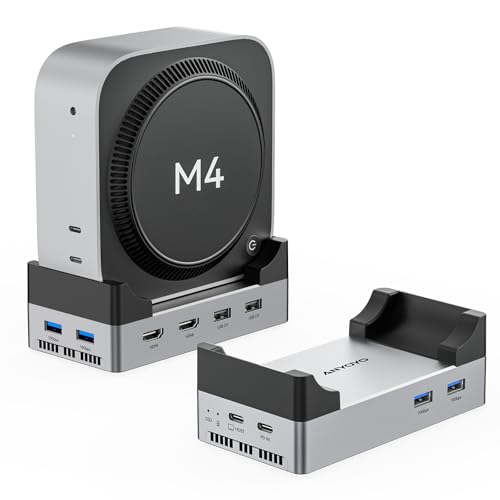
#2 🥈 ANYOYO 40Gbps Mac Mini M4 Dock: Dual HDMI Power with High-Speed Expansion
Quick Summary
- 🖴 M.2 NVMe SSD Enclosure supporting up to 8TB with 40Gbps transfer speeds for ultra‑fast storage expansion
- 📺 Dual HDMI 4K@60Hz outputs for dual‑monitor setups and smooth external display performance
- 🔌 4 × USB‑A 3.1 (10Gbps), 2 × USB‑A 2.0, plus aluminum USB‑C hub design for versatile connectivity
- ⚡ 40Gbps SSD speeds ensure high‑performance file handling and multitasking
- 🛠️ Tool‑free SSD installation with aluminum stand design that matches the Mac Mini M4 aesthetic
- 📡 Wi‑Fi signal‑friendly design to avoid interference with wireless performance
- ✅ Best for power users who need dual HDMI outputs, faster SSD speeds, and maximum connectivity in one dock
📑 Specifications — ANYOYO 40Gbps Mac Mini M4 Dock
| Spec | Details |
|---|---|
| Storage Expansion | M.2 NVMe SSD enclosure, up to 8TB capacity, blazing 40Gbps transfer speeds |
| Video Output | Dual HDMI ports supporting 4K@60Hz for dual‑monitor setups |
| Connectivity | 4 × USB‑A 3.1 (10Gbps), 2 × USB‑A 2.0, aluminum USB‑C hub design |
| Port Speeds | SSD slot at 40Gbps, modern USB‑A at 10Gbps, legacy USB‑A at 2.0 |
| Installation | Tool‑free SSD setup, supports NVMe drives |
| Design & Build | Aluminum stand design, Wi‑Fi signal‑friendly |
| Power | Bus‑powered via Mac Mini USB‑C connection (no external adapter required) |
| Best For | Power users needing dual HDMI outputs and fast SSD speeds with maximum connectivity |
If you’re looking for a more affordable way to expand your Mac Mini or MacBook without investing in a full NVMe dock, check out our 5 Best USB‑C Hubs and Docking Stations for MacBook & Mac Mini (2026 Guide).

Pros
- Ultra‑fast 40Gbps NVMe SSD enclosure with up to 8TB capacity
- Dual HDMI outputs for dual‑monitor setups
- 4 × USB‑A 10Gbps ports for high‑speed peripherals
- Wi‑Fi signal‑friendly aluminum design
- Tool‑free SSD installation
Cons
- Bulkier design compared to sleeker docks like RayCue
- Higher cost due to premium features
- No SD/TF card slots or audio jack (less versatile for creators)
ANYOYO 40Gbps Mac Mini M4 Dock
Verdict — ANYOYO 40Gbps Mac Mini M4 Dock
The ANYOYO 40Gbps Dock is kinda the performance beast in this lineup. Dual HDMI outputs let you run two 4K@60Hz displays at once, which is great if you’re into multi‑monitor setups. The dedicated SSD slot can hit ~2,500–3,000 MB/s speeds with a good NVMe drive — that’s way faster than the 10Gbps hubs. Reviewers said it’s stable and fast, but yeah, the design is bulkier and not as “Apple‑style” sleek. Also no SD/TF card slots, so creators might miss that. Price is higher too. I think ~2,500 MB/s is more than enough for heavy video editing or big media projects, but probably overkill if you just do office work.
Editor’s Note: 40Gbps bandwidth means you can get ~2,500–3,000 MB/s real‑life transfers with a premium NVMe SSD. That’s perfect for video editors, photographers, or anyone moving huge files. But if you only need daily jobs or office jobs, a 10Gbps dock (like Satechi) is cheaper and still fine.
In Short:
For speed + dual monitors → ANYOYO 40Gbps Dock is the performance pick.
For daily use → Satechi 10Gbps Hub is enough and looks nicer.
Discover our Best USB‑C Hubs and Docking Stations for Mac Review
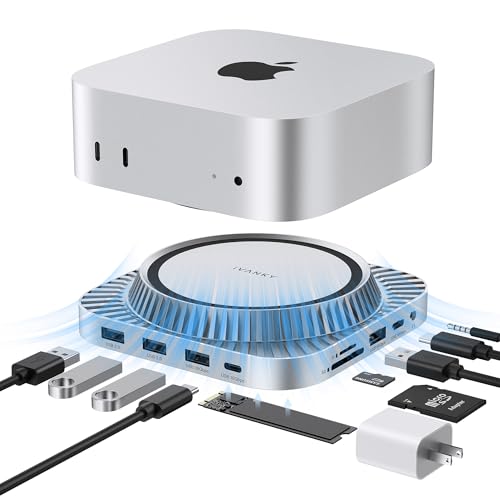
#3 🥉 IVANKY 13‑in‑1 Dock: Versatile Connectivity
Quick Summary
- 🖴 NVMe SSD Enclosure supporting up to 8TB for external storage expansion (10Gbps speeds)
- 📺 HDMI 4K@120Hz output plus DisplayPort for crisp video
- 🔌 USB‑C & USB‑A ports (10Gbps), SD/TF card slots, Ethernet, and dual audio ports for versatile connectivity
- ⚡ Stable 10Gbps transfer speeds for smooth file handling and peripheral use
- 🛠️ Tool‑free SSD installation with a larger white chassis design (less compact than Satechi)
- 🔋 External power adapter included for reliable multi‑device performance
- ✅ Best for productivity users who need higher refresh rates, and maximum connectivity at solid value
📋 Specifications – IVANKY Mac Mini M4 13‑in‑1 Dock
| Spec | Details |
|---|---|
| Storage Expansion | M.2 NVMe SSD enclosure, up to 8TB capacity, 10Gbps transfer speeds |
| Video Output | HDMI supporting 4K@120Hz |
| Connectivity | 2 × USB‑C (10Gbps), 5 × USB‑A, 2 × audio ports, SD/TF card slots, Ethernet |
| Port Count | 13 total ports (multi‑monitor + peripherals) |
| Installation | SSD slot with tool‑free setup |
| Design & Build | White finish, larger footprint than Satechi, includes external 20W PD adapter |
| Power | Comes with its own power adapter for stable multi‑device use |
| Best For | Users needing higher refresh rates, and versatile connectivity |

Pros
- Supports 4K@120Hz HDMI
- Integrated NVMe SSD enclosure (up to 8TB)
- Includes Ethernet and dual audio ports for broader connectivity
- Comes with its own power adapter for stable performance
- More affordable than premium Thunderbolt docks
Cons
- SSD enclosure limited to 10Gbps speeds
- Bulkier design compared to Satechi’s sleek aluminum stand
- White finish may not match Mac Mini aesthetics as seamlessly
IVANKY 13‑in‑1 Dock
Verdict — IVANKY 13‑in‑1 Dock
The IVANKY 13‑in‑1 Dock is kinda the “connectivity monster” in this lineup. With HDMI going up to 4K@120Hz — that’s pretty smooth if you’re into productivity setups or gaming. It’s got a ton of ports (USB‑C, USB‑A, Ethernet, audio, etc.), so you don’t really run out of options. SSD speeds though, not the fastest — reviewers saw around ~800–900 MB/s, which is fine for daily jobs but not pro video editing. Design is more functional than pretty, doesn’t have that Apple‑style polish. In my opinion, ~850 MB/s is fairly enough for office work and multi‑monitor setups, but creators who need crazy fast storage might want a 40Gbps dock.
Editor’s Note: Real‑life SSD speeds are about ~850 MB/s here. That’s good enough for productivity, browsing, backups, and even light creative work. But if you’re pushing big video files or heavy image projects, you’ll feel the limit compared to 40Gbps docks.
In Short:
For lots of ports → IVANKY 13‑in‑1 Dock is the versatile pick.
For premium design or faster SSD → Satechi or ANYOYO are better choices.
Related Post : Best Mouse for MacBook and Mac Mini
Best 2TB NVMe SSDs for Mac Mini M4 Dock Stations

When upgrading your Mac Mini M4 dock with a 2TB NVMe SSD, you don’t need the fastest Gen5 drives — dock speeds are capped at ~850 MB/s (USB 3.2 Gen2) or ~3,500 MB/s (Thunderbolt 4). What matters most is price, reliability, and fit. Here are the four best options in 2026:
🥇 Best Value Pick: Samsung 990 EVO Plus (2TB)
- Why it’s great: Affordable, widely available, and delivers more than enough speed for dock limits.
- Dock fit: Slim design, no bulky heatsink, perfect for enclosures.
- Verdict: The most balanced choice for everyday Mac users.
🛡️ Mainstream Reliable: Samsung 990 PRO (2TB)
- Why it’s great: Proven reliability, strong endurance, and competitive pricing compared to inflated “budget” drives.
- Dock fit: Available in non‑heatsink versions, ensuring compatibility.
- Verdict: A safe pick if you want long‑term stability.
💸 Budget Dock Option: Crucial P310 (2TB, non‑heatsink)
- Why it’s great: Lower price point, solid performance, and dependable warranty support.
- Dock fit: Important to choose the non‑heatsink version for proper enclosure fit.
- Verdict: Best for users who want a reliable upgrade without overspending.
⚡ Performance Enthusiast: WD_BLACK SN850X (2TB)
- Why it’s great: Gaming‑grade performance, excellent sustained speeds, and strong brand reputation.
- Dock fit: Non‑heatsink model works well in dock stations.
- Verdict: Ideal for creators or gamers who want premium performance, even if dock speeds cap out lower.
📌 Buying Advice
- Skip overpriced “budget” drives like Crucial P3 — they’re currently more expensive than Samsung’s EVO line!
- Always check for non‑heatsink versions to ensure proper fit inside dock enclosures.
- Don’t chase Gen5 speeds — dock stations won’t utilize them, so stick to reliable Gen4 models.
#4 Qwiizlab Mac Mini Hub: Affordable Expansion with Balanced Connectivity

Quick Summary
- 📺 HDMI 4K@60Hz output for crisp video on external displays
- 🔌 USB‑C & USB‑A ports (10Gbps), SD/TF card slots, and audio jack for versatile connectivity
- ⚡ 40Gbps transfer speeds for smooth file handling and peripheral use
- 🛠️ Tool‑free SSD installation with a compact aluminum design that blends with the Mac Mini
- 📡 Stable Wi‑Fi performance thanks to interference‑friendly design
- ✅ Best for Mac Mini owners who want a balance of affordability, storage expansion, and everyday connectivity without premium pricing
📑 Specifications — Qwiizlab Mac Mini Hub
| Spec | Details |
|---|---|
| Storage Expansion | M.2 NVMe SSD enclosure, up to 8TB capacity, Thunderbolt 4/5 speeds up to 40Gbps |
| Video Output | HDMI port supporting 4K@60Hz external display |
| Connectivity | 2 × USB‑C (10Gbps), 1 × USB‑A (10Gbps), 2 × USB‑A (2.0), SD/TF 4.0 card readers, 3.5mm audio jack |
| Port Speeds | Thunderbolt 4/5 SSD slot at 40Gbps, general USB‑C/USB‑A ports at 10Gbps, legacy USB‑A at 2.0 |
| Installation | Tool‑free SSD setup, supports M.2 PCIe drives |
| Design & Build | Compact aluminum stand, designed to match Mac Mini M4/M4 Pro aesthetics |
| Power | Bus‑powered via Mac Mini USB‑C connection (no external adapter required) |
| Best For | Mac Mini owners seeking affordable storage expansion and versatile connectivity |
Pros
- 40Gbps NVMe SSD enclosure with up to 8TB capacity
- Compact aluminum design that blends seamlessly with Mac Mini aesthetics
- Includes SD/TF 4.0 card readers with fast 312MB/s speeds
- Balanced mix of modern (USB‑C 10Gbps) and legacy (USB‑A 2.0) ports
- Affordable compared to premium options like Satechi
Cons
- HDMI limited to 4K@60Hz (no 120Hz support)
- Fewer premium touches compared to higher‑end docks
Qwiizlab Mac Mini M4 Hub
Verdict — Qwiizlab Mac Mini M4 Hub
The Qwiizlab 40Gbps Hub is kinda the “value champ” here. It’s affordable but still packs good expansion. SSD speeds are way better than the 10Gbps hubs — reviewers saw around ~2,500 MB/s read speeds with a decent NVMe drive. That’s plenty fast for most jobs, even some video editing. Ports are practical: Thunderbolt 4, USB‑C, USB‑A, HDMI, SD card slots… so you don’t really miss much. The design is compact and matches the Mac Mini nicely. Downsides? HDMI doesn’t go to super high refresh rates like some premium docks, and the finish isn’t as polished as Satechi. I think ~2,500 MB/s is fairly enough for daily use and mid‑level creative work, unless you’re a hardcore video editor.
Editor’s Note: 40Gbps bandwidth means you can expect ~2,500 MB/s real‑life speeds with a good NVMe SSD. That’s solid for backups, photo libraries, and even some editing. But if you’re into heavy video production, premium Thunderbolt docks with higher refresh HDMI might still be better.
In Short:
For affordable SSD expansion + balanced ports → Qwiizlab 40Gbps Hub is the best value pick.
For premium design or max performance → Satechi (style) or ANYOYO (speed) are stronger choices.
Related Post : Best MagSafe Chargers for iPhone 2026
Technical Comparison — Mac Mini M4 Docking Stations
| Docking Station | Speed | HDMI | USB Ports | Features |
|---|---|---|---|---|
| Satechi Mac Mini M4 Hub | 10Gbps | 1 × HDMI (4K@60Hz) | 3 × USB‑A, 1 × USB‑C | Premium Apple‑like design, sleek fit |
| ANYOYO 40Gbps Dock | 40Gbps | 2 × HDMI (4K@60Hz) | 6 × USB‑A | Dual HDMI, fastest SSD speeds |
| IVANKY 13‑in‑1 Dock | 10Gbps | 1 × HDMI (4K@120Hz) | 5 × USB‑A, 2 × USB‑C | Dual‑monitor support, SSD enclosure, rich I/O |
| Qwiizlab Mac Mini Hub | 40Gbps (TB5) | 1 × HDMI (4K@60Hz) | 3 × USB‑A, 1 × USB‑C | Affordable expansion, balanced ports |
| Minisopuru Mac Mini Hub | 10Gbps | 1 × HDMI (4K@60Hz) | 2 × USB‑A, 1 × USB‑C | Budget‑friendly, simple expansion |
| RayCue Mac Mini M4 Dock | 10Gbps | 1 × HDMI (4K@60Hz) | 4 × USB‑A, 1 × USB‑C | Sleek stand, tool‑free SSD install |
| Special Pick for EU: | ||||
| UGREEN Mac Mini M4 Dock | 10Gbps | 1 × HDMI (8K@60Hz) | 3 × USB‑A, 1 × USB‑C | Premium Apple‑like design, reliable SSD enclosure, 8K support |
#5 Minisopuru MINI4MAX Mac mini M4 Dock: Good Expansion with Everyday Connectivity

Quick Summary
- NVMe/SATA SSD Enclosure supporting up to 8TB for external storage expansion (10Gbps speeds)
- 📺 HDMI 4K@60Hz output for crisp video on external displays
- 🔌 USB‑A ports, SD/TF card slots, and audio jack for versatile connectivity
- ⚡ 10Gbps transfer speeds for smooth file handling and peripheral use
- 🛠️ Tool‑free SSD installation with a compact aluminum design that matches the Mac Mini
- 📡 Stable Wi‑Fi performance thanks to interference‑friendly design
📑 Specifications — Minisopuru MINI4MAX Mac mini M4 Dock
| Spec | Details |
|---|---|
| Storage Expansion | M.2 NVMe/SATA SSD enclosure, up to 8TB capacity, 10Gbps transfer speeds |
| Video Output | HDMI port supporting 4K@60Hz external display |
| Connectivity | 3 × USB‑A, SD/TF card slots, 3.5mm audio jack |
| Port Speeds | SSD slot at 10Gbps, general USB‑C/USB‑A ports at 10Gbps, legacy USB‑A at 2.0 |
| Installation | Tool‑free SSD setup, supports NVMe and SATA drives |
| Design & Build | Compact aluminum design, matches Mac Mini aesthetics |
| Power | Bus‑powered via Mac Mini USB‑C connection (no external adapter required) |
| Best For | Budget‑minded Mac Mini owners seeking affordable SSD expansion and versatile connectivity |

Pros
- NVMe/SATA SSD enclosure with up to 8TB capacity
- Compact aluminum design that blends with Mac Mini aesthetics
- Tool‑free SSD installation for easy setup
Cons
- HDMI limited to 4K@60Hz (no 120Hz support)
Minisopuru MINI4MAX
Verdict — Minisopuru Mac Mini Hub
The Minisopuru MINI4MAX is kinda the “everyday pick” in this lineup. It’s compact, matches the Mac Mini nicely, and gives you SSD expansion without costing too much. In benchmark tests, people saw around ~850–950 MB/s read speeds depending on the NVMe drive. That’s not crazy fast like 40Gbps docks, but honestly it’s fine for backups, photo libraries, and office jobs. Ports are decent — USB‑C, USB‑A, HDMI, SD card slots — so you’ve got most of what you need day‑to‑day. Downsides? Yeah, it doesn’t have the premium polish of Satechi, and speeds aren’t enough for heavy video editing. I think ~900 MB/s is fairly enough for daily use, but not for pro creative work.
Editor’s Note: 10Gbps bandwidth means you’ll get about ~900 MB/s real‑life speeds with a decent NVMe SSD. That’s fine for everyday jobs, but if you’re into heavy video or image processing, a 40Gbps dock (like ANYOYO or Qwiizlab) is way better — those can hit ~2,500–3,000 MB/s.
In Short:
For daily use + compact design → Minisopuru MINI4MAX is a solid everyday choice.
For heavy editing + max speed → ANYOYO 40Gbps or Qwiizlab 40Gbps are stronger picks.
#6 RayCue Mac Mini M4 Dock: Sleek Stand with Balanced Everyday Connectivity

Quick Summary
- 🖴 M.2 NVMe/SATA SSD Enclosure supporting up to 8TB for external storage expansion (10Gbps speeds)
- 📺 HDMI 4K@60Hz output for crisp video on external displays
- 🔌 USB‑C & USB‑A ports (10Gbps), 2 × USB‑A (5Gbps), USB‑C charging port, SD/TF card slots, and audio jack for versatile connectivity
- ⚡ 10Gbps transfer speeds for smooth file handling and peripheral use
- 🛠️ Tool‑free SSD installation with aluminum stand design that matches Mac Mini M4/M4 Pro aesthetics
- 📡 Stable Wi‑Fi performance thanks to interference‑friendly design
- ✅ Best for Mac Mini owners who want a sleek aluminum stand with balanced connectivity and charging support
📑 Specifications — RayCue Mac Mini M4 Dock
| Spec | Details |
|---|---|
| Storage Expansion | M.2 NVMe/SATA SSD enclosure, up to 8TB capacity, 10Gbps transfer speeds |
| Video Output | HDMI port supporting 4K@60Hz external display |
| Connectivity | 1 × USB‑C (10Gbps), 1 × USB‑A (10Gbps), 2 × USB‑A (5Gbps), USB‑C charging port, SD/TF card slots, 3.5mm audio jack |
| Port Speeds | SSD slot at 10Gbps, modern USB‑C/USB‑A at 10Gbps, additional USB‑A at 5Gbps |
| Installation | Tool‑free SSD setup, supports NVMe and SATA drives |
| Design & Build | Aluminum stand design, matches Mac Mini M4/M4 Pro aesthetics |
| Power | Bus‑powered via Mac Mini USB‑C connection (no external adapter required) |
| Best For | Mac Mini owners seeking sleek design with balanced connectivity and charging support |

Pros
- Sleek aluminum stand design that blends with Mac Mini aesthetics
- NVMe/SATA SSD enclosure with up to 8TB capacity
- Includes USB‑C charging port for added convenience
- Balanced mix of 10Gbps and 5Gbps USB ports
- Tool‑free SSD installation
Cons
- HDMI limited to 4K@60Hz (no 120Hz or dual HDMI support)
- Fewer high‑end features compared to Satechi or IVANKY
RayCue Mac Mini M4 Dock
Verdict — RayCue Mac Mini M4 Dock
The RayCue Mac Mini M4 Dock is kinda the “style pick” here. It looks sleek under the Mac Mini, almost like a stand, and gives you balanced everyday connectivity. SSD expansion works fine, but speeds are slower than the big boys — reviewers saw around ~700–800 MB/s depending on the drive. That’s okay for backups, docs, and photo libraries, but not really enough for heavy video editing. HDMI output is limited too, so don’t expect crazy refresh rates. On the plus side, it supports charging and the design is clean, which some folks really like. I think ~750 MB/s is also fairly enough for daily jobs, but not for pro workloads.
Editor’s Note: 10Gbps bandwidth here gives about ~700–800 MB/s real‑life speeds. That’s fine for everyday use, but if you’re into video editing or big creative projects, you’ll want a 40Gbps dock (ANYOYO or Qwiizlab) for ~2,500–3,000 MB/s speeds.
In Short:
For sleek design + everyday use → RayCue Mac Mini M4 Dock is the mid‑tier style choice.
For faster SSD + pro work → ANYOYO 40Gbps or Qwiizlab 40Gbps are stronger picks.
Additional Mac Mini M4 Docking Stations Worth Considering
Beyond the main hubs we tested in detail, these docking stations also offer compelling features and performance. They’re strong alternatives that may suit different setups, budgets, or preferences, and are well worth keeping in mind when choosing the right hub for your Mac Mini M4.
UGREEN Mac Mini M4 Dock with DisplayPort and NVMe SSD Support

Specifications
| Feature | Details |
|---|---|
| Total Ports | 10 connectivity options |
| Display Output | DisplayPort up to 8K@120Hz / 4K@240Hz (Mac Mini M4 Pro required for 4K@240Hz) |
| Dual Display Support | Connect two 4K monitors simultaneously (via DisplayPort + Mac Mini HDMI/Thunderbolt) |
| Storage Expansion | M.2 NVMe SSD enclosure (2230/2242/2260/2280), up to 8TB capacity, 10Gbps speed |
| USB Ports | 4× USB-A (10Gbps), 1× USB-C (10Gbps) |
| Card Reader | SD/TF card reader, up to 170MB/s |
| Audio | 3.5mm audio port |
| File Transfer Speed | Up to 10Gbps (USB-C/USB-A); transfer ~3,000 high-res photos in 60 seconds |
| Design | Seamless fit with Mac Mini M4, minimalist curves, bottom groove power button for easy startup |
Pros
- Seamless dual‑display support with high‑resolution output
- Generous storage expansion for creative workflows
- Strong brand reputation with reliable build quality
- Elegant design that complements the Mac Mini
Cons
- Limited availability in the U.S. market

UGREEN Mac Mini M4 Dock with DisplayPort
Verdict — UGREEN Mac Mini M4 Dock
The UGREEN Mac Mini M4 Dock with DisplayPort is best for users who need high-resolution display support alongside fast storage expansion. It’s a powerful, well-designed dock that balances performance and connectivity, though its value depends on whether you’ll fully use the 8K/4K display capabilities.
Editor’s Note: UGREEN is one of the leading brands in computer and electronics accessories, with a strong reputation for quality and affordability. I often prefer their products firsthand, as they consistently deliver reliable performance at fair prices. This UGREEN Mac Mini M4 Dock is no exception. It offers a unique 8K display support feature, which is rare at this price point. In addition, it supports up to 8TB of NVMe SSD storage at 10Gbps speeds which is more than sufficient for everyday workloads.
The only drawback with this UGREEN Mac Mini M4 Dock is that it’s fairly difficult to find in the U.S. market, especially on Amazon.com. The reason isn’t entirely clear — it may be related to recent tariff issues or temporary supply constraints. However, the dock is widely available across the UK and EU markets. If you’re based in Europe, I strongly recommend considering this UGREEN M4 dock. For U.S. buyers, though, you may currently face extra expenses when importing.
Best Mac Mini M4 Hub with NVMe SSD Support: Summary
At the end of the day, all these Mac Mini M4 docks solve the same problem: Apple’s internal SSD upgrades are crazy expensive, and the Mac Mini itself doesn’t give you enough ports. Each hub here adds affordable storage expansion plus the extra connectivity Apple skipped.
If you care about style and everyday use, the Satechi Hub is the premium pick — ~900 MB/s speeds are more than enough for backups, photo libraries, and office jobs. If you need raw performance, the ANYOYO 40Gbps Dock is the beast, hitting ~2,500–3,000 MB/s with a good NVMe drive and dual HDMI for multi‑monitor setups. For those who want balanced value, the Qwiizlab 40Gbps Hub gives Thunderbolt 4 and ~2,500 MB/s speeds at a fair price, while Minisopuru and RayCue cover the mid‑tier with ~800–900 MB/s speeds and compact designs. The IVANKY Dock is the connectivity monster, with tons of ports, though SSD speeds sit closer to ~850 MB/s.
So the choice is simple:
- Daily jobs, backups, office work → 10Gbps hubs like Satechi, Minisopuru, RayCue, IVANKY are fairly enough.
- Heavy video editing, big creative projects → 40Gbps hubs like ANYOYO or Qwiizlab are the way to go.
👉 In short, pick the dock that matches your workflow. For most people, ~900 MB/s is plenty. For Pros, ~2,500 MB/s makes life easier. Either way, all six give you way more flexibility than Apple’s pricey SSD upgrades.
How We Rated the Best Mac Mini Dock Stations?
While evaluating Mac Mini M4 Docking stations, we considered many important aspects of Docking stations to make a comprehensive rating. Read More ▼
Performance
- NVMe/SATA speed (read/write benchmarks)
- Heat management & stability under load
- Video output quality (HDMI/USB4 refresh rates)
Design & Ease of Use
- Build quality, materials, aesthetics
- Fit under Mac Mini (stacking footprint)
- Wi‑Fi friendliness (no interference)
- SSD installation simplicity (tool‑free vs screws)
Ports & Connectivity
- Number and type of ports (USB‑A, USB‑C, HDMI, Thunderbolt, SD/TF, audio)
- Speed of ports (USB 2.0 vs 10Gbps vs 40Gbps)
- Multi‑monitor support and refresh rates
Value & Reliability
- Price vs features compared to Apple’s internal SSD upgrades
- Availability (Amazon.com vs EU/Asia stores)
- Brand trust, warranty, firmware updates
- Long‑term durability
Tips for Apple Mac Mini M4 NVMe Docking Stations
Stick to Gen4 Reliability
Gen5 SSDs may look tempting, but Mac Mini docks don’t take advantage of their speed. A solid Gen4 drive offers the best balance of performance, compatibility, and value.
Use Certified Cables
Thunderbolt 4 and HDMI 2.1 ports deliver their full speed only with certified cables. Investing in high‑quality cables prevents bottlenecks, display flicker, and random disconnects.
Keep Firmware Updated
Dock manufacturers and SSD vendors release firmware updates that improve compatibility and stability. Check periodically firmware to ensure your hardware runs at peak performance.
Optimize macOS Storage Settings
Enable “Optimize Mac Storage” in macOS preferences to balance internal and external SSD usage. This ensures your docked NVMe drive integrates smoothly into your workflow without cluttering your main drive.
Expert Tip from Review Editor
Pair your dock with a well‑reviewed Gen4 NVMe SSD and invest the savings from skipping Gen5 into higher capacity (like 4TB or 8TB). You’ll notice the difference in workflow far more than chasing theoretical speeds.
FAQ for Apple Mac Mini M4 NVMe Docking Stations
Can I install macOS onto an NVMe SSD in a dock?
Yes. macOS can be installed and booted from an external NVMe SSD connected via a Thunderbolt dock. Many Mac users do this to expand storage or improve performance without paying for Apple’s costly internal upgrades. The process involves formatting the external SSD with APFS, creating a macOS installer, and selecting the external drive during installation. Once set up, you can boot directly from the docked SSD. Keep in mind that while performance is excellent, it may still be slightly slower than Apple’s internal SSD due to Thunderbolt bandwidth limits.
Which is better — the internal Apple SSD or an NVMe SSD in an external dock?
Apple’s internal SSDs are extremely fast and tightly integrated with macOS, but they are expensive and not user‑upgradeable. An NVMe SSD in a dock offers more affordable expansion and flexibility. For everyday workflows, Gen4 NVMe drives in a dock deliver excellent speed, though Apple’s internal SSDs still lead in raw performance.
Is there a performance difference between internal Apple SSDs and docked NVMe SSDs?
Yes. Internal Apple SSDs typically achieve higher read/write speeds thanks to direct integration with the system board. Docked NVMe SSDs are limited by Thunderbolt 4 bandwidth, but in real‑world use (video editing, backups, large file transfers), the difference is often negligible unless you’re pushing extreme workloads.
How do prices compare between Apple’s internal SSD upgrades and NVMe SSDs with a dock?
Apple’s internal upgrades are significantly more expensive — often several times the cost of a dock plus a high‑capacity NVMe SSD. For example, upgrading to 8TB internally can cost thousands, while pairing a dock with an 8TB Gen4 NVMe SSD is far more affordable.
Can I use my Mac Mini M4 dock with another Mac?
Yes. Most Thunderbolt 4/USB4 docks are cross‑compatible with other Macs and even some PCs. You can move your dock between devices, though performance may vary depending on the host system’s Thunderbolt implementation.
Do I need a Gen5 NVMe SSD for my Mac Mini M4 dock?
No. Current Mac Mini M4 dock stations don’t utilize Gen5 speeds. A reliable Gen4 SSD offers the best balance of performance, compatibility, and price. If you want more impact, put the savings toward higher capacity (like 4TB or 8TB), which will benefit your workflow far more than unused Gen5 speed.
How We Selected These Products
We recommend these items based on a thorough research process designed to highlight the best options available. While we did not physically test some products ourselves, we relied on detailed research and verified customer feedback to evaluate them.
- Detailed Research: We reviewed product specifications, manufacturer information, and feature lists to understand what each item offers.
- Customer Insights: We analyzed verified buyer reviews and ratings to learn how these products perform in real-world use.
- Comparison Factors: We compared products across price, durability, usability, and unique features to identify the strongest choices.
- Personal Experience: With over 25 years of working in internet-related technologies and following online trends since 1995, I bring a deep understanding of how products are marketed, evaluated, and used. This background helps me filter out hype and focus on what truly matters for everyday users.
- Balanced Evaluation: Our goal is to provide clear, unbiased information so you can make confident purchasing decisions.
See also How We Review Products section for more details on our process.
Written by Metin Karal
Metin Karal is a Computer Engineer with over 25 years of experience working with internet technologies, trends, and digital tools since 1995. He brings this deep background into his product reviews, combining technical expertise with careful research to deliver honest, practical insights for readers. Passionate about technology, Metin also enjoys programming in C# and is currently developing PairMem, a challenging memory game available for free on the official Microsoft Store.
Disclosure: This article may contain affiliate links. As an Amazon Associate, we earn from qualifying purchases at no additional cost to you. For more details, please see our [Privacy Policy]