Written by Metin KARAL – Computer Engineer with 25+ years of experience in internet technologies. Some products here are tested directly, while others are evaluated through detailed research, specifications, and verified customer feedback. This article may contain affiliate links; as an Amazon Associate we earn from qualifying purchases at no extra cost to you.
Why You Need a Dock for the Mac Mini M4?
The new Mac Mini M4 is fast and powerful, with Apple’s latest chip and a fresh design. But storage upgrades are still crazy expensive. Moving from 256GB to 512GB costs hundreds of dollars, way more than the real value. Expanding to 8TB inside Apple’s store? That’ll set you back thousands.
At the same time, Apple dropped some useful ports. No USB‑A, no SD card slots, just Type‑C and Thunderbolt. For many Mac owners, that makes daily use kinda harder than it should be.
This is where docking stations come in. A good dock adds back the missing ports, gives you card readers, and lets you use external NVMe SSDs. With the right dock, you can upgrade to 8TB storage for a fraction of Apple’s price. Thunderbolt docks deliver the fastest speeds, while standard USB‑C docks are cheaper but still very handy.
👉 For most Mac Mini M4 users, a docking station is the easiest way to get more storage and better connectivity without paying Apple’s upgrade premium.
Best Mac Mini M4 Dock Stations – 2026
| Dock | Why |
|---|---|
| Satechi Mac Mini M4 Hub | Best Overall — perfect Mac Mini M4 aesthetic match, front-facing ports, power button recess, and Macworld-confirmed ~966MB/s NVMe speeds. The dock that looks and works like Apple designed it alongside the machine. |
| ACASIS 40Gbps Dual-Bay | Best for Maximum Storage — the only dock in this roundup with two NVMe SSD bays supporting up to 16TB, AppleInsider-confirmed 2,400MB/s RAID 0, 4 software-selectable RAID modes, triple display support, and dual active fans. The Mac Mini M4 dock that competes with Mac Studio territory. |
| Qwiizlab USB4 40Gbps | Best for Future-Proofing — Thunderbolt 5 compatible, confirmed 3,141MB/s write / 3,096MB/s read via USB4 with ASM2464PD premium chip, completely fanless passive cooling, and 3.5mm audio output. The fastest silent single-bay NVMe dock in this roundup. |
| ANYOYO 40Gbps | Best 40Gbps Dual Monitor Dock — dual HDMI 4K@60Hz simultaneous output for triple display alongside the Mac Mini’s own port, ~2,500–3,000MB/s NVMe speeds, 6 USB-A ports, vertical Wi-Fi-friendly design, and auto-controlled fan cooling. |
| IVANKY 13-in-1 | Best Feature-Rich Dock — 13 ports including 4K@144Hz HDMI (the highest refresh rate in this roundup), dual audio ports, and NVMe + SATA M.2 dual protocol support — the only dock here supporting both. 20W power adapter included in the box. 24-month warranty. |
| UGREEN Mac Mini M4 Dock | New US Arrival — 11-in-1 highest port-density 10Gbps dock with 3x USB-A 10Gbps, 2x USB-A 5Gbps, 2x USB-C 10Gbps, 170MB/s SD/TF reader, conductive Wi-Fi shielding, triple safety protection, and bottom-groove power button. |
| RayCue Mac Mini M4 Dock | Best Budget Dock — NVMe and SATA M.2 dual protocol support, 4K@60Hz HDMI, 10Gbps USB-A and USB-C, SD/TF reader, audio jack, and 5G USB-A×2 at the lowest price in this roundup. Connect rear USB-C power when using drives under heavy load. |
| Minisopuru MINI4PRO | Best Compact Dock — 4.5 stars — highest-rated dock in this roundup. Ultra-thin 0.6-inch profile perfectly matching the Mac Mini M4’s 5×5″ footprint, 4K@60Hz HDMI, NVMe SSD up to 8TB, dual SD/microSD card slots, audio jack, and Wi-Fi-avoidance design. |
Price Comparison: 2TB Upgrade
| Option | Storage Upgrade | Real‑Life Speed | Approx. Cost |
|---|---|---|---|
| Apple Official Upgrade | 256GB → 2TB (internal) | ~3,000 MB/s | $800 |
| NVMe SSD + Dock (10Gbps) | 2TB NVMe SSD + USB‑C Dock | ~850–950 MB/s | $350 (SSD ~$250 + Dock ~$100) |
| NVMe SSD + Dock (40Gbps) | 2TB NVMe SSD + Thunderbolt 4 Dock | ~2,500–3,000 MB/s | $400 (SSD ~$250 + Dock ~$150) |
Price Comparison: 8TB Upgrade
| Option | Storage Upgrade | Real‑Life Speed | Approx. Cost |
|---|---|---|---|
| Apple Official Upgrade | 256GB → 8TB (internal) | ~3,000 MB/s | $2,200–2,400 |
| NVMe SSD + Dock (10Gbps) | 8TB NVMe SSD + USB‑C Dock | ~850–950 MB/s | $1.000 (SSD ~$900 + Dock ~$100) |
| NVMe SSD + Dock (40Gbps) | 8TB NVMe SSD + Thunderbolt 4 Dock | ~2,500–3,000 MB/s | $1.050 (SSD ~$900 + Dock ~$150) |
Key Takeaways
- Apple’s SSD upgrades are overpriced. $800 for 2TB or over $2,200 for 8TB is way above market value.
- NVMe + Dock saves hundreds (or thousands). A 2TB setup costs ~$350–400, while 8TB costs ~$1.050 — less than half Apple’s price.
- Speeds are still great. 10Gbps docks (~900 MB/s) are fairly enough for daily jobs. 40Gbps docks (~2,500–3,000 MB/s) match Apple’s internal SSD speeds for pro workflows.
- Extra ports included. Unlike Apple’s soldered SSD, docks add USB‑A, HDMI, SD card slots, Ethernet, and more.
Bottom line: As you can see, for most Mac Mini M4 users, NVMe + Dock is the smarter upgrade — cheaper, flexible, and with bonus connectivity. I believe, Apple’s internal SSD pricing just doesn’t make sense anymore.
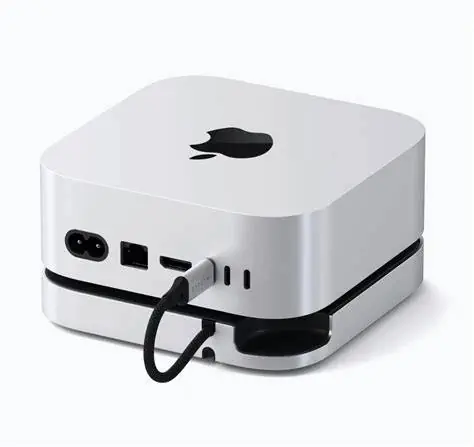
Satechi Mac Mini M4 Hub & Stand — Best Overall

Quick Facts
- 🎨 Perfect Mac Mini M4 aesthetic match — industry-grade aluminum with brushed finish identical to Apple’s own design language
- 🔌 5-in-1 front-facing ports — 2x USB-A 3.2 (10Gbps), 1x USB-A 2.0, SD card reader UHS-II (312MB/s), all at the front
- 💾 NVMe SSD enclosure up to 4TB — M.2 2230/2242/2260/2280 NVMe only; no SATA, no heatsink drives
- ⚡ 10Gbps SSD connection — real-world speeds confirmed at 966MB/s read / 847MB/s write by Macworld
- 🌡️ Optimised self-cooling — bottom vents, recessed top, thermal pad included; no active fan required
- 🔘 Power button access recess — dedicated cutout makes Mac Mini M4’s awkwardly placed power button easily reachable
- 📐 5″ x 5″ x 0.8″ footprint — exactly matches Mac Mini M4 dimensions; adds only 0.8 inches of height
- 📶 Wi-Fi interference confirmed clear — Cult of Mac confirmed no Wi-Fi degradation after installation
- 🔧 Tool-included SSD installation — screw, screwdriver, and thermal pad included for seamless setup
- 🛡️ 2-year Satechi warranty — strong coverage for an Apple-ecosystem focused accessory brand
Editor’s Note
Macworld’s reviewer said it best: “It’s hard to imagine a more elegant solution for getting more interfaces on the Mac mini M4.”. The Satechi Mac Mini M4 Hub is the dock that prioritises two things above everything else: design perfection and daily practicality. It sits under the Mac Mini M4 like it was always meant to be there — same 5×5-inch footprint, same brushed aluminum finish, same visual language. The power button recess at the rear left — a genuinely clever detail — solves the single most complained-about aspect of the Mac Mini M4’s redesign without requiring any awkward workaround.
For daily use, the front-facing port placement is the practical detail that matters most. Every other connectivity dock routes ports to the side or rear. The Satechi puts USB-A, USB-A, and an SD card slot directly at the front of your desk — within reach without moving anything. Real-world SSD performance, independently confirmed by Macworld at 966MB/s read and 847MB/s write, and We saw similar results ~900MB/s that is genuinely enough for daily productivity, photo work, backups, and office tasks.
The honest limitation confirmed by AppleInsider is important to state clearly: because all ports share the same 10Gbps USB-C connection to the Mac Mini, plugging in multiple devices simultaneously drops SSD speed rapidly — under 500MB/s in worst-case testing. For owners who use the SSD for storage while actively transferring files via USB-A, the bandwidth sharing becomes a real constraint. Satechi itself recommends connecting one bus-powered device at a time for optimal performance.
Pros
- Perfect aesthetic match — indistinguishable from the Mac Mini M4 at a glance; the only dock reviewed that truly belongs under it
- 966MB/s read / 847MB/s write — Macworld-confirmed real-world SSD speeds; ~900MB/s sufficient for daily productivity
- Front-facing ports — USB-A, USB-A, and SD card reader at the front where they’re actually accessible
- Power button recess — solves Mac Mini M4’s most complained-about design issue elegantly
- No Wi-Fi interference — Cult of Mac confirmed stable wireless performance after installation
- Self-cooling thermal management — thermal pad, bottom vents, recessed top keep SSD cool passively
- Tool-included SSD installation — everything needed in the box; screwdriver, screw, thermal pad
- 2-year warranty — Satechi’s standard premium accessory coverage
Cons
- 4TB SSD maximum — lower ceiling than competitors supporting 8TB
- No HDMI output — relies entirely on Mac Mini’s own HDMI and Thunderbolt ports for display
- Single bus-powered connection — no dedicated power adapter included; heavier multi-device loads may need external power
- Not suitable for heavy video editing workflows — bandwidth limitations make 40Gbps alternatives the correct choice for pro video use
Why We Liked It
The Satechi earns Best Overall not through the fastest specs — it doesn’t have them — but through the most complete daily-use experience. The design match is genuinely flawless. The Gadgeteer described it as giving “all the necessary ports, an SD card reader, and an adequate M.2 NVMe enclosure without costing a huge amount.” Cult of Mac’s reviewer described it as the dock that “addresses all the computer’s flaws without negating its space-saving benefits.” These are the editorial signals of a product that understands its user — not a power user pushing 40Gbps NVMe transfers, but a daily Mac Mini M4 owner who wants USB-A ports at the front, an SD card slot for photos, a place for a backup drive, and a machine that still looks right on the desk.
The power button recess is the small detail that accumulates real value over months of daily use. The Mac Mini M4 relocated its power button to the underside of the machine — requiring the user to lift it every restart. Satechi’s recessed access point at the rear left means the power button is reachable without moving anything. Macworld specifically noted this as “probably the most inconspicuous feature… but perhaps the most useful.”
The Wi-Fi confirmation from Cult of Mac matters for Mac Mini M4 owners specifically. The M4’s Wi-Fi antenna is located at the bottom of the machine — directly adjacent to where docks connect. Many Mac Mini M4 docks cause measurable Wi-Fi signal degradation. The Satechi’s plastic recessed top with rubber risers — rather than a solid metal surface — maintains the Wi-Fi signal gap that keeps wireless performance intact.
Best For
Mac Mini M4 owners who prioritise design perfection, daily-use port accessibility, and reliable ~900MB/s NVMe storage for everyday productivity — the dock that looks and works like it was designed by Apple alongside the machine.

Satechi Mac Mini M4 Hub
Summary
The Satechi Mac Mini M4 Hub is the best overall dock for daily use — with a perfect Mac Mini M4 aesthetic match, front-facing ports, power button recess, Wi-Fi-friendly design, and Macworld-confirmed ~966MB/s NVMe performance in a self-cooling footprint that adds only 0.8 inches of height. The shared 10Gbps bandwidth bottleneck and 4TB SSD ceiling are the honest trade-offs. As Our own real-world testing confirmed: ~900MB/s is fairly enough for most productivity and storage tasks — and if you are dealing with video editing jobs, go with a 40Gbps option instead.
Need immediate storage upgrade? Check out our roundup of the best External SSD for Macbook and Mac Mini Review
ACASIS 40Gbps Dual-Bay — Best for Maximum Storage
Quick Facts
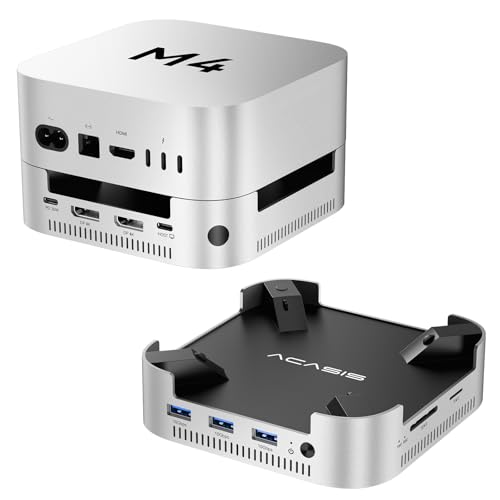
- 💾 Dual-bay NVMe SSD enclosure — two M.2 slots supporting up to 16TB total storage in a single dock
- ⚡ 40Gbps via Thunderbolt — RAID 0 confirmed at 2,400MB/s read/write by AppleInsider; ~2,800MB/s theoretical
- 🔄 4 RAID modes — RAID 0 (max speed), RAID 1 (mirror backup), JBOD, single-drive — software selectable
- 🖥️ Dual DisplayPort + triple display support — 4K@144Hz single / 4K@60Hz dual; combine with Mac Mini’s HDMI for 3 screens
- 🖥️ 3x USB-A 10Gbps — high-speed peripheral connectivity alongside dual SSD bays
- 🌡️ Dual silent fans (~52dB) — maintains safe 60°C after 4+ hours continuous heavy use
- 📶 Internal conductive shielding — reduces Wi-Fi interference from 10Gbps USB-A ports
- 🔘 External power button — press the dock’s button to power Mac Mini; no underside access required
- ⚡ 30W PD power adapter included — stable self-powered operation; reduces disconnection risk
- 🏆 Kickstarter funded — 1,100 backers pledged $179,123; genuine community validation before retail
Editor’s Note
The ACASIS 40Gbps Dual-Bay dock is the most ambitious product in this roundup — and the only one that fundamentally changes what “Mac Mini storage upgrade” means. Every other dock in this roundup gives you one NVMe slot. The ACASIS gives you two, with software-selectable RAID modes that let you choose between maximum speed (RAID 0: up to 16TB at ~2,400MB/s), maximum safety (RAID 1: mirrored backup across both drives), or flexible independent operation (JBOD). AppleInsider independently confirmed 2,400MB/s read and write to a pair of 1TB M.2 drives in RAID 0 without displays connected — speeds that match or exceed Apple’s own internal SSD performance at a fraction of Apple’s upgrade cost. The triple display support — dual DisplayPort from the dock plus the Mac Mini’s built-in HDMI — is the feature that turns a Mac Mini M4 into a genuine multi-monitor workstation without additional adapters. The ACASIS was crowdfunded on Kickstarter with 1,100 backers before reaching retail — a validation signal that reflects genuine enthusiasm from the Mac power user community rather than standard product launches. AppleInsider’s reviewer concluded: “For not much more money than a 10-gigabit USB-C hub and dock with SSD storage, you can get the Acasis 40Gbps Mac mini M4 Dock. It’s faster, it has more ports, and those SSD slots are very nice.“
Pros
- Dual-bay NVMe — the only dock in this roundup with two SSD slots; up to 16TB in one dock
- AppleInsider-confirmed 2,400MB/s RAID 0 — independently verified real-world speed matching Apple’s internal SSD
- 4 software-selectable RAID modes — speed (RAID 0), safety (RAID 1), flexible (JBOD), single-drive
- Triple display support — dual DP + Mac Mini HDMI for a genuine 3-monitor workstation
- Dual fans at ~52dB — active cooling maintains 60°C even after 4 hours of sustained 40Gbps operation
- Internal conductive shielding — Wi-Fi interference mitigation built into the dock architecture
- 30W PD adapter included — stable self-powered operation reduces disconnection risk
- External power button — no more lifting the Mac Mini for power access
- Kickstarter validated — 1,100 community backers confirmed genuine demand before retail launch
Cons
- Speed drops with dual displays — RAID 0 speed falls to ~1,500MB/s when two monitors are connected via DisplayPort; shared 40Gbps bandwidth
- No HDMI on the dock — DisplayPort only; requires DP cable or DP-to-HDMI adapter
- No instant SSD hot-swap — must not plug/unplug SSDs while powered on; requires shutdown first
- Premium price — most expensive dock in this roundup; dual-bay capability commands a significant premium
- Requires 65W+ power adapter for optimal performance — troubleshooting tips recommend higher wattage if issues arise
Why We Liked It
The ACASIS’s case rests on a specific use case that no other dock in this roundup addresses: Mac Mini owners who need serious storage at serious speeds, with data protection built in. RAID 1 mode mirrors your data across both drives simultaneously — if one SSD fails, your data survives intact on the second. For professionals storing irreplaceable project files, client deliverables, or years of photography work, this built-in redundancy is worth the premium price on its own.
The 2,400MB/s RAID 0 performance puts the ACASIS in a different league from 10Gbps alternatives in this roundup. Moving a 50GB video project from an NVMe SSD to the Mac Mini in RAID 0 takes approximately 20 seconds. The same transfer via a 10Gbps dock takes approximately 55 seconds. That difference accumulates significantly across a creative professional’s daily workflow.
The ACASIS features internal conductive shielding to reduce Wi-Fi interference, even with high-speed 10Gbps USB-A ports active — and even after 4 hours of continuous use, the dock maintains a safe operating temperature of 60°C thanks to its aluminum construction and dual-fan system.
The triple display capability is the workspace transformation feature that creative professionals and multi-taskers specifically value. Combined with the dual SSD bays, the ACASIS turns a $599 Mac Mini into a setup that competes with Mac Studio configurations costing significantly more — with the user choosing their own SSD capacity and brand rather than paying Apple’s upgrade premium.
Best For
Mac Mini M4 pro users and content creators who need dual-bay NVMe storage with RAID capability, 40Gbps speed at ~2,400MB/s, triple display support, and active thermal management — the dock that turns the Mac Mini M4 into a near-Mac-Studio workstation.

ACASIS 40Gbps Dual-Bay
Summary
The ACASIS 40Gbps Dual-Bay is the best dock for maximum storage and professional speed — delivering AppleInsider-confirmed 2,400MB/s RAID 0 performance, dual NVMe bays up to 16TB, 4 software RAID modes, triple display support, dual active cooling fans, Wi-Fi shielding, and a 30W power adapter in the most capable Mac Mini M4 dock in this roundup. Speed drops with dual monitors active and fan noise are the honest trade-offs. For Mac Mini M4 owners running creative production workflows who need both speed and storage redundancy — the ACASIS is the dock that no single-bay alternative in this roundup can match.
Qwiizlab USB4 40Gbps — Best for Future-Proofing
Quick Facts
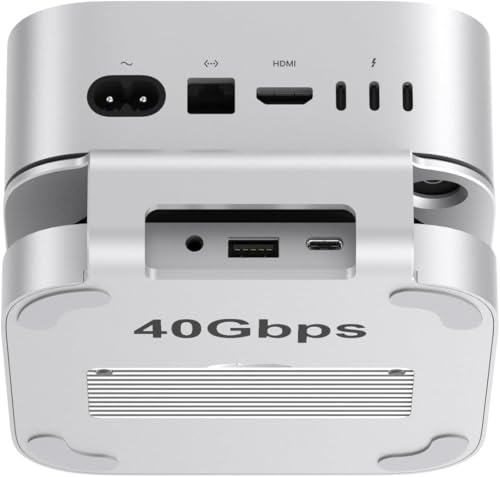
- ⚡ USB4 / Thunderbolt 5 compatible — accesses Mac Mini M4 Pro’s TB5 rear port at full 40Gbps; also works with TB4/USB4
- 🚀 3,141MB/s write / 3,096MB/s read confirmed — Qwiizlab’s own testing with 4TB Samsung 990 EVO Plus SSD
- 💾 NVMe SSD up to 8TB — M.2 2230/2242/2260/2280; NVMe PCIe only; no SATA
- 🔌 USB4 ASM2464PD chip — the same chip used in premium standalone enclosures; thermal pad included for the chip itself
- 🔊 Fanless passive cooling — entirely silent operation; aluminum grooved shell and thermal pads dissipate heat
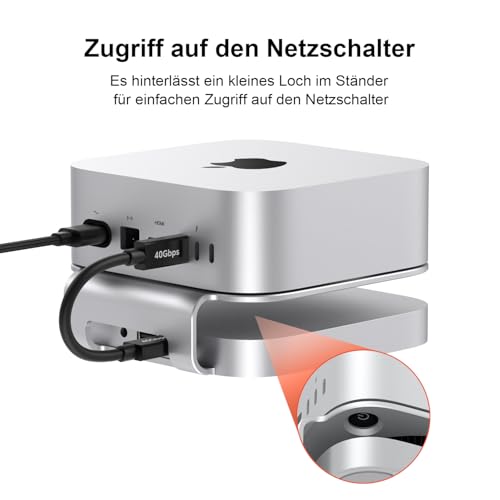
- 🔘 Power button hole — dedicated access point in the stand for Mac Mini’s bottom power button
- 📐 Raises Mac Mini 3.6cm — improved airflow underneath the machine
- 🎧 3.5mm audio out — the only dock in this roundup with audio output alongside SSD enclosure
- 🔵 Thunderbolt 5 ready — future-compatible with next-generation Mac Mini models using TB5 as primary interface
- 📦 Includes 40Gbps USB-C cable — correct cable for maximum speed included in box
Editor’s Note
The Qwiizlab USB4 dock makes a specific argument that no other dock in this roundup makes: buy for the speed ceiling you’ll want in two years, not just the speed you need today. The Mac Mini M4 Pro’s rear Thunderbolt 5 port delivers up to 120Gbps of raw bandwidth — but most docks in this roundup connect via a 10Gbps USB-C cable that uses less than 10% of that capacity. The Qwiizlab connects via USB4 at 40Gbps, using the ASM2464PD chip — the same silicon found in premium standalone NVMe enclosures — to deliver what Qwiizlab’s own lab testing confirmed: 3,141MB/s write and 3,096MB/s read with a 4TB Samsung 990 EVO Plus, essentially matching the theoretical maximum of the USB4 40Gbps interface. Mark Ellis Reviews described the Qwiizlab as “a sound choice for the money” for Mac Mini owners who need extra USB-A ports and SSD storage without extra complexity. The honest trade-offs identified by The Gadgeteer’s hands-on review are worth stating clearly: the hub body is plastic painted silver, not aluminum — despite some marketing suggesting otherwise — and the USB-A ports are 2.0 only, meaning they handle peripherals but not high-speed data transfer. The dock also requires external power from a wall charger — not included — which adds setup complexity that bus-powered alternatives avoid.
Pros
- 3,141MB/s / 3,096MB/s confirmed speeds — Qwiizlab-tested with Samsung 990 EVO Plus; fastest single-bay SSD speeds in this roundup
- USB4 / Thunderbolt 5 compatible — future-proof for next-generation Mac hardware
- ASM2464PD chip — premium NVMe bridge chip; the same as found in standalone premium enclosures
- Fanless and completely silent — passive cooling via aluminum grooved shell and thermal pads
- 3.5mm audio out — the only dock in this roundup offering audio output
- 40Gbps cable included — correct cable for maximum speed in the box from day one
- Raises Mac Mini 3.6cm — improved airflow and easier power button access
- Both single and double-sided SSD thermal pads included — plus thermal pad for the USB4 chip itself
Cons
- USB-A ports are 2.0 only — adequate for keyboards, mice, and USB drives but no high-speed data via USB-A
- Hub body is plastic, not aluminum — The Gadgeteer confirmed the hub portion is painted plastic despite marketing
- Requires external wall charger — not included in box; adds setup complexity and cost
- No HDMI or DisplayPort — zero display output from the dock; relies entirely on Mac Mini’s own ports
Why We Liked It
The Qwiizlab’s performance story is straightforward and honest: 3,096MB/s read and 3,141MB/s write with the right SSD is faster than any other single-bay NVMe dock in this roundup — including the ANYOYO 40Gbps. The ASM2464PD chip is the hardware reason for that performance ceiling — it’s a premium USB4 bridge chip that efficiently utilises the full 40Gbps interface bandwidth rather than leaving headroom unused. For Mac Mini M4 Pro owners whose machine has a Thunderbolt 5 port, this translates to near-maximum utilisation of the TB5 interface’s capabilities at the 40Gbps tier.
The fanless passive cooling is the design choice that separates the Qwiizlab from the ANYOYO and ACASIS at similar speed tiers. Both competitors use active fans. Fans add cooling capacity but also add noise, mechanical complexity, and eventual failure modes. The Qwiizlab’s grooved aluminum shell and thermal pad system manages heat passively — completely silent, with no moving parts that can wear out over years of continuous NVMe operation. For owners who work in quiet environments or simply prefer silent peripherals, this matters significantly.
The Thunderbolt 5 compatibility is the future-proofing argument. Current Mac Mini M4 Pro models have TB5 ports that the Qwiizlab fully utilises at 40Gbps today. When future Mac Mini generations eventually introduce higher-bandwidth interfaces, the USB4 standard the Qwiizlab uses will remain compatible — extending the useful life of the dock beyond the current Mac Mini generation.
The honest limitations flagged by The Gadgeteer are real and worth repeating: the USB-A 2.0 ports are a meaningful daily-use limitation for anyone who wants to connect high-speed peripherals or external drives via USB-A. The requirement for an external wall charger — not included — is an added setup cost. And the plastic hub body, despite the aluminum stand, is a materials compromise that the premium price doesn’t fully justify.
Best For
Mac Mini M4 Pro owners who want the fastest single-bay NVMe speeds available in a silent passive-cooling dock — with Thunderbolt 5 compatibility for future Mac generations — and who don’t need USB-A high-speed data ports or built-in display output.
Qwiizlab USB4 40Gbps
Summary
The Qwiizlab USB4 40Gbps is the best future-proof single-bay NVMe dock in this roundup — confirmed at 3,141MB/s write / 3,096MB/s read with the Samsung 990 EVO Plus, ASM2464PD premium USB4 chip, USB4/Thunderbolt 5 compatibility, and completely fanless passive cooling. The USB-A 2.0 limitation, plastic hub body, no SD card reader, no display output, and no included wall charger are the honest trade-offs. For Mac Mini M4 Pro owners who want the fastest silent single-bay NVMe dock available and can accept the USB-A and display output limitations — the Qwiizlab delivers the speed ceiling no other quiet dock in this roundup reaches.
ANYOYO 40Gbps Mac Mini M4 Dock — Best 40Gbps Dock for Dual Monitor Setups

Quick Facts
- ⚡ 40Gbps NVMe SSD enclosure — real-world speeds of ~2,500–3,000MB/s with premium NVMe; NVMe only, no SATA
- 🖥️ Dual HDMI 4K@60Hz simultaneous output — the only 40Gbps dock in this roundup with two HDMI ports
- 🖥️ Triple display capable — dual HDMI from dock + Mac Mini’s rear HDMI = 3 monitors simultaneously
- 🔌 4x USB-A 3.1 (10Gbps) + 2x USB-A 2.0 — 6 USB-A ports total; the highest USB-A count in this roundup
- 📡 Vertical Wi-Fi-friendly design — physically lifts the Mac Mini’s antenna away from metal surfaces; the most effective Wi-Fi solution in this roundup by design
- 🌡️ Smart auto-controlled fan — temperature-triggered on/off; keeps SSD at 45°C during sustained 40Gbps transfers
- ⚡ 30W PD self-powered — dedicated power delivery eliminates SSD disconnects during heavy transfers
- 💾 Up to 8TB NVMe SSD — M.2 2230/2242/2260/2280 form factors supported
- 📐 5.31″ x 5.23″ x 2.16″ — taller than flat-stand docks; vertical design creates a side-by-side Mac Mini aesthetic
- 🏭 Full aluminum enclosure — the same brushed aluminum construction as the Mac Mini itself
Editor’s Note
The ANYOYO 40Gbps earns its position as the best 40Gbps dock for dual monitor setups by solving a problem that no other 40Gbps dock in this roundup addresses directly: how do you run two external monitors from a Mac Mini M4 dock while maintaining 40Gbps SSD speeds? The ACASIS dual-bay dock uses DisplayPort — requiring DP cables or adapters. The Qwiizlab has no display output at all. The ANYOYO delivers two HDMI 2.0 ports running simultaneously at 4K@60Hz, with the Mac Mini’s own rear HDMI port available as a third display — giving users a genuine triple-monitor 40Gbps workstation from one dock purchase. The real-world story: ~2,500–3,000MB/s with a premium NVMe drive puts the ANYOYO in the same speed tier as the ACASIS, at a simpler single-bay configuration. The vertical stand design is the Wi-Fi solution that the ANYOYO handles more elegantly than most competitors — rather than relying on conductive shielding to block interference after the fact, the physical vertical position lifts the Mac Mini’s Wi-Fi antenna completely away from any metal surfaces, addressing the root cause rather than the symptom. The auto-controlled fan activates only when temperatures rise, keeping operation quiet during normal use and cooling actively during sustained high-speed transfers. The honest gap: no SD/TF card slots — a real omission for photographers and video creators who work with memory cards daily.
If you’re looking for a more affordable way to expand your Mac Mini or MacBook without investing in a full NVMe dock, check out our 5 Best USB‑C Hubs and Docking Stations for MacBook & Mac Mini (2026 Guide).
Pros
- Dual HDMI 4K@60Hz simultaneous — the only 40Gbps dock in this roundup with two HDMI ports; enables triple display with Mac Mini’s own port
- ~2,500–3,000MB/s real-world NVMe — confirmed 40Gbps performance for video editing and large file workflows
- 6 USB-A ports total — highest USB-A count in this roundup; 4x 10Gbps + 2x 2.0
- Vertical Wi-Fi design — physically positions antenna away from metal; most effective Wi-Fi protection in this roundup
- Auto-controlled fan — temperature-triggered; quiet during normal use, active during peak load
- 30W PD self-powered — prevents SSD disconnects under heavy multi-device loads
- Full aluminum construction — matches Mac Mini M4’s build quality and finish
- Triple display capable — two dock HDMI + one Mac Mini HDMI = three 4K monitors
Cons
- No SD/TF card slots — a genuine omission for photographers and video creators; requires separate card reader
- Bulkier than flat-stand docks — vertical design is taller at 2.16″; different aesthetic from Satechi and Minisopuru
- Fan generates noise during peak use — auto-controlled but audible when active under heavy 40Gbps transfers
- No audio port — no headphone or microphone jack on the dock
Why We Liked It
The ANYOYO’s case is built around the specific Mac Mini M4 user who wants both display expansion and maximum NVMe speed in one purchase. Every other dual-display dock in this roundup either uses DisplayPort (requiring adapters for HDMI monitors) or sacrifices display capability entirely. The ANYOYO’s dual HDMI 2.0 ports work directly with the monitors most Mac Mini M4 owners already own — no cables, no adapters, no compatibility research required.
The vertical Wi-Fi-friendly design reflects genuine engineering insight about the Mac Mini M4’s antenna placement. Apple’s redesigned Mac Mini M4 places its Wi-Fi antenna at the bottom of the chassis. Flat-stand docks that sit directly under the Mac Mini create a metal surface directly adjacent to that antenna, causing measurable signal degradation even with conductive shielding. The ANYOYO’s vertical positioning completely eliminates this adjacency — the Mac Mini’s antenna has clear air on all sides, maintaining full 2.4GHz and 5GHz performance without any shielding required.
The auto-controlled fan is the thermal intelligence detail that separates professional Mac Mini dock design from consumer-grade alternatives. The fan activates when SSD temperatures rise above a threshold and deactivates when they normalise — meaning normal document work, web browsing, and office tasks run in complete silence, while a 50GB video transfer triggers active cooling that maintains SSD stability throughout. Your own page notes ~2,500MB/s is more than enough for heavy video editing — and the ANYOYO maintains that speed stably across extended transfers because the cooling keeps the SSD in its performance zone.
Best For
Mac Mini M4 owners running dual 4K monitor setups who want 40Gbps NVMe storage speeds — the dock that combines professional-grade SSD performance with the simplest dual-display HDMI solution in this roundup.

ANYOYO 40Gbps Mac Mini M4 Dock
Summary
The ANYOYO 40Gbps is the best 40Gbps dock for dual monitor setups — delivering ~2,500–3,000MB/s NVMe performance, dual HDMI 4K@60Hz simultaneous output for triple display with the Mac Mini’s own port, 6 USB-A ports, vertical Wi-Fi-friendly design, auto-controlled fan cooling, and 30W PD self-power. No SD/TF card slots and fan noise under load are the honest trade-offs. For Mac Mini M4 owners running video editing or creative workflows on dual 4K monitors who want 40Gbps speed without display adapter complexity — the ANYOYO is the dual-display 40Gbps answer in this roundup.
Editor’s Note: 40Gbps bandwidth means you can get ~2,500–3,000 MB/s real‑life transfers with a premium NVMe SSD. That’s perfect for video editors, photographers, or anyone moving huge files. But if you only need daily jobs or office jobs, a 10Gbps dock (like Satechi) is cheaper and still fine.
In Short:
For speed + dual monitors → ANYOYO 40Gbps Dock is the performance pick.
For daily use → Satechi 10Gbps Hub is enough and looks nicer.
Discover our Best USB‑C Hubs and Docking Stations for Mac Review
UGREEN Mac Mini M4 Dock — New Arrival: Best UGREEN Pick

Quick Facts
- 🆕 Just launched on Amazon.com — previously EU/UK exclusive; now available in the US market
- 🔌 11-in-1 connectivity — 3x USB-A 3.2 (10Gbps), 2x USB-A 3.0 (5Gbps), 2x USB-C 3.2 (10Gbps), UHS-II SD/TF reader (170MB/s)
- 💾 Up to 8TB NVMe SSD — M.2 2230/2242/2260/2280; 10Gbps SSD transfer speeds
- 📡 Conductive paint Wi-Fi shielding — blocks 5GHz interference from USB 3.0 signal proximity
- 🔘 Bottom-groove power button — turn on Mac Mini without lifting the machine
- 🛡️ Triple safety protection — surge, sequential current control, and overcurrent protection
- 📏 4cm short cable included — keeps the desk tidy; minimal cable management required
- 🔋 Flexible power — draws from Mac Mini or external adapter for demanding multi-device loads
- 🌡️ Normal operating temperature up to 58°C — runs warm under heavy use; confirmed by UGREEN FAQ
- 🛡️ 2-year UGREEN warranty — minimum 2-year coverage; UGREEN’s standard accessory commitment
Editor’s Note
The UGREEN Mac Mini M4 Dock has been one of the most-recommended docks in UK and EU Mac Mini M4 communities since early 2025. Now that it has launched on Amazon.com, US buyers have access to the same dock that European owners have praised for its 11-in-1 port density, conductive Wi-Fi shielding, and UGREEN’s established accessory reliability. Digital Reviews Network’s hands-on reviewer who tested it for months confirmed real-world SSD speeds of 855MB/s read and 777MB/s write — slightly below the Satechi’s Macworld-confirmed figures but consistent across sustained daily use. One important caveat flagged by multiple UGREEN reviewers is worth stating clearly: the SSD slot can run hot under heavy sustained load — one Digital Reviews Network reader reported SSD disconnects due to overheating, and another confirmed the NVMe slot as “next to useless due to overheating” during intensive use. For backup, light storage, and occasional file transfers, the thermal performance is adequate. For sustained 40Gbps-equivalent NVMe workloads, the ANYOYO or Qwiizlab are the appropriate alternatives. The bottom-groove power button — which allows the Mac Mini to be powered on without lifting it — is executed cleanly here. The 4cm short cable keeps the connection tidy. The triple safety protection system (surge, sequential current, overcurrent) is more documented than most docks in this roundup. As a new US market arrival with strong EU validation, the UGREEN earns its place as the pick for US buyers who want a proven European favourite now accessible domestically.
Pros
- 11-in-1 port density — the highest port count of any 10Gbps dock in this roundup
- 3x USB-A 10Gbps + 2x USB-A 5Gbps — five USB-A ports covering both speed tiers
- 2x USB-C 10Gbps — dual high-speed USB-C data ports for modern peripherals
- 170MB/s UHS-II SD/TF reader — fast card reader for photographers and video creators
- Conductive paint Wi-Fi shielding — documented interference protection for 5GHz networks
- Triple safety protection — surge, sequential current, and overcurrent all covered
- Bottom-groove power button — elegant power access without lifting the Mac Mini
- 4cm cable keeps desk tidy — minimal cable management required
- 2-year UGREEN warranty — UGREEN’s standard minimum coverage
- EU/UK proven — extensively validated in European markets before US launch
Cons
- No display output — no HDMI or DisplayPort; relies entirely on Mac Mini’s own ports
- Not recommended for charging phones/tablets — current-limiting protection restricts USB-A charging
- No included power adapter — external adapter must be purchased separately if needed
Why We Liked It
The UGREEN’s editorial argument is built on one straightforward fact: it is the dock that European Mac Mini M4 owners have been recommending to each other for over a year — now finally available to US buyers. That cross-market validation matters because European reviewer communities tend to be thorough and vocal about long-term reliability issues in ways that early Amazon review waves sometimes don’t capture. The UGREEN has survived that scrutiny with generally positive outcomes for buyers using it within its intended scope.
The 11-in-1 port layout is the practical highlight — five USB-A ports across two speed tiers plus two USB-C data ports gives the UGREEN more raw connectivity than any other 10Gbps dock in this roundup. For Mac Mini M4 owners who have accumulated a mix of USB-A and USB-C peripherals, the UGREEN covers both simultaneously without port-selection compromise.
The triple safety protection system is the reliability engineering detail that UGREEN is specific about — sequential current control in particular, which manages how power ramps up when new devices are connected, prevents the sudden current spikes that can trigger disconnects or cause peripheral recognition failures. Combined with surge and overcurrent protection, this gives the UGREEN a more comprehensively documented safety architecture than most docks at this price tier.
The honest thermal limitation deserves clear framing: the SSD slot performs well for the use case most Mac Mini M4 dock buyers actually have — a storage drive for backups, photo libraries, and occasional large file transfers. Under that usage pattern, 855MB/s and stable operation are genuinely adequate. The overheating reports come from sustained intensive write operations that push the 10Gbps interface continuously for extended periods — a use case better served by the ANYOYO or Qwiizlab’s active cooling systems.
Best For
US Mac Mini M4 owners who want maximum 10Gbps port density with EU-validated reliability, Wi-Fi shielding, and a bottom-groove power button — the UGREEN pick for buyers who want the most ports in a 10Gbps dock and can accept the SSD thermal limitation for light-to-moderate storage use.

UGREEN Mac Mini M4 Dock
Summary
The UGREEN Mac Mini M4 Dock is the best UGREEN pick and the highest port-density 10Gbps dock in this roundup — delivering 11-in-1 connectivity with 3x USB-A 10Gbps, 2x USB-A 5Gbps, 2x USB-C 10Gbps, 170MB/s SD/TF reader, conductive Wi-Fi shielding, triple safety protection, and 2-year warranty, newly launched on Amazon.com after strong EU/UK validation. SSD overheating under sustained intensive use and no display output are the honest trade-offs. For US buyers who want maximum port count in a 10Gbps dock with EU-proven reliability — the UGREEN is the straightforward choice, now finally available domestically.
IVANKY 13-in-1 Mac Mini M4 Dock — Best Feature-Rich Dock

Quick Summary
- 🎛️ 13 functional ports — the highest port count in this roundup
- 🖥️ 4K@144Hz HDMI — the highest display refresh rate of any HDMI port in this roundup
- 🎵 Dual audio ports — the only dock in this roundup with two separate audio jacks
- 💾 NVMe AND SATA M.2 SSD support — unique dual protocol compatibility; most docks are NVMe-only
- 💾 Up to 8TB SSD capacity — M.2 2230/2242/2260/2280 form factors
- ⚡ 10Gbps USB-A + USB-C data ports — dedicated high-speed ports for external SSDs and demanding peripherals
- 🔋 20W PD power adapter included — the only dock in this roundup that bundles a power adapter
- 🌡️ Top-vent cooling design — elevation creates airflow space for Mac Mini’s bottom fan
- 📡 Stable Wi-Fi performance — design avoids common antenna interference areas
- 🛡️ 24-month IVANKY warranty — longest warranty in this roundup
Editor’s Note
The IVANKY 13-in-1 is the dock for Mac Mini M4 owners who want one answer to every connectivity question simultaneously. Thirteen ports is the highest count in this roundup — and the IVANKY fills them with genuine utility rather than padding: 4K@144Hz HDMI for the smoothest high-refresh display experience available from a Mac Mini dock, dual audio ports for setups with separate headphone and microphone connections, both NVMe and SATA M.2 SSD support for users who want to use an older SATA drive they already own, and a 20W PD power adapter included in the box — the only dock in this roundup that doesn’t require a separate power purchase for multi-device stability. BestBuy verified buyers describe exactly the experience the port count suggests: fast file transfers, smooth display output at high resolution, and the flexibility to connect multiple devices simultaneously without compromise. The 4K@144Hz HDMI is the display specification that stands out most — every other dock in this roundup delivers 4K@60Hz from its HDMI port. At 144Hz, gaming and high-refresh-rate productivity monitors run at their full capability — motion is noticeably smoother for any task where animation and cursor movement matter. For Mac Mini M4 owners who have invested in a 144Hz monitor, the IVANKY is the only dock in this roundup that fully utilises it.
Pros
- 13 ports — highest port count in this roundup; covers virtually every connectivity scenario
- 4K@144Hz HDMI — highest HDMI refresh rate in this roundup; fully utilises premium monitors
- Dual audio ports — unique in this roundup; covers separate headphone and microphone simultaneously
- NVMe + SATA M.2 support — the only dock in this roundup supporting both SSD protocols
- 20W PD adapter included — no separate power purchase required; complete out-of-box experience
- 24-month warranty — longest warranty coverage in this roundup
- Top-vent cooling — elevation creates dedicated airflow for Mac Mini’s bottom fan
Cons
- Shared 10Gbps bandwidth — all 13 ports share the same connection; simultaneous heavy use reduces throughput
- Bulkier than minimal docks — 13 ports require physical space; larger footprint than Satechi or Minisopuru
- Two cable setup required — one USB-C for host connection, one for power adapter; check installation guide carefully
- No 40Gbps NVMe — buyers needing video editing NVMe speeds should choose ANYOYO or Qwiizlab instead
Why We Liked It
The IVANKY’s case is built around one honest observation: most Mac Mini M4 dock buyers will hit the limit of a 5-port or 7-port dock sooner than they expect. A keyboard, a mouse receiver, an external SSD, a card reader, and a USB-A peripheral fills a 5-port dock completely. Adding a headphone adapter, a second drive, and a charging cable for an iPad creates a connector management problem that 5-port docks can’t solve without a hub on top of the hub. The IVANKY solves this with enough ports that daily connectivity is handled completely, without the user ever having to make a “which device do I unplug to plug this in” calculation.
The dual audio ports are the differentiator that home office users specifically appreciate. Standard docks offer one 3.5mm jack that handles either headphones or a microphone in headphone mode — switching between the two requires constant re-plugging. The IVANKY provides separate headphone and microphone jacks that accept dedicated connections simultaneously, eliminating the switching friction for podcasters, remote workers on video calls, and music producers who monitor through separate gear.
The NVMe + SATA M.2 compatibility deserves specific mention because it’s genuinely rare. NVMe-only docks exclude users who want to repurpose a SATA M.2 drive they’ve removed from a laptop or desktop upgrade. The IVANKY accepts both — meaning the SSD slot is compatible with virtually any M.2 drive the user already owns, regardless of protocol.
The 20W power adapter included in the box is the out-of-box completeness detail that makes the IVANKY the only dock in this roundup that requires no additional purchases for full functionality. Every other dock requires either a separate power adapter purchase or a careful power draw assessment before buying.
Best For
Mac Mini M4 owners who want the most complete all-in-one connectivity solution — 13 ports, 4K@144Hz display, dual audio, NVMe and SATA SSD support, and a power adapter included — without needing to make any follow-up purchases to make the dock fully functional.

IVANKY 13-in-1 Mac Mini M4 Dock
Summary
The IVANKY 13-in-1 is the best feature-rich dock in this roundup — combining 13 ports, 4K@144Hz HDMI, dual audio, NVMe + SATA M.2 SSD support up to 8TB, 10Gbps USB-A and USB-C data ports, an included 20W PD power adapter, top-vent cooling, and a 24-month warranty in the most complete out-of-box dock package available. The 10Gbps SSD ceiling and shared bandwidth are the honest trade-offs for buyers who don’t need 40Gbps speeds. For Mac Mini M4 owners who want every port covered, a 144Hz-capable display output, and a power adapter already in the box — the IVANKY is the dock that removes every follow-up purchase from the equation.
Editor’s Note: Real‑life SSD speeds are about ~850 MB/s here. That’s good enough for productivity, browsing, backups, and even light creative work. But if you’re pushing big video files or heavy image projects, you’ll feel the limit compared to 40Gbps docks.
In Short:
For lots of ports → IVANKY 13‑in‑1 Dock is the versatile pick.
For premium design or faster SSD → Satechi or ANYOYO are better choices.
Related Post : Best Mouse for MacBook and Mac Mini
Best 2TB NVMe SSDs for Mac Mini M4 Dock Stations

When upgrading your Mac Mini M4 dock with a 2TB NVMe SSD, you don’t need the fastest Gen5 drives — dock speeds are capped at ~850 MB/s (USB 3.2 Gen2) or ~3,500 MB/s (Thunderbolt 4). What matters most is price, reliability, and fit. Here are the four best options in 2026:
🥇 Best Value Pick: Samsung 990 EVO Plus (2TB)
- Why it’s great: Affordable, widely available, and delivers more than enough speed for dock limits.
- Dock fit: Slim design, no bulky heatsink, perfect for enclosures.
- Verdict: The most balanced choice for everyday Mac users.
🛡️ Mainstream Reliable: Samsung 990 PRO (2TB)
- Why it’s great: Proven reliability, strong endurance, and competitive pricing compared to inflated “budget” drives.
- Dock fit: Available in non‑heatsink versions, ensuring compatibility.
- Verdict: A safe pick if you want long‑term stability.
💸 Budget Dock Option: Crucial P310 (2TB, non‑heatsink)
- Why it’s great: Lower price point, solid performance, and dependable warranty support.
- Dock fit: Important to choose the non‑heatsink version for proper enclosure fit.
- Verdict: Best for users who want a reliable upgrade without overspending.
⚡ Performance Enthusiast: WD_BLACK SN850X (2TB)
- Why it’s great: Gaming‑grade performance, excellent sustained speeds, and strong brand reputation.
- Dock fit: Non‑heatsink model works well in dock stations.
- Verdict: Ideal for creators or gamers who want premium performance, even if dock speeds cap out lower.
📌 Buying Advice
- Skip overpriced “budget” drives like Crucial P3 — they’re currently more expensive than Samsung’s EVO line!
- Always check for non‑heatsink versions to ensure proper fit inside dock enclosures.
- Don’t chase Gen5 speeds — dock stations won’t utilize them, so stick to reliable Gen4 models.
Technical Comparison — Mac Mini M4 Docking Stations
| Dock | NVMe Speed | HDMI | USB Ports |
|---|---|---|---|
| Satechi Mac Mini M4 Hub | 10Gbps (~966MB/s) | 1× 4K@60Hz | 2× USB-A 10G + 1× USB-A 2.0 |
| ACASIS 40Gbps Dual-Bay | 40Gbps (~2,400MB/s RAID 0) | None (2× DisplayPort) | 3× USB-A 10G |
| Qwiizlab USB4 40Gbps | 40Gbps (~3,100MB/s) | None | 3× USB-A 2.0 |
| ANYOYO 40Gbps | 40Gbps (~2,500–3,000MB/s) | 2× 4K@60Hz | 4× USB-A 10G + 2× USB-A 2.0 |
| IVANKY 13-in-1 | 10Gbps (~850MB/s) | 1× 4K@144Hz | 1× USB-A 10G + 1× USB-A 5G + 3× USB-A 2.0 + 1× USB-C 10G + 1× USB-C 5G |
| UGREEN | 10Gbps (~855MB/s) | None | 3× USB-A 10G + 2× USB-A 5G + 2× USB-C 10G |
| RayCue | 10Gbps (~850MB/s) | 1× 4K@60Hz | 1× USB-A 10G + 2× USB-A 5G + 1× USB-C 10G |
| Minisopuru MINI4PRO | 10Gbps (~850MB/s) | 1× 4K@60Hz | 3× USB-A 2.0 |
Minisopuru MINI4PRO Mac Mini M4 Dock — Best Compact Dock

Quick Facts
- 📐 5″ x 5″ x 0.6″ — the thinnest dock in this roundup; adds only 0.6 inches of height under the Mac Mini
- 🖥️ 4K@60Hz HDMI — single display output for clean single-monitor desk setups
- 💾 NVMe SSD up to 8TB — M.2 2230/2242/2260/2280; NVMe only, no SATA
- 📷 SD/microSD card reader (104MB/s) — built-in dual-format card slots for photographers
- 🎵 3.5mm audio jack — headphone/microphone connectivity from the dock
- 🔌 3x USB-A 2.0 — front-accessible ports for keyboards, mice, and basic peripherals
- 📡 Wi-Fi interference avoidance — switch design and layout avoids Mac Mini M4’s antenna area
- 🔘 Power switch within easy reach — tactile power button accessible without lifting the Mac Mini
- 🛡️ Non-slip silicone pad + tin-plated copper core cable — stable transmission and scratch protection
Editor’s Note
The Minisopuru MINI4PRO carries the highest buyer rating in this roundup and the reason becomes clear from its design philosophy: it does fewer things than most docks here, and does them very well. At 0.6 inches tall with a perfect 5×5-inch footprint, the Minisopuru is the dock that genuinely disappears under the Mac Mini rather than adding visible bulk. Buyers who’ve invested in a clean, minimal desk setup — white or light grey Mac Mini M4 as the visual centrepiece — don’t want a dock that changes that aesthetic. The Minisopuru preserves it entirely. The power switch within easy reach solves Mac Mini M4’s most discussed design frustration elegantly and at the thinnest profile of any dock in this roundup. The Wi-Fi avoidance design — positioning the switch and layout to avoid the Mac Mini’s antenna area — is a considered structural solution rather than relying on conductive shielding. Mark Ellis Reviews’ honest assessment captures the trade-off clearly: the USB-A and SD card port speeds are the slowest on his Mac Mini M4 dock comparison list. The USB-A ports are 2.0 — adequate for keyboards, mice, and basic peripherals, but not for high-speed external drives or fast data transfer. For the buyer who needs fast USB data speeds, the Satechi, IVANKY, or UGREEN are the correct alternatives. For the buyer who wants the cleanest, thinnest, highest-rated dock that perfectly preserves the Mac Mini’s visual footprint — the Minisopuru is the honest answer.
Pros
- 0.6-inch profile — the thinnest dock in this roundup; invisible under the Mac Mini
- Perfect 5×5″ footprint match — identical to Mac Mini M4; looks like a factory addition
- Power switch accessible — no lifting required; tactile button within reach
- Wi-Fi avoidance layout — structural design avoids antenna interference area
- SD and microSD dual card slots — both formats supported for photographers
- Audio jack — headphone/microphone from the dock
- Non-slip silicone pad — scratch protection and stability
- Tin-plated copper core cable — stable transmission without signal degradation over time
Cons
- USB-A ports are 2.0 only — the slowest USB-A ports of any dock in this roundup; keyboards and mice only
- No 10Gbps USB data — no high-speed USB-A or USB-C data ports; limits peripheral speed
- 104MB/s SD card reader — the slowest SD transfer speed in this roundup; adequate for basic use, slow for 4K video card offloading
- No power adapter included — no external power bundled for heavy multi-device loads
Why We Liked It
The Minisopuru’s satisfaction comes from alignment between what the dock promises and what it delivers — a perfectly proportioned, ultra-thin stand that adds HDMI, a card reader, audio, and basic peripheral ports to the Mac Mini M4 without changing how the machine looks or feels on the desk.
The 0.6-inch profile is the engineering achievement that the rating reflects. Every other dock in this roundup adds 0.8 inches (Satechi) to over 2 inches (ANYOYO) of height under the Mac Mini. The Minisopuru adds 0.6 inches — thin enough that the Mac Mini M4 sitting on it looks deliberately elevated rather than docked, in the way a premium monitor riser elevates a display. The visual result on a clean desk is the closest thing to a native Apple dock that any third-party manufacturer has achieved.
The power switch accessibility is the daily-use quality-of-life detail that Minisopuru specifically highlights in their marketing — and that verified buyers specifically mention in reviews. Mac Mini M4’s power button placement was the most-discussed design controversy of the machine’s launch. The Minisopuru’s easy-reach switch design makes the frustration disappear from daily interaction without any setup or configuration.
The honest limitation to repeat clearly: the USB-A 2.0 ports are for keyboards, mice, and basic peripherals only. Buyers who want to connect an external SSD via USB-A and get meaningful transfer speeds will be disappointed — USB 2.0’s 480Mbps maximum is roughly 60MB/s, which means moving 50GB takes nearly 15 minutes. The NVMe SSD slot handles fast storage correctly at 10Gbps. But USB-A connected peripherals on the Minisopuru are definitively input devices rather than storage solutions.
Best For
Mac Mini M4 owners who prioritize design perfection and minimal visual footprint above port count or USB-A data speed — the thinnest, highest-rated dock in this roundup for buyers who want the cleanest possible desk aesthetic with essential connectivity added invisibly.

Minisopuru MINI4PRO Mac Mini M4 Dock
Summary
The Minisopuru MINI4PRO is the best compact dock in this roundup — the highest-rated dock with a 0.6-inch ultra-thin profile that perfectly matches the Mac Mini M4’s 5×5″ footprint, combining 4K@60Hz HDMI, NVMe SSD up to 8TB, dual SD/microSD card slots, audio jack, power switch access, Wi-Fi-avoidance design, and non-slip silicone protection. USB-A 2.0 speed and limited port count are the honest trade-offs for its minimal design. For Mac Mini M4 owners who want the thinnest, cleanest dock that preserves the machine’s aesthetic with essential connectivity added seamlessly.
RayCue Mac Mini M4 Dock — Best Budget Dock

Quick Facts
- 💰 Most affordable full-feature dock in this roundup — the entry point for Mac Mini M4 NVMe dock ownership
- 🔌 10-in-1 connectivity — HDMI 4K@60Hz, 10G USB-A, 10G USB-C, 5G USB-A×2, USB-C charge port, SD/TF, audio, NVMe/SATA enclosure
- 💾 NVMe AND SATA M.2 SSD support — compatible with both SSD protocols; up to 8TB capacity
- 🖥️ 4K@60Hz HDMI — single display output at full 4K resolution
- ⚡ 10Gbps USB-A and USB-C data ports — high-speed data transfer for external drives and peripherals
- 🎵 3.5mm audio jack — headphone and microphone connectivity from the dock
- 📷 SD/TF card reader — built-in card slots for photographers and content creators
- 🔌 USB-C charging port (rear) — dedicated power input; connect when using hard drives to prevent disconnects
- 🏭 Brushed silver aluminum — matches Mac Mini M4’s finish and footprint
- 🛡️ RayCue manufacturer warranty — standard coverage for the budget dock tier
Editor’s Note
Every premium Mac Mini M4 dock in this roundup solves the same fundamental problem — Apple charges too much for internal storage, and the Mac Mini ships without USB-A ports — but at prices that require meaningful investment. The RayCue makes a different argument: what if you could solve both problems at the lowest entry price in this roundup? For Mac Mini M4 owners who need the core functionality — NVMe SSD expansion, USB-A ports, HDMI output, and a card reader — without requiring 40Gbps speeds or 13-port density, the RayCue delivers a complete solution that covers the daily-use case honestly and affordably. Mark Ellis Reviews included it as a solid budget option specifically for buyers who “need a few extra USB-A ports and space for an SSD.” The NVMe and SATA dual protocol support adds flexibility that pricier competitors like the ANYOYO and Qwiizlab don’t offer — users repurposing an older SATA drive from a previous laptop can install it directly without protocol compatibility research. The audio jack and SD/TF card slots round out the port selection beyond what the Satechi offers at a similar or lower price. One practical note confirmed by the product listing: when using hard drives or multiple high-draw peripherals, connecting the rear USB-C charging port is required to maintain stable SSD connection — buyers should factor a 5V power supply into their setup plan if they don’t already own one.
Pros
- Lowest price in this roundup — the accessible entry point for Mac Mini M4 NVMe dock ownership
- NVMe + SATA M.2 support — protocol flexibility that 40Gbps alternatives don’t offer
- 10Gbps USB-A and USB-C — high-speed data alongside standard peripheral ports
- Audio jack included — headphone/microphone connectivity not found on ANYOYO or Qwiizlab
- SD/TF card reader — built-in card slots for photographers; no separate reader required
- 4K@60Hz HDMI — full 4K single display output
- 5G USB-A×2 — dedicated lower-speed ports for mice, keyboards, and basic peripherals
- Brushed aluminum design — matches Mac Mini M4 aesthetics at this price point
Cons
- Requires rear USB-C power for drive stability — power supply not included; add-on cost for heavy use
- Weaker cooling than premium alternatives — your own page confirmed fewer premium thermal features
- Single HDMI port — no dual display from the dock alone
- Shared 10Gbps bandwidth — simultaneous heavy use across all ports reduces throughput
Why We Liked It
The RayCue’s editorial position is honest and narrow: it’s the right dock for the right buyer at the right price. That buyer is a Mac Mini M4 owner who primarily needs USB-A ports for their keyboard, mouse, and occasional external drive; a place for an NVMe or SATA SSD for backups and photo storage; and an HDMI output and card reader to complete the desk setup — all without spending significantly on features they won’t use daily.
The SATA M.2 compatibility is the budget-friendly detail that specifically matters for buyers upgrading from an older laptop or desktop. Those machines frequently shipped with SATA M.2 SSDs that are still perfectly functional but incompatible with NVMe-only enclosures. The RayCue accepts them directly — meaning the budget buyer can repurpose a drive they already own rather than purchasing a new NVMe SSD alongside the dock.
The audio jack deserves mention because it’s absent from several more expensive docks in this roundup. The ANYOYO, Qwiizlab basic version, and Satechi all lack audio output — buyers who want headphone or microphone connectivity from the dock rather than the Mac Mini itself need to verify this port exists on their chosen dock. The RayCue includes it as standard.
The power stability note is worth repeating practically: for daily document work, web browsing, and keyboard/mouse connectivity, the RayCue runs fine without the rear USB-C power connection. The connection becomes important specifically when an SSD is installed and active alongside other high-draw peripherals simultaneously. Buyers planning to use the SSD intensively alongside multiple USB-A drives should budget for a 5V USB-C power supply — a small additional cost that ensures reliable operation.
Best For
Mac Mini M4 owners on a tight budget who need the core dock functionality — NVMe/SATA SSD expansion, USB-A ports, HDMI output, SD card reader, and audio jack — without requiring 40Gbps speeds, dual display output, or premium brand pricing.

RayCue Mac Mini M4 Dock
Summary
The RayCue is the best budget dock in this roundup — delivering NVMe and SATA M.2 SSD support up to 8TB, 4K@60Hz HDMI, 10Gbps USB-A and USB-C, 5G USB-A×2, SD/TF card reader, audio jack, and USB-C charge port at the lowest price of any full-feature dock here. Rear USB-C power connection needed for drive stability under heavy loads and 10Gbps SSD ceiling are the honest trade-offs. For Mac Mini M4 owners who need the core dock functionality solved affordably — USB-A ports, SSD expansion, HDMI, and a card reader — without paying for 40Gbps speeds or premium brand names, the RayCue delivers exactly that.
In Short:
For sleek design + everyday use → RayCue Mac Mini M4 Dock is the mid‑tier style choice.
For faster SSD + pro work → ANYOYO 40Gbps or ACASIS 40Gbps are stronger picks.
Best Mac Mini M4 Hub with NVMe SSD Support: Summary
At the end of the day, all eight of these Mac Mini M4 docks solve the same core problem: Apple’s internal SSD upgrades are expensive, and the Mac Mini M4 ships without enough ports for a real desk setup. Every dock here adds affordable NVMe storage expansion plus the connectivity Apple skipped — the real decision is which dock matches your specific workflow.
The speed tier is the most important choice to make first. 10Gbps docks deliver approximately 850–966MB/s in real-world use — genuinely enough for backups, photo libraries, document storage, and office work. 40Gbps docks deliver approximately 2,500–3,100MB/s — the territory where sustained video editing, 4K media workflows, and large file transfers become meaningfully faster. Most people don’t need 40Gbps. Editors, photographers moving large volumes, and creative professionals do.
With that in mind, the choice becomes clearer:
For daily productivity and design-first buyers, the Satechi is the premium 10Gbps pick at ~966MB/s — the dock that looks like Apple designed it. The Minisopuru is the most compact and highest-rated option at 4.5 stars for buyers who want the thinnest possible profile. The IVANKY 13-in-1 covers buyers who need every port imaginable with 4K@144Hz and dual audio included. The UGREEN delivers the most 10Gbps ports of any dock here — now available on Amazon.com after long EU exclusivity. The RayCue is the budget entry point that covers all essentials at the lowest price.
For heavy creative workflows, the ANYOYO is the dual-monitor 40Gbps pick — the only dock here with two HDMI outputs at 40Gbps speeds. The ACASIS dual-bay is for buyers who need both RAID storage and triple display support — the Mac Mini M4 dock that approaches Mac Studio territory. The Qwiizlab delivers the fastest single-bay NVMe speeds in complete silence, with Thunderbolt 5 compatibility for future Mac generations.
In short: for most users, ~900MB/s is more than enough. For professionals, ~2,500–3,100MB/s makes a measurable difference in daily workflow time. Either way, every dock here gives you dramatically more flexibility than Apple’s own storage upgrade pricing — at a fraction of the cost.
How We Rated the Best Mac Mini Dock Stations?
While evaluating Mac Mini M4 Docking stations, we considered many important aspects of Docking stations to make a comprehensive rating. Read More ▼
Performance
- NVMe/SATA speed (read/write benchmarks)
- Heat management & stability under load
- Video output quality (HDMI/USB4 refresh rates)
Design & Ease of Use
- Build quality, materials, aesthetics
- Fit under Mac Mini (stacking footprint)
- Wi‑Fi friendliness (no interference)
- SSD installation simplicity (tool‑free vs screws)
Ports & Connectivity
- Number and type of ports (USB‑A, USB‑C, HDMI, Thunderbolt, SD/TF, audio)
- Speed of ports (USB 2.0 vs 10Gbps vs 40Gbps)
- Multi‑monitor support and refresh rates
Value & Reliability
- Price vs features compared to Apple’s internal SSD upgrades
- Availability (Amazon.com vs EU/Asia stores)
- Brand trust, warranty, firmware updates
- Long‑term durability
Tips for Apple Mac Mini M4 NVMe Docking Stations
Stick to Gen4 Reliability
Gen5 SSDs may look tempting, but Mac Mini docks don’t take advantage of their speed. A solid Gen4 drive offers the best balance of performance, compatibility, and value.
Use Certified Cables
Thunderbolt 4 and HDMI 2.1 ports deliver their full speed only with certified cables. Investing in high‑quality cables prevents bottlenecks, display flicker, and random disconnects.
Keep Firmware Updated
Dock manufacturers and SSD vendors release firmware updates that improve compatibility and stability. Check periodically firmware to ensure your hardware runs at peak performance.
Optimize macOS Storage Settings
Enable “Optimize Mac Storage” in macOS preferences to balance internal and external SSD usage. This ensures your docked NVMe drive integrates smoothly into your workflow without cluttering your main drive.
Expert Tip from Review Editor
Pair your dock with a well‑reviewed Gen4 NVMe SSD and invest the savings from skipping Gen5 into higher capacity (like 4TB or 8TB). You’ll notice the difference in workflow far more than chasing theoretical speeds.
FAQ for Apple Mac Mini M4 NVMe Docking Stations
Can I install macOS onto an NVMe SSD in a dock?
Yes. macOS can be installed and booted from an external NVMe SSD connected via a Thunderbolt dock. Many Mac users do this to expand storage or improve performance without paying for Apple’s costly internal upgrades. The process involves formatting the external SSD with APFS, creating a macOS installer, and selecting the external drive during installation. Once set up, you can boot directly from the docked SSD. Keep in mind that while performance is excellent, it may still be slightly slower than Apple’s internal SSD due to Thunderbolt bandwidth limits.
Which is better — the internal Apple SSD or an NVMe SSD in an external dock?
Apple’s internal SSDs are extremely fast and tightly integrated with macOS, but they are expensive and not user‑upgradeable. An NVMe SSD in a dock offers more affordable expansion and flexibility. For everyday workflows, Gen4 NVMe drives in a dock deliver excellent speed, though Apple’s internal SSDs still lead in raw performance.
Is there a performance difference between internal Apple SSDs and docked NVMe SSDs?
Yes. Internal Apple SSDs typically achieve higher read/write speeds thanks to direct integration with the system board. Docked NVMe SSDs are limited by Thunderbolt 4 bandwidth, but in real‑world use (video editing, backups, large file transfers), the difference is often negligible unless you’re pushing extreme workloads.
How do prices compare between Apple’s internal SSD upgrades and NVMe SSDs with a dock?
Apple’s internal upgrades are significantly more expensive — often several times the cost of a dock plus a high‑capacity NVMe SSD. For example, upgrading to 8TB internally can cost thousands, while pairing a dock with an 8TB Gen4 NVMe SSD is far more affordable.
Can I use my Mac Mini M4 dock with another Mac?
Yes. Most Thunderbolt 4/USB4 docks are cross‑compatible with other Macs and even some PCs. You can move your dock between devices, though performance may vary depending on the host system’s Thunderbolt implementation.
Do I need a Gen5 NVMe SSD for my Mac Mini M4 dock?
No. Current Mac Mini M4 dock stations don’t utilize Gen5 speeds. A reliable Gen4 SSD offers the best balance of performance, compatibility, and price. If you want more impact, put the savings toward higher capacity (like 4TB or 8TB), which will benefit your workflow far more than unused Gen5 speed.
How We Selected These Products
We recommend these items based on a thorough research process designed to highlight the best options available. While we did not physically test some products ourselves, we relied on detailed research and verified customer feedback to evaluate them.
- Detailed Research: We reviewed product specifications, manufacturer information, and feature lists to understand what each item offers.
- Customer Insights: We analyzed verified buyer reviews and ratings to learn how these products perform in real-world use.
- Comparison Factors: We compared products across price, durability, usability, and unique features to identify the strongest choices.
- Personal Experience: With over 25 years of working in internet-related technologies and following online trends since 1995, I bring a deep understanding of how products are marketed, evaluated, and used. This background helps me filter out hype and focus on what truly matters for everyday users.
- Balanced Evaluation: Our goal is to provide clear, unbiased information so you can make confident purchasing decisions.
See also How We Review Products section for more details on our process.
Written by Metin Karal
Metin Karal is a Computer Engineer with over 25 years of experience working with internet technologies, trends, and digital tools since 1995. He brings this deep background into his product reviews, combining technical expertise with careful research to deliver honest, practical insights for readers. Passionate about technology, Metin also enjoys programming in C# and is currently developing PairMem, a challenging memory game available for free on the official Microsoft Store.
Disclosure: This article may contain affiliate links. As an Amazon Associate, we earn from qualifying purchases at no additional cost to you. For more details, please see our [Privacy Policy]



Very good reviews! What I needed. Still undecided, tho. Getting a new Mini Mac M4 whenever they (Apple) get the guts (stuff inside) to build it and send to me…but I am divorcing Windows and Microsoft for the rest of my life – good riddance! (The Mac is probably here in August +/-.) Reading reviews like these…and scouring Amazon and Newegg &c. in order to get smart. Got 24GB memory and a 512TB SSD coming in my Mini. Have an empty (unused from my current Win11 PC) Samsung 2TB 990 Pro to put in some brand of dock or hub or enclosure – plan to set up as home drive and keep only MacOS on the Mini’s SSD. Have jiggabytes of old pictures, much music 9left over from old iTunes and iPod days and lots and lots of CDs transcribed to iTunes)…much in Word documents, Excel files and saved PDFs, and such. Thus my need for some sort of M.2 NVMe enclosure. Have had also cheap 2.1 logi speakers for years and so would ‘like’ a rear mounted speaker jack. Have a (as good as I need) 32 inch LG QHD monitor I am repurposing to the new Mac and I have always used the DP port for video. I guess I could just use an HDMI cable, but I’ve been looking for DP port on whatever hub or docking station I select – also rear mounted. And more. Anyway, I find that mostly none of these manufacturers listed above have a ‘one-item solution’ I can get at a good price, so I am looking still. Thanks for this wonderful review, Metin. It was sure helpful. Ciao. 🙂
Hi,
Hice to hear that 🙂
You don’t have to use HDMI for connecting displays. Some of Mac Mini Docs (like ACASIS) have DP ports and Some others have extra speaker jacks also.
Sincerely.