Written by Metin KARAL – Computer Engineer with 25+ years of experience in internet technologies. Some products here are tested directly, while others are evaluated through detailed research, specifications, and verified customer feedback. This article may contain affiliate links; as an Amazon Associate we earn from qualifying purchases at no extra cost to you.
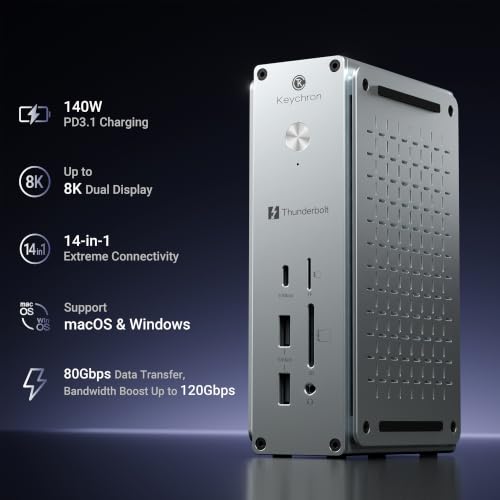
The Keychron Thunderbolt 5 Dock is one of the first docking stations built around Intel’s newest Thunderbolt 5 standard. On paper, it checks almost every box a modern workstation could ask for: massive bandwidth, powerful laptop charging, dual 8K display support, fast networking, and a premium aluminum chassis.
But impressive specifications don’t automatically make a great dock.
After digging through the hardware, competing products, and early expert impressions, it’s clear that Keychron understood something many manufacturers overlook: professionals value reliability and simplicity just as much as raw speed. Rather than stuffing the dock with flashy features, they’ve focused on delivering a clean, quiet desktop hub that should disappear into your workflow—which is exactly what a good dock is supposed to do.
Quick Facts
- ⚡ Connection: Thunderbolt 5 with 80Gbps bidirectional bandwidth and up to 120Gbps Bandwidth Boost
- 🖥️ Display Support: Up to dual 8K @ 60Hz (host dependent)
- 🔋 Laptop Charging: Up to 140W Power Delivery
- 🔌 Ports: 14 total including Thunderbolt 5, USB-A, USB-C, HDMI 2.1, 2.5Gb Ethernet, SD and microSD
- 🌐 Networking: Integrated 2.5 Gigabit Ethernet
- 💾 USB Performance: Up to 10Gbps transfer speeds
- 🧊 Cooling: Completely fanless aluminum design
- 💻 Compatibility: macOS and Windows with Thunderbolt 5, Thunderbolt 4 and USB4 compatibility
- ⚙️ Power Supply: External 180W power adapter included
- 🏗️ Construction: CNC-machined aluminum enclosure
Editor’s Note
This dock reminds me of the first generation of Thunderbolt 3 products years ago.
Back then, the technology was ahead of the laptops. Today, Thunderbolt 5 finds itself in a very similar position. The hardware is genuinely impressive—but most people simply don’t own a computer capable of taking full advantage of it yet. If your laptop still uses Thunderbolt 4 or USB4, this dock will work perfectly, but you’ll never see the performance you’re paying for.
That isn’t a flaw in the dock. It’s simply the reality of buying cutting-edge hardware.
What I do appreciate is that Keychron resisted the temptation to turn this into a “gaming dock.” No RGB lighting, no noisy cooling fan, no gimmicks—just a clean aluminum enclosure designed to sit quietly on a desk for years. That’s exactly what I’d expect from equipment aimed at professionals.
If you are looking for a Thunderbolt external SSDs, check our dedicated Best SSD for MacBook Pro review.
Pros
- One cable replaces your desk setup — Connect displays, storage, networking, accessories and laptop charging through a single Thunderbolt cable, dramatically reducing desktop clutter.
- Enough bandwidth for demanding workflows — Large file transfers, external SSDs and multiple high-resolution monitors can all run simultaneously without competing for bandwidth.
- Silent operation — The fanless aluminum design means there’s no background noise, making it a great fit for recording studios, offices and quiet workspaces.
- Excellent future-proofing — Buying a Thunderbolt 5 dock today means you’re unlikely to outgrow it when your next laptop arrives.
- Premium construction — The CNC-machined aluminum housing feels more like professional workstation equipment than a typical consumer accessory.
- Generous charging capability — High-power laptops can stay charged while handling every connected peripheral through the same cable.
- Flexible expansion — Three Thunderbolt ports leave room to grow instead of forcing difficult compromises between displays, storage and other accessories.
Cons
- Most buyers won’t use its full potential — Unless your computer supports Thunderbolt 5, much of the available bandwidth will simply go unused.
- The power brick is substantial — While necessary for delivering high charging output, the external adapter occupies almost as much desk space as the dock itself.
- Premium hardware commands a premium investment — This is aimed at professionals rather than casual users who only need a few extra USB ports.
- Still building a long-term reputation — As Keychron’s first docking station, it hasn’t yet developed the years of reliability history enjoyed by brands like CalDigit.
- Some workflows may still require adapters — Depending on your monitors and cable setup, you may still need additional display adapters despite the generous port selection.
Thunderbolt 5 vs Thunderbolt 4 — Is It Worth It?
Thunderbolt 5 doubles the baseline bandwidth of Thunderbolt 4 from 40Gbps to 80Gbps while introducing Bandwidth Boost, allowing up to 120Gbps for display-heavy workloads. That extra capacity matters if you’re driving multiple high-resolution monitors while simultaneously transferring data from fast external SSDs or capture devices.
However, most current laptops still ship with Thunderbolt 4 or USB4. The Keychron dock works with those systems, but they’ll operate within the limits of the host computer rather than the dock itself. Buying a Thunderbolt 5 dock today is as much about future-proofing as it is about immediate performance.

Why We Liked It
What impressed me most wasn’t a particular specification. It was the design philosophy.
Many premium docks compete by adding more and more ports, lights and features until they become miniature desktop computers. Keychron took the opposite approach. The port selection is generous without feeling excessive, the enclosure is understated, and the passive cooling eliminates one more moving part that could fail over time.
That’s the kind of engineering decision that usually pays off in long-term daily use.
Who Is This Dock For?
Creative professionals. If you’re editing high-resolution video, transferring large media libraries, or working with multiple displays every day, this dock gives modern workstations the bandwidth they’ve been waiting for.
Developers and engineers. Multiple monitors, wired networking, external SSDs and fast charging can all coexist without turning your desk into a cable jungle.
Professionals planning their next workstation. Even if your current laptop doesn’t fully exploit Thunderbolt 5, this dock should remain relevant through several hardware upgrade cycles.
Who should skip it?
If your daily workload consists of email, web browsing and a single external monitor, you’ll probably notice very little difference compared to a quality Thunderbolt 4 dock that costs considerably less.
How It Compares
Keychron Thunderbolt 5 Dock vs CalDigit TS5
The CalDigit TS5 has years of professional trust behind it and remains the safe recommendation for buyers who prioritize a proven track record.
The Keychron takes a slightly different approach. It delivers similarly premium hardware with a cleaner minimalist aesthetic while entering the market at a competitive level. If long-term reliability proves as strong as the hardware suggests, it could become one of the most compelling alternatives in the Thunderbolt 5 category.
Keychron Thunderbolt 5 Dock vs UGREEN Maxidock
UGREEN focuses on maximum connectivity, squeezing in as many expansion options as possible.
Keychron instead prioritizes simplicity and everyday usability.
If your workstation resembles a production studio with dozens of peripherals, the UGREEN may offer greater flexibility. If you value a cleaner desk and a more understated design, the Keychron is likely the more appealing choice.
Things Buyers Should Know
Thunderbolt 5 isn’t automatically faster for everyone.
If your current laptop only supports Thunderbolt 4 or USB4, the dock remains fully compatible—but your computer becomes the limiting factor.
Think of it like installing a Formula 1 engine in a family sedan. The hardware has incredible capability, but the rest of the system determines how much of it you can actually use.
For buyers planning to upgrade their laptop in the next couple of years, that’s less of a concern. For everyone else, it’s worth asking whether a quality Thunderbolt 4 dock would deliver nearly the same real-world experience.
Final Verdict
The Keychron Thunderbolt 5 Dock feels less like an experimental first-generation product and more like a mature workstation accessory that simply happens to use the newest connectivity standard.
Its biggest obstacle isn’t the hardware.
It’s that Thunderbolt 5 itself is still ahead of the market.
If you’re investing in a new high-performance workstation — or expect to within the next year or two — this dock makes a compelling case as the centerpiece of your desktop setup. But if your current laptop tops out at Thunderbolt 4, I’d save the extra money unless you specifically want the future-proofing.
Keychron Thunderbolt 5 Dock
Summary
The Keychron Thunderbolt 5 Dock is an impressive first effort that combines premium build quality, excellent connectivity, and enough bandwidth to satisfy even demanding creative workflows. While its full potential requires a Thunderbolt 5 laptop, buyers investing in next-generation hardware will find it to be a capable and future-ready docking station that should remain relevant for years.
Written by Metin Karal
Metin Karal is a Computer Engineer with over 25 years of experience working with internet technologies, trends, and digital tools since 1995. He brings this deep background into his product reviews, combining technical expertise with careful research to deliver honest, practical insights for readers. Passionate about technology, Metin also enjoys programming in C# and is currently developing PairMem, a challenging memory game available for free on the official Microsoft Store.
How We Selected These Products
We recommend these items based on a thorough research process designed to highlight the best options available. While we did not physically test some products ourselves, we relied on detailed research and verified customer feedback to evaluate them.
- Detailed Research: We reviewed product specifications, manufacturer information, and feature lists to understand what each item offers.
- Customer Insights: We analyzed verified buyer reviews and ratings to learn how these products perform in real-world use.
- Comparison Factors: We compared products across price, durability, usability, and unique features to identify the strongest choices.
- Personal Experience: With over 25 years of working in internet-related technologies and following online trends since 1995, I bring a deep understanding of how products are marketed, evaluated, and used. This background helps me filter out hype and focus on what truly matters for everyday users.
- Balanced Evaluation: Our goal is to provide clear, unbiased information so you can make confident purchasing decisions.
See also How We Review Products section for more details on our process.