Written by Metin KARAL – Computer Engineer with 25+ years of experience in internet technologies. Some products here are tested directly, while others are evaluated through detailed research, specifications, and verified customer feedback. This article may contain affiliate links; as an Amazon Associate we earn from qualifying purchases at no extra cost to you.
Choosing the right MacBook Air case isn’t just about looks—it’s about how you actually use your laptop day to day. Some users need slim, lightweight sleeves for in-bag protection, while others want semi-rigid or hard shell cases that can handle travel, drops, and daily wear.
In the comparison below, we’ve broken down the best MacBook Air cases and sleeves by what really matters: protection level, portability, storage, and overall value. Whether you’re a student, commuter, or frequent traveler, this quick table helps you find the right fit in seconds.
Looking for a quality MacBook Pro Case? Check our 9 Best MacBook Pro Case, Sleeve & Bag review.
Best MacBook Air Cases & Sleeves Comparison
| Case | Why |
|---|---|
| tomtoc 360° Protective Case | Best Overall MacBook Air Sleeve — CornerArmor edge protection, structured padding, and smart storage make it the most complete everyday protection option. |
| MOSISO 13.3″ Sleeve | Best Budget Sleeve — Affordable with solid padding, soft lining, and tons of color options; great for students and casual use. |
| BlueSwan Hard Shell | Best Snap-On Case — Rigid slim shell with TPU bumpers; ideal for users who want constant protection without a sleeve. |
| tomtoc 360° Slim Sleeve | Best Slim Sleeve — Ultra-lightweight with CornerArmor protection and recycled fabric; perfect for in-bag carry without added bulk. |
| FINPAC Hard Sleeve | Best for Maximum Protection — Semi-hard EVA shell with thick 360° padding; ideal for travel and heavily packed bags. |
| MoKo Utility Sleeve Bag | Best Multi-Carry Option — Handle + shoulder strap + compartments; works as both a sleeve and a laptop bag. |
| BAGSMART Quilted Sleeve | Best Stylish Sleeve — Quilted design with soft interior and carry options; built for users who prioritize aesthetics. |
| MoKo Everyday Sleeve Bag | Best Balanced Pick — Clean design, soft padded interior, and practical storage; a well-rounded everyday choice. |
💡 Quick Tip: Choose a hard shell (BlueSwan) for desk protection, a semi-rigid sleeve (FINPAC) for travel, or a soft sleeve (tomtoc/MOSISO) for lightweight daily carry.
MOSISO 13.3″ MacBook Air Sleeve
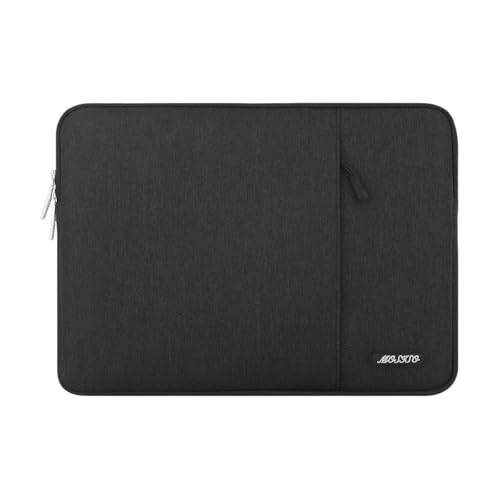
Quick Facts
- 🎨 Colors: Extensive color and pattern choices to match personal style.
- 🧵 Material: Polyester outer; foam padding; fluffy fleece lining for scratch and light‑bump protection.
- 🎒 Form factor: Slim vertical sleeve with a front accessory pocket.
- ⚖️ Profile: Very lightweight and low bulk — designed to slide into backpacks and briefcases.
- 🔧 Fit: Multiple size options covering common 13–14″ MacBook Air/Pro models.
Editor’s Note
MOSISO has made a name by offering affordable, colorful accessories that prioritize accessibility and choice. This 13.3″ sleeve follows that playbook: simple, reliable construction, lots of sizes and finishes, and a focus on being an easy, replaceable everyday protector rather than a premium, engineered case. The brand’s strength is giving buyers a way to personalize their carry without a big investment.
Because MOSISO targets broad compatibility and value, the sleeve intentionally trades advanced impact engineering for lightweight convenience and style. That makes it a sensible pick for people who want a no‑fuss cover that prevents scratches and cushions minor knocks while keeping weight and bulk to a minimum.
If you also use a MacBook Neo or want budget alternatives, see our Best MacBook Neo Case (2026) — From $9.99 roundup.
Pros
- Very lightweight and slim — easy to carry or stash inside another bag.
- Huge selection of colors and patterns for personalization.
- Front pocket adds basic organization for charger, mouse, or small accessories.
- Soft fleece lining helps prevent surface scratches.
- Water Resistant
Cons
- Basic protection only — foam padding is designed for scratches and light bumps, not heavy drops.
- Fit can be snug on some thin‑bezel models; check internal dimensions for exact compatibility.
Why We Liked It
Practical, no‑frills protection. MOSISO delivers the core function most buyers want from a soft sleeve: a soft interior to prevent scratches and a padded barrier for everyday knocks. For users who already carry a larger bag, it works very well as an in‑bag protector.
Style and variety as a feature. The brand’s wide palette of colors and patterns is a genuine selling point — it lets buyers match the sleeve to personal taste or to multiple devices in a household without spending much.
Useful pocketing for daily carry. The vertical front pocket is a small but meaningful upgrade over bare neoprene sleeves, offering a place for a charger, mouse, or small notebook and improving day‑to‑day convenience.

MOSISO 13.3″ MacBook Air Sleeve
Best For: Students, casual users, and anyone who wants a lightweight, colorful sleeve as an in‑bag protector or inexpensive everyday cover.
Summary
The MOSISO 13.3″ Laptop Sleeve is a lightweight, budget-friendly option designed for everyday scratch protection and portability. Its soft fleece lining, slim profile, and wide range of colors make it a practical in-bag sleeve for students and casual users. While it’s not built for heavy impacts, it delivers solid value as an affordable, no-fuss daily protector.
tomtoc 360° Protective Case – Best Overall Protection Case

Quick Facts
- 🛡️ Protection: CornerArmor shock‑absorbing corners + high‑density padding for 360° impact defense.
- 💧 Weather resistance: Water‑resistant outer fabric for light rain and spills.
- 🎒 Form factor: Slim sleeve with front accessory pocket and hidden back pocket.
- 🔒 Hardware: YKK zippers and reinforced stress points.
- ♻️ Sustainability: Multiple sustainability features listed on product pages.
- 💻 Compatibility: Fits 13‑inch MacBook Air M5/M4/M3/M2/M1 and similar 13″ laptops.
Editor’s Note
This version offers more structure and storage, making it closer to a compact carry solution than a basic sleeve. Tomtoc has built a steady reputation by solving everyday protection problems with pragmatic engineering rather than chasing fashion. The CornerArmor approach—reinforcing the corners instead of simply adding uniform foam—reflects a design choice informed by common user failure modes: corners are where sleeves and laptops most often take the worst damage. That focus lets tomtoc deliver meaningful impact defense while keeping the overall profile slim and commuter‑friendly.
The brand positions these sleeves between cheap neoprene covers and bulky, rigid cases: durable materials, reliable hardware, and commuter‑oriented details (hidden back pocket, tidy front organizer) are consistent talking points in user discussions and retailer descriptions. For people who want a protective insert that lives inside a backpack or briefcase, tomtoc’s 360° model is a clear, practical option.
Pros
- Targeted corner protection with CornerArmor for realistic drop scenarios.
- Slim, commuter‑friendly profile that slides into backpacks and briefcases easily.
- Organized storage via front pocket and internal small pockets for charger and cables.
- Quality hardware — YKK zippers and reinforced seams noted on product listings.
- Water‑resistant outer fabric helps against light spills and rain.
Cons
- Slim internal depth limits capacity for bulky chargers or dongles.
- Design tradeoff: focused corner guards can leave flat‑surface impact protection thinner than some clamshell cases.
Why We Liked It
Targeted protection that matches real‑world damage patterns. The CornerArmor design addresses the most common and damaging impact scenario for sleeves—corner impacts—so the sleeve provides meaningful defense without turning into a heavy, heat‑trapping clamshell. That makes it a sensible compromise for daily commuters.
Commuter‑first ergonomics and useful details. The slim silhouette slides into larger bags without adding bulk, and the front organizer plus hidden back pocket are practical touches that reviewers and users repeatedly call out as helpful for transit and travel. These small features improve daily workflow more than their size suggests.
Solid construction signals longevity. Water‑resistant fabric, reinforced seams, and smooth YKK zippers are consistent quality cues that separate this sleeve from generic neoprene covers. For users who want a protective insert that looks and feels durable, the tomtoc 360° reads like a thoughtful, well‑built choice.

tomtoc 360° Protective Case for 13″ MacBook Air
Best For: Commuters and professionals who keep their MacBook inside a larger bag and want targeted corner‑impact protection, tidy accessory organization, and a slim, low‑profile sleeve rather than a bulky standalone case.
Summary
The tomtoc 360° Protective Laptop Case for 13″ MacBook Air is a practical, well‑engineered sleeve that prioritizes the protection points that matter in everyday carry. Its CornerArmor corners, tidy accessory organization, and durable materials make it an excellent protective insert for commuters and professionals who keep their laptop inside a larger bag. It won’t replace a crush‑proof hard case, but for daily drops, bumps, and light weather exposure, it offers a smart balance of protection, portability, and thoughtful details.
MoKo MacBook Air Utility Sleeve Bag

Quick Facts
- 🛡️ Protection: Soft lining + foam padding for scratch and light‑bump protection.
- 💧 Weather resistance: Water‑resistant polyester exterior for everyday splashes.
- 🎒 Carry options: Top handle + detachable shoulder strap for hand, shoulder, or crossbody carry.
- 🗂️ Storage: Dual pockets — main laptop compartment plus front accessory pocket.
- ⚖️ Fit: Designed for 13–14″ laptops including recent MacBook Air/Pro models.
- 🔧 Profile: Lightweight, portable, and easy to stash in larger bags.
Editor’s Note
MoKo positions itself as a practical accessories brand that focuses on versatility and everyday convenience. This 13–14″ model leans into that ethos by combining a slim sleeve profile with multiple carry options — a top handle for quick grabs and a detachable shoulder strap when you want hands‑free mobility. That hybrid approach makes the bag useful both as an in‑bag sleeve and as a light standalone carry solution for short commutes.
The design choices reflect a common user need: many buyers want more than a simple sleeve but less than a full briefcase. MoKo’s water‑resistant polyester and soft interior aim to strike a balance between protection and portability, while the dual pockets keep small accessories organized without adding bulk.
Pros
- Multiple carry modes (handle + detachable shoulder strap) for flexible use.
- Water‑resistant exterior helps against light rain and spills.
- Dual pockets separate laptop from charger and small accessories.
- Slim, lightweight profile that fits inside larger bags or works as a quick standalone bag.
Cons
- Accessory capacity limited — larger power bricks or bulky hubs may be tight.
- Shoulder strap hardware on some soft sleeves can feel less robust than on structured bags.
Why We Liked It
Flexible carry options that match real daily routines. The combination of a top handle and a detachable shoulder strap is the standout practical feature: it lets the sleeve act as a quick grab bag for short trips or a hands‑free option for walking and transit. That flexibility is especially useful for users who alternate between walking, rideshares, and office carry.
Everyday protection with commuter convenience. The water‑resistant polyester exterior and soft fleece interior provide reliable scratch prevention and guard against light splashes, while the foam padding cushions minor knocks. The dual pockets keep essentials accessible and reduce the need to open a larger bag every time you need a charger or mouse.
Lightweight, low‑bulk design. For people who already carry a backpack or tote, this sleeve functions well as a protective insert; for short errands it doubles as a compact shoulder bag. The tradeoff is obvious — you gain portability and convenience at the expense of heavy‑duty impact or crush protection.

MoKo MacBook Air Utility Sleeve Bag
Best For: Users who want a lightweight sleeve that doubles as a quick standalone bag — ideal for short commutes, coffee‑shop work sessions, and travelers who prefer a low‑bulk carry with flexible strap options.
Summary
The MoKo MacBook Air Sleeve Bag is a practical, flexible option for MacBook Air/Pro owners who want more than a bare sleeve but less than a full briefcase. Its detachable shoulder strap and top handle make it uniquely adaptable for short commutes and quick errands, while the water‑resistant exterior and soft interior deliver dependable everyday protection. If you need crush‑proof security or heavy‑duty drop protection, look to a rigid case — but for low‑bulk, versatile daily carry, MoKo’s hybrid sleeve is a strong, convenient choice.
BlueSwan MacBook Air 13.6″ Hard Shell Protective Cover

Quick Facts
- 🛡️ Protection: Reinforced PC shell + soft TPU bumpers for surface and corner defense.
- 🎨 Finish: Matte / clear options that closely match Apple colors; anti‑fingerprint surface.
- 🌬️ Cooling: 1:1 heat‑dissipation ports + raised feet to reduce trapped heat.
- 🔌 Fit & Access: Precision cutouts for full port access and unobstructed hinge movement.
- 🔧 Installation: Snap‑on top and bottom for tool‑free fit and easy removal.
- 💻 Compatibility: Designed for MacBook Air 13.6″ (M5/M4/M3/M2) — confirm model number before buying.
Editor’s Note
BlueSwan aims to deliver the look and feel of an OEM cover while adding everyday protection. The brand emphasizes color accuracy and finish—their matte and clear variants are engineered to closely match Apple’s Midnight, Starlight, and other tones so the case reads like a natural extension of the laptop rather than an obvious aftermarket add‑on. That attention to finish is a recurring user talking point: buyers who care about keeping the MacBook’s aesthetic intact often choose snap‑on shells for that reason.
Functionally, BlueSwan balances rigid surface protection with soft corner impact absorption by combining a high‑density PC top/bottom with TPU bumpers. The inclusion of venting and raised feet shows the design team considered thermal behavior and desk stability—two common complaints about cheap snap‑on shells.
Pros
- Slim, precision fit that preserves the MacBook Air silhouette.
- Reinforced PC shell + TPU bumpers for combined surface and corner protection.
- Anti‑fingerprint matte finish keeps the laptop looking cleaner.
- Vented bottom and raised feet help airflow and stability.
- Easy snap‑on installation with full port and hinge clearance.
Cons
- Clips can wear if removed frequently; careful removal recommended.
- Matte surfaces still scuff under heavy abrasion even if fingerprints are reduced.
Why We Liked It
OEM‑style finish with practical protection. The BlueSwan case stands out because it aims to match Apple’s finishes closely while adding a protective layer. That makes it appealing to users who want to preserve the MacBook’s look while preventing everyday scratches and cosmetic wear.
Smart hybrid construction. Combining a rigid PC shell for surface protection with soft TPU bumpers at vulnerable edges is a sensible compromise: the shell resists scratches and minor impacts, while the bumpers absorb shock from knocks and short drops without adding noticeable bulk.
Thoughtful usability details. The venting pattern and raised feet address a common downside of snap‑on shells—heat trapping—while precision cutouts keep ports and hinge action unobstructed. Those small details improve daily comfort and reduce the “aftermarket case” feel.

BlueSwan MacBook Air 13.6″ Hard Shell
Best For: Owners who prioritize preserving the MacBook Air’s original look while adding low‑profile surface and corner protection — ideal for professionals who want a discreet, OEM‑matching cover for daily desk and travel use.
Summary
The BlueSwan MacBook Air 13.6″ hard shell is a well‑balanced snap‑on cover that focuses on appearance, fit, and sensible protection. It’s not a ruggedized solution, but its reinforced PC construction plus TPU bumpers protect against the most common cosmetic and impact issues while keeping the laptop slim and usable. The anti‑fingerprint matte finishes and color‑matching options make it especially attractive to users who care about aesthetics, and the venting/raised feet show practical attention to thermal and desk use. For anyone who wants to keep their Air looking like new without adding bulk, BlueSwan is a practical, unobtrusive choice.
FINPAC Hard Sleeve for MacBook Air

Quick Facts
- 🛡️ Protection: Semi‑hard EVA shell + 5 mm internal padding for 360° shock resistance.
- 💧 Weather resistance: 1600D high‑density polyester outer fabric for improved water repellency.
- 🔒 Hardware: Premium YKK zippers for secure, long‑lasting closure.
- 🎒 Form factor: Hard‑shell sleeve with hand strap; slides into backpacks or carries solo.
- 📐 Fit: Internal dimensions suited for 13–14″ MacBook Air/Pro and similar ultrabooks.
- 🧰 Extras: Front pocket and structured interior to keep accessories organized.
Editor’s Note
FINPAC positions this sleeve as a practical middle ground between soft neoprene covers and bulky hard cases. The semi‑hard EVA shell is designed to resist everyday knocks and prevent the kind of cosmetic damage that accumulates in transit, while the 1600D polyester exterior adds a level of water repellency and abrasion resistance you don’t usually see at this price point. The inclusion of YKK zippers and a hand strap signals that the product is aimed at commuters and travelers who want a durable, no‑nonsense protective sleeve that still fits inside a larger bag.
The design choices—structured shell, modest padding thickness, and a slim external profile—reflect a clear tradeoff: better surface and edge protection than a soft sleeve, but without the weight and bulk of a full clamshell or briefcase. That makes FINPAC a sensible option for users who want reliable day‑to‑day defense and tidy organization without committing to a heavy carry system.
Pros
- Semi‑hard EVA shell provides solid surface and edge protection.
- 1600D polyester exterior improves water and wear resistance.
- 5 mm padding + YKK zippers for secure, long‑lasting protection.
- Slim profile with hand strap — easy to carry or slide into a backpack.
- Structured interior keeps laptop and accessories separated.
Cons
- Not crush‑proof — semi‑hard shell resists impacts but won’t replace a rugged case.
- Hand strap and minimal padding favor portability over extreme protection.
Why We Liked It
Balanced protection for everyday travel. The FINPAC sleeve’s semi‑hard EVA shell and 5 mm padding deliver a meaningful step up from soft neoprene covers: it resists surface scratches and cushions common knocks while remaining slim enough to fit inside a commuter bag. That balance is useful for people who want protection without extra bulk.
Durable materials and practical hardware. The 1600D polyester outer fabric and YKK zippers are durability signals that matter in real life—these elements help the sleeve shrug off scuffs and keep closures working smoothly over months of use. The structured interior and accessory pocket also reduce the need to rummage through a larger bag for chargers and cables.
Travel‑friendly ergonomics. The hand strap and slim footprint let the sleeve function both as an in‑bag protector and a quick‑grab carry for short trips. It’s a practical compromise for commuters and business travelers who need a protective sleeve that’s easy to handle and reliable on the move.

FINPAC Hard Sleeve — Semi‑Hard EVA Protection for MacBook Air
Best For: Commuters and frequent travelers who want a slim, semi‑rigid sleeve that protects against everyday bumps, scratches, and light moisture while remaining easy to carry and stow.
Summary
The FINPAC Hard Laptop Sleeve is a practical, travel‑oriented option for 13–14″ MacBook owners who want more protection than a soft sleeve without the weight of a full hard case. Its semi‑hard EVA shell, 1600D polyester exterior, and YKK zippers combine to offer reliable surface and edge defense, modest water resistance, and durable everyday performance. While it won’t replace a crush‑proof solution for extreme conditions, FINPAC’s structured design, accessory pocketing, and slim ergonomics make it a strong choice for commuters, students, and business travelers who need dependable protection and easy portability.
tomtoc 360° Protective Sleeve for MacBook Air – Best Slim Minimal Sleeve

Quick Facts
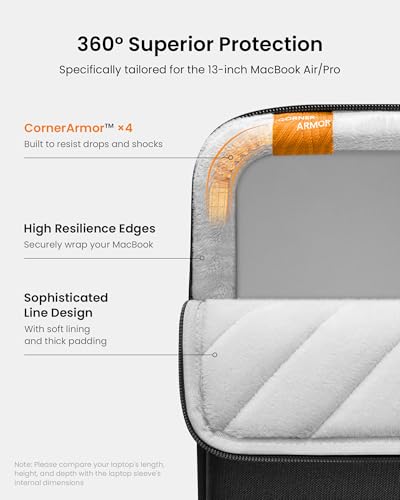
- 🛡️ Protection: CornerArmor shock‑absorbing corners + high‑density padding for targeted 360° defense.
- 💧 Weather resistance: Water‑resistant recycled fabric for light rain and spills.
- 🎒 Form factor: Slim sleeve with front accessory pocket and hidden back pocket.
- 🔒 Hardware: YKK zippers and reinforced stress points.
- ♻️ Sustainability: Recycled materials and eco features called out by the brand.
- 💻 Compatibility: Fits 13‑inch MacBook Air (M5/M4/M3/M2/M1)
Editor’s Note
This model focuses on minimal bulk and portability, making it ideal as a lightweight in-bag protector. Tomtoc has built a reputation by solving practical commuter problems rather than chasing fashion. The 360° sleeve’s defining idea—CornerArmor—targets the most common real‑world failure mode for sleeves: corner impacts when a bag is dropped or knocked. That focused engineering lets tomtoc deliver meaningful impact defense while keeping the overall profile slim and pocketable.
Beyond protection, tomtoc emphasizes durable materials and everyday usability: water‑resistant recycled fabrics, YKK hardware, and commuter‑friendly pockets (including a hidden back pocket and AirTag/key strap). Those details make the sleeve behave like a protective insert designed to live inside a larger bag rather than a bulky standalone case.
Pros
- CornerArmor for realistic drop protection.
- Slim profile that fits easily into backpacks and briefcases.
- Organized front pocket with internal small pockets for charger and cables.
- Durable hardware (YKK zippers) and reinforced seams.
- Water‑resistant outer fabric for light weather protection.
Cons
- Limited internal depth — not ideal for bulky power bricks or large dongles.
- Not a hard shell — protects against drops and bumps but not heavy crushing or submersion.
- Corner‑focused padding means flat‑surface impact protection is thinner than some clamshell designs.
Why We Liked It
Targeted protection that matches real‑world damage patterns. The CornerArmor design reinforces the points that actually fail most often in sleeves—corners—so the sleeve provides meaningful defense without turning into a heavy, heat‑trapping clamshell. That makes it a sensible compromise for daily commuters.
Commuter‑first ergonomics and useful details. The slim silhouette slides into larger bags without adding bulk, and the front organizer plus hidden back pocket are practical touches that reviewers and users repeatedly call out as helpful for transit and travel. These small features improve daily workflow more than their size suggests.
Durable construction and sustainability signals. Water‑resistant recycled fabric, reinforced seams, and smooth YKK zippers are quality cues that separate this sleeve from generic neoprene covers. For buyers who want a protective insert that looks and feels durable, tomtoc’s 360° sleeve reads like a thoughtful, well‑built choice.
tomtoc 360° Protective Sleeve
Best For: Users who want a thin, lightweight sleeve with basic organization and easy portability.
Summary
The tomtoc 360° Protective Laptop Sleeve for 13″ MacBook Air is a well‑engineered commuter sleeve that focuses protection where it matters most. Its CornerArmor corners, tidy accessory organization, and durable, water‑resistant materials make it an excellent protective insert for users who carry their laptop inside a backpack or briefcase. It won’t replace a crush‑proof hard case for extreme conditions, but for everyday drops, bumps, and light weather exposure, tomtoc’s design delivers a smart balance of protection, portability, and practical details.
BAGSMART MacBook Air Case
Quick Facts
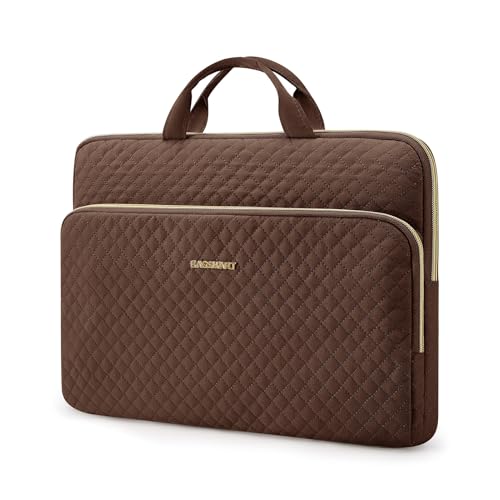
- 🎒 Form factor: Quilted soft sleeve with top handles and detachable shoulder strap.
- 🛡️ Protection: Foam padding + fabric‑wrapped edge guards for scratch and dent resistance.
- 🧵 Material: Lightweight polyester exterior; soft interior lining.
- 🗂️ Storage: Front pocket for charger, phone, mouse, and small accessories.
- 📐 Fit: Designed for 13–13.3″ MacBook Pro / MacBook Air and similar ultrabooks.
- 🎨 Style: Multiple color options (coffee brown, beige, black, pink) with a quilted finish.
Editor’s Note
BAGSMART focuses on everyday usability with a fashion sensibility. The quilted finish and fabric‑wrapped guards make this sleeve feel more like an accessory than a purely technical product, which is why it’s popular among buyers who want their laptop carry to match a personal style. The brand’s design choices favor lightweight comfort and approachable styling over heavy‑duty protection.
Functionally, the sleeve is built to protect against scratches, edge dents, and light bumps while remaining slim enough to slide into a larger bag. The inclusion of both handles and a detachable strap reflects a practical understanding of short trips and quick errands where a full backpack isn’t needed.
Pros
- Lightweight, low‑bulk quilted design that looks like a fashion accessory.
- Multiple carry modes (top handles + detachable shoulder strap).
- Soft interior and fabric‑wrapped edge guards to prevent scratches and dents.
- Front pocket for everyday essentials and small accessories.
Cons
- Basic foam padding — not intended for heavy drops or crush protection.
- Limited internal depth for bulky chargers or large docking hubs.
Why We Liked It
Versatile, commuter‑friendly ergonomics. The combination of handles and a detachable shoulder strap makes the BAGSMART sleeve flexible: it works as an in‑bag protector and converts quickly into a compact carry for short commutes, coffee runs, or meetings.
Style that doesn’t sacrifice function. The quilted exterior and color options let the sleeve double as a personal accessory while the soft lining and fabric‑wrapped guards protect the laptop surface from scratches and edge dents—practical protection presented with a polished look.
Everyday convenience. The front pocket and slim footprint make daily use easier—chargers, phone, and small peripherals have a dedicated place, reducing the need to open a larger bag for quick access.

BAGSMART MacBook Air Case
Best For: Style‑minded commuters, students, and professionals who want a lightweight, attractive sleeve that doubles as a quick standalone carry for 13–13.3″ laptops.
Summary
The BAGSMART 13–13.3″ Laptop Case is a stylish, practical sleeve that prioritizes lightweight portability, multiple carry modes, and a polished quilted aesthetic. It provides dependable scratch and dent protection for everyday use and adds useful organization with a front pocket and soft interior lining. While it’s not designed for heavy impact or crush protection, its combination of convenience, style, and versatility makes it a strong choice for anyone who wants a sleeve that looks as good as it functions for daily commutes and short trips.
MoKo MacBook Air Everyday Sleeve Bag

Quick Facts
- 🛡️ Protection: Soft padded lining + foam cushioning for scratch and light‑bump defense.
- 💧 Weather resistance: Water‑resistant polyester exterior for light splashes.
- 🎒 Carry options: Top handle + detachable shoulder strap for hand or hands‑free carry.
- 🗂️ Storage: Two compartments — main laptop bay and a front pocket for cables, phone, or tablet.
- 📐 Fit: Designed for 13.3–14″ laptops including recent MacBook Air/Pro and similar ultrabooks.
- 🔧 Profile: Slim, lightweight, and portable — recommended for bare‑machine use.
Editor’s Note
MoKo builds accessories around everyday practicality and broad compatibility. This 13.3–14″ sleeve reflects that approach: a clean, slim silhouette with a water‑resistant outer fabric and a soft, thickened lining to protect screens and finishes. The dual‑compartment layout and detachable strap show the brand’s focus on flexible carry modes—use it as an in‑bag sleeve, a quick grab‑and‑go shoulder bag, or a compact hand‑carry for short trips.
The design favors portability and convenience over heavy‑duty protection. MoKo’s choice of materials and construction aims to keep weight low while offering sensible protection for commuters, students, and professionals who typically carry their laptop inside a larger bag or use the sleeve for short errands.
Pros
- Multiple carry modes (handle + detachable shoulder strap).
- Water‑resistant exterior and soft interior lining for scratch prevention.
- Two compartments for neat organization of laptop and small accessories.
- Slim, lightweight profile that stows easily in backpacks and briefcases.
Cons
- Recommended for bare‑machine use; thicker protective skins or bulky cases may affect fit.
- Accessory capacity limited for large power bricks or oversized hubs.
Why We Liked It
Flexible carry that fits real routines. The combination of a top handle and detachable shoulder strap makes the sleeve adaptable: it works as a protective insert inside a larger bag and converts quickly into a compact shoulder bag for short commutes or meetings.
Practical two‑compartment layout. Separating the laptop from chargers, phone, or a small tablet keeps daily essentials organized and reduces the need to open a larger bag for quick access.
Lightweight, commuter‑friendly construction. Water‑resistant polyester and a soft, thickened lining provide sensible protection for everyday use while keeping the sleeve slim and easy to carry.

MoKo MacBook Air Everyday Sleeve Bag
Best For: Commuters and students who want a slim, water‑resistant sleeve that doubles as a quick shoulder or hand carry for MacBook Air.
Summary
The MoKo MacBook Air Sleeve Bag is a versatile, low‑bulk option for users who need flexible carry modes and tidy organization without the weight of a full briefcase. Its water‑resistant exterior, soft interior, and dual compartments make it a reliable everyday sleeve for short commutes, campus life, and travel where light protection and portability matter most. It’s not a ruggedized solution for heavy impacts, but for daily scratch prevention, splash resistance, and convenient carry, MoKo’s hybrid sleeve is a practical, well‑priced choice.
Final Paragraph
Each of these MacBook Air cases serves a different purpose, so the “best” choice comes down to your daily routine. If you want maximum protection and organization, go with tomtoc or FINPAC. Prefer something lightweight and budget-friendly? MOSISO is a solid everyday option. And if you like a cleaner, minimal setup, a slim sleeve or snap-on shell like BlueSwan keeps things simple without sacrificing protection.
👉 The key is to match the case to how you carry your MacBook—not just how it looks.
MacBook Air Cases Frequently Asked Questions
Which type of case should I choose?
Start by ranking what matters most: protection level, bulk, appearance, and carry style.
If you want to keep the finish pristine and add minimal bulk, pick a precision hard shell. Always confirm the case lists your exact MacBook Air model identifier and check internal dimensions before buying.
Slim sleeve — best when the Air lives inside a backpack or tote; prevents scratches and cushions light knocks while adding almost no bulk.
Corner‑focused commuter sleeve — choose this if you often carry the Air alone or travel; reinforced corners and denser padding protect against the most common drop damage.
Semi‑rigid or EVA shell sleeve — good middle ground for frequent travelers who want structure and water resistance without a full hard case.
Snap‑on hard shell — ideal when cosmetic preservation is the priority; it prevents surface scratches and scuffs while keeping the laptop profile thin. Decision checklist:
If you mostly stash the Air in another bag, pick a slim sleeve.
If you carry the Air by hand or travel often, pick a corner‑reinforced or semi‑rigid sleeve.
Will a case affect cooling or wireless performance?
The MacBook Air relies on passive cooling; anything that traps heat against the bottom or blocks airflow can increase surface temperature and, under sustained load, cause thermal throttling. Look for cases with vented bottom panels, raised feet, or thin profiles that leave airflow paths unobstructed. Snap‑on shells that include vent cutouts and rubber feet reduce thermal risk.
Wireless signals: plastic, TPU, and fabric cases rarely affect Wi‑Fi or Bluetooth. Metal accessories or cases with large metal plates near the hinge or antenna areas can degrade signal strength. If you use external antennas or cellular hotspots, avoid metal‑heavy accessories near the top hinge. Practical rule: if you notice sustained heat or reduced wireless performance, remove the case and retest; choose a different model with venting or a thinner profile if problems persist.
Thermal checks after installation: run a video call or a short rendering task and feel the bottom; compare CPU performance or fanless behavior with and without the case if you suspect throttling.
How do I ensure correct fit and avoid compatibility issues?
Apple reuses screen sizes across different chassis and years, so a “13‑inch” label can be ambiguous. Find your model identifier in About This Mac and match it to the case listing. For sleeves, measure the laptop with any thin skins, dongles, or protective keyboard covers you plan to keep on it because many sleeves are intended for bare machines only. For hard shells, confirm cutouts align with ports, vents, and the camera; ensure the hinge clears when closing. Pre‑purchase checklist:
Verify the return policy and delivery window so you can exchange if fit is wrong. If a product page offers a fit template or measurement guide, use it before ordering.
Confirm model identifier matches the seller’s compatibility list.
Check internal dimensions and compare to your laptop with any accessories attached.
Look for seller photos showing correct port and hinge cutouts.
How should I clean and maintain my case?
Care depends on material:
Rubber feet and adhesive pads: inspect periodically and replace if worn to maintain stability and airflow. Storage tip: store cases flat in a cool, dry place away from direct sunlight to prevent warping, color fading, or adhesive degradation.
Fabric and recycled textile sleeves: spot clean with a soft cloth, mild detergent, and cool water; air dry completely before use.
Semi‑hard EVA and polyester exteriors: wipe with a damp cloth and mild soap; dry thoroughly.
Hard PC or TPU shells: remove the case and wipe with a microfiber cloth and 70% isopropyl alcohol to remove oils and fingerprints; avoid bleach or abrasive pads that can dull finishes.
Zippers and hardware: keep zipper tracks free of grit; apply a small amount of zipper lubricant or wax if action becomes stiff.
Will using a case affect warranty or Apple service?
Apple’s limited warranty and AppleCare cover manufacturing defects in the MacBook Air itself. A third‑party case does not automatically void that coverage. However, if a case causes physical damage—pressure marks, cracked chassis, or blocked vents that lead to overheating—Apple may classify the damage as accidental and charge for repairs. When seeking service, remove the case before inspection and before shipping the device. Keep receipts for both the laptop and the case if you need to return or claim a defect with the case seller.
When to remove the case before service:
- When shipping the device for warranty service.
- Before diagnostic tests or repairs.
- If the case is suspected to have caused or concealed physical damage.
Written by Metin Karal
Metin Karal is a Computer Engineer with over 25 years of experience working with internet technologies, trends, and digital tools since 1995. He brings this deep background into his product reviews, combining technical expertise with careful research to deliver honest, practical insights for readers. Passionate about technology, Metin also enjoys programming in C# and is currently developing PairMem, a challenging memory game available for free on the official Microsoft Store.
How We Selected These Products
We recommend these items based on a thorough research process designed to highlight the best options available. While we did not physically test some products ourselves, we relied on detailed research and verified customer feedback to evaluate them.
- Detailed Research: We reviewed product specifications, manufacturer information, and feature lists to understand what each item offers.
- Customer Insights: We analyzed verified buyer reviews and ratings to learn how these products perform in real-world use.
- Comparison Factors: We compared products across price, durability, usability, and unique features to identify the strongest choices.
- Personal Experience: With over 25 years of working in internet-related technologies and following online trends since 1995, I bring a deep understanding of how products are marketed, evaluated, and used. This background helps me filter out hype and focus on what truly matters for everyday users.
- Balanced Evaluation: Our goal is to provide clear, unbiased information so you can make confident purchasing decisions.
See also How We Review Products section for more details on our process.



Pingback: 7 Best MacBook Neo Case (2026) — From $9.99
Pingback: 9 Best MacBook Pro Case, Sleeve & Bag (2026) — 14" and 16" Expert Picks