Written by Metin KARAL – Computer Engineer with 25+ years of experience in internet technologies. Some products here are tested directly, while others are evaluated through detailed research, specifications, and verified customer feedback. This article may contain affiliate links; as an Amazon Associate we earn from qualifying purchases at no extra cost to you.
The MacBook Pro 14″ and MacBook Pro 16″ are not the same machine — and the right protection for each isn’t the same either. A 14″ owner commuting daily needs a different solution than a 16″ creative professional traveling between client sites with a full accessory kit. Most MacBook Pro case guides treat them as one category and give you a generic list of cases and sleeves. This guide doesn’t.
We’ve organized every pick by size and use case: dedicated sections for the MacBook Pro 14″ and MacBook Pro 16″, each covering the specific shoulder bags, sleeves, hardshell cases, and backpacks that actually make sense for that machine. Every pick is reviewed in full — with honest pros, cons, and ratings — so you can match your protection choice to how you actually carry your MacBook Pro, not just what fits inside it.
Looking for a quality MacBook Air Case? Check our 8 Best MacBook Air Case review.
| Product | Why Choose It |
|---|---|
| tomtoc Defender-A42 Bag | Best Overall Case for MacBook Pro 14″ – CornerArmor protection, tri-compartment organization, YKK zippers, and AirTag strap in a slim professional package. |
| MOSISO Vertical Sleeve 14″ & 16″ | Best Budget Sleeve for MacBook Pro 14″ & 16″ — foam and fleece interior, generous front pocket, 30+ colors, slim profile. The honest everyday budget sleeve for MacBook Pro 14″. |
| Incase Edge Hardshell | Best Hardshell Case for MacBook Pro 14″ & 16″ – The only product in this roundup that protects the MacBook Pro during use — Makrolon polycarbonate snap-on shell that preserves the aluminum finish through years of desk and surface contact. |
| Swissdigital SD1670 Backpack | Best Travel Backpack for MacBook Pro 14″ & 16″ — patented integrated USB charging, RFID protection, dedicated snug laptop compartment, and Add-A-Bag trolley system in a sleek matte profile. |
| Thule Gauntlet Sleeve 14″ | Best Sleeve for MacBook Pro 14″ – Rigid polyurethane with full corner and edge coverage, clamshell in-case usability, and a lifetime warranty. The maximum transit protection for the 14″ Pro. |
| MOSISO 360 Shoulder Bag 16″ | Best Budget Shoulder Bag for MacBook Pro 16″ – 360° foam and fleece protection, 6-in-1 carry modes, luggage strap, 13+ colors, and budget pricing. |
| tomtoc Essence-A35 Slim Sleeve 16″ | Best Slim Sleeve for MacBook Pro 16″ – Precision-fit CornerArmor sleeve with a flat minimalist silhouette and expanded front pocket — built for designers, developers, and creatives who want the cleanest sleeve available for the 16″ Pro. |
| tomtoc 360° Protective Sleeve 14″ & 16″ | Protective Sleeve for MacBook Pro 14″ & 16″ – Dual Wirecutter and NBC Select recognition — CornerArmor corners, YKK zippers, AirTag strap, and a charger-sized front pocket. The most independently validated sleeve for MacBook Pro 14″ & 16″. |
| Victorinox Altmont Professional | Premium Travel Backpack for MacBook Pro 14″ & 16″ — Travel Sentry combination lock on the laptop compartment, removable tri-fold desk organizer, ballistic polyester base, and 1+10 year warranty. The bag that matches the MacBook Pro’s own standard of quality. |
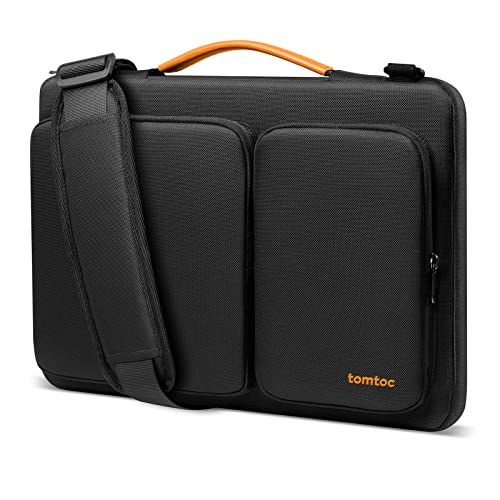
tomtoc Defender-A42 — Best Case for MacBook Pro 14″
Quick Facts
- 🏆 Wirecutter “Great Laptop Bag” pick — independently recognized by NYT’s Wirecutter for carrying versatility and quality
- 🛡️ CornerArmor technology — 4 dedicated corner protectors with high-resilient edges and high-density padding; MIL-STD-810H 2025 drop test certified
- 💧 Water-resistant recycled fabric — PFAS-free water repellent treatment on eco-friendly recycled materials
- 🗂️ Smart tri-compartment system — two separate accessory compartments, multiple small pockets, AirTag/key strap, and hidden back pocket
- 🔒 YKK zippers throughout — premium Japanese zipper hardware on all openings; reinforced stress points
- 🤝 PU leather handles — comfortable carry handle with padded shoulder pad and detachable strap with carabiner
- 📐 Internal dimensions — 12.80″ x 9.13″ x 0.91″; fits 14″ MacBook Pro M5/M4/M3/M2/M1 Pro/Max 2021–2026
- ♻️ 3 sustainability certifications — eco-friendly recycled fabrics with environmental credentials
- 📅 12-month warranty — tomtoc’s worry-free customer support coverage
- 💻 Also available for MacBook Pro 16″ — same Defender-A42 series in a larger size for 16-inch models
Editor’s Note
When Wirecutter — The New York Times’ independent product testing publication — calls something “A Great Laptop Bag,” that’s not marketing language. It’s the result of hands-on evaluation against every competing option in the category. The tomtoc Defender-A42 earned that recognition for a straightforward reason: it combines the three things MacBook Pro 14″ owners actually need in a daily carry bag — comprehensive drop protection, organized accessory storage, and comfortable all-day carrying — without overengineering any of them. The CornerArmor technology addresses the specific failure mode that shoulder bags typically can’t prevent: corner impacts when the bag is set down hard or knocked off a desk. Four dedicated corner protectors combined with high-density padding and water-resistant fabric mean the MacBook Pro M5 inside is genuinely defended against the drops, bumps, and spills that happen during real commutes. The tri-compartment system with hidden back pocket is the organizational detail that separates the Defender-A42 from single-pocket sleeves — charger, cables, USB hub, and accessories each have a home, and the AirTag/key strap means you can locate the bag as easily as the laptop. For MacBook Pro 14″ owners who commute daily and want one bag that handles protection, organization, and all-day comfort in a professional-looking package, the tomtoc Defender-A42 is the benchmark pick.
Pros
- Wirecutter-recognized quality — independently validated as a top laptop bag by NYT’s testing publication
- CornerArmor with MIL-STD-810H certification — dedicated corner protectors plus military-grade drop test verified in 2025
- Tri-compartment organization — two accessory compartments, multiple pockets, AirTag strap, hidden back pocket
- YKK zippers on all openings — premium hardware that outlasts generic zippers significantly
- Water-resistant recycled fabric — PFAS-free treatment; eco-friendly materials with 3 sustainability certifications
- Detachable shoulder strap + carry handle — flexible carrying options for different daily scenarios
- Fits MacBook Pro M1 through M5 — 2021–2026 compatibility confirmed across all 14″ Pro models
- Available in 16″ version — same Defender-A42 quality in the correct size for MacBook Pro 16″
Cons
- Slim profile limits accessory capacity — 0.91″ internal depth is optimized for the MacBook Pro, not bulkier peripherals
- 12-month warranty only — shorter than some premium bag competitors that offer lifetime coverage
Why We Liked It
The tri-compartment system solves organization without sacrificing the protection story — the main compartment’s high-density padding and CornerArmor technology are unchanged regardless of how loaded the accessory compartments are.
The YKK zippers are the quality signal that experienced bag buyers recognize immediately. Generic zippers are the most common failure point across budget laptop bags — they snag, stick, and eventually fail at the pull. YKK zippers, used by premium bag brands worldwide, operate smoothly under daily use and last significantly longer under repeated cycling. Combined with reinforced stress points at every high-tension seam, the Defender-A42’s construction quality is built to outlast the MacBook Pro generation it’s carrying.
The hidden back pocket is the security detail that daily commuters appreciate most. Keeping personal items — wallet, passport, transit cards — in a back-facing pocket that’s inaccessible while the bag is being worn provides meaningful theft deterrence in crowded commute environments. It’s a small design decision that Pack Hacker reviewers specifically called out as a daily-use quality-of-life feature.
The environmental credentials matter to the MacBook Pro audience in a way they often don’t for budget product categories. Three sustainability certifications and PFAS-free water repellent treatment on recycled fabrics align with the values that premium Mac buyers typically hold — and they don’t compromise the protection story at all.
If you are also using a MacBook Neo or want budget alternatives, see our MacBook Neo Case roundup.

tomtoc Defender-A42 for MacBook Pro 14″
Best For: MacBook Pro 14″ owners who commute daily and need comprehensive drop protection, organized accessory storage, and comfortable single-shoulder carry in one professionally designed bag — validated independently by Wirecutter.
Summary
The tomtoc Defender-A42 is the go-to shoulder bag for MacBook Pro 14″ — a Wirecutter-recognized pick combining CornerArmor military-grade drop protection, a smart tri-compartment storage system, YKK zippers throughout, and water-resistant recycled fabric in a slim, professional-looking shoulder bag. It fits every 14″ MacBook Pro from M1 through M5, carries with a detachable padded shoulder strap or PU leather handle, and organizes daily accessories without compromise. A 16″ MacBook Pro version is available in the same Defender-A42 series for owners of the larger model. For MacBook Pro 14″ owners who want one bag that handles protection, organization, and all-day commuting — and whose quality has been independently verified — the Defender-A42 is the benchmark.
Thule Gauntlet — Best Sleeve for MacBook Pro 14″

Quick Facts
- 🛡️ Rigid polyurethane exterior — molded hard shell covers 100% of the MacBook Pro including all edges and corners
- 📐 Enhanced corner and edge protection — reinforced where drops cause the most damage; full perimeter coverage
- 💻 Clamshell design — open and work directly from the sleeve without removing the MacBook Pro
- 🔒 YKK Vislon #5 zipper — chunky large-tooth YKK zipper runs the full clamshell perimeter; adds edge protection
- 🧸 Padded interior — soft lining protects MacBook Pro’s aluminum body from scratches and surface damage
- ♻️ 100% recycled interior — interior lining and trim materials fully recycled; partially recycled exterior
- ⚖️ 0.84 lb — lightweight for a hard-shell sleeve; Thule’s rigid protection without significant weight penalty
- 🎨 Available in Black, Blue, Hazy Green — multiple color options to match MacBook Pro or personal preference
- 🏆 Limited lifetime warranty — Thule stands behind the Gauntlet for the life of your MacBook Pro
- 💻 Also available for MacBook Pro 16″ — same Gauntlet construction in the correct size for the larger model
Editor’s Note
Thule has spent 75+ years building protective cases for outdoor and adventure gear — tested through arctic cold, desert heat, salt chambers, and machines that simulate two trips around the world in under a week. The Gauntlet MacBook Sleeve brings that same engineering philosophy to the MacBook Pro 14″: a rigid molded polyurethane shell that covers every millimeter of the laptop’s exterior — not just the faces, but the full perimeter of corners and edges where drop damage actually concentrates. Most sleeves are soft neoprene or fabric — they protect against scratches but compress under impact, transferring force directly to the MacBook Pro’s aluminum chassis. The Gauntlet’s rigid exterior distributes and absorbs that energy instead. The clamshell design is the daily-use feature that separates it from standard sleeve-only protection: the MacBook Pro stays inside the Gauntlet while you work, with two elastic side straps holding the back panel upright when the lid is open. No unpacking and repacking every time you sit down — open the zipper, open the lid, work. The limited lifetime warranty reflects Thule’s confidence in the construction — a signal that matters when you’re spending around $60 on a sleeve for a $2,000 machine. For MacBook Pro 14″ owners who want hard-shell protection that doesn’t require removing their laptop to use it, the Gauntlet is in a category of its own.
Pros
- Rigid polyurethane shell — full coverage — covers 100% of the MacBook Pro including all corners and edges
- Clamshell in-case usability — work directly from the sleeve; no removal required
- YKK Vislon #5 zipper — large-tooth premium zipper adds edge protection and outlasts generic zippers
- Limited lifetime warranty — Thule backs the Gauntlet for the full ownership cycle
- Lightweight for hard-shell — 0.84 lb; meaningful protection without a heavy weight penalty
- Multiple colors — Black, Blue, Hazy Green available
- 100% recycled interior — environmental credentials without compromising protection
- 75+ year Thule engineering heritage — tested to standards that exceed most laptop accessory brands
Cons
- No accessory pockets — sleeve only; no storage for charger, cables, or accessories
- No shoulder strap — carry handle only; no strap attachment point for over-shoulder transport
- Higher price than soft sleeves — premium pricing reflects Thule’s build quality and warranty
Why We Liked It
The Gauntlet’s core engineering decision — a rigid polyurethane exterior rather than soft padding — is the choice that makes it genuinely different from every neoprene or felt sleeve on the market. Soft sleeves protect against scratches and minor surface contact. They compress under impact, which means a meaningful drop transfers force through to the MacBook Pro’s chassis. The Gauntlet’s molded shell works differently: it distributes impact energy across the rigid structure before it reaches the laptop. Pack Hacker’s review confirmed the polyurethane shell covers the MacBook Pro completely — no exposed edges, no corners left vulnerable — with the full-perimeter YKK Vislon zipper adding structural reinforcement along the case seam.
The clamshell design is more useful in practice than it sounds on paper. The typical soft sleeve workflow is: pull MacBook Pro out, work, put it back in, zip closed. Multiplied across a full workday with multiple location changes, that’s a repetitive routine that wears on the sleeve’s entry point over time. The Gauntlet’s elastic straps hold the open sleeve upright while working — MacBook Pro stays protected on the bottom and sides at all times, and zipping closed when moving takes seconds rather than requiring a full removal cycle.
The limited lifetime warranty is the long-term value signal. At $60, the Gauntlet is priced above soft sleeve alternatives — but Thule’s lifetime coverage removes the replacement cost risk for the ownership cycle. A soft sleeve at $25 that wears through in two years costs more over time than a Gauntlet that Thule replaces if it fails.

Thule Gauntlet Sleeve for MacBook Pro 14″
Best For: MacBook Pro 14″ owners who want hard-shell protection with clamshell in-case usability — the pick for users who carry their MacBook Pro inside a larger bag and want rigid corner and edge defense backed by a lifetime warranty.
Summary
The Thule Gauntlet is the premium hard-shell sleeve for MacBook Pro 14″ — a rigid molded polyurethane exterior with full corner and edge coverage, clamshell in-case usability, YKK Vislon #5 zipper, and 100% recycled interior, backed by Thule’s limited lifetime warranty and 75+ years of protection engineering heritage. It’s heavier and bulkier than soft sleeves, and has no accessory pockets — it’s purpose-built for one thing: keeping the MacBook Pro protected inside a larger bag. A 16″ MacBook Pro version is available in the same Gauntlet construction for owners of the larger model. For MacBook Pro 14″ owners who want the most structurally protective sleeve available with the confidence of a lifetime warranty, the Gauntlet earns its premium price.
MOSISO 360° Protective — Best Budget Shoulder Bag for MacBook Pro 16″

Quick Facts
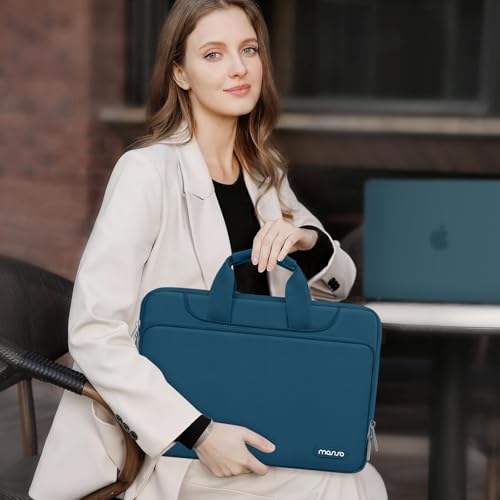
- 🛡️ 360° reinforced interior edges — foam padding layer and fluffy fleece lining absorb bumps, shocks, and scratches from all sides
- 🎨 13+ color options — widest color selection in this roundup including Teal Green, Navy Blue, Purple, and more
- 👜 6-in-1 carry modes — shoulder bag, briefcase, sleeve, handle bag, messenger, or crossbody — all from one bag
- 📐 Internal dimensions — 15.94″ x 1.39″ x 11.22″; fits MacBook Pro 16″ M1 through M5 2019–2026
- 🗂️ Large front pocket — 15.55″ x 8.66″ with inner small pocket for organized accessory storage
- 🎒 Luggage strap on back — slides over rolling luggage tube for hands-free airport carry
- 📏 Adjustable shoulder strap — 29.5″–52.3″ range with padded shoulder pad; handles tuck away when unused
- ♻️ 3 sustainability certifications — at least 50% recycled material, safer chemicals, ethical manufacturing
- 💻 MacBook Pro 16″ M1–M5 compatible — all models 2019–2026 confirmed; also fits MacBook Air 15″
Editor’s Note
The MacBook Pro 16″ is a large, heavy machine — at 2.15 kg it’s one of the most substantial laptops Apple makes. Most shoulder bags in this size category sacrifice either protection or portability to keep costs down. The MOSISO 360 Protective finds the balance between them at a price that makes everything else on this page look expensive: foam padding with fleece lining on all six sides, reinforced interior edges for drop protection, a large organized front pocket, a luggage strap for airport carry, and an adjustable shoulder strap — all for under $30. The 6-in-1 carry flexibility is the practical differentiator that budget bags rarely deliver: the removable shoulder strap and tuck-away handles mean the bag works as a shoulder messenger, a briefcase, or a sleeve inside a larger bag depending on the day. For MacBook Pro 16″ owners who want confident daily protection, color personality, and carry versatility without spending $60+, the MOSISO 360 is the most practical value pick in the 16″ category.
Pros
- 360° foam and fleece interior protection — all-side padding absorbs shocks and prevents scratches
- 6-in-1 carry flexibility — adapts to shoulder, briefcase, sleeve, crossbody, handle, or luggage strap carry
- 13+ color options — most extensive color range in this roundup; expresses personal style
- Large organized front pocket — spacious with inner sub-pocket; mouse, cables, charger all fit
- Luggage strap — slides over rolling luggage for hands-free airport carry
- Budget-friendly pricing — significant savings over premium bag alternatives with comparable daily protection
- MacBook Pro 16″ M1–M5 compatible — full 2019–2026 lineup covered
Cons
- Soft padding only — no rigid exterior like the Thule Gauntlet; flex under hard impact
- Slimmer profile limits bulky accessories — 1.39″ depth accommodates MacBook Pro but not thicker peripherals
- No AirTag strap — no dedicated key or tracker attachment point
Why We Liked It
The MOSISO 360’s value story for MacBook Pro 16″ owners is about covering all practical protection and carry scenarios without demanding a premium price. The fleece interior lining is the detail that budget bag buyers most appreciate in practice — hard fabric lining scratches the MacBook Pro’s aluminum body every time it’s inserted and removed. Fleece eliminates that entirely. Combined with the foam padding layer that absorbs shock from all sides, the MacBook Pro 16″ is genuinely protected against the everyday drops and knocks that commuters encounter.
The luggage strap is the travel feature that distinguishes the MOSISO from basic shoulder bags at this price point. Holding both a rolling suitcase handle and a laptop bag strap on a busy airport concourse is one of the most common travel frustrations — the MOSISO’s back luggage strap slides over rolling luggage handles and stays in place, eliminating that problem without requiring a separate travel sleeve purchase.
The color selection is a real differentiator for the MacBook Pro 16″ audience. Professional MacBook Pro 16″ owners increasingly want accessories that reflect personal style rather than defaulting to generic black — the 13+ color options including Teal Green, Navy Blue, and Purple give the MOSISO a personality that premium bags at twice the price rarely offer.
MOSISO 360 Protective Shoulder Bag for MacBook Pro 16″
Best For: MacBook Pro 16″ owners who want 360° foam protection, organized storage, and versatile carry modes at the most accessible price in this roundup — especially suited for students, hybrid workers, and frequent travelers who want color options.
Summary
The MOSISO 360 is the smart budget pick for MacBook Pro 16″ — delivering 360° foam and fleece interior protection, a large organized front pocket, 6-in-1 carry flexibility, a luggage strap, and 13+ color options at under $30. It won’t out-protect a Thule or out-organize a tomtoc, but for MacBook Pro 16″ owners who need confident daily protection and carry flexibility without a premium price, nothing in this roundup matches its value.
tomtoc Essence-A35 — Best Slim Sleeve for MacBook Pro 16″
Quick Facts
- 🛡️ CornerArmor Technology — tomtoc’s patented reinforced shock-absorbing corners; military-grade drop test certified
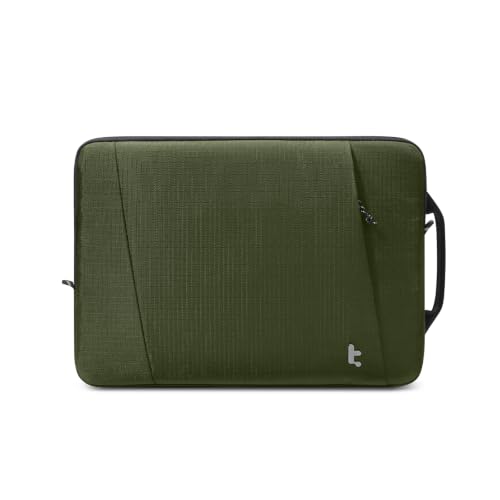
- 📐 Precision MacBook Pro fit — internal dimensions 14.01″ x 9.77″ x 0.66″; tailored tight fit eliminates internal movement
- 🧴 Water-resistant outer fabric — tear-resistant eco-friendly material with PFAS-free water repellent treatment
- 🎒 Expanded front pocket — 10.83″ x 10.83″ fits charger, cables, and small accessories; more space than most slim sleeves
- ✏️ Flat-edge minimalist silhouette — clean lines designed for professional environments; slides into backpacks without bulk
- ♻️ Recycled materials throughout — built from durable recycled fabrics; 3 sustainability certifications
- 🔒 YKK zippers — premium Japanese zipper hardware on main and front pocket openings
- 📅 2-year tomtoc warranty — longer coverage than the Defender-A42 shoulder bag
- 💻 MacBook Pro 16″ M1–M5 compatible — all models 2019–2026; also available in 14″ size
Editor’s Note
The MacBook Pro 16″ is a creative professional’s primary tool — and most of its owners already carry a quality backpack or tote. What they need from a sleeve isn’t a standalone carry solution — it’s the best possible internal protection layer that disappears inside whatever bag they’re already using. The tomtoc Essence-A35 is built for exactly that. CornerArmor Technology — tomtoc’s patented reinforced corner system — addresses the specific vulnerability that slim sleeves typically ignore: corner impacts when the laptop shifts inside a backpack during movement. Paired with soft padding on both faces and a precision-fit internal profile that eliminates the slack that causes sliding, the Essence-A35 keeps the MacBook Pro 16″ stationary and protected through a full day’s worth of transit. The flat-edge minimalist silhouette is the design decision that makes it genuinely different from the tomtoc Defender-A42 shoulder bag: where the Defender-A42 is an organizer and carrier, the Essence-A35 is a pure protection layer — refined, professional, and designed specifically for designers, developers, and creatives who want their MacBook Pro to arrive in pristine condition without any added visual noise.
Pros
- CornerArmor Technology — patented corner protection; the weakest point of any sleeve addressed directly
- Precision MacBook Pro fit — tailored internal dimensions eliminate movement inside the sleeve
- Water-resistant PFAS-free fabric — handles spills and rain; eco-friendly treatment
- Expanded front pocket — unusually large for a slim sleeve; fits charger and cables comfortably
- Flat minimalist profile — slides into backpacks cleanly without adding bulk or awkward shape
- YKK zippers — premium hardware on all openings
- 2-year warranty — above average for the slim sleeve category
- MacBook Pro 16″ M1–M5 compatible — full 2019–2026 lineup
Cons
- Sleeve only — no carry handle or shoulder strap; must be carried inside another bag
- No clamshell design — MacBook Pro must be removed to use; unlike the Thule Gauntlet
- Soft exterior — not rigid protection; less impact resistance than the Thule Gauntlet’s polyurethane shell
- Front pocket square shape — 10.83″ x 10.83″ is deep but narrow; wide items don’t fit easily
Why We Liked It
The Essence-A35’s engineering priority is clear from the first detail: a tailored internal fit that holds the MacBook Pro 16″ without play. Loose sleeves let the laptop slide against the interior when a bag is set down hard or jostled in transit — every slide is a potential scratch on the aluminum body, and accumulated micro-abrasions are what turn a pristine MacBook Pro dull over two years of daily carry. The precise 14.01″ x 9.77″ internal profile holds the 16″ Pro snugly, and the CornerArmor corners absorb the impact energy that the MacBook Pro’s own corners would otherwise receive when the bag is bumped.
The front pocket size is a genuine surprise for a sleeve this slim. At 10.83″ x 10.83″ it accommodates the MacBook Pro 16″ M4/M5 charger, a USB-C cable, and a small hub — meaning the Essence-A35 replaces the need for a separate accessory pouch for professionals who travel light. That’s a real daily carry simplification that the minimalist design philosophy promises and the dimensions actually deliver.
The aesthetic signals matter to the target audience. tomtoc specifically positions the Essence-A35 for designers, developers, architects, and content creators — professions where the tools you carry are visible to clients and colleagues. The flat-edge silhouette and refined texture look deliberate and premium rather than utilitarian, in a way that the foam-padded budget alternatives don’t.

tomtoc Essence-A35 Slim Sleeve for MacBook Pro 16″
Best For: MacBook Pro 16″ owners who carry their laptop inside a quality backpack or tote and want the most protective, minimalist-looking sleeve available — built for creative professionals who value precision fit and premium aesthetics alongside protection.
Summary
The tomtoc Essence-A35 is the precision slim sleeve for MacBook Pro 16″ — a tailored-fit CornerArmor-protected, water-resistant, minimalist sleeve with an expanded front pocket, YKK zippers, and a flat-edge profile designed to disappear inside any professional bag. It’s purpose-built for MacBook Pro 16″ owners who want their device protected during transit without adding bulk or visual noise to their carry setup. The honest trade-offs — a newer review base and no clamshell usability — define who it’s for. For designers, developers, and creatives who want the cleanest, most precisely fitted sleeve available for the MacBook Pro 16″, the Essence-A35 is the one to reach for.
Incase Edge Hardshell — Hardshell Case for MacBook Pro 14″ & 16″

Quick Facts
- 🏗️ 100% Makrolon polycarbonate — Bayer-engineered lightweight PC trusted across aerospace and medical industries; fully recyclable end-of-life
- 🎨 Dual-texture design — matte raised edges with inset center accent panel; complements MacBook Pro’s design rather than hiding it
- 🛡️ 360° wraparound protection — raised edge bumpers on all sides with full corner and surface scratch defense
- 💨 Intelligent air-flow ventilation — precision cutouts maintain MacBook Pro’s thermal management under sustained loads
- 🦶 Rubberized feet — prevents sliding on desks and nearly any surface; adds stability during use
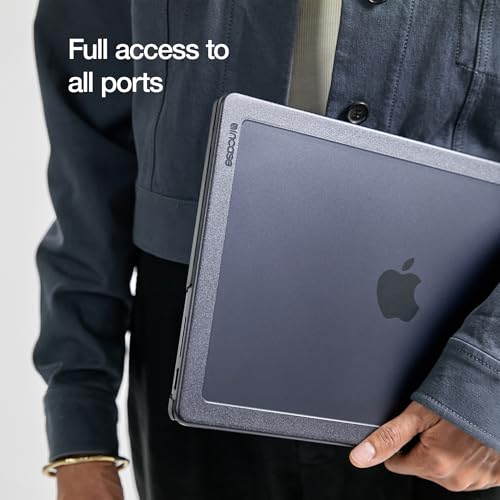
- 🔌 Full port and button access — every Thunderbolt port, MagSafe, headphone jack, and Touch ID fully accessible
- 🔒 Micro-clip snap attachment — installs and removes cleanly without tools; laptop closes fully with case installed
- ♻️ Fully recyclable material — Makrolon chosen for low CO₂ emissions and end-of-life recyclability
- 🏆 Incase — MacBook hardshell originators since 2009 — the brand that created the first MacBook hardshell case
- 💻 Also available for MacBook Pro 16″ — same Edge Hardshell construction in the correct size for the larger model
Editor’s Note
Incase created the first MacBook hardshell case in 2009 — and the Edge Hardshell is the refined evolution of that original design, built specifically around the MacBook Pro 14″‘s engineering requirements. The choice of Makrolon polycarbonate — a Bayer-engineered material used across aerospace, automotive, and medical industries — is the material story that separates this from generic PC hardshells. Makrolon offers high impact resistance at lower weight than standard polycarbonate, with fully recyclable end-of-life credentials that most hardshell case brands don’t address. The dual-texture design is the visual differentiator: matte raised edges with a slightly inset center panel create a purposeful aesthetic that complements the MacBook Pro’s own design language rather than hiding it under opaque plastic. Reviewers who have used Incase hardshells across multiple MacBook generations consistently note the cases surviving 2+ years of daily use without cracking or chipping — a durability track record that cheaper hardshells rarely match. For MacBook Pro 14″ owners who want the MacBook’s aluminum body permanently protected from desk scratches, bag abrasion, and surface contact without adding meaningful bulk or changing how the machine looks, the Edge Hardshell is the hardshell choice that respects both the machine and its owner.
Pros
- Makrolon polycarbonate — premium Bayer-engineered material; stronger and lighter than standard PC hardshells
- Dual-texture design — matte edges and inset center complement MacBook Pro’s design identity
- Full ventilation access — precision-cut airflow openings maintain MacBook Pro’s thermal performance under load
- Rubberized feet — prevents desk and surface sliding; adds working stability
- Snap-on micro-clips — installs and removes cleanly without tools or force
- Full port and button access — every port, button, and indicator light accessible with case on
- Incase’s 15+ year MacBook hardshell heritage — proven track record since the original 2009 design
- Fully recyclable Makrolon — meaningful environmental credentials for premium Mac buyers
Cons
- Surface protection, not drop armor — hardshell defends against scratches and abrasion; not engineered for serious drop impact
- Premium pricing for a hardshell — significantly more expensive than generic polycarbonate alternatives
- No carry functionality — case only; no handle, strap, or storage of any kind
Why We Liked It
The Incase Edge Hardshell addresses the protection problem that sleeve and bag buyers often overlook entirely: what happens to the MacBook Pro’s aluminum finish between carry sessions. Every time the MacBook Pro slides in and out of a backpack, sits on a desk without protection, or makes surface contact during use, micro-scratches accumulate. Over a 4-6 year MacBook Pro ownership cycle, those accumulated scratches are what turn a pristine Space Black finish into a visibly worn machine. The hardshell eliminates all of that — the Makrolon shell takes every surface contact so the aluminum never has to.
The ventilation design is where Incase’s 15+ years of MacBook-specific engineering shows. Generic hardshells often partially block the MacBook Pro’s bottom ventilation slots — creating thermal stress under sustained loads like video exports, compilation, or graphics rendering. The Edge Hardshell’s precision cutouts maintain full airflow geometry, which means the protection story is genuinely complete: the MacBook Pro’s body is defended without compromising the M-series chip’s performance envelope.
The dual-texture aesthetic is a considered design decision rather than a stylistic flourish. The matte raised edges provide grip and frame the case visually, while the inset center keeps the MacBook Pro’s own industrial design visible through the case profile. For professionals who carry their MacBook Pro to client meetings and creative sessions where the machine itself is visible, that design continuity matters — the Edge Hardshell reads as an intentional accessory choice rather than a utilitarian afterthought.
Incase Edge Hardshell — Hardshell Case for MacBook Pro 14″ & 16″
Best For: MacBook Pro 14″ & 16″ owners who keep their laptop on desks and carry it inside bags daily — the hardshell that permanently protects the MacBook Pro’s aluminum finish without changing how the machine looks, feels, or performs, for the full ownership cycle.
Summary
The Incase Edge Hardshell is the premium hardshell for MacBook Pro 14″ — 100% Makrolon polycarbonate with dual-texture design, intelligent ventilation cutouts, rubberized feet, and micro-clip snap-on installation, from the brand that invented the MacBook hardshell in 2009. Where sleeves and bags protect the MacBook Pro in transit, the Edge Hardshell protects it everywhere else — on desks, in meetings, during use — keeping the aluminum finish pristine through years of daily contact that soft cases can’t address. The honest trade-off is clear: this is surface and scratch defense, not drop armor. For MacBook Pro 14″ & 16″ owners who want their machine to look as good in year four as it did on day one, the Edge Hardshell is the case that makes that possible.
tomtoc 360° Protective Sleeve for MacBook Pro 14″ & 16″

Quick Facts
- 🏆 Wirecutter “Best Laptop Sleeves and MacBook Cases” — recognized by NYT’s independent product testing publication
- 🏅 NBC Select Giftable Tech Award 2023 — dual editorial recognition across independent publications
- 🛡️ CornerArmor Technology — tomtoc’s patented reinforced corner shock absorption; military-grade drop test certified
- 💧 Spill-resistant recycled fabric — PFAS-free water repellent treatment on eco-friendly outer material
- 🔒 YKK zippers — premium Japanese hardware on main and front pocket openings; reinforced stress points
- 🗂️ Front accessory pocket — 10.04″ x 8.07″; fits MacBook Pro charger, cable, and small hub
- 🏷️ AirTag/key strap — dedicated attachment point inside for location tracking and key carry
- 📐 Internal dimensions — 12.31″ x 8.71″ x 0.61″; precision-fit for MacBook Pro 14″ 2021–2026
- ♻️ 3 sustainability certifications — recycled fabrics, PFAS-free treatments, eco-focused manufacturing
- 📅 12-month tomtoc warranty — backed by responsive customer support
Editor’s Note
When Wirecutter — The New York Times’ independent product testing publication — names something the best in its category, and NBC Select separately awards it a Giftable Tech distinction in the same year, the editorial case is made from two independent directions. The tomtoc 360° Protective Sleeve earned both recognitions for the same core reason: it does everything a MacBook Pro 14″ sleeve needs to do, and executes each element with a quality standard that competing sleeves at similar price points consistently fall short of. CornerArmor Technology — tomtoc’s patented reinforced corner system — addresses the specific vulnerability that flat padding alone can’t solve: the corner impacts that happen when a laptop-loaded bag is set down on a hard floor, caught on a stair edge, or jostled in public transit. Combined with high-density soft padding on both faces, PFAS-free spill-resistant recycled fabric, and YKK zippers on every opening, the protection story covers daily reality rather than just marketing scenarios. The AirTag strap is the practical daily-carry detail that most sleeve buyers discover they needed only after losing a bag in a busy workspace — it’s the kind of considered addition that separates purposeful product design from feature lists.
Pros
- Wirecutter Best + NBC Select Award — dual independent editorial recognition across different methodologies
- CornerArmor Technology — patented corner protection addresses the specific weakness flat padding ignores
- Spill-resistant PFAS-free recycled fabric — handles real-world bag environments while maintaining eco credentials
- YKK zippers on all openings — premium hardware that outlasts generic zippers under years of daily cycling
- AirTag/key strap — dedicated inside attachment for location tracking and key management
- Front pocket — fits MacBook Pro charger and cable; go-with-just-the-sleeve convenience
- Precision MacBook Pro fit — 2021–2026 M1–M5 all confirmed; minimal internal play
- Military-grade drop test certified — not just a marketing claim; tested to MIL-STD standard
Cons
- 12-month warranty — shorter than Thule’s lifetime coverage for sleeve buyers who want longer assurance
- No clamshell design — MacBook Pro must be removed to use; unlike the Thule Gauntlet
- No carry handle or strap — sleeve only; requires another bag for transport
Why We Liked It
The tomtoc 360° sleeve’s dominance in the MacBook Pro 14″ sleeve category comes down to a quality execution gap that becomes obvious when you handle competing products side by side. The YKK zippers don’t snag. The CornerArmor corners are visibly reinforced rather than just slightly thicker than the surrounding material. The spill-resistant fabric repels liquid rather than absorbing it. The front pocket is deep enough to actually fit a MacBook Pro charger rather than just a few cables. Each of these details sounds incremental in isolation — together they add up to a sleeve that works correctly every single day without frustration, which is exactly what Wirecutter’s methodology measures and why this sleeve earned that recognition.
The AirTag strap deserves specific credit for solving a problem that sleeve buyers rarely anticipate before it happens. A MacBook Pro sleeve left in a conference room, airport lounge, co-working space, or even a familiar office becomes genuinely difficult to locate without a tracker. The dedicated internal strap accommodates an AirTag without forcing it into the accessory pocket or creating a bump in the sleeve profile — it’s built into the design from the start, which is the right way to implement it.
The front pocket dimensions are the practical differentiator over competing sleeves at this price tier. At 10.04″ x 8.07″, it fits a MacBook Pro M4/M5 charger — the full brick, not just the cable — alongside a USB-C cable and a small hub. For MacBook Pro 14″ owners who want to carry the essentials without a separate accessory pouch, that single pocket converts the sleeve from a pure protection layer into a complete light-travel carry solution.

tomtoc 360° Protective Sleeve for MacBook Pro 14″ & 16″
Best For: MacBook Pro 14″ & 16″ owners who carry their laptop inside a backpack or bag daily and want the most independently validated, quality-executed sleeve available — backed by Wirecutter’s recommendation and refined details like CornerArmor corners, YKK zippers, and an AirTag strap that most competing sleeves skip.
Summary
The tomtoc 360° Protective Sleeve is the Wirecutter-validated sleeve for MacBook Pro 14″ — combining CornerArmor military-grade corner protection, PFAS-free spill-resistant recycled fabric, YKK zippers, a dedicated AirTag strap, and a front pocket large enough for the MacBook Pro charger in a precision-fit sleeve that covers every MacBook Pro 14″ generation from M1 through M5. Two independent editorial bodies recognized it as the best in class, and the construction details confirm exactly why — every component is executed at a quality standard that competing sleeves consistently fall short of. For MacBook Pro 14″ & 16″ owners who want to buy once and carry confidently, the tomtoc 360° is the sleeve the evidence points to.
MOSISO Vertical Sleeve — Budget Sleeve for MacBook Pro 14″ & 16″
Quick Facts
- 🏆 #1 Best Seller in Laptop Sleeves — Regularly Amazon’s highest-volume validated choice in the laptop sleeve category
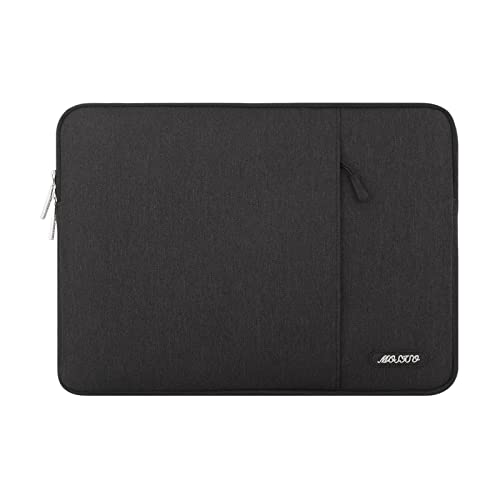
- 🧸 Foam + fleece interior — polyester foam padding layer with fluffy fleece lining protects against bumps and scratches
- 📐 Internal dimensions — 14.17″ x 0.79″ x 10.14″; fits MacBook Pro 14″ and most 14″ Windows laptops
- 🗂️ Vertical front pocket — 10″ x 9.84″; generous space for mouse, earphones, pens, and notepads
- 📏 Top-loading single zipper — smooth-gliding access for quick laptop retrieval
- 🪶 0.79″ slim profile — disappears inside briefcases, backpacks, or totes without adding meaningful bulk
- ♻️ 3 sustainability certifications — recycled materials, safer chemicals, ethical manufacturing standards
- 🎨 30+ color options — widest color range of any sleeve in this roundup
- 💻 Compatible with MacBook Pro 14″ & 16″
Editor’s Note
MOSISO regularly enters Amazon’s #1 Best Seller in Laptop Sleeves and it is not a position earned by marketing spend — it’s the result of a purchase volume that reflects genuine, repeated satisfaction across an enormous buyer base. The MOSISO Vertical Sleeve holds that ranking because it solves the everyday sleeve problem with the exact right amount of product. Foam padding absorbs everyday shocks. Fleece lining prevents the aluminum-scratching that hard interior fabrics cause. The generous front pocket handles the accessories most MacBook Pro owners carry without needing a separate pouch. The slim 0.79″ profile fits inside any bag without fighting for space. And 30+ color options let buyers choose a sleeve that reflects who they are rather than defaulting to generic black. It won’t compete with the tomtoc’s CornerArmor precision or the Thule’s rigid shell — that’s not what it’s designed to do. The MOSISO is the honest everyday protection layer for MacBook Pro 14″ owners who already carry a quality bag and want a reliable sleeve that does its job quietly, affordably, and in whatever color makes them happy.
Pros
- Foam and fleece interior — foam absorbs shocks; fleece prevents the aluminum scratching that hard liners cause
- 30+ color options — the most extensive color selection of any sleeve in this roundup
- Slim 0.79″ profile — fits inside any bag without adding bulk or awkward shape
- Generous front pocket — 10″ x 9.84″ handles mouse, accessories, and notepads together
- Universal 14″ laptop fit — works with MacBook Pro 14″ and all major Windows 14″ laptops
- 3 sustainability certifications — recycled materials and ethical manufacturing
- Most accessible price in the sleeve category — maximum value for everyday protection needs
Cons
- No CornerArmor or rigid protection — foam padding only; less impact defense than premium alternatives at corners
- Generic zipper — not YKK; long-term durability under years of daily cycling less verified
- Vertical orientation — users who prefer horizontal sleeve access will need an alternative
Why We Liked It
The MOSISO’s daily value argument is built around what most MacBook Pro 14″ sleeve buyers actually experience in practice. The fleece interior is the detail that matters most for day-to-day use. Hard fabric sleeve liners — common across budget alternatives — create friction against the MacBook Pro’s aluminum body every time it’s inserted and removed. Over weeks of daily use, that friction leaves fine scratches across the bottom panel that accumulate into a visibly scuffed surface. The MOSISO’s fluffy fleece lining eliminates that friction entirely — the MacBook Pro slides in and out against a material that can’t scratch aluminum regardless of how many times it happens.
The front pocket proportions are genuinely useful rather than just present. At 10″ x 9.84″, it’s large enough to hold a small mouse alongside a charging cable and earphones — a combination that most budget sleeve pockets can’t manage simultaneously. For students and hybrid workers who need to carry the basics without a dedicated accessory pouch, that front pocket converts the MOSISO from a pure sleeve into a light daily carry solution.
The 30+ color selection is a legitimate differentiator that deserves more than a bullet point. MacBook Pro 14″ buyers increasingly treat their laptop accessories as an extension of personal style — particularly students and creative professionals who carry their setup visibly in co-working spaces, libraries, and coffee shops. Most sleeves at this price point offer black, grey, and navy. The MOSISO offers those plus Teal Green, Dusty Rose, Purple, and more than two dozen additional options, which is why buyers return to it across multiple MacBook generations rather than upgrading to premium alternatives.

MOSISO Vertical Sleeve — Best Budget Sleeve for MacBook Pro 14″
Best For: MacBook Pro 14″ & 16 owners who already carry a quality bag and want a reliable everyday sleeve that protects against scratches and light impacts, carries accessories in a generous front pocket, and comes in the color that fits their style — without spending more than the job requires.
Summary
The MOSISO Vertical Sleeve earns its place as Amazon’s #1 Best Seller in Laptop Sleeves through a combination that budget sleeve buyers consistently find hard to beat: foam and fleece interior protection that prevents scratching, a front pocket large enough for real daily accessories, a 0.79″ slim profile that fits any bag, and 30+ color options at the lowest price in this roundup. It’s not trying to compete with CornerArmor corners or YKK zippers — it’s trying to give MacBook Pro 14″ owners a sleeve that works every day, comes in their color, and never costs more than it should. For MacBook Pro 14″ & 16″ owners who want honest everyday protection without premium spend, the MOSISO does exactly what it promises — and does it in the color that actually makes you want to carry it.
Swissdigital SD1670 — Travel Backpack for MacBook Pro 14″ & 16″

Quick Facts
- 💻 Dedicated 16″ padded laptop compartment — separate padded section holds MacBook Pro 16″ snugly without movement
- 🔌 Patented integrated USB charging port — built-in cable design lets you charge devices on the move; power bank not included but no special bank required
- 🔒 RFID protection pocket — blocks unauthorized scanning of credit cards, passports, and driver’s licenses
- 🌙 Highly reflective accents — exceptional reflectivity for visibility and safety during nighttime commutes
- 💨 Breathable mesh back panel — air ventilation padding provides comfortable support on long carries
- 🧳 Add-A-Bag trolley system — slides over rolling luggage handle; keeps hands free at airports and stations
- 🗂️ Multi-compartment organization — separate laptop zone, main organizer compartment, and front pocket with pen slots
- 🎒 Adjustable padded shoulder straps — breathable and pressure-relieving; fits men and women
- 💻 Also available in 17″ version — same SD1670 design in a larger size for 17″ laptop users
Editor’s Note
MacBook Pro 16″ owners who travel regularly face a carry problem that shoulder bags and sleeves don’t solve: carrying a heavy 16″ Pro alongside everything else needed for a full day or multi-day trip without shoulder fatigue. The Swissdigital SD1670 is built specifically for that scenario. The dedicated padded laptop compartment holds the MacBook Pro 16″ securely — real-world users confirm it sits snugly without wobbling even during fast-paced transit through busy airports and streets — while the remaining compartments handle the full accessory and travel load that the 16″ Pro audience typically carries. The patented integrated USB charging port is the practical travel differentiator that most backpacks don’t offer: a dedicated port with a built-in cable routing system that lets you keep a phone or tablet charging from a power bank inside the bag while the bag stays zipped and on your back. No rummaging, no exposed cables, no stopping to find your charger. The RFID protection pocket addresses a real travel security concern — identity theft via contactless card scanning in crowded airports and transit hubs — without requiring a separate RFID wallet. The Add-A-Bag trolley strap completes the travel story: when the MacBook Pro 16″ plus accessories plus travel essentials add up to a heavy load, sliding the backpack over a rolling suitcase handle removes that weight entirely during long terminal walks.
Pros
- Patented integrated USB charging port — purpose-built cable routing for on-the-go device charging without exposing cables
- RFID protection pocket — guards credit cards, passports, and IDs from contactless scanning in crowded environments
- Dedicated snug laptop compartment — real-world confirmed to hold 16″ MacBook Pro without movement or wobble
- Add-A-Bag trolley system — eliminates shoulder load during airport and station transit
- Highly reflective accents — meaningful safety feature for commuters and cyclists
- Breathable mesh back panel — air ventilation reduces back perspiration on longer carries
- Multi-compartment organization — pen slots, separate organizer, and front pocket keep everything accessible
- Sleek profile — matte finish doesn’t read oversized despite 16″ capacity
Cons
- Better for travel than daily commute — real-world buyers note it may feel large for regular short-distance daily carry
- No chest or waist strap — large 16″ backpack without front stabilization straps can shift during active movement
- Black only in primary listing — color options more limited than MOSISO sleeve alternatives
Why We Liked It
The Swissdigital SD1670’s daily carry experience is defined by the integration story — three features that most backpacks treat as add-ons are here designed as core components. The USB charging port isn’t a generic clip-on adapter; it’s a patented system with an integrated cable routing path specifically designed so the bag stays closed and organized while a device charges. The RFID pocket isn’t a loose sleeve inside the main compartment; it’s a dedicated pocket with its own access point that keeps protected items separate from the rest of the bag contents. The Add-A-Bag system isn’t an afterthought strap; it’s a purpose-designed trolley connector that balances the bag stably on rolling luggage handles without tipping or sliding.
The laptop compartment’s snug fit is the detail that MacBook Pro 16″ owners most appreciate in practice. Generic backpack laptop sleeves are sized for “up to 16 inches” — which in practice means the 16″ Pro slides around inside with meaningful play, especially at the corners. Real-world users specifically highlight that the SD1670’s compartment holds the 16″ Pro without any wobble even when moving quickly — the kind of secure fit that reduces the micro-impacts that accumulate over months of daily carry and eventually manifest as subtle dents and dings on the MacBook Pro’s aluminum corners.
The reflective accents are a feature that most buyers discover after purchase rather than before — cyclists, walkers, and commuters who use the bag after dark find the visibility improvement genuinely meaningful, not just a marketing detail. For MacBook Pro 16″ owners who commute year-round in northern cities where post-work darkness is a daily reality for months at a time, that’s a safety feature that earns its place.

Swissdigital SD1670 — Travel Backpack for MacBook Pro 14″ & 16″
Best For: MacBook Pro 14″ & 16″ owners who travel regularly and want a backpack that carries the full load — laptop, accessories, and travel essentials — with integrated USB charging, RFID protection, and a trolley system that removes the weight entirely when rolling luggage is available.
Summary
The Swissdigital SD1670 is the travel-ready backpack for MacBook Pro 16″ — combining a dedicated padded laptop compartment that holds the 16″ Pro snugly, a patented integrated USB charging port with built-in cable routing, RFID protection pocket, breathable mesh back panel, reflective accents, and Add-A-Bag trolley system in a sleek matte profile that doesn’t read oversized despite its 16″ capacity. It’s designed for the MacBook Pro 16″ owner who travels regularly and needs one bag that handles protection, security, connectivity, and carry versatility without compromise. The honest trade-off — it performs best in travel scenarios rather than minimal daily commutes — defines exactly who it’s built for. Also available in a 17″ version for the largest laptop configurations. For MacBook Pro 16″ owners who need a backpack that’s as well-equipped for the journey as the machine inside it, the SD1670 delivers.
Victorinox Altmont Professional Essentials — Premium Travel Backpack for MacBook Pro

Quick Facts
- 🇨🇭 Swiss-engineered since 1897 — Victorinox Alpine rucksack engineering heritage applied to professional carry
- 🔒 Travel Sentry Approved combination lock — lockable zippers secure the laptop and tablet compartment against opportunistic access
- 🧰 Removable tri-fold essentials organizer — detaches from the bag; hangs near a desk or work space; folds compactly for use without the bag
- 🏗️ Ballistic-weave polyester with abrasion-resistant base — heavy-duty fabric construction at the highest-wear contact points
- 💺 Compression-molded back panel — structured ergonomic support for all-day carry comfort
- 🧳 Trolley pass-through strap — slides over rolling luggage handle; frees hands in airports and stations
- 📐 24 liters / 11 compartments — book-opening main compartment, top gadget pocket, flip-down front pocket, two vertical front pockets, two multi-purpose side pockets
- ⚖️ 2.4 lbs — lightweight for the level of organization and construction quality
- 🛡️ Lifetime guarantee + 1+10 year warranty — Victorinox’s most comprehensive coverage in this roundup
- 💻 Fits MacBook Pro 15″ and 16″ — padded laptop and separate tablet compartment; 24″ size accommodates the full 16″ Pro setup
Editor’s Note
Victorinox has been engineering precision tools since 1897 — and the Altmont Professional Essentials is the direct application of that Swiss engineering heritage to a professional laptop backpack. Where the Swissdigital SD1670 is the travel utility workhorse and the tomtoc Defender-A42 is the validated everyday commuter bag, the Victorinox Altmont Professional occupies a distinct category: the premium executive backpack designed for professionals who carry their MacBook Pro to client meetings, international travel, and business environments where the bag itself signals the same attention to quality as the machine inside it. The Travel Sentry Approved combination lock is the security feature that distinguishes the Altmont from every other backpack in this roundup — it’s not a zipper lock or a generic padlock attachment; it’s an integrated, TSA-recognized combination system built directly onto the lockable laptop compartment zippers. For professionals who transit through airport security regularly or work in co-working spaces where bag theft is a real concern, that’s the feature that makes the Victorinox irreplaceable. The removable tri-fold essentials organizer is the organizational innovation that no competing bag in this roundup offers: a charger, cable, USB hub, and pen organizer that detaches from the bag entirely and hangs near your desk or hotel workspace, then folds into a compact tri-fold and returns to the bag when you move. It solves the cable-tangle and desk-clutter problem that MacBook Pro owners with a full travel accessory kit deal with every day.
Pros
- Travel Sentry Approved combination lock — integrated TSA-recognized zipper lock on laptop compartment; the only backpack in this roundup with built-in laptop security
- Removable tri-fold essentials organizer — detaches and hangs at desk; folds away cleanly; solves cable organization at every workstation
- Ballistic-weave polyester base — abrasion-resistant heavy-duty construction at highest-contact surfaces
- Compression-molded back panel — structured ergonomic support; doesn’t collapse under load
- 11 compartments — book-opening main space, separate laptop and tablet zones, flip-down front pocket, vertical exterior pockets, side pockets
- Stands upright independently — structured construction holds shape when placed on floors or surfaces
- 1+10 year warranty — among the strongest coverage of any product in this roundup
- 2.4 lbs — light for the build quality and organizational depth
- Victorinox 125+ year heritage — the same brand precision that defines the Swiss Army Knife
Cons
- Premium price point — the most expensive bag in this roundup; reflects materials and engineering rather than marketing
- No USB charging port — unlike the Swissdigital SD1670, no integrated charging passthrough
- Limited color options — professional black only; no color personality
Why We Liked It
The Victorinox Altmont Professional’s engineering story starts with the same principle that defined the original Swiss Army Knife: every component should serve a purpose, and no component should compromise another. The combination lock doesn’t add bulk — it integrates into the zipper pull system. The removable organizer doesn’t disrupt the main compartment — it hangs from a dedicated attachment point that returns cleanly when the organizer is removed. The compression-molded back panel doesn’t stiffen the bag uncomfortably — it maintains structure under load while conforming to the wearer’s back geometry.
The removable tri-fold organizer is the feature MacBook Pro 16″ professionals will use every single day in a way that sounds mundane until they experience it. The typical professional’s MacBook Pro accessory kit includes a 140W charger, a USB-C cable, a hub, AirPods, a portable battery, and a selection of cables and adapters. In a standard bag, all of that lives in a front pocket that turns into a tangle every time it’s opened. The Victorinox organizer gives each item a dedicated slot, sleeve, or loop — and then the entire organizer lifts out as one piece and hangs from a hotel room hook, office desk partition, or co-working space monitor mount. When leaving, the organizer is fully packed before it goes back in the bag — no hunting for cables, no untangling.
The ballistic polyester base addresses the specific wear pattern that professional bags suffer before the rest of the bag shows any deterioration. The bottom corners and base contact surface — where the bag is set down hundreds of times a year on airport floors, cafe chairs, and office surfaces — are where standard polyester bags begin to abrade and fray first. Ballistic-weave polyester at the base extends the Altmont’s visible lifespan significantly beyond comparable bags, which is why the 1+10 year warranty is a credible promise rather than a marketing claim.
A note on fit: one genuine limitation flagged by reviewers is that the shoulder strap adjustment design may not pull tight enough for smaller frames. MacBook Pro 16″ professionals planning to carry a fully loaded 24L bag on longer commutes should try the fit before committing if possible.

Victorinox Altmont Professional Essentials
Best For: MacBook Pro professionals who travel internationally and work across multiple office environments — the premium backpack built for those who need a Travel Sentry combination lock on their laptop compartment, a removable organizer that works at every workstation, and a bag that matches the professional standard of the machine it carries.
Summary
The Victorinox Altmont Professional Essentials is the premium executive backpack for MacBook Pro — combining ballistic-weave polyester construction, a Travel Sentry Approved integrated combination lock, a removable tri-fold essentials organizer, a compression-molded back panel, 11 compartments across 24 liters, and a trolley pass-through strap in a 2.4 lb package backed by a 1+10 year warranty and Victorinox’s 125+ years of Swiss engineering precision. It’s the most expensive bag in this roundup and it earns that position through engineering decisions — a built-in laptop lock and a detachable desk organizer — that no other bag here offers. The honest limitations — strap adjustment range and the 15″ listed laptop compatibility — are worth verifying for your specific setup. For MacBook Pro professionals who need a backpack that secures their machine, organizes their accessories at every workspace, and communicates the same standard of quality as the Swiss Army Knife it shares a heritage with, the Victorinox Altmont Professional is the bag that delivers on all three.
Summary
The MacBook Pro is a long-term investment — the average owner keeps theirs for 4-6 years, and with M-series chips delivering generational performance that ages well, many are extending that cycle further. The right protection choice reflects that: a Wirecutter-validated sleeve, a Thule lifetime-warranty hardshell, or a Victorinox bag engineered to last as long as the machine inside it are not one-time purchases — they’re accessories that pay back their cost across an ownership cycle measured in years, not months.
If you’re deciding between categories: start with a sleeve. A quality sleeve inside whatever bag you already carry is the single highest-return protection investment for any MacBook Pro. Add a hardshell if your MacBook Pro spends significant time on unprotected desks or surfaces. Upgrade to a dedicated bag when your carry load — accessories, charger, hub, cables — consistently overflows your current setup. The picks in this guide cover every step of that progression, for both the 14″ and the 16″, at every price point the MacBook Pro audience shops.
Buyer’s Guide — How to Choose the Right MacBook Pro Case, Sleeve, or Bag
Hardshell Case, Sleeve, or Bag — Which One Do You Actually Need?
Most MacBook Pro owners end up needing more than one type of protection — they just don’t realize it until they’ve owned the machine for a year. Understanding what each product type actually does makes the decision straightforward.
A hardshell case stays on the MacBook Pro during use. It protects the aluminum chassis from desk scratches, surface abrasion, and the micro-damage that accumulates invisibly through daily use and surfaces as a dull, worn finish after 12-18 months. The Incase Edge Hardshell is the only product in this roundup that addresses this scenario — every other pick is a transit protection solution. If you regularly use your MacBook Pro on unprotected surfaces, in co-working spaces, or anywhere the chassis makes daily contact with hard surfaces, a hardshell is the protection layer a sleeve or bag can’t replace.
A sleeve protects the MacBook Pro in transit — specifically from corner impacts, bag pressure, and the minor drops that happen when a loaded bag is set down hard. It lives inside another bag. The critical quality signals in a sleeve are corner protection (CornerArmor vs flat padding), zipper hardware (YKK vs generic), and internal fit precision (tailored vs universal). The tomtoc 360° and Thule Gauntlet represent opposite ends of the sleeve spectrum: the tomtoc is a soft padded sleeve with patented corner reinforcement, while the Thule is a rigid hard-shell sleeve that allows in-case use. Both protect well — the choice comes down to whether you need to open the laptop without removing it from the sleeve.
A shoulder bag or backpack is the complete carry solution — it carries the MacBook Pro and everything else. The choice between shoulder bag and backpack for the MacBook Pro 16″ specifically comes down to carry duration: for commutes under 30 minutes a shoulder bag is comfortable; for longer carries, airport transit, or heavy accessory loads, a backpack distributes weight across both shoulders and is significantly more sustainable over a full day.
MacBook Pro 14″ vs 16″ — Does Size Change the Protection Decision?
The size difference between the MacBook Pro 14″ and 16″ is more significant than the display diagonal suggests. The 16″ model weighs 2.15 kg (4.7 lbs) versus the 14″‘s 1.6 kg (3.5 lbs) — a difference that becomes immediately meaningful when combined with a charger, hub, and daily accessories in a shoulder bag. This weight gap is the primary reason the backpack picks in this roundup are positioned for the 16″ rather than the 14″: the Swissdigital SD1670 and Victorinox Altmont Professional distribute the 16″‘s load across both shoulders in a way no single-shoulder bag can match comfortably over a full day.
The size difference also means cases, sleeves, and bags are not interchangeable between models. A sleeve sized for the 14″ will not zip closed over a 16″, and a 16″ sleeve will leave the 14″ with enough internal play to shift and scratch during transit. Every pick in this guide is specifically sized and listed with verified model number compatibility — always cross-reference before purchasing.
How to Verify Your MacBook Pro Model Before Buying
Every MacBook Pro case, sleeve, and bag lists compatibility by model number — a four-digit number prefixed with the letter A, printed in small text on the bottom of the chassis. Open Apple menu → About This Mac, or look for the “Model” line in System Information. MacBook Pro 14″ models from 2021 to 2026 span A2442 through A3434. MacBook Pro 16″ models from 2021 to 2026 span A2485 through A3429.
The most important compatibility boundary is 2021 and later vs pre-2021. The 2021 redesign introduced a different chassis size, MagSafe charging, additional ports, and a notch display — making it physically incompatible with every case designed for the 2019-2020 Touch Bar models. If your MacBook Pro has a notch, MagSafe, and HDMI port, you have the current chassis that all picks in this guide are built for. If it has a Touch Bar and only USB-C ports on both sides, you need cases specifically listed for those older models — none of the picks in this roundup will fit correctly.
The Combination That Most MacBook Pro Owners End Up With
After working through the decision framework above, most MacBook Pro 14″ and 16″ owners converge on the same practical combination: a quality sleeve inside a quality bag. The sleeve handles corner protection and surface isolation inside the bag’s laptop compartment. The bag handles everything else — accessory organization, carry comfort, and the daily transit load.
For the MacBook Pro 14″, the tomtoc 360° Protective Sleeve inside the tomtoc Defender-A42 shoulder bag is the Wirecutter-validated combination that covers both layers. For the MacBook Pro 16″, the tomtoc Essence-A35 inside the Swissdigital SD1670 backpack covers the transit protection and carry scenarios that the 16″‘s size and weight require. Add the Incase Edge Hardshell if your MacBook Pro spends significant time on unprotected surfaces between carry sessions — and you have complete protection coverage for every scenario.
Tips for Getting the Most from Your MacBook Pro Protection
Don’t buy a precision-fit sleeve if you plan to use it with a hardshell case on. Precision-fit sleeves like the tomtoc Essence-A35 are dimensioned for the bare MacBook Pro chassis. A hardshell case adds 1-3mm of thickness that precision sleeves can’t accommodate without stressing the zipper. If you want both, use a universal-fit sleeve like the MOSISO Vertical, or choose a bag with a padded compartment rather than a precision sleeve.
Check ventilation cutouts before buying any hardshell. The MacBook Pro’s aluminum body actively dissipates heat — a hardshell that blocks the bottom vents forces the fans to compensate, which increases fan noise and thermal stress under sustained workloads. The Incase Edge Hardshell has precision-cut ventilation aligned with the MacBook Pro’s actual vent geometry. Generic hardshells often have approximate or decorative slots that don’t align correctly with your specific model’s vents.
Match your sleeve’s opening orientation to how you actually work. Horizontal sleeves (zip along the long edge) let you slide the MacBook Pro out sideways in one motion — faster for desk setups where you’re unpacking repeatedly. Vertical sleeves (top-loading zip) are slimmer and more secure in tight bags where horizontal sliding isn’t practical. The MOSISO Vertical is top-loading; the tomtoc 360° is horizontal. Neither is objectively better — it depends entirely on your daily carry workflow.
For the MacBook Pro 16″, consider the bag’s trolley strap before buying. When the MacBook Pro 16″ plus charger, hub, cables, and daily essentials adds up to 3-4 kg in a bag, the ability to slide that bag onto rolling luggage during airport transit is not a luxury — it’s a meaningful physical relief. Both the tomtoc Defender-A42 and the Victorinox Altmont Professional have trolley pass-through straps. The Swissdigital SD1670’s Add-A-Bag system goes further with a dedicated connector. If you travel by air even occasionally, this feature pays back its value within the first trip.
Don’t confuse water-resistant and waterproof. Every sleeve and bag in this roundup that claims water resistance uses a surface treatment that repels light rain and spills — it is not submersion protection, and it does not protect the laptop compartment from sustained exposure in heavy rain. For MacBook Pro owners who work outdoors or in genuinely wet environments, a waterproof bag with sealed zippers is a different product category entirely, and none of the picks in this roundup qualify. Water-resistant is honest protection against a spilled coffee or a brief walk in light drizzle — nothing more.
The lifetime warranty on the Thule Gauntlet changes its value calculation. At first glance, $60 for a sleeve is premium pricing compared to budget alternatives. Over a 5-6 year MacBook Pro ownership cycle, a sleeve that wears out and needs replacing at year two costs more than a Thule that Thule replaces under warranty if it fails. The warranty doesn’t cover accidental damage — but manufacturing defects and workmanship failures are exactly what premium sleeve buyers encounter as zippers fatigue and seams separate after years of daily use. When comparing sleeve prices, factor in the replacement cost scenario rather than just the purchase price.
Frequently Asked Questions
Does a hardshell case affect MacBook Pro’s thermal performance?
It can, if the case is poorly designed. The MacBook Pro’s aluminum chassis actively dissipates heat as part of its thermal management system — it’s not just a cosmetic shell. A hardshell case that covers the bottom ventilation slots or blocks the fan exhaust area forces the M-series chip to rely entirely on its internal fans, which can cause the fans to run louder and longer under sustained workloads like video exports or compilation. The Incase Edge Hardshell addresses this with precision-cut ventilation openings specifically designed to maintain the MacBook Pro’s airflow geometry. If you use a hardshell case, verify before purchasing that it has proper ventilation cutouts aligned with your specific MacBook Pro model’s vent locations — not generic slots, but model-specific cutouts. If you run the MacBook Pro under heavy sustained loads regularly, a quality sleeve inside a good bag is thermally safer than any hardshell.
Will a MacBook Pro 14″ case fit the 16″, or vice versa?
No — and this is one of the most common purchase mistakes in this category. The MacBook Pro 14″ and 16″ have different footprints, chassis depths, and hinge geometry. A 14″ hardshell case will not close correctly on a 16″ body, and a 16″ sleeve will leave the 14″ with enough internal play to slide and potentially scratch during transit. The same applies across generations: a case designed for the 2019-2020 MacBook Pro will not fit the 2021 and later redesign, which introduced a different chassis size with MagSafe, additional ports, and a notch display. Before purchasing any hardshell case, cross-reference the model number printed on the bottom of your MacBook Pro (format: A followed by 4 digits) against the case’s compatibility list. Every case in this guide includes verified model numbers for every compatible MacBook Pro generation.
Do I need both a hardshell case and a sleeve, or is one enough?
They solve different problems, which is why the most complete setup uses both. A hardshell case stays on the MacBook Pro during use and protects the aluminum body from desk scratches, surface abrasion, and everyday contact damage — the micro-damage that accumulates invisibly over months and surfaces as a dull, worn finish after a year or two. A sleeve protects the MacBook Pro during transit, specifically from corner impacts, bag pressure, and the minor drops that happen when a bag is set down hard. Neither replaces the other: a hardshell alone provides no cushioning during transport, and a sleeve alone leaves the MacBook Pro’s chassis unprotected during every work session. For most MacBook Pro 14″ and 16″ owners, the practical combination is a slim sleeve inside a quality bag for daily carry, with or without a hardshell for desk-session protection depending on how careful you are about surface contact.
Is the MacBook Pro 16″ too heavy for a shoulder bag?
The MacBook Pro 16″ weighs 2.15 kg (4.7 lbs) on its own — before adding a charger, hub, cables, and daily essentials. That total carry weight on a single shoulder strap over a full commute is something to consider carefully. For short-distance urban commutes of 15-30 minutes, a well-padded shoulder bag like the tomtoc Defender-A42 with its cushioned strap and PU leather handle manages the 16″ Pro comfortably. For longer carries — airport transit, multi-stop days, campus commutes — a backpack distributes the MacBook Pro 16″‘s weight across both shoulders, which is significantly more comfortable over time. The Swissdigital SD1670 and Victorinox Altmont Professional both address this with padded adjustable shoulder straps designed for the full professional carry load. The honest answer: if you’re carrying the 16″ Pro for more than 30 minutes at a stretch regularly, a backpack is the more comfortable long-term choice.
Can I fit a MacBook Pro in a sleeve while it has a hardshell case on?
Usually not — and it matters to check before buying both. Hardshell cases add between 1-3mm of thickness to the MacBook Pro’s profile depending on the case. Precision-fit sleeves like the tomtoc Essence-A35 and tomtoc 360° Protective Sleeve are designed with exact internal dimensions matched to the bare MacBook Pro chassis — adding a hardshell case underneath will create a fit that’s too tight to zip closed, or will stress the sleeve’s zipper over time. If you plan to use both a hardshell and a sleeve together, look for sleeves with slightly more generous internal dimensions, or choose a bag with a padded laptop compartment that doesn’t rely on precision fit. The MOSISO Vertical Sleeve’s universal 14″ dimensions accommodate minor size additions more comfortably than precision-fit alternatives.
How do I verify which MacBook Pro model I have before buying a case?
Open Apple menu → About This Mac and look at the model identifier — or check the bottom of the MacBook Pro chassis for the model number printed in small text (format: Model AXXXX). MacBook Pro 14″ models from 2021 to 2026 span model numbers A2442 through A3434 depending on chip generation. MacBook Pro 16″ models from 2021 to 2026 span A2485 through A3429. Every case, sleeve, and bag in this guide lists the specific model numbers it’s confirmed compatible with, so matching your AXXXX number against the compatibility list takes 30 seconds and eliminates any return risk. If your MacBook Pro is a 2021 or later model with a notch display, MagSafe port, and HDMI port, it uses the current chassis design that all picks in this guide are built for. Pre-2021 models with the Touch Bar use a different chassis and require different cases entirely.
Written by Metin Karal
Metin Karal is a Computer Engineer with over 25 years of experience working with internet technologies, trends, and digital tools since 1995. He brings this deep background into his product reviews, combining technical expertise with careful research to deliver honest, practical insights for readers. Passionate about technology, Metin also enjoys programming in C# and is currently developing PairMem, a challenging memory game available for free on the official Microsoft Store.
How We Selected These Products
We recommend these items based on a thorough research process designed to highlight the best options available. While we did not physically test some products ourselves, we relied on detailed research and verified customer feedback to evaluate them.
- Detailed Research: We reviewed product specifications, manufacturer information, and feature lists to understand what each item offers.
- Customer Insights: We analyzed verified buyer reviews and ratings to learn how these products perform in real-world use.
- Comparison Factors: We compared products across price, durability, usability, and unique features to identify the strongest choices.
- Personal Experience: With over 25 years of working in internet-related technologies and following online trends since 1995, I bring a deep understanding of how products are marketed, evaluated, and used. This background helps me filter out hype and focus on what truly matters for everyday users.
- Balanced Evaluation: Our goal is to provide clear, unbiased information so you can make confident purchasing decisions.
See also How We Review Products section for more details on our process.


Pingback: 7 Best iPhone 17e Case Review - Rugged, Slim, and MagSafe‑Ready Picks
Pingback: 7 Best MacBook Neo Case (2026) — From $9.99