
Written by Metin KARAL – Computer Engineer with 25+ years of experience in internet technologies. Some products here are tested directly, while others are evaluated through detailed research, specifications, and verified customer feedback. This article may contain affiliate links; as an Amazon Associate we earn from qualifying purchases at no extra cost to you.
Finding a truly left handed ergonomic mouse can be a challenge, since most models are designed for right‑handed comfort. Vertical mice are a great solution, helping reduce wrist strain and improve posture, but not all options deliver the same balance of features, build quality, and value. We tested and compared five of the most popular left handed vertical mouse available today, scoring them on comfort, design, performance, and price. Below you’ll find our ranked list, complete with final scores and quick facts, so you can easily choose the best fit for your needs.
Editor’s Recommendation ⭐
Logitech Lift for Business Left – If you want ergonomic comfort tailored for left-handed professionals, the Logitech Lift for Business Left is the clear choice. Its vertical design promotes natural wrist posture, reducing strain during long work sessions, while the soft‑touch finish ensures all‑day comfort. With enterprise‑grade security via Logi Bolt wireless technology and multi‑OS compatibility, it’s built for modern hybrid workflows. For left‑handed users who demand both health‑conscious design and reliable business performance, this is the mouse we’d trust every day.
Best Left Handed Ergonomic Mouse — Our Top Picks
| Model | Facts |
|---|---|
| Logitech Lift for Business Left | Ergonomic vertical grip, silent clicks, Bluetooth + USB, compatible with MacBook, long battery life. |
| Evoluent VM4L (Wired) | Best ergonomics, wired USB, adjustable sensitivity, standard clicks. |
| Kensington Pro Fit Ergo (K79810WW) | Comfortable design, sturdy build, wireless via USB, no Bluetooth/silent clicks. |
| Perixx PERIMICE‑713L | Budget vertical mouse, lightweight, USB wireless, lacks Bluetooth/silent clicks. |
| Urby Left Handed Mouse | Silent clicks, vertical design, USB wireless, light build, no Bluetooth. |
Logitech Lift for Business Left — Why #1: We recommend the Logitech Lift as the best left handed ergonomic mouse overall. It combines ergonomic comfort, silent clicks, and Bluetooth + USB connectivity in a compact design. Perfect solution for Mac users. Battery life is excellent, and customization is easy. Slightly pricier, but unbeatable for versatility and quiet operation. Perfect left handed vertical mouse.
Evoluent VM4L (Wired) — Why #2: We recommend the Evoluent VM4L for users who prioritize ergonomics above all. Its sculpted vertical shape is unmatched for wrist comfort, with reliable wired performance and adjustable sensitivity. No silent clicks or Bluetooth, but still the leader in ergonomic design.
Kensington Pro Fit Ergo (K79810WW) — Why #3: We recommend the Kensington Pro Fit Ergo as a solid office choice. It offers comfortable vertical support, sturdy build quality, and smooth wireless via USB receiver. Missing Bluetooth and silent clicks, but strong value for everyday professional use.
Perixx PERIMICE‑713L — Why: We recommend the Perixx PERIMICE‑713L for budget buyers. It delivers basic ergonomic support at a low price, with lightweight design and USB wireless connectivity. No Bluetooth or silent clicks, but a simple entry‑level option.
Urby Left Handed Mouse — Why: We recommend the Urby Left-Handed Mouse for those who want silent clicks on a budget. It’s quiet, ergonomic, and connects via USB receiver. Build quality is light and durability limited, but it’s the cheapest way to get silent operation.
#1 🥇 Logitech Lift for Business Left — Best Left Handed Mouse in 2026
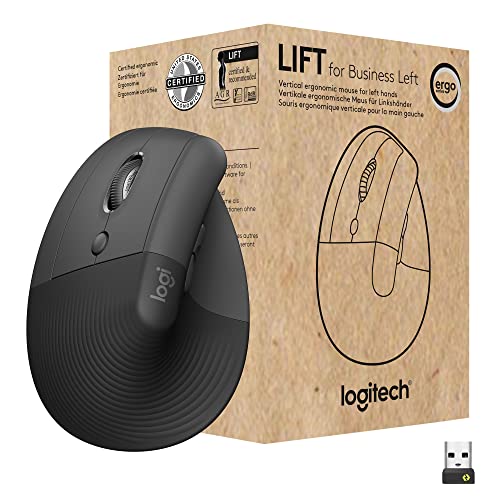
Quick Summary
- 🖱️ Ergonomic vertical design for left-handed comfort
- 🔇 Silent clicks for distraction-free work
- 📡 Dual connectivity: Bluetooth & Logi Bolt USB receiver
- 💻 Compatible with Windows, macOS, ChromeOS, Linux
- 🔒 Secure wireless with Logi Bolt encryption
- 🎨 Graphite finish, lightweight build
- ✅ Best for left-handed professionals in IT-managed workplaces
Pros
- Comfortable vertical grip
- Silent click buttons
- Bluetooth + USB receiver support
- Easy button customization
- Long battery life
Cons
- Not rechargeable
- Best for small/medium hands
- Higher price than budget models
- Limited color choices
Editor’s Note: Apple has been phasing out USB-A ports for quite some time. Recently, all USB-A ports are removed from Mac Mini M4. This means you can no longer use a USB mouse receiver with your MacBook or Mac Mini. Consequently, Bluetooth mouse is the only solution for new Macs. If you’re left-handed and looking for a high-quality mouse, the Logitech Lift for Business Left is an excellent left handed ergonomic mouse for your MacBook or Mac Mini M4.
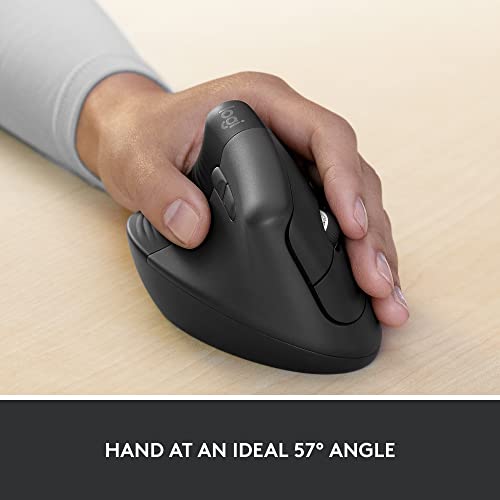
Logitech Lift for Business Left
Verdict
The Logitech Lift for Business Left is one of the best left handed ergonomic mouse with complete ergonomic options for left‑handed users. Its vertical handshake grip that feels natural and helps reduce wrist strain. The compact shape suits small to medium hands, while silent clicks make it great for shared offices or late‑night use. Bluetooth support means easy connection without a dongle, and Logitech’s software allows simple customization.
Best thing: Since decent Apple MacBook or Mac Mini models don’t have a USB-A port, Logitech Lift for Business Left seamlessly connects to your MacBook via Bluetooth. Actually there is no much left-handed Bluetooth mouse option for MacBook family.
The battery can last up to two years, and although it isn’t rechargeable, in my opinion that’s a minor trade‑off compared to the comfort and quiet operation it delivers. I find it to be one of the best left‑handed ergonomic mice available, combining practicality with modern wireless features.
#2 🥈 Evoluent VM4L (Wired) — Ergonomics Specialist

Quick Summary
- 🖱️ Ergonomic handshake design reduces wrist and forearm strain
- 🎯 High‑precision optical sensor works on most surfaces
- 🔌 Wired USB plug‑and‑play, no batteries needed
- 🎛️ Adjustable pointer speed (extra low to high) with LED indicators
- 🖲️ Six programmable buttons via Evoluent Mouse Manager software
- ✋ Sculpted thumb rest and extended lip prevent finger drag
- 📐 Best suited for medium to large hands (7.0″ or more)
- 💻 Compatible with Windows, macOS, Linux (limited customization on macOS/Linux)
- ✅ Best for left‑handed users seeking ergonomic comfort with wired reliability
Pros
- Excellent ergonomic design
- Comfortable for larger hands
- Reliable wired connection
- Adjustable sensitivity
Cons
- No silent clicks
- No Bluetooth or wireless option
- Higher price point
- Bulkier design than competitors

Evoluent VM4L (Wired)
Verdict
The Evoluent VM4L is often regarded by many people as the gold standard for left‑handed ergonomics, with a larger and more sculpted vertical design. That design keeps the wrist in a neutral position and reduces strain during long sessions. The buttons are well placed, though they produce standard clicks rather than silent ones, and performance is solid thanks to adjustable sensitivity and a reliable wired connection. In my opinion, the lack of Bluetooth or wireless options makes it less flexible, and the higher price may be a drawback, but I find it an excellent choice if ergonomics are your top priority and you’re fine with a wired setup. But I want to warn you again; it is a wired mouse, not wireless. If you are looking for a wireless mouse, look for another 4-mouse reviewed here.
#3 🥉 Kensington Pro Fit Ergo (K79810WW) — Reliable Office Choice

Quick Summary
- 🖱️ Ergonomist‑approved 41° angled design made specifically for left‑handed users
- ✋ Neutral “handshake” grip improves comfort and reduces wrist strain
- 🔌 Plug‑and‑play USB receiver, no drivers or downloads required
- 📡 Wireless connectivity with 128‑bit AES encryption for secure performance
- 🎛️ Six‑button control with forward/back, scroll/middle click, and DPI adjustment
- 🎯 Triple DPI settings: 800 / 1200 / 1600 for precision control
- 💻 Compatible with Windows, macOS, ChromeOS (customization via KensingtonWorks software)
- ✅ Best for left‑handed professionals seeking ergonomic comfort and secure wireless productivity
Pros
- Comfortable vertical design
- Sturdy build quality
- Smooth wireless performance
- Good value for money
Cons
- No Bluetooth support
- No silent clicks
- Bulkier than some competitors
- Limited customization options

Kensington Pro Fit Ergo
Verdict
Many people find the Kensington Pro Fit Ergo as a dependable choice for left‑handed office users, with a vertical design that supports a natural wrist position and helps reduce strain during long sessions. The sturdy build and professional look fit well in business settings, while performance is smooth thanks to solid wireless connectivity via USB receiver. It doesn’t include Bluetooth or silent clicks, but battery life is strong and setup is simple. In my opinion, this mouse offers reliable comfort and practicality without the premium price tag, and I find it a well‑built ergonomic option for everyday work.
#4 Perixx PERIMICE‑713L — Budget-Friendly Pick
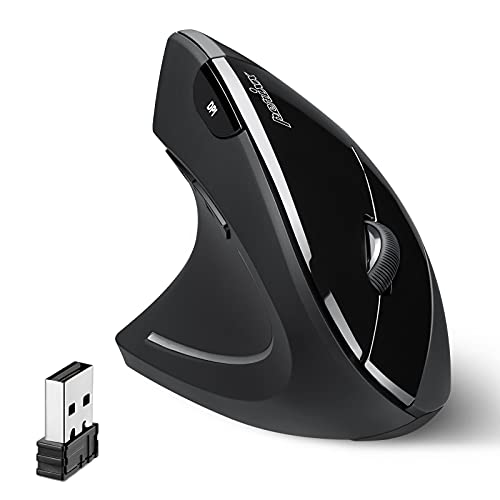
Quick Summary
- 🖱️ Ergonomic vertical design made for left‑handed users
- 🎛️ Six‑button layout to boost productivity
- 📡 2.4GHz wireless connection with USB receiver (up to 10m range)
- 🎯 Adjustable DPI levels: 800 / 1200 (default) / 1600
- 🔋 Powered by AA battery with low‑battery LED indicator
- 💻 Compatible with Windows, macOS, Linux (basic functions on macOS/Linux)
- 🎨 Lightweight build, natural grip for long hours of use
- ✅ Best for left‑handed users seeking affordable ergonomic comfort with wireless freedom
Pros
- Affordable price
- Vertical ergonomic design
- Easy setup with USB receiver
- Lightweight build
Cons
- No Bluetooth support
- No silent clicks
- Average build quality
- Limited customization options

Perixx PERIMICE‑713L
Verdict
The Perixx PERIMICE‑713L is a simple, affordable option for left-handed users who want a vertical mouse without spending much. Its design supports a more natural wrist position, though it feels less refined compared to premium models. The build is lightweight and functional, but not as sturdy as higher-end competitors. Performance is decent for everyday tasks, with wireless connectivity via USB receiver, but it lacks Bluetooth and silent clicks. Battery life is fair, and setup is straightforward. I would suggest this mouse if you’re on a budget and want basic ergonomic support without extra features.
#5 Urby Left Handed Mouse — Budget Silent Option
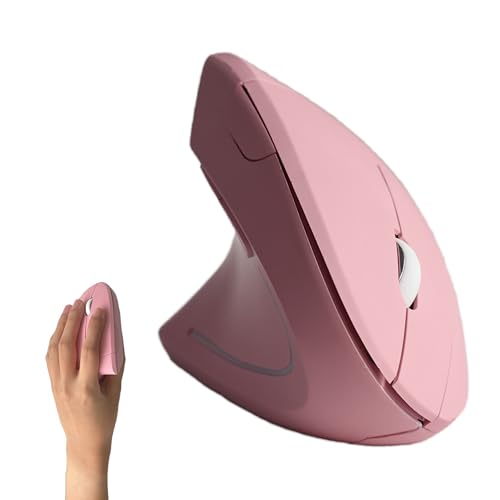
Quick Summary
- 🖱️ Vertical ergonomic design made specifically for left‑handed users
- ✋ Natural “handshake” grip reduces wrist and forearm strain
- 📡 Wireless connectivity (2.4GHz) with USB receiver, plug‑and‑play setup
- 🔋 Powered by 2 AAA batteries (included)
- 🎛️ Multiple buttons for office and gaming use, lightweight build
- 💻 Compatible with Windows, macOS, iPadOS, laptops and PCs
- 🎨 Available in black or white finish
- ✅ Best for left‑handed users seeking affordable ergonomic comfort for work or gaming
Pros
- Silent click buttons
- Affordable price
- Vertical ergonomic design
- Easy setup with USB receiver
Cons
- Average build quality
- Limited customization
- Best for light use, not heavy workloads

Urby Left Handed Mouse
Verdict
The Urby Left Handed Mouse is a low-cost choice for users who want a vertical design with silent clicks. Its shape supports a more natural wrist position, though it feels less polished than premium models. The soundless buttons are a nice touch for quiet environments, making it suitable for offices or late-night use. Performance is basic, with wireless connectivity through a USB receiver. Build quality is light and functional, though not very durable. I would suggest this mouse if you’re on a tight budget and want silent operation without extra features.
Best Left Handed Mouse – Summary
For left‑handed users, the Logitech Lift for Business Left stands out as the best overall vertical mouse, thanks to its ergonomic comfort, quiet clicks, and versatile Bluetooth/USB pairing. For users who prioritize pure ergonomics, the Evoluent VM4L (Wired) remains the leader with its sculpted design, though it lacks modern wireless features. The Kensington Pro Fit Ergo offers a balanced office‑friendly option, while the Perixx PERIMICE‑713L provides basic ergonomics at a budget price. Finally, the Urby Left Handed Mouse is the most affordable way to get silent clicks, making it a solid entry‑level pick.
How We Selected These Products
We recommend these items based on a thorough research process designed to highlight the best options available. While we did not physically test some products ourselves, we relied on detailed research and verified customer feedback to evaluate them.
- Detailed Research: We reviewed product specifications, manufacturer information, and feature lists to understand what each item offers.
- Customer Insights: We analyzed verified buyer reviews and ratings to learn how these products perform in real-world use.
- Comparison Factors: We compared products across price, durability, usability, and unique features to identify the strongest choices.
- Personal Experience: With over 25 years of working in internet-related technologies and following online trends since 1995, I bring a deep understanding of how products are marketed, evaluated, and used. This background helps me filter out hype and focus on what truly matters for everyday users.
- Balanced Evaluation: Our goal is to provide clear, unbiased information so you can make confident purchasing decisions.
See also How We Review Products section for more details on our process.
Written by Metin Karal
Metin Karal is a Computer Engineer with over 25 years of experience working with internet technologies, trends, and digital tools since 1995. He brings this deep background into his product reviews, combining technical expertise with careful research to deliver honest, practical insights for readers. Passionate about technology, Metin also enjoys programming in C# and is currently developing PairMem, a challenging memory game available for free on the official Microsoft Store.
Disclosure: This article may contain affiliate links. As an Amazon Associate, we earn from qualifying purchases at no additional cost to you. For more details, please see our [Privacy Policy]

