
Written by Metin KARAL – Computer Engineer with 25+ years of experience in internet technologies. Some products here are tested directly, while others are evaluated through detailed research, specifications, and verified customer feedback. This article may contain affiliate links; as an Amazon Associate we earn from qualifying purchases at no extra cost to you.
Left-handed users represent roughly 10% of the population — and the ergonomic mouse market mostly ignores them. Most vertical mice are designed for right hands and simply mirrored, rather than sculpted for left-hand anatomy. This roundup covers the 7 best left-handed ergonomic mice across every use case: the Logitech Lift for dual Bluetooth and Mac compatibility, MEETION’s rechargeable triple-connectivity option, the Evoluent VM4L from the inventors of the vertical mouse category with clinical RSI endorsement, the Kensington Pro Fit with government-grade wireless encryption, the Perixx PERIMICE-713L that broke the affordability barrier for RSI sufferers, the ELECOM EX-G trackball for users who need zero wrist movement, and the Urby for small hands and first-time buyers. Whether you’re preventing wrist strain, recovering from an injury, or simply tired of using a right-handed mouse backwards, there’s a clear answer here.
Editor’s Recommendation ⭐
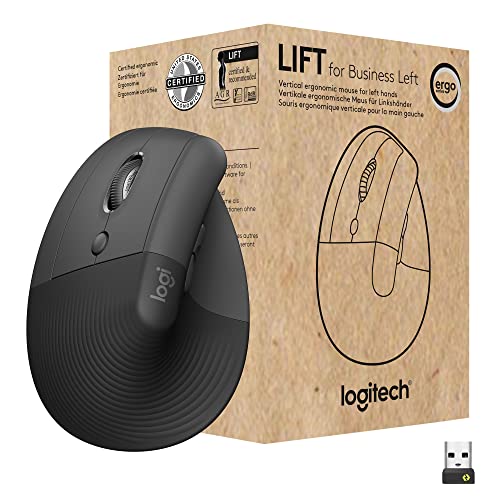
Logitech Lift for Business Left – If you want ergonomic comfort tailored for left-handed professionals, the Logitech Lift for Business Left is the clear choice. Its vertical design promotes natural wrist posture, reducing strain during long work sessions, while the soft‑touch finish ensures all‑day comfort. With enterprise‑grade security via Logi Bolt wireless technology and multi‑OS compatibility, it’s built for modern hybrid workflows. For left‑handed users who demand both health‑conscious design and reliable business performance, this is the mouse we’d trust every day.
Best Left Handed Ergonomic Mouse — Our Top Picks
WHY Table:
| Mouse | Why |
|---|---|
| Logitech Lift Left | Best Overall — dual Bluetooth + Logi Bolt USB, the only mouse on this list that works natively with current MacBook and Mac Mini without adapters; 57° ergonomist-certified angle; whisper-quiet silent clicks; enterprise-grade wireless encryption. Best for Mac users and business professionals. |
| MEETION BTM008 Left | Best Rechargeable Mouse — the only USB-C rechargeable mouse on this list; triple Bluetooth 5.2 + 5.2 + 2.4G USB for simultaneous three-device connectivity; 4 DPI levels; 3 sustainability certifications. |
| Evoluent VM4L | Best Ergonomics Specialist — the inventor of the vertical mouse category; true left-hand mirror design with patented broad bottom lip eliminating pinky drag; side-mounted DPI controls; 6 programmable buttons; up to 70% muscle strain reduction confirmed by occupational therapists and hand surgeons. Best for medium-large hands with RSI or clinical referrals. |
| Kensington Pro Fit Ergo K79810WW | Best Office Mouse — 128-bit AES government-grade wireless encryption; 3-year warranty — the longest on this list; plug-and-play without driver installation; KensingtonWorks cross-platform customisation for Windows, macOS, and ChromeOS. Best for corporate, government, and educational deployments. |
| ELECOM EX-G Left Handed Trackball | Best Trackball Mouse — the only pick on this list that eliminates wrist movement entirely; thumb-operated 34mm ball, 6 programmable buttons with tilt scroll, optical tracking with red ball upgrade path. Clinically relevant for severe carpal tunnel, post-surgical hand conditions, and limited desk space. |
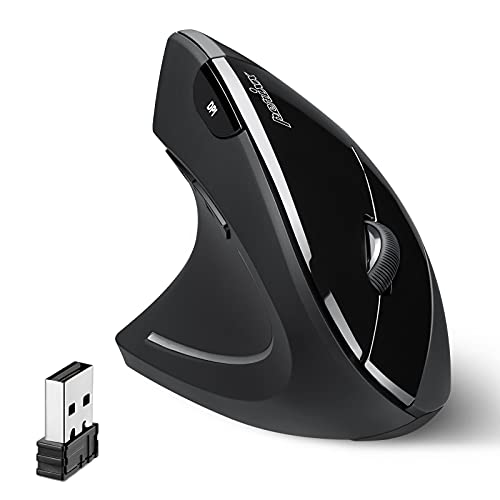
| Perixx PERIMICE-713L | Best Budget Mouse — the mouse that broke the affordability barrier for left-handed RSI sufferers; silent left and right clicks; confirmed all-hand-size fit including small hands; Android compatibility; rubber-coated grip; 6 buttons. |
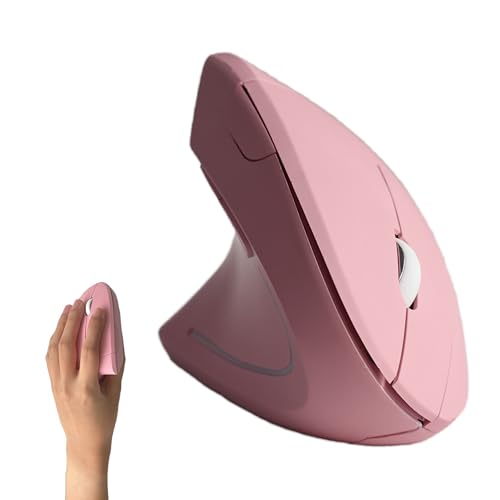
| Urby Left Handed Mouse | Budget Silent Pick — the only left-handed vertical mouse on this list in Pink; batteries included in the box; silent clicks; compact fit for small and medium hands. Best for students, children, and first-time vertical mouse buyers. |
Logitech Lift for Business Left — Best Overall
Quick Facts
- 🖱️ Type: Left-handed vertical ergonomic mouse
- 📡 Connectivity: Dual — Bluetooth Low Energy + Logi Bolt USB receiver
- 📐 Ergonomic Angle: 57° — Logitech-optimised handshake position
- 🔇 Silent Clicks: Yes — whisper-quiet left and right click buttons
- 🎯 Sensor: 4000 DPI high-precision optical — SmartWheel scrolling
- 🔒 Security: Logi Bolt encrypted — Secure Connections Only mode (BLE Level 4)
- 🔋 Battery: Up to 2 years — AA battery (included)
- 🖥️ Compatibility: Windows / macOS / ChromeOS / Linux / iPadOS
- 🌍 Certification: Globally certified — over 100 countries
- ✋ Hand Size: Small to medium hands
- 📦 In the Box: Mouse + Logi Bolt USB receiver + AA battery + documentation
- ✅ Warranty: Logitech standard warranty
Editor’s Note
The Logitech Lift for Business Left is the only left-handed vertical mouse on this list that solves the MacBook problem. Apple has progressively removed USB-A ports from the entire Mac lineup — the Mac Mini M4, MacBook Air M4, and MacBook Pro M5 all lack USB-A entirely. This means the USB receiver-only mice on this list simply don’t work with current Macs without an adapter. The Logitech Lift connects via Bluetooth Low Energy natively — no adapter, no dongle, no hub required. For left-handed Mac users, this isn’t a convenience feature, it’s a compatibility requirement that no other mouse on this list fully addresses.
CNN Underscored named the Logitech Lift the best ergonomic mouse for anyone with wrist, arm or shoulder problems — describing it as gripped like a handshake and offering a more attractive, compact design than even the pricier Logitech MX Vertical.
Pros
- Dual Bluetooth + Logi Bolt USB — the only mouse on this list that works natively with MacBook Air, MacBook Pro, and Mac Mini without any adapter or hub
- 57° ergonomic angle — Logitech-certified handshake position designed and tested by leading ergonomists; reduces forearm muscle fatigue and alleviates wrist pressure simultaneously
- Whisper-quiet silent clicks — designed for shared offices, libraries, and late-night work sessions — the click sound is virtually inaudible from a normal working distance
- Enterprise-grade Logi Bolt security — Bluetooth Low Energy Security Mode 1 Level 4 encryption; the most secure wireless connection on this list
- Up to 2-year battery life — the longest battery life on this list; most users replace the AA battery once every 18-24 months
Cons
- Small to medium hands only — Tom’s Hardware confirmed the Lift is specifically designed for smaller-handed users; large-handed users may find the grip constrictive during extended sessions
- Graphite only for left-handed version — the right-handed version comes in rose and pale gray; the left-hand model ships in graphite only
Why is Bluetooth important for a left-handed mouse in 2026?
Because most current Macs have no USB-A ports. The Mac Mini M4, MacBook Air M4/M5, and MacBook Pro M5 all removed USB-A entirely — meaning any mouse that relies on a USB-A wireless receiver won’t connect without an adapter or hub. For left-handed Mac users, Bluetooth is the only native connection method. The Logitech Lift is the only dedicated left-handed vertical ergonomic mouse on this list that offers Bluetooth as a primary connection — making it the default recommendation for any Mac-using lefty, regardless of other preferences.
Why We Liked It
TechGearLab’s hands-on testing confirmed the Logitech Lift as incredibly comfortable with excellent tracking and precision — noting it was among the most ergonomically focused wireless mice they tested. A user whose husband had undergone multiple hand and wrist surgeries specifically noted there was “no question” the Lift felt better than a standard mouse — the kind of real-world medical context that makes ergonomic claims credible rather than marketing-driven.
PCWorld highlighted the Lift’s excellent dual connectivity, customizable buttons, and smooth tracking — noting it’s best for people looking to prevent wrist and elbow pain rather than those seeking cheap ergonomic alternatives. For left-handed users who want to coordinate their complete peripheral setup, our Best Left-Handed Watches for Men covers another category where left-handed design genuinely matters — the design philosophy behind dedicated left-handed products applies across categories.
Best For
Left-handed Mac users and business professionals who need Bluetooth connectivity, silent clicks, enterprise wireless security, and ergonomic certification from a single mouse that works natively across every current Apple and Windows device without adapters.
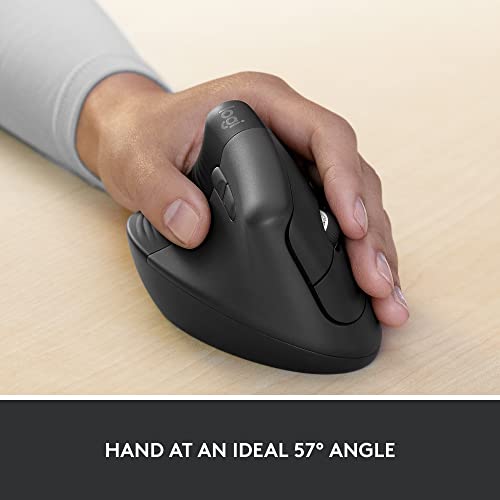
Logitech Lift for Business Left
Verdict
The Logitech Lift for Business Left earns Best Overall through dual Bluetooth + Logi Bolt connectivity that works natively with all current Macs, a 57° ergonomist-certified angle, whisper-quiet silent clicks, enterprise-grade wireless encryption, and up to 2-year battery life — the most complete feature package on this list. Small-to-medium hand sizing and graphite-only colour on the left-hand version are the honest trade-offs. For left-handed professionals who need both Mac compatibility and ergonomic comfort, this is the only mouse on this list that fully delivers both.
MEETION BTM008 Left-Handed Rechargeable Mouse — Best Rechargeable Mouse

Quick Facts
- 🖱️ Type: Left-handed vertical ergonomic rechargeable mouse
- 📡 Connectivity: Triple — Bluetooth 5.2 + Bluetooth 5.2 + 2.4G USB receiver
- 🔋 Battery: Built-in 500mAh rechargeable — USB-C charging
- ⏱️ Battery Life: 2-3 months per charge (standard use)
- 🎯 DPI Settings: 4 levels — 800 / 1200 / 1600 / 2400
- 🖥️ Compatibility: Windows / macOS / Linux / iPadOS / Android
- 🌱 Sustainability: 3 certifications — 50%+ recycled material, safer chemicals, worker rights
- 🔇 Silent Clicks: Not specified
- 🎨 Colour: Left Black only
- 📦 In the Box: Mouse + USB-A receiver + USB-C charging cable + user manual
- ✅ Warranty: MEETION 365-day support
Editor’s Note
Rechargeable versus battery-powered is one of the most practical decisions in the left-handed ergonomic mouse category — and the MEETION BTM008 is the only rechargeable option on this list. Every other mouse here uses disposable batteries — AA or AAA — which need replacement every few weeks to several months depending on usage. The BTM008 charges via USB-C and delivers 2-3 months of use per charge for normal daily users. A Walmart reviewer with large hands who uses a mouse all day noted battery life of 4-5 days between charges under heavy use — and specifically called out USB-C charging as quick and accessible, making battery life a non-issue in daily practice.
MEETION’s own certification confirms the BTM008 is built with 3 sustainability credentials — 50%+ recycled material, chemicals safer for human health and the environment, and manufacturing that protects worker rights. For left-handed users who care about the environmental and social impact of their peripherals, this is the only mouse on this list with documented sustainability certifications.
Pros
- USB-C rechargeable — the only rechargeable mouse on this list — no disposable batteries ever; charge with the same USB-C cable used for most modern devices
- Triple connectivity — Bluetooth 5.2 + Bluetooth 5.2 + 2.4G USB; connects to two Bluetooth devices and one USB receiver simultaneously for seamless multi-device switching
- 4 DPI levels (800-2400) — the widest DPI range on this list alongside the Logitech Lift; switchable on-the-fly without software for precision control across different tasks
- 3 sustainability certifications — 50%+ recycled material, safer chemicals, and verified worker rights protection; the strongest sustainability credentials of any mouse on this list
- 365-day support — MEETION’s round-the-clock customer service commitment with 24/7 online support
Cons
- Limited brand heritage vs Logitech or Kensington — MEETION is a growing peripheral brand but lacks the decades of ergonomic research backing that established brands publish; ergonomic angle specs are not independently certified
- No silent clicks confirmed — the listing does not specify silent click technology; buyers who need quiet operation for shared offices should choose the Logitech Lift or Perixx instead
- Left-handed version has fewer reviews than right-handed variant — the right-handed BTM008 has substantially more buyer data; the left-handed specific variant is less validated by volume
How long does the MEETION BTM008 actually last on a single charge?
It depends entirely on how heavily you use it. MEETION quotes 2-3 months for standard use — which would be light to moderate daily office work. A Walmart reviewer who uses a mouse all day professionally reported 4-5 days between charges under heavy use — still describing this as completely acceptable given how quickly it charges via USB-C. The honest answer is heavy users will charge weekly, moderate users monthly, and light users potentially quarterly. Since the USB-C cable is the same as most modern phones and laptops, keeping a spare on the desk means charging is never an interruption to the workflow.
Why We Liked It
Triple connectivity is the feature that separates this from every other mouse on this list for multi-device users. The BTM008 connects to two separate Bluetooth devices and one USB receiver simultaneously — meaning a left-handed user with a MacBook, an iPad, and a Windows desktop can switch between all three without re-pairing. The Logitech Lift offers Bluetooth plus USB receiver, which covers two devices. The MEETION covers three — the only mouse on this list capable of this without any additional software or manual re-pairing.
The USB-C charging port placement is deliberately accessible — MEETION confirmed the port is easy to reach without removing the mouse from the desk. Unlike older rechargeable mice where the charging port was tucked under the body requiring the mouse to be inverted or removed entirely, the BTM008 charges in its natural working position. For left-handed users who want to pair their mouse with a complete ergonomic left-handed setup, our Best Mouse for MacBook Neo covers additional Mac-optimised pointing device options that complement the MEETION’s triple connectivity.
Best For
Left-handed users who want the only rechargeable vertical ergonomic mouse on this list — particularly multi-device users who switch between a Mac, iPad, and Windows PC daily and don’t want to manage disposable batteries.

MEETION BTM008 Left-Handed Rechargeable Mouse
Verdict
The MEETION BTM008 Left-Handed Mouse earns Best Rechargeable Mouse through triple Bluetooth 5.2 + 5.2 + USB-C connectivity, a built-in 500mAh rechargeable battery, 4 DPI levels, 3 sustainability certifications, and MEETION’s 365-day support — the most connectivity-flexible and environmentally certified mouse on this list. Limited brand ergonomic research credentials and unconfirmed silent click operation are the honest trade-offs for a newer brand entering the specialised left-handed vertical market.
Evoluent VM4L Vertical Mouse — Best Ergonomics Specialist

Quick Facts
- 🖱️ Type: Left-handed vertical ergonomic mouse — wired USB
- 📡 Connectivity: Wired USB only — no wireless or Bluetooth
- 📐 Ergonomic Design: Patented shape — true left-hand mirror design, not ambidextrous
- 🎯 Sensor: Adjustable optical — 4 pointer speed settings via side controls
- 🔲 Buttons: 6 programmable — Evoluent Mouse Manager software (Windows)
- 💡 Indicator: LED pointer speed indicators — chrome thumb rest
- ✋ Hand Size: Medium to large — 7 inches (175mm) wrist to middle finger minimum
- 🖥️ Compatibility: Windows / macOS / Linux
- 📦 In the Box: Mouse + USB cable + driver download card
- ✅ Warranty: 2-year limited warranty
Editor’s Note
Evoluent didn’t adapt an existing mouse design for left-handers — they invented the vertical mouse category. The company holds the original patent on the vertical mouse handshake design, and every other vertical mouse on this list — including the Logitech Lift — exists in a category that Evoluent created. The VM4L is a true mirror design specifically sculpted for left hands, not a symmetric ambidextrous shape that’s been rebranded as left-handed. AskErgoWorks confirmed that the vertical handshake position the VM4L provides reduces muscle strain by up to 70% compared to traditional mice — and the mouse is specifically recommended by occupational therapists and hand surgeons for preventing and treating mouse-related RSI and tendinitis.
Studies suggest vertical mice can decrease muscle activity by up to 10% compared to traditional mice — but the Evoluent’s patented shape goes further by specifically engineering the thumb rest, button placement, and palm shelf together as a system rather than simply tilting a standard mouse body.
Pros
- Inventor of the vertical mouse category — the original patented design that established the ergonomic standard every other mouse on this list follows; 70% reduction in muscle strain confirmed by ergonomic specialists
- True left-hand mirror design — sculpted specifically for left-hand anatomy, not an ambidextrous compromise; button placement, thumb rest, and palm shelf all engineered for left-hand use
- Side-mounted pointer speed controls — adjust DPI without releasing the mouse grip; the only mouse on this list with controls that don’t require you to take your hand off the mouse to change sensitivity
- 6 programmable buttons — the most programmable buttons on any standard vertical mouse on this list; Evoluent Mouse Manager allows per-application customisation on Windows
- Extra-wide bottom lip — the pinky rest shelf prevents the last finger from dragging on the desk; a construction detail that no other mouse on this list addresses as deliberately
Cons
- Wired only — no wireless or Bluetooth; cable tethers the mouse to the computer; not suitable for MacBook users without a USB hub
- Windows-only full software — Evoluent Mouse Manager for full button programming runs on Windows only; macOS users get basic function but lose button customisation
- Hand size minimum — requires at least 7 inches from wrist to middle finger; smaller-handed users should consider the Evoluent VM4S small version instead — the regular VM4L will feel too large
How long does it take to adapt to the Evoluent VM4L from a standard mouse?
Most users adapt within 3-5 days. AskErgoWorks noted that cursor precision returns to normal within 2-3 days, and pain relief typically begins within the first week. The recommended approach is to start with 30-60 minute sessions and gradually increase duration — rather than switching cold turkey for a full workday immediately. One B&H reviewer who had used a standard mouse for decades described the switch as seamless, noting the vertical position felt immediately natural. Another reviewer noted a full year of use later they didn’t know how they’d lived without it. The adjustment period is real but shorter than most users anticipate.
Why We Liked It
The VM4L’s patented broad bottom lip is the single most underrated feature on any mouse on this list. The pinky on a standard mouse drags along the desk surface during lateral mouse movement — generating friction and contributing to the cumulative strain that develops into RSI over months of daily use. The VM4L’s extra-wide flange lifts the pinky off the desk entirely, eliminating that friction source completely. CloudNine Ergonomic Solutions confirmed that the thumb rest has been reshaped in the VM4 to provide even more comfort over earlier versions — the kind of iterative refinement that only comes from a brand that has been making the same product family for over two decades.
The recommendation record from healthcare professionals is the validation that no amount of marketing can replicate. An ergonomic firm recommended the mouse to three staff members who all reported relief from hand and wrist motion problems. A verified buyer noted a professional ergonomic assessment led them to the VM4L specifically. This level of clinical endorsement — from occupational therapists, physical therapists, and hand surgeons — is unique on this list and reflects the Evoluent’s position as the reference standard for left-handed ergonomic computing. For left-handed users building a complete ergonomic left-handed setup, our Best Mouse for MacBook covers additional pointing device options for those who need wireless alongside the VM4L’s wired precision.
Best For
Left-handed users with medium to large hands who experience wrist pain, RSI, tendinitis, or carpal tunnel symptoms — and anyone who wants the most ergonomically researched and clinically endorsed left-handed mouse available, without wireless being a requirement.

Evoluent VM4L Vertical Mouse
Verdict
The Evoluent VM4L earns Best Ergonomics Specialist as the inventor of the vertical mouse category — a true left-hand mirror design with patented broad bottom lip, side-mounted DPI controls, 6 programmable buttons, and up to 70% muscle strain reduction confirmed by occupational therapists and hand surgeons. Wired-only connectivity and Windows-only software are the significant modern limitations, but for left-handed users whose primary concern is ergonomic health rather than wireless convenience, no mouse on this list has a stronger clinical recommendation record.
Kensington Pro Fit Ergo Left-Handed Mouse — Best Office Mouse

Quick Facts
- 🖱️ Type: Left-handed vertical ergonomic wireless mouse
- 📡 Connectivity: 2.4GHz USB receiver — plug-and-play, no drivers required
- 📐 Ergonomic Angle: 41° — ergonomist-approved neutral handshake grip
- 🔒 Security: 128-bit AES encryption — government-grade wireless security
- 🎯 DPI Settings: 3 levels — 800 / 1,200 / 1,600
- 🔲 Buttons: 6 — forward, back, left, right, scroll/middle-click, DPI
- 🔋 Battery: AA battery — replaceable
- 🖥️ Compatibility: Windows / macOS / ChromeOS — not Windows ARM
- 📦 In the Box: Mouse + USB nano receiver + battery + documentation
- ✅ Warranty: 3-year limited warranty
Editor’s Note
Kensington has been making professional-grade desktop accessories for over 40 years — and the Pro Fit Left-Handed Ergo Mouse is the product that most directly reflects that heritage. Where consumer-focused brands emphasise features and price, Kensington emphasises certification and security. The 128-bit AES encryption on the wireless connection isn’t a standard feature of consumer mice — it’s the same encryption standard used in government and financial sector IT deployments. CDW stocks this mouse specifically for IT procurement orders alongside other Kensington enterprise peripherals — a distribution channel that reflects the buyer profile Kensington designed it for.
B&H Photo confirmed the 41° ergonomist-approved tilt creates a neutral grip that positions the hand for improved comfort — the neutral handshake position that prevents the forearm twisting that causes RSI during extended office sessions.
Pros
- 128-bit AES government-grade encryption — the most secure wireless connection on this list — suitable for corporate environments where unencrypted Bluetooth or USB receiver connections are a security concern
- 3-year warranty — the longest warranty of any mouse on this list; Kensington backs the K79810WW with three full years of coverage confirmed by CDW’s enterprise listing
- Plug-and-play USB — no drivers required — the receiver works immediately without software installation; critical for IT deployments where managed devices can’t install third-party software
- KensingtonWorks free customisation software — assigns shortcuts to all six buttons and adjusts cursor and scrolling speed; ChromeOS compatible unlike most mouse software
- 41° ergonomist-approved angle — validated by professional ergonomists; the certification backs the comfort claim with independent professional assessment
Cons
- No Bluetooth — USB receiver only; not suitable for current MacBook Air or MacBook Pro without a USB hub or adapter
- No silent clicks — standard click sound; not suitable for shared open-plan offices, libraries, or late-night sessions where click noise is disruptive
- 1,600 DPI maximum — the lowest DPI ceiling on this list; adequate for standard office displays but limiting for high-resolution or multi-monitor setups
Why does the Kensington have 128-bit AES encryption when other wireless mice don’t?
Because Kensington designs for corporate and government IT environments where unencrypted wireless connections are a compliance risk. Standard 2.4GHz wireless mice broadcast signals that can theoretically be intercepted within range — a low risk for home users but a genuine concern in corporate offices where multiple wireless devices operate in proximity and data security policies apply. The 128-bit AES encryption wraps every signal in the same standard used by financial institutions and government agencies. OfficeCrave confirmed that schools, government, medical, accounting, corporate, and military organisations all use this mouse — the security feature is the reason it appears in procurement lists that consumer wireless mice don’t reach.
Why We Liked It
The 3-year warranty is the commitment that separates Kensington from every other mouse brand on this list. Consumer peripherals typically offer 1-2 year warranties. Kensington’s 3-year coverage reflects a durability confidence that organisations rely on when equipping multiple workstations — a mouse failing after 18 months and requiring replacement is a support burden that corporate IT teams specifically calculate when specifying equipment. The K79810WW’s 3-year warranty shifts that calculation in favour of Kensington across its lifetime cost.
KensingtonWorks’ ChromeOS compatibility is a specific detail worth noting for educational and enterprise deployments. Most mouse customisation software is Windows-only — Kensington’s cross-platform approach covers Windows, macOS, and ChromeOS from a single software solution, making it viable in mixed-OS corporate environments and Chromebook-equipped classrooms where left-handed students are typically underserved by the standard peripheral selection.
Best For
Left-handed professionals in corporate, government, educational, or security-conscious environments where 128-bit AES wireless encryption, plug-and-play IT deployment, ChromeOS compatibility, and a 3-year warranty matter more than Bluetooth or silent clicks.

Kensington Pro Fit Ergo Left-Handed Mouse
Verdict
The Kensington Pro Fit Ergo Left-Handed Mouse earns Best Office Mouse through 128-bit AES government-grade wireless encryption, a 3-year warranty that’s the longest on this list, plug-and-play deployment without driver installation, six-button KensingtonWorks customisation, and Kensington’s 40+ year enterprise peripheral heritage. No Bluetooth and no silent clicks are the honest limitations for home users, but for corporate and institutional left-handed users where security credentials and warranty coverage are procurement requirements, the Kensington is the only mouse on this list built for that environment.
Perixx PERIMICE-713L — Best Budget Mouse
Quick Facts
- 🖱️ Type: Left-handed vertical ergonomic wireless mouse
- 📡 Connectivity: 2.4GHz USB receiver — plug-and-play, 10m range
- 🔇 Silent Clicks: Yes — left and right buttons only (scroll and side buttons are not silent)
- 🎯 DPI Settings: 3 levels — 800 / 1,200 / 1,600
- 🔲 Buttons: 6 — DPI switch, 2 browsing side buttons, scroll with middle click
- ⚖️ Weight: 0.35 lb — lightweight body
- 📐 Dimensions: 4.92 × 2.44 × 3.03 inches
- 🔋 Battery: 2 × AAA alkaline — not included
- 🖥️ Compatibility: Windows 7-11 / macOS 10.12+ / Android 4.3+
- 📦 In the Box: Mouse + USB nano receiver + user manual
- ✅ Warranty: 12-month via Perixx website
Editor’s Note
Computer-Posture specifically highlighted the Perixx PERIMICE-713 as the product that broke the affordability barrier for RSI sufferers — noting that until Perixx entered the market, the left-handed vertical mouse category was dominated by Evoluent and DXT at over $80-100. The PERIMICE-713L made the ergonomic improvement accessible to left-handed users who couldn’t justify premium pricing for a health accessory. Founded in 2006 in Germany, Perixx applies German engineering principles to consumer ergonomic peripherals — the PERIMICE-713L is the left-handed version of their top-selling ergonomic mouse, with a slightly tilted left shape that eliminates wrist bending during natural hand placement.
A Walmart reviewer bought the mouse specifically for their mother with mobility issues — reporting zero wrist strain and a natural feel from day one. That caregiver-to-patient context — choosing a mouse for someone with existing mobility problems — is the most honest validation an ergonomic product can receive.
Pros
- Silent left and right clicks — the most affordable silent-click left-handed vertical mouse on this list — reduced click noise for shared spaces without paying the Logitech Lift premium
- All hand sizes — Perixx specifically designed the PERIMICE-713L for all hand sizes, not just medium-large; the only left-handed vertical mouse on this list confirmed for small hands
- Android 4.3+ compatibility — works with Android tablets and smartphones via USB OTG adapter; the broadest mobile OS compatibility on this list
- Rubber-coated surface — soft tactile grip coating maintains hold during extended sessions without the sweaty palm slippage that smooth plastic surfaces cause
- Lightweight 0.35 lb — the lightest mouse on this list; less wrist fatigue during long repositioning sessions than heavier alternatives
Cons
- Back/forward buttons not supported on macOS — Perixx confirmed the side navigation buttons don’t function on macOS; Mac users lose two of the six buttons’ intended functionality
- No Bluetooth — USB receiver only; not suitable for current MacBook Air or Pro without an adapter or hub
- 12-month warranty only — the shortest warranty on this list; Kensington offers 3 years and Evoluent 2 years for comparison
How long does the adjustment period take when switching from a traditional mouse to the Perixx PERIMICE-713L?
Perixx themselves state most users adapt within 1-2 weeks. The vertical position feels unnatural initially because the hand has spent years in a pronated position — the muscle memory of forearm rotation doesn’t reset immediately. Computer-Posture’s review confirmed cursor precision returns within a few days, with comfort improvements beginning from the first session. The recommended approach is starting with 30-60 minute sessions rather than switching cold turkey for a full workday — the same advice applies to all vertical mice on this list. An eBay verified buyer who compared the Perixx against the considerably more expensive Adesso found fit, working distance, and tracking accuracy all excellent — the premium alternative didn’t justify its higher cost.
Why We Liked It
The all-hand-size design is the specification detail that separates the Perixx from the Evoluent and Kensington on this list. Both the VM4L and the Kensington Pro Fit require at least medium-large hands — Perixx explicitly confirmed the PERIMICE-713L suits all different hand sizes. For left-handed users with smaller hands who’ve previously tried vertical mice only to find them uncomfortably large, the Perixx is the only option on this list that directly addresses that fit problem.
Computer-Posture noted the Perixx Perimice-713 has a near-true vertical mouse design — a meaningful distinction from ambidextrous mice repositioned as vertical, where the true vertical angle is compromised by a shape that needs to work for both hands. The slightly tilted left shape of the 713L positions naturally for left-hand anatomy specifically, reducing both forearm twisting and wrist deviation simultaneously during sustained use.
Best For
Left-handed users with any hand size who want silent clicks, wireless ergonomic comfort, and vertical mouse benefits at the lowest sensible price on this list — particularly anyone with existing wrist, forearm, or RSI symptoms who needs an accessible entry point into left-handed vertical mice.

Perixx PERIMICE-713L Left-Handed Mouse
Verdict
The Perixx PERIMICE-713L earns Best Budget Mouse as the mouse that broke the affordability barrier for left-handed RSI sufferers — silent left and right clicks, all-hand-size fit, Android compatibility, rubber-coated grip, and lightweight 0.35 lb construction at the lowest ergonomic price on this list. The macOS button limitation, USB-receiver-only connection, and 12-month warranty are honest trade-offs at the budget price point, but for left-handed users who need ergonomic relief without premium spending, the Perixx delivers the core benefits reliably.
ELECOM EX-G Left Handed Trackball Mouse — Best Trackball Mouse

Quick Facts
- 🖱️ Type: Left-handed trackball mouse — thumb-operated 34mm ball
- 📡 Connectivity: 2.4GHz USB receiver — wireless, 1 × AA battery included
- 🎯 Tracking: Optical — red ball variant for superior accuracy (sold separately)
- 🖲️ Ball Size: 34mm — thumb-controlled, not wrist or arm movement
- 🔲 Buttons: 6 programmable — includes tilt scroll wheel for horizontal scroll
- 🎯 DPI Settings: 2 levels — 750 (low) / 1,500 (high)
- 📐 Dimensions: 3.7″ W × 4.9″ L × 1.9″ H
- ⚖️ Weight: 4.5 oz without battery
- 🖥️ Compatibility: Windows Vista/7/8/10+ / macOS 10.10+
- 📦 In the Box: Mouse + USB receiver + 1 × AA battery
- ✅ Warranty: ELECOM standard warranty
Editor’s Note
A trackball mouse is fundamentally different from every other pick on this list — and for a specific category of left-handed user, it’s the only type that works. Vertical mice still require wrist and forearm movement to reposition the cursor. A trackball mouse keeps the hand completely stationary — only the thumb moves, rolling the ball to control the cursor. For left-handed users with severe carpal tunnel, post-surgical hand conditions, or tendinitis where any wrist movement is painful, the trackball eliminates the movement entirely rather than just reducing its impact. Lim Team’s long-term user review described years of persistent wrist pain and finger numbness from traditional mice resolved specifically by switching to the ELECOM EX-G — calling it indispensable to their daily workflow.
Electronikz’s reviewer highlighted the precise optical tracking as significantly improving productivity and comfort for graphic design work — a specific use case where trackball precision often exceeds standard mouse accuracy because the hand doesn’t lift or drift during fine cursor movements.
Pros
- Zero wrist movement required — thumb controls the ball entirely; the hand, wrist, and forearm remain completely stationary during cursor movement; the most radical RSI prevention approach on this list
- 6 programmable buttons including tilt scroll — tilt scroll wheel enables horizontal scrolling without additional keyboard shortcuts — the most complete button set of any trackball on this list
- Optical tracking with red ball upgrade path — black ball standard; optional red ball sold separately improves optical sensor accuracy; the only mouse on this list with a user-replaceable tracking component
- Mouse-like shape learning curve — ELECOM specifically designed the button placement to mirror a standard mouse layout; users who transition from a standard mouse adapt faster than with other trackball designs
- Long-term proven relief — multiple independent reviewers with documented RSI, carpal tunnel, and post-surgical conditions specifically credit the EX-G with resolving symptoms that vertical mice didn’t fully address
Cons
- 1-2 week adjustment period — Review-Rating confirmed most new trackball users need 1-2 weeks before movement feels natural; the thumb-operated control feels unnatural initially for users who have only used standard mice
- 1,500 DPI maximum — the lowest DPI ceiling on this list; adequate for standard office displays but limiting for large high-resolution multi-monitor setups
- No Bluetooth — USB receiver only; not compatible with current MacBook Air or MacBook Pro without an adapter
Who should choose a trackball over a vertical mouse for left-handed ergonomic use?
Three specific groups. First, users with severe or post-surgical hand conditions where any wrist movement causes pain even with a vertical mouse. Second, users with very limited desk space — a trackball requires no mouse pad and zero lateral movement, making it ideal for cramped workstations, airplane tray tables, and sofa arm use. Third, users who need fine cursor precision for design, editing, or illustration — once mastered, trackball precision often exceeds standard mouse accuracy because the hand never lifts and drifts. For users whose primary concern is reducing movement rather than eliminating it, any other vertical mouse on this list is the better starting point.
Why We Liked It
The trackball occupies a category that no vertical mouse can replace. Lim Team’s reviewer described years of persistent wrist pain and finger numbness from traditional mice being resolved after switching to the EX-G — noting it became indispensable, with the ergonomic design, precise tracking, and programmable buttons together creating a measurably more comfortable daily workflow. That long-term resolution of documented symptoms, rather than short-term comfort improvement, is the validation that distinguishes the EX-G from alternatives.
The mouse-like button layout is the design choice that makes ELECOM’s trackball accessible to users who’ve never used a trackball before. Many trackball designs use unconventional button arrangements that require complete relearning of muscle memory — the EX-G mirrors the button placement of a standard left-handed mouse, meaning the transition preserves existing click patterns while only the cursor movement method changes. For left-handed users building a complete ergonomic desk environment, our Best Left-Handed Watches for Men covers another category where left-handed users are consistently underserved by mainstream design — the same market gap that makes the ELECOM EX-G exist applies across product categories.
Best For
Left-handed users with severe carpal tunnel, post-surgical hand conditions, or any situation where wrist movement itself is the problem — and anyone with limited desk space or precision design work where zero wrist drift during cursor movement provides a meaningful accuracy advantage.

ELECOM EX-G Left Handed Trackball Mouse
Verdict
The ELECOM EX-G Left Handed Trackball earns Best Trackball Mouse as the only cursor control device on this list that eliminates wrist movement entirely — thumb-operated 34mm ball, 6 programmable buttons with tilt scroll, optical tracking with red ball upgrade path, and long-term documented RSI relief from multiple independent reviewers. The 1-2 week adjustment period, 1,500 DPI ceiling, and USB-only connectivity are honest trade-offs for a device that solves a fundamentally different problem than every other pick on this list.
Urby Left Handed Vertical Mouse — Best Ultra-Budget Pick
Quick Facts
- 🖱️ Type: Left-handed vertical ergonomic wireless mouse
- 📡 Connectivity: 2.4GHz USB receiver — plug-and-play
- 🔇 Silent Clicks: Yes — quiet button operation
- 🎨 Colour Options: Pink, Black, White
- ✋ Hand Size: Small to medium — compact body
- 🔋 Battery: 2 × AAA — included in the box
- 🖥️ Compatibility: Windows / macOS / iPadOS
- 📦 In the Box: Mouse + USB receiver + batteries
- ✅ Warranty: Urby standard support
Editor’s Note
Urby was founded on a specific frustration — the brand’s own listing describes going through dozens of manufacturers searching for an affordable left-handed mouse that doesn’t cost a fortune and doesn’t look aggressively tactical. The result is the Urby Left Handed Mouse: a vertically oriented left-hand ergonomic mouse in Pink, Black, and White colourways that prioritises approachability over feature density. A parent who bought the Urby for their 12-year-old left-handed son described it fitting perfectly in a child’s hand and helping with comfort during long programming and schoolwork sessions — a use case that reveals who this mouse actually serves best: younger users, first-time vertical mouse buyers, and anyone who wants to try the ergonomic format without committing to a higher price point.
Pros
- Available in Pink — the only left-handed vertical mouse on this list available in Pink — alongside Black and White; the aesthetic options reflect Urby’s design-first philosophy in a category where black is almost universal
- Batteries included — the only mouse on this list that includes batteries in the box; no separate purchase needed before first use
- Silent clicks — quiet button operation for shared offices, libraries, and late-night sessions at a price point where silent click technology is rare
- iPadOS compatible — works with iPad via USB OTG adapter; the budget entry point for left-handed iPad users who need pointing device support
- Small hand fit — the compact body suits children, teenagers, and adults with smaller hands who find the Evoluent and Kensington too large
Cons
- Scroll wheel durability concern — a verified Amazon buyer reported the scroll wheel reversing scroll direction after approximately 6 months of heavy daily use; buyers who scroll intensively should consider this a potential long-term limitation
- No DPI adjustment — fixed sensitivity only; buyers who need precision control across different display sizes and resolutions need a different pick
Is the Urby left-handed mouse suitable for adults or just children?
It suits smaller-handed adults perfectly well — but large-handed adults will find it cramped. A verified buyer with medium-sized women’s hands described it as on the small side, while users who purchased it for children and teenagers reported an excellent fit. The vertical ergonomic position provides genuine wrist posture benefits regardless of hand size — so smaller-handed adults who can’t comfortably grip the Evoluent or Kensington will find the Urby more accommodating. The honest positioning is: ideal for small hands at any age, functional for medium hands, and too small for large hands.
Why We Liked It
The batteries-included detail is a small thing that matters disproportionately at the ultra-budget end of the market. Every other wireless mouse on this list ships without batteries — meaning a first-time buyer has to make a separate purchase before the mouse works at all. The Urby is ready to use immediately out of the box. For a left-handed child, student, or first-time ergonomic mouse buyer who just wants to plug in and start, that immediacy matters more than any technical specification.
The aesthetic philosophy behind the Urby deserves acknowledgment. Urby’s own product description notes that other left-handed ergonomic mice look too muscular — the brand deliberately chose softer colourways and a less aggressive silhouette. For left-handed users — particularly women and younger users — who want ergonomic benefits without a mouse that looks like gaming hardware, the Urby’s design direction fills a gap that Evoluent, Kensington, and Perixx all miss. A verified buyer named Sarah specifically called out the glossy-matte colour pattern as a nice touch compared to the usual boring black or neon options available to left-handed users.
Best For
Left-handed users with small to medium hands who want silent clicks, a non-aggressive aesthetic, and the lowest possible entry price into vertical ergonomic mice — particularly students, children, and first-time ergonomic mouse buyers.
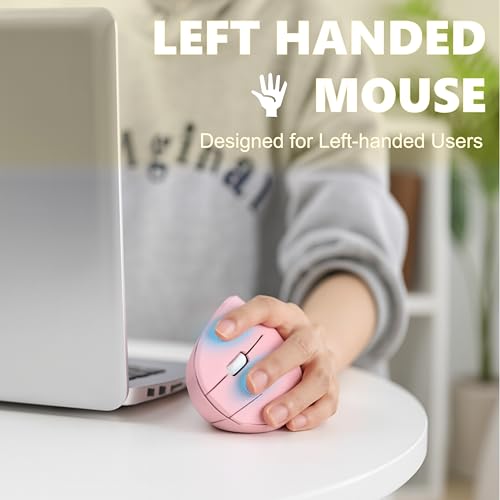
Urby Left Handed Vertical Mouse
Verdict
The Urby Left Handed Vertical Mouse earns Best Ultra-Budget Pick as the only left-handed vertical mouse on this list available in Pink, with batteries included, silent clicks, and small-hand ergonomic fit at the lowest price in this roundup. Scroll wheel durability over heavy sustained use and the absence of DPI adjustment are honest limitations — but for first-time vertical mouse buyers, students, and smaller-handed users who want to try left-handed ergonomic computing without a significant financial commitment, the Urby is the clear starting point.
Written by Metin Karal
Metin Karal is a Computer Engineer with over 25 years of experience working with internet technologies, trends, and digital tools since 1995. He brings this deep background into his product reviews, combining technical expertise with careful research to deliver honest, practical insights for readers. Passionate about technology, Metin also enjoys programming in C# and is currently developing PairMem, a challenging memory game available for free on the official Microsoft Store.
How We Selected These Products
We recommend these items based on a thorough research process designed to highlight the best options available. While we did not physically test some products ourselves, we relied on detailed research and verified customer feedback to evaluate them.
- Detailed Research: We reviewed product specifications, manufacturer information, and feature lists to understand what each item offers.
- Customer Insights: We analyzed verified buyer reviews and ratings to learn how these products perform in real-world use.
- Comparison Factors: We compared products across price, durability, usability, and unique features to identify the strongest choices.
- Personal Experience: With over 25 years of working in internet-related technologies and following online trends since 1995, I bring a deep understanding of how products are marketed, evaluated, and used. This background helps me filter out hype and focus on what truly matters for everyday users.
- Balanced Evaluation: Our goal is to provide clear, unbiased information so you can make confident purchasing decisions.
See also How We Review Products section for more details on our process.
- 6 Best Mouse for MacBook Neo (2026) — Expert Picks

- 8 Best MacBook Neo Accessories (2026) — Complete Setup Guide
- Better Than Apple? 10 Best Mouse for MacBook Neo, Air & Pro (2026)

Disclosure: This article may contain affiliate links. As an Amazon Associate, we earn from qualifying purchases at no additional cost to you. For more details, please see our [Privacy Policy]