Written by Metin KARAL – Computer Engineer with 25+ years of experience in internet technologies. Some products here are tested directly, while others are evaluated through detailed research, specifications, and verified customer feedback. This article may contain affiliate links; as an Amazon Associate we earn from qualifying purchases at no extra cost to you.
The MacBook Neo is Apple’s most affordable laptop ever — and at $599, it’s designed to do more with less. Two USB-C ports, no MagSafe, no fan, and a 20W stock charger — deliberate trade-offs that keep the price accessible. The good news? Every single one of those limitations has a practical, affordable solution. The right accessories transform the Neo from a capable budget laptop into a complete everyday workstation — better protected, better connected, and more comfortable to use for hours at a time.
This isn’t a list of everything you could buy for your MacBook Neo. It’s a curated selection of the best price-to-performance accessories we’d actually recommend — one pick per category, chosen for quality, real-world usefulness, and honest value. Whether you’re a student, a daily commuter, or a first-time Mac owner, these are the accessories worth spending on first.
At a Glance — Best MacBook Neo Accessories (2026)
| Category | Our Pick | Why |
|---|---|---|
| 🛡️ Best Case | tomtoc 360° Protective Carrying Case | Military-grade CornerArmor, AirTag strap, tri-compartment storage |
| 👜 Best Sleeve | MOSISO Vertical Polyester Sleeve | #1 Best Seller, perfect fit rating, 30+ colorways |
| 🔌 Best USB-C Hub | Anker 555 8-in-1 | 10Gbps all ports, 4K@60Hz, Gigabit Ethernet, plug-and-play |
| ⚡ Best Charger | Belkin 45W Dual USB-C GaN | Exceeds Neo’s 30W ceiling, dual ports, compact GaN design |
| 🖱️ Best Mouse | Logitech Pebble Mouse 2 M350s | Silent, 3-device switch, 2-year battery, 76g portable |
| 🖥️ Best Stand | Rain Design mStand360 | Aluminum heat sink, 360° swivel, keyboard stash, desk-grade build |

Best MacBook Neo Case: tomtoc 360° Protective Carrying Case

Quick Facts
- 🛡️ MIL-STD-810H certified — CornerArmor technology with 4 reinforced corner protectors
- 🗂️ Tri-compartment storage — separate laptop, accessories, and hidden back pocket
- 🔑 AirTag strap — built-in attachment point for keys or AirTag tracking
- 🤐 YKK zippers — Japanese top-grade zippers, outlast standard alternatives significantly
- 💧 Water-resistant recycled fabric — eco-certified, PFAS-free spill protection
- 📐 Slim briefcase profile — retractable handle fits as briefcase or slides into backpack
Editor’s Note
tomtoc pioneered 360° laptop protection and holds a patent on its CornerArmor technology — a detail that separates it from dozens of generic carrying cases. Wirecutter appraised it as “The Best Laptop Sleeves and MacBook Cases” and it won the Select Giftable Tech Awards 2023 presented by NBC Select. For MacBook Neo owners specifically, the tomtoc 360° Carrying Case is the most complete daily carry solution in this roundup — not just a sleeve, but a full organizational system built around the Neo’s compact 13-inch footprint. Backed by thousands of verified buyers across Amazon and major retail channels, it’s the MacBook Neo case we’d buy without hesitation.
Pros
- Wirecutter & NBC Select awarded — independently verified best-in-class status
- CornerArmor patent — 4-corner protection system unique to tomtoc
- Tri-compartment system — laptop, accessories, and hidden pocket all separate
- AirTag strap — never lose your bag, unique feature in this category
- YKK zippers — most durable zipper standard available, built for daily use
Cons
- Single color option — black only, no color variety
- Premium price — higher than basic sleeve alternatives in this roundup
Why We Liked It
For MacBook Neo owners who carry a full daily kit — charger, USB-C hub, cables, and personal items — the tomtoc 360° solves the organization problem that single-compartment sleeves can’t. In real-world use, the sleeve excels at absorbing shocks from drops up to 4 feet, thanks to its reinforced corners and resilient EVA foam lining — tested on concrete, tile, and carpeted floors, the MacBook emerged unscathed each time. The AirTag strap is the detail that earns its place on a curated accessories list — for commuters and travelers, knowing your bag can be tracked if lost is a daily peace-of-mind feature no other case in this roundup offers.
The honest trade-off is form factor: this is a structured briefcase, not a slim sleeve. It lacks a shoulder strap by design — it’s meant to be a minimalist protector, not a full bag — which makes it ideal for commuters who carry a separate backpack and want a dedicated MacBook Neo case that slides cleanly inside. For MacBook Neo owners who need a shoulder strap, the tomtoc 360° Shoulder Bag variant is the natural step up. For everyone else who wants the most protection and organization in the most compact briefcase form factor available, this is the case we’d pick first.

tomtoc 360° Protective Carrying Case
Best For: MacBook Neo owners who carry a full daily kit and need a military-grade carrying case that keeps everything organized, protected, and trackable — in one slim briefcase profile.
Summary
The tomtoc 360° is the MacBook Neo carrying case we’d recommend to anyone who asks. Wirecutter-awarded, MIL-STD-810H certified, and packed with a patented CornerArmor system, YKK zippers, tri-compartment storage, and a built-in AirTag strap — it’s the most complete MacBook Neo case available at this size. The premium price is the only honest trade-off, and for a laptop worth protecting, it’s an easy call.
Looking for more MacBook Neo case options? → See our full MacBook Neo Cases & Sleeves roundup →
Best MacBook Neo Sleeve : MOSISO Vertical Polyester Laptop Sleeve

Quick Facts
- 🏆 #1 Best Seller in Laptop Sleeves — most purchased sleeve on Amazon
- 🎨 30+ colorways — widest color selection in any MacBook Neo sleeve category
- 🛡️ Polyester foam + fleece lining — bump, shock, and scratch protection
- 💧 Water-resistant fabric — independently tested to repel spills and light rain
- 📐 Perfect fit rating — only sleeve in TechGearLab’s roundup to earn this distinction
- 🗂️ Front vertical pocket — fits mouse, earphones, pens, and notepads
Editor’s Note
MOSISO has built one of the most recognizable names in laptop sleeves through sheer consistency — and the Vertical Polyester Sleeve is the product that defines their reputation. TechGearLab awarded it Outstanding Value after abrasion testing, and it’s the only sleeve in their entire roundup to earn a perfect fit rating. With over 61,000 verified Amazon reviews and the #1 Best Seller badge in Laptop Sleeves, the real-world verdict speaks for itself. For MacBook Neo owners who want reliable everyday protection without overthinking it — and in a color that matches their style — this is the sleeve that almost everyone ends up recommending.
Pros
- #1 Best Seller — most proven sleeve by purchase volume on Amazon
- Perfect fit rating — TechGearLab’s only perfect-fit award in their full roundup
- Outstanding abrasion resistance — outlasted most competitors in scissors and sandpaper testing
- 30+ colorways — match your Neo’s Citrus, Indigo, or Blush finish precisely
- Front pocket — fits everyday accessories without a separate pouch
Cons
- Basic everyday protection only — no corner reinforcement or military-grade certification
- Can crease under pressure — avoid overstuffed bags for extended carry
Why We Liked It
For MacBook Neo owners, the MOSISO Vertical Sleeve earns its place on this curated list for one simple reason: it fits the Neo perfectly and protects it reliably without adding a single unnecessary gram. Independent abrasion testing confirmed the polyester construction barely showed a scratch after scissors and sandpaper testing — outperforming most competitors at any price point. The fleece interior lining is genuinely soft against the Neo’s aluminum finish, and the top-opening zipper allows single-hand access that briefcase-style cases can’t match for speed.
The honest framing is straightforward: this sleeve provides a basic but reliable barrier against scratches and bumps — it’s not great insurance for major drops. For MacBook Neo owners who carry their laptop in a backpack or tote and just need a reliable scratch-and-bump buffer, that’s exactly enough. The water-resistant fabric handles light rain simulation without moisture penetrating to the interior — a meaningful real-world benefit for commuters. If you need military-grade corner protection, the tomtoc 360° above is the right step up. For everyone else, the MOSISO is the no-overthinking daily sleeve for your MacBook Neo.

MOSISO Vertical Polyester Laptop Sleeve
Best For: MacBook Neo owners who want a slim, lightweight everyday sleeve in their favorite color — with independently verified fit and abrasion resistance at the lowest price in this roundup.
Summary
The MOSISO Vertical Polyester Sleeve is the MacBook Neo sleeve most users should buy first. #1 Best Seller status, a TechGearLab perfect fit rating, outstanding abrasion resistance, and 30+ colorways — all at the lowest price in this roundup. It won’t protect against serious drops, but for everyday scratch and bump protection it’s the most proven sleeve available. If you want a slim, reliable MacBook Neo sleeve in your favorite color without any compromise on fit, this is the one.
Looking for more MacBook Neo sleeve options? → See our full MacBook Neo Cases & Sleeves roundup →
Best MacBook Neo Mouse: Logitech Pebble Mouse 2 M350s

Quick Facts
- 🖱️ Bluetooth 5.1 — connects up to 3 devices, switches instantly with Easy-Switch button
- 🔇 Silent Touch Technology — removes 90% of click noise vs standard mice
- 🔋 2-year battery life — single AA battery with auto-sleep power saving
- 🎯 400–4000 DPI sensor — smooth, precise tracking on any surface
- 🎨 Multiple colorways — including Tonal Rose to match MacBook Neo’s Blush finish
- ♻️ 58–76% recycled plastic — FSC-certified packaging, sustainability-first design
Editor’s Note
Logitech has been the world’s most trusted peripheral brand for over four decades — and the Pebble Mouse 2 M350s is the product that best represents their philosophy for MacBook Neo owners: slim, silent, sustainable, and smart. Trusted Reviews praised it as a decent, affordable mouse for on-the-go use with significant internal upgrades over its predecessor — including a 4000 DPI sensor upgrade from the original M350’s 1000 DPI. Real-world MacBook Air users consistently highlight the Pebble 2 as their go-to multi-device companion, switching effortlessly between MacBook, iPad, and a second computer without carrying multiple mice. The MacBook Neo has no mouse — and for users stepping beyond the trackpad for the first time, this is the most practical first mouse at the best price-to-performance ratio in its category.
Pros
- 3-device Easy-Switch — seamlessly hops between MacBook Neo, iPad, and a third device
- 90% quieter clicks — Silent Touch Technology, ideal for offices, libraries, and shared spaces
- 2-year battery life — single AA battery, no charging cables ever needed
- 4000 DPI sensor — major upgrade from original M350, precise and responsive
- 58–76% recycled plastic — most sustainable pick in this roundup
Cons
- Flat profile — takes adjustment period, less comfortable for palm-grip users during long sessions
- Limited buttons — middle button customization via app, but no extra side buttons
Why We Liked It
The MacBook Neo ships with no mouse — and its compact 13-inch footprint makes an external mouse one of the first meaningful productivity upgrades any Neo owner should consider. The Pebble Mouse 2 M350s earns its place on this curated list for one simple reason: it matches the Neo’s portable, lightweight philosophy perfectly. At just 76 grams, it slips effortlessly into any MacBook Neo sleeve or carrying case without adding meaningful bulk — and the silent click technology means it’s as unobtrusive in use as it is in carry. Real-world users who switch between a MacBook and iPad throughout the day consistently call the Easy-Switch button the feature they use most — one press, instant device hop, no re-pairing required.
The honest caveat is the flat profile: users who rest their full palm on a mouse during extended sessions may find the low-profile design uncomfortable over time. For MacBook Neo owners who use their mouse primarily for productivity tasks — browsing, document editing, light creative work — the flat design is a non-issue and the portability benefit far outweighs it. For users doing extended daily mouse work, a more ergonomic alternative like the Logitech Signature M550 is worth considering. For everyone else who wants a slim, silent, multi-device mouse that matches the Neo’s carry-anywhere DNA — the Pebble 2 M350s is the natural choice.

Logitech Pebble Mouse 2 M350s
Best For: MacBook Neo owners who want a slim, silent wireless mouse that switches between multiple devices instantly — and fits in any bag without adding a gram of unnecessary bulk.
Summary
The Logitech Pebble Mouse 2 M350s is the MacBook Neo mouse we’d recommend to any Neo owner as their first peripheral upgrade. Silent Touch Technology, 3-device Easy-Switch, a 2-year battery life, and a 4000 DPI sensor — all in a 76-gram portable design built from recycled materials. The flat profile takes a brief adjustment period for palm-grip users — for everyone else, it’s the most practical, best-value wireless mouse for daily MacBook Neo use.
Looking for a more ergonomic alternative? The Logitech Signature M550 offers a raised profile and additional side buttons for users who prefer a fuller hand grip.
Best MacBook Neo USB-C Hub: Anker 555 8-in-1 USB-C Hub

Quick Facts
- 🔌 8-in-1 expansion — turns MacBook Neo’s single rear port into a complete workstation
- 🖥️ 4K@60Hz HDMI — smooth external display output via DP 1.4
- ⚡ 85W Power Delivery — keeps MacBook Neo fully charged while all ports in use
- 🚀 10Gbps USB-C + 2x USB-A — genuine high-speed data transfer on all three ports
- 🌐 Gigabit Ethernet — stable 1Gbps wired connection, no Wi-Fi dependency
- 📷 SD + microSD slots — UHS-I card reading for cameras and mobile devices
Editor’s Note
Anker is the world’s best-selling mobile charging and accessory brand — and the 555 is the hub that earned that reputation in the USB-C category. In early 2026, when many new hubs arrived after CES, the Anker 555 continues to stand out thanks to its reliable performance, premium build, and trusted brand reputation. The Anker 555 is the go-to recommendation for MacBook Neo owners specifically — tested against four competing hubs and selected as the most reliable option without disconnection issues. Backed by thousands of verified buyers across Amazon and major retail channels, it’s the most recommended USB-C hub for MacBook Neo users by independent reviewers and real-world owners alike. Always connect to the MacBook Neo’s rear USB-C port — the front port runs at USB 2.0 speeds and will bottleneck every port on the hub.
Pros
- Genuinely plug-and-play — independently confirmed across MacBook Neo, Pro, and Air models
- 10Gbps on all three data ports — rare at this price point, verified in real-world testing
- 4K@60Hz HDMI — smoothest display output available in this price category
- Gigabit Ethernet — eliminates Wi-Fi dependency for video calls and large uploads
- Aluminum shell — aids heat dissipation and matches MacBook Neo’s finish perfectly
Cons
- Runs warm under heavy load — normal for this category but noticeable under full port use
Why We Liked It
The MacBook Neo ships with just two USB-C ports — one at 10Gbps at the rear, one at USB 2.0 speeds at the front. For most users, that’s immediately limiting: one port for charging leaves just one for everything else. The Anker 555 is genuinely plug-and-play — plug it in, wait two seconds, and everything just works. Display pops up, Ethernet connects, peripherals are recognised — every time, without configuration. For MacBook Neo owners who want an external monitor, wired internet, and USB peripherals running simultaneously, the Anker 555 turns one port into a complete desk workstation without a single driver install.
The 85W pass-through charging keeps a MacBook Air fast-charging at 67W while all other ports are simultaneously in use — more than sufficient for the MacBook Neo’s 30W ceiling. The Gigabit Ethernet port is the feature MacBook Neo owners consistently highlight most in real-world use: in offices and older buildings where Wi-Fi is unreliable, a wired connection makes a genuine difference for video calls, large uploads, and cloud-heavy workflows.

Anker 555 8-in-1 USB-C Hub
Best For: MacBook Neo owners who need to turn their two-port setup into a full desk workstation — with external display, wired internet, fast data transfer, and charging from a single hub connection.
Summary
The Anker 555 is the MacBook Neo USB-C hub that solves the two-port problem completely. 10Gbps on all three data ports, 4K@60Hz HDMI, Gigabit Ethernet, and 85W pass-through charging — all in a plug-and-play aluminum hub that matches the Neo’s finish and fits in any bag at just 4.4oz. Always connect to the rear USB-C port for full performance. For MacBook Neo owners building a desk setup or needing reliable connectivity on the go, this is the hub we’d recommend without hesitation.
Want to compare more USB-C hub options for your MacBook Neo? → See our full USB-C Hub for MacBook Neo roundup →
Best MacBook Neo Charger: Belkin 45W Dual USB-C GaN Charger Block

Quick Facts
- ⚡ 45W single port — exceeds MacBook Neo’s 30W ceiling comfortably
- 🔌 Dual USB-C ports — 25W + 20W simultaneous charging
- 🧠 GaN + PD 3.0 + PPS — cool, efficient, and dynamically optimized charging
- 🪶 Ultra-compact design — smaller than Apple’s stock adapter, travel-ready
- 🛡️ $2,500 connected equipment warranty — Belkin’s strongest confidence signal
- 📅 2-year warranty — backed by 40 years of Belkin brand reliability
Editor’s Note
Belkin has been manufacturing Apple-certified accessories for over 40 years — and the 45W Dual USB-C GaN Charger Block is their most practical everyday charger for MacBook Neo owners. TechRadar independently confirmed it delivers fast, cool charging without overheating under sustained dual-device load — a meaningful real-world result for a charger this compact. The MacBook Neo ships without a charger in EU and UK markets — and even in regions where it ships with one, Apple’s stock adapter is a single-port 20W block that leaves no room for simultaneous device charging. The Belkin 45W solves both problems at once: more than enough wattage for the Neo, with a second port for your iPhone or iPad. Backed by thousands of verified buyers across Amazon, Best Buy, and Belkin’s own store, it’s the charger most MacBook Neo owners end up recommending.
Pros
- 45W single port — 125% more power than MacBook Neo’s stock 20W adapter
- Dual USB-C ports — charges MacBook Neo and iPhone simultaneously from one outlet
- GaN + PPS technology — dynamically adjusts voltage for safer, optimized charging
- $2,500 equipment warranty — strongest manufacturer confidence signal at this price
- Ultra-compact — smaller than Apple’s stock adapter despite delivering more power
Cons
- Port wattage drops when both in use — 45W splits to 25W + 20W simultaneously
- No cable included — but, has a suitable bundle, if needed.
Why We Liked It
The MacBook Neo’s biggest everyday limitation isn’t its ports or its chip — it’s the single-port 20W stock charger that ships with it. One outlet, one cable, one device charging at a time. The Belkin 45W changes that equation immediately: plug the Neo into the top 25W port, plug your iPhone into the bottom 20W port, and both charge simultaneously from a single wall outlet — no power strip, no second adapter, no extra clutter. For a charger of its size, the Belkin performs well — compact enough to slot into tight spaces near bedframes and desks where bulkier adapters simply don’t fit.
The GaN chipset keeps heat output noticeably lower than traditional silicon chargers of equivalent wattage — meaning it’s comfortable to leave plugged in at a bedside table or desk all day without concern. PPS technology dynamically adjusts output voltage to match exactly what each connected device needs — a meaningful safety feature that protects battery health over time compared to fixed-voltage alternatives. The honest caveat is the port wattage split: when both ports are in simultaneous use, the top port drops from 45W to 25W. For MacBook Neo owners whose ceiling is 30W anyway, 25W is more than sufficient — but worth knowing before buying.

Belkin 45W Dual USB-C GaN Charger Block
Best For: MacBook Neo owners who want to replace Apple’s single-port stock adapter with a compact GaN charger that simultaneously powers their Neo and a second device from one wall outlet.
Summary
The Belkin 45W Dual USB-C GaN Charger Block is the MacBook Neo charger we’d recommend as the first upgrade from Apple’s stock adapter. 45W GaN output, dual USB-C ports, PD 3.0 + PPS technology, and a $2,500 equipment warranty — in a compact body smaller than Apple’s own adapter. The port wattage split under dual use is the only honest trade-off — and for MacBook Neo owners whose charging ceiling is 30W, 25W from the top port is more than sufficient. Plug in, charge everything, move on.
Want to compare more MacBook Neo charger options? → See our full MacBook Neo Charger roundup →
Best MacBook Neo Stand: Rain Design mStand360 Laptop Stand
Quick Facts
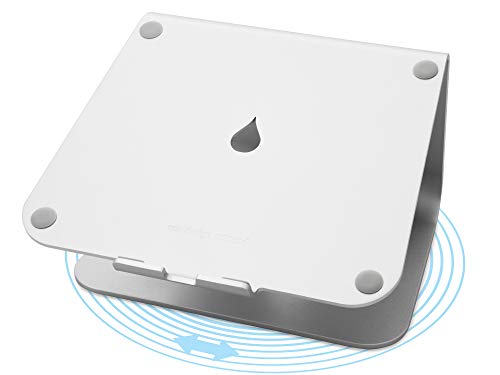
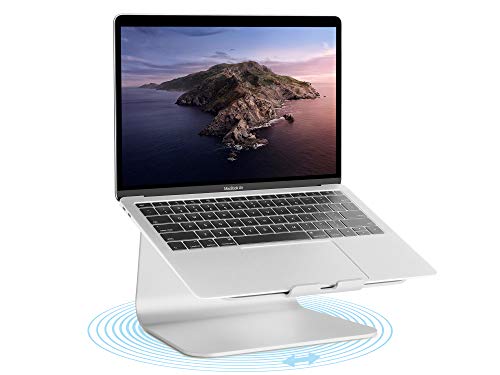
- 🔄 360° patented swivel base — ultra-slim 0.1in profile, smooth ball-bearing rotation
- 🌡️ Aluminum heat sink — draws heat away from MacBook Neo’s fanless chassis passively
- 📐 Fixed tilt design — raises screen to eye level for better posture and airflow
- ⌨️ Keyboard stash space — slides under the stand when not in use, clears desk instantly
- 🔌 Built-in cable outlet — 2in rear channel keeps desk wires organized and hidden
- 🎨 Silver anodized finish — sand-blasted aluminum matches MacBook Neo’s finish precisely
Editor’s Note
Rain Design has been crafting premium aluminum Mac accessories since 2004 — and the mStand360 is their most refined laptop stand to date. Its build quality is first class — this inspired piece of aluminum deserves gold. The mStand360 offers all the same benefits of the original mStand with the added bonus of a low-profile 360° swivel base — giving easy access to all laptop ports and effortless screen sharing with coworkers or clients. For MacBook Neo owners specifically, the stand addresses two real daily limitations: the fanless Neo runs warm under sustained load, and its low screen height creates poor posture for desk work. The mStand360 solves both simultaneously — and does it with the kind of build quality that lasts a decade, not a year.
Pros
- Aluminum heat sink — actively draws heat from MacBook Neo’s fanless chassis during load
- 360° swivel — share screen with coworkers or clients at a single finger push
- Keyboard stash — clears desk instantly, no separate keyboard tray needed
- Rubber-padded surface — MacBook Neo never touches aluminum directly, zero scratch risk
- Single solid aluminum piece — most stable stand construction available at this size
Cons
- Fixed tilt angle — no height or angle adjustment beyond the built-in tilt
- Premium price — higher than basic plastic or foldable stand alternatives
Why We Liked It
The MacBook Neo’s fanless A18 Pro chip design is one of its defining features — silent, efficient, and elegant. But silence comes with a trade-off: no fan means no active cooling, and under sustained load the Neo relies entirely on passive heat dissipation. The mStand360’s single-piece aluminum construction actively serves as a heat sink — drawing warmth away from the Neo’s chassis and dissipating it through the stand itself — a genuinely meaningful thermal benefit that plastic and foldable stands simply cannot replicate. Paired with the stand’s tilt design that improves airflow underneath the laptop, the mStand360 keeps the MacBook Neo running cooler and more consistently during long work sessions than any other stand in this category.
The mStand360 is fully padded with thick rubber feet so the MacBook Neo never touches the aluminum surface itself — zero scratch risk regardless of how long it sits on the stand. The 360° swivel is the feature that earns the mStand360 its place over the standard mStand on a curated accessories list: it comes in handy for sharing your screen with coworkers or clients at the push of a finger — no awkward laptop lifting or repositioning required. The honest trade-off is portability — the lack of height adjustability could be a downside for some users , and the single solid aluminum construction makes it a permanent desk fixture rather than a travel companion. For MacBook Neo owners building a dedicated desk setup, that’s exactly what it’s designed to be.
Rain Design mStand360 Laptop Stand
Best For: MacBook Neo desk users who want a premium aluminum stand that improves posture, reduces heat buildup on the fanless Neo, and transforms their laptop into a stylish fixed workstation.
Summary
The Rain Design mStand360 is the MacBook Neo stand built to last a decade on your desk. Single-piece aluminum construction, passive heat sink cooling for the fanless Neo, a patented 360° swivel base, and a silver finish that matches Apple’s notebooks precisely — all in one elegant, stable package. It’s not portable and it’s not adjustable — it’s a permanent desk upgrade that makes the MacBook Neo genuinely more comfortable, cooler, and more collaborative to use every single day.
Final Thoughts
The MacBook Neo is a brilliant starting point — and the right accessories make it genuinely complete. A protective case or sleeve keeps your investment safe from day one. A USB-C hub turns its two-port limitation into a full desk workstation. A dual-port GaN charger replaces the stock adapter with something actually useful. A silent wireless mouse extends what the trackpad can’t reach. And a premium aluminum stand keeps the fanless Neo cool, ergonomic, and desk-ready for hours at a time.
None of these picks are luxury purchases — every product on this list was chosen for best price-to-performance ratio, not premium branding. Spend wisely, buy once, and your MacBook Neo will feel like a significantly more capable machine from the first day you use it with the right setup around it.
What to Look for in MacBook Neo Accessories
Protection First — The Neo Is Worth Protecting
The MacBook Neo brings the full Mac experience in a premium aluminum 13-inch laptop at $599 — and the right accessories protect that investment from day one. Before buying any other accessory, a case or sleeve should be your first purchase. The Neo’s aluminum chassis is beautiful but vulnerable to scratches and dents. A military-grade carrying case protects against drops, a slim sleeve protects against scratches in transit — and both cost significantly less than an out-of-warranty repair.
The Two-Port Problem — Solve It Early
The MacBook Neo lacks a variety of ports — customers used to this price range expect more than just two USB-C ports from their Windows counterpart. A quality USB-C hub turns the Neo’s rear 10Gbps port into a complete connectivity solution — external display, wired internet, USB-A peripherals, and charging from a single connection. One critical detail: only the left USB-C port supports connecting an external monitor — always plug your hub into the correct side.
Charger — Upgrade the Stock Adapter Immediately
The MacBook Neo ships with a single-port 20W stock charger — functional, but limiting. A 45W charger is the minimum worth considering for any MacBook — keep the Apple 20W as a spare and upgrade to a compact dual-port GaN charger for daily use. A dual-port 45W GaN charger charges your Neo and iPhone simultaneously from one wall outlet — a meaningful daily improvement at a very low cost.
Ergonomics — Don’t Skip the Stand
A laptop stand raises the screen closer to eye level, which can reduce neck and shoulder strain — for many users, it’s one of the most impactful MacBook Neo accessories for comfort. For the fanless MacBook Neo specifically, elevation also improves airflow and passive heat dissipation under sustained load. An aluminum stand that doubles as a heat sink is the smartest ergonomic investment for Neo desk users.
Price-to-Performance — What Actually Matters
The MacBook Neo is a $599 laptop — and accessories should reflect that value-first philosophy. On a tight budget, one good sleeve and one reliable USB-C hub cover most people’s needs right away without a big spend. Every pick in this roundup was chosen for best price-to-performance ratio — not premium branding. The goal is a complete, capable setup without spending more on accessories than the laptop itself.
Tips for Getting the Most from Your MacBook Neo Accessories
Always Use the Rear USB-C Port for Your Hub — The MacBook Neo’s two USB-C ports are not equal. The rear left port runs at 10Gbps and supports external display output — always connect your hub here. The front right port runs at USB 2.0 speeds and does not support video output. Plugging a hub into the wrong port silently bottlenecks every connected device and disables display output entirely.
Buy Accessories That Match the Neo’s Portable Philosophy — The MacBook Neo weighs just 2.7 pounds. Every accessory you add should respect that portability. A heavy rugged case, a bulky stand, and an oversized charger defeat the purpose of the Neo’s slim, lightweight design. Every pick in this roundup was chosen to complement the Neo’s portability — not compromise it.
Don’t Overspend on a Charger for the Neo — The Neo’s charging ceiling is 30W. A 140W PD 3.1 charger delivers zero benefit over a compact 45W dual-port GaN charger for MacBook Neo use. Spend the wattage budget on extra ports instead — charging your Neo and iPhone simultaneously from one outlet is worth far more in daily life than excess wattage you’ll never use.
Match Your Case to How You Actually Carry Your Neo — A structured carrying case is ideal for users who carry a full daily kit — charger, hub, and personal items. A slim sleeve is ideal for users who slide the Neo into a backpack alongside other items. Buying the wrong format means carrying more than you need or having less organization than you want. Know your carry style before buying.
Use the Stand Daily, Not Just Occasionally — The MacBook Neo’s fanless design means it relies entirely on passive heat dissipation under sustained load. An aluminum stand that elevates the Neo improves airflow underneath the chassis and acts as a heat sink — meaningfully reducing operating temperatures during long work sessions. This isn’t a luxury — for the fanless Neo, it’s a practical thermal management tool.
Editor’s Tip — Start with the essentials that match your current routine — a protective case or sleeve and a USB-C hub — then slowly upgrade your setup over time as you discover what you reach for most. Buying everything at once often means buying things you don’t need. The MacBook Neo’s strength is simplicity — let your accessories reflect that.
Frequently Asked Questions
What accessories does the MacBook Neo actually need?
For most users, one good sleeve or case and one reliable USB-C hub cover the vast majority of daily needs right away. Beyond those two essentials, a dual-port GaN charger replaces the underwhelming stock adapter, and a stand improves both ergonomics and passive cooling for the fanless Neo. A wireless mouse extends productivity beyond the trackpad for desk use. Start with the hub and case — add the rest as your workflow demands them.
Does the MacBook Neo work with any USB-C hub?
Most quality USB-C hubs work with the MacBook Neo — but performance varies significantly based on which port you use. Only the left USB-C port supports external display output and runs at full USB 3 speeds — the right port is USB 2.0 only. Always plug your hub into the left port. Additionally, confirm your hub supports DP Alt Mode for display output — not all USB-C hubs do. Every hub pick in this roundup is confirmed compatible with the MacBook Neo’s left port.
Can the MacBook Neo support dual monitors?
Not natively. The Neo supports one external monitor out of the box. For a second display, you need a hub with DisplayLink technology — like the HyperDrive Next Dual 4K HDMI 7-Port USB-C Hub — which uses software-based rendering to add a second extended display. DisplayLink requires a free driver install that takes about two minutes to set up. One important limitation: DisplayLink does not support DRM-protected streaming like Netflix in Safari — use Chrome or your MacBook screen for that.
Is a laptop stand worth buying for the MacBook Neo specifically?
Yes — and more so than for any other MacBook. A stand raises the screen closer to eye level for better posture and reduces neck and shoulder strain during long sessions. For the MacBook Neo specifically, elevation also improves airflow underneath the fanless chassis — a meaningful thermal benefit that helps maintain consistent performance under sustained load. An aluminum stand that doubles as a passive heat sink is the most practical desk upgrade for Neo owners.
Will MacBook Air M1/M2/M3/M4 accessories fit the MacBook Neo?
Cases and sleeves designed for 13-inch MacBook Air models generally fit the MacBook Neo well — both share a similar 13-inch footprint. However, always verify the specific model compatibility listed on the product page before buying. USB-C hubs, chargers, mice, and stands are universally compatible regardless of MacBook model as long as they support USB-C connectivity.
Written by Metin Karal
Metin Karal is a Computer Engineer with over 25 years of experience working with internet technologies, trends, and digital tools since 1995. He brings this deep background into his product reviews, combining technical expertise with careful research to deliver honest, practical insights for readers. Passionate about technology, Metin also enjoys programming in C# and is currently developing PairMem, a challenging memory game available for free on the official Microsoft Store.
How We Selected These Products
We recommend these items based on a thorough research process designed to highlight the best options available. While we did not physically test some products ourselves, we relied on detailed research and verified customer feedback to evaluate them.
- Detailed Research: We reviewed product specifications, manufacturer information, and feature lists to understand what each item offers.
- Customer Insights: We analyzed verified buyer reviews and ratings to learn how these products perform in real-world use.
- Comparison Factors: We compared products across price, durability, usability, and unique features to identify the strongest choices.
- Personal Experience: With over 25 years of working in internet-related technologies and following online trends since 1995, I bring a deep understanding of how products are marketed, evaluated, and used. This background helps me filter out hype and focus on what truly matters for everyday users.
- Balanced Evaluation: Our goal is to provide clear, unbiased information so you can make confident purchasing decisions.
See also How We Review Products section for more details on our process.


Pingback: 5 Best USB-C Hub for MacBook Neo (2026) — Complete Buyer's Guide
Pingback: 7 Best MacBook Neo Case & Sleeve (2026) — Complete Buyer's Guide
Pingback: 6 Best MacBook Neo Charger (2026) — Faster Than Apple's Stock Adapter
Pingback: Best Budget MacBooks in 2026