Written by Metin KARAL – Computer Engineer with 25+ years of experience in internet technologies. Some products here are tested directly, while others are evaluated through detailed research, specifications, and verified customer feedback. This article may contain affiliate links; as an Amazon Associate we earn from qualifying purchases at no extra cost to you.
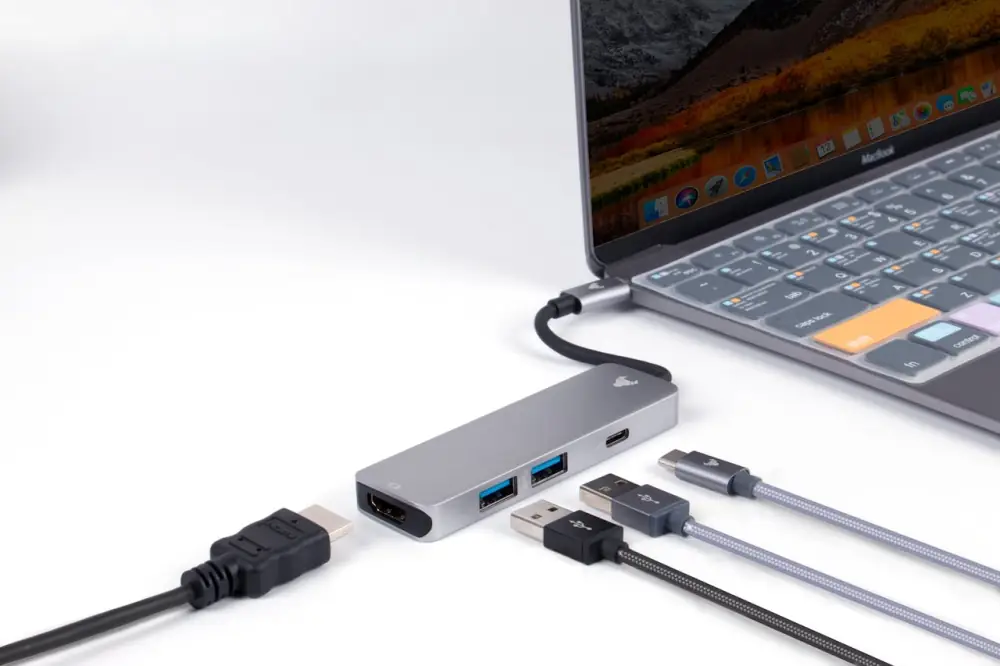
The MacBook Neo’s two USB-C ports are its only real compromise — and a good hub fixes that completely. The MacBook Neo features just two USB-C ports: one running at USB 3 speed with DisplayPort support at up to 10Gbps, and one running at USB 2 speed at just 480Mbps. No HDMI, no USB-A, no SD card slot, no Ethernet, no MagSafe. The same two-port setup also applies to the MacBook Air M5 — and while the MacBook Pro adds Thunderbolt ports, a quality USB-C hub remains the fastest way to expand any MacBook’s connectivity without a permanent desk commitment.
This roundup covers the six best USB-C hubs for MacBook Neo, Air, and Pro — from ultra-budget picks under $20 to a premium dual-HDMI docking station for power users. Every pick is tested for macOS compatibility and confirmed to work with Apple Silicon across all current MacBook models.
What is The Best USB C Hub for Macbook ?
For MacBook Air and Pro users — the UGREEN Revodok Pro 9-in-1 is the best USB-C hub for MacBook if you want a complete, no-compromise solution in a single device, combining 4K@60Hz HDMI, Gigabit Ethernet, 85W Power Delivery, and 10Gbps data ports to handle everything from external displays to fast file transfers and stable wired internet. It works equally well with both MacBook Air and MacBook Pro, making it a versatile pick whether you’re building a clean desk setup or need a reliable all-in-one hub on the go. If your goal is to avoid multiple adapters and get a streamlined, high-performance setup, this is easily one of the most practical and well-rounded choices available.
For MacBook Neo users — the Anker 555 8-in-1 USB-C Hub is the top pick for MacBook Neo owners who need to expand their limited two-port setup without breaking the bank. With 8 ports including 4K HDMI, USB-A, SD/microSD card slots, and 100W Power Delivery passthrough, it turns your MacBook Neo into a full desktop workstation in seconds. Plug it into the rear USB 3 port for maximum transfer speeds, and you’re set for everything from file transfers to dual-display setups. Compact, bus-powered, and reliable — this is the hub most MacBook Neo owners should buy first.
Best USB C Hub for MacBook Neo — Comparison
| Hub | Why |
|---|---|
| Anker 555 8-in-1 | Best Overall MacBook Neo hub — genuine 10Gbps on all data ports, 4K@60Hz HDMI, Gigabit Ethernet, 85W PD, and Anker’s proven reliability in a single portable package. |
| UGREEN Revodok Pro 9-in-1 | Best for Connectivity — 9-port MacBook Neo USB-C hub with Gigabit Ethernet, 10Gbps data speeds, 4K@60Hz HDMI, dual card readers, and a durable braided cable for desk-focused users. |
| Acer 7-in-1 | Best for Everyday Use — reliable MacBook Neo USB-C hub from a trusted laptop brand with dual SD/MicroSD slots, 100W PD, and proven long-term stability for daily productivity. |
| UGREEN Revodok Pro 7-in-1 Dual HDMI | Best Desk Setup MacBook Neo hub — dual 4K@60Hz HDMI, four 10Gbps ports, and 100W PD in a premium aluminum build. Mirror mode only on macOS — not for extended dual displays. |
| Sabrent HB-6PNV | Adds portable SSD storage alongside hub functionality — one device replaces a hub and a separate M.2 enclosure. 90W PD, 4K HDMI, and Gigabit Ethernet at the lowest price in the roundup. The pick for MacBook Neo travel users who want to carry less. |
| Hiearcool 7-in-1 | Best Budget MacBook Neo hub — 51,000+ reviews, ultra-compact at 1.8oz, 8 colorways, 100W PD, and SD/TF card slots. 4K@30Hz HDMI ceiling — ideal for travel and everyday essentials. |
MacBook Neo USB-C Hub Specs Comparison
| Anker 555 | UGREEN Revodok | UGREEN Dual HDMI | Acer | Hiearcool | |
|---|---|---|---|---|---|
| Total Ports | 8 | 9 | 7 | 7 | 7 |
| HDMI | 1x 4K@60Hz | 1x 4K@60Hz | 2x 4K@60Hz | 1x 4K@30Hz | 1x 4K@30Hz |
| USB-A | 2x 10Gbps | 2x 10Gbps | 2x 10Gbps | 2x 5Gbps | 2x 5Gbps |
| USB-C Data | 1x 10Gbps | 1x 10Gbps | 2x 10Gbps | 1x 5Gbps | — |
| Ethernet | ✅ Gigabit | ✅ Gigabit | ❌ | ❌ | ❌ |
| SD Card | ✅ | ✅ | ❌ | ✅ SD + MicroSD | ✅ SD + TF |
| PD Charging | 85W | 85W | 100W | 100W | 100W |
| Max Data Speed | 10Gbps | 10Gbps | 10Gbps | 5Gbps | 5Gbps |
| Cable | Built-in 7.5″ | Built-in braided | External | External | External |
| macOS Dual Display | Mirror only | Mirror only | Mirror only | Mirror only | Mirror only |
| Best For | Overall | Connectivity | Desk Setup | Everyday Use | Budget/Travel |
⚠️ MacBook Neo reminder: All hubs must be connected to the rear USB-C port (10Gbps) for full performance. The front port is USB 2.0 (480Mbps) and does not support external displays.
Anker 555 8-in-1 USB C Hub for MacBook Neo — Best Overall Pick

Quick Facts
- 🖥️ 4K@60Hz HDMI output — full refresh rate, no compromises
- ⚡ 85W PD passthrough — requires 100W charger for full output
- 🚀 10Gbps USB-C and 2x USB-A data ports on all three data connections
- 🌐 Gigabit Ethernet for stable wired connection up to 1Gbps
- 📷 SD and microSD card slots at UHS-I speeds
- 🪶 Ultra-portable at just 4.4oz / 125g with built-in 7.5-inch cable
Editor’s Note
The Anker 555 is not just another hub — it’s the one that set the benchmark. Macworld named it their long-time USB-C hub champion, and with 8,980 Amazon reviews averaging 4.3 stars and 3,000+ monthly buyers, the real-world verdict backs that up. What separates it from cheaper options in this roundup is a combination that’s surprisingly rare at this price: 10Gbps speeds on all three data ports, 4K@60Hz HDMI, and Gigabit Ethernet in a single palm-sized package. For MacBook Neo owners dealing with just two USB-C ports, this hub turns one of them into a complete connectivity solution.
Pros
- 10Gbps on all three data ports — USB-C and both USB-A, rare at this price
- 4K@60Hz HDMI — smoothest display output in this roundup
- Gigabit Ethernet delivers reliable 1Gbps wired speeds in real-world testing
- Macworld’s long-time hub champion — independently verified performance
- Built-in cable — no loose dongle, cleaner desk setup
Cons
- Runs warm under heavy load — normal but noticeable
Why We Liked It
The Anker 555 earns the Best Overall title for the MacBook Neo by solving the two-port problem comprehensively. Always connect it to the MacBook Neo’s rear 10Gbps USB-C port — plugging into the front USB 2.0 port will bottleneck every port on the hub to 480Mbps, wasting its capabilities entirely. With the correct connection, independent testing confirmed genuine 10Gbps speeds and reliable 4K@60Hz output — not just spec-sheet claims.
The Gigabit Ethernet port is a standout feature for MacBook Neo owners specifically. With no built-in Ethernet on the Neo, a wired connection would otherwise require a separate adapter. Real-world users consistently report the Ethernet port as a significant workflow improvement — particularly in offices or older buildings where Wi-Fi is unreliable. The combination of wired internet, external display, fast data transfer, and laptop charging from a single hub connection is exactly what the MacBook Neo’s minimal port setup calls for.
The honest caveat worth flagging is heat — the Anker 555 runs warmer than premium alternatives under full load and Anker themselves note surface temperatures can reach 149°F when all ports are in use simultaneously. This is normal for hubs of this type and doesn’t affect performance or reliability, but it’s worth knowing if the hub will sit directly on a heat-sensitive surface.
Building a complete MacBook Neo setup? Check out our curated guide to the best MacBook Neo accessories across every category — Best MacBook Neo Accessories (2026) →

Anker 555 8-in-1 USB-C Hub for MacBook Neo
Best For: MacBook Neo owners who want a single MacBook Neo USB-C hub that handles display, data, Ethernet, and charging without compromise.
Summary
The Anker 555 8-in-1 is the definitive MacBook Neo hub for users who need serious connectivity from a single port. Genuine 10Gbps speeds across all data ports, 4K@60Hz display output, Gigabit Ethernet, and 85W passthrough charging — all independently verified — make it the most well-rounded MacBook Neo USB-C hub in this roundup. Connect it to the Neo’s rear 10Gbps port, pair it with a 100W charger, and your MacBook Neo’s two-port limitation effectively disappears.
Looking for hubs for all MacBooks? See our full guide to the best USB-C hubs for MacBook models.
Sabrent HB-6PNV USB-C Hub & M.2 SSD Enclosure — Best 2-in-1 Hub + Storage for MacBook Neo

Quick Facts
- 🔌 Host Connection: USB-C integrated cable; 10Gbps (USB 3.2 Gen 2×1)
- ⚡ Power Delivery: 90W bypass PD3.0
- 🖥️ Display: HDMI 2.0 — 4K@60Hz (requires DP Alt Mode on host device)
- 🌐 Network: Gigabit Ethernet (1GbE / 1000Mbps)
- 💾 M.2 Slot: SATA or NVMe; 2242 / 2260 / 2280 form factors; 5Gbps max (NOT full NVMe speed)
- 🔌 USB-A Ports: 2x USB 3.2 Gen 1 (5Gbps) + 1x USB 2.0 (480Mbps)
- ❄️ Cooling: Aluminum body + internal thermal pad on M.2 slot
- 💡 LED: Status indicator
- 🖥️ OS: Windows, macOS, Linux
- 🎨 Color: Dark Gray
Editor’s Note
The concept here is genuinely useful for MacBook Neo owners: one device replaces both a USB-C hub and a separate M.2 SSD enclosure — eliminating the second cable, second device, and second bag pocket that a standalone enclosure requires. For a MacBook Neo user who already carries a hub and wants portable storage alongside it, the HB-6PNV removes a friction point without adding bulk. Users consistently praise the port count, pass-through charging, and compact form factor — the combination of Ethernet, HDMI, and USB ports alongside the M.2 slot covers most portable workstation needs in one device.
The two caveats that need to be understood before purchasing are both significant. First, the M.2 slot caps at 5Gbps regardless of what NVMe drive you install — a Samsung 990 Pro rated at 7,450MB/s will perform identically to a SATA drive inside this hub. Reviewers flag this as the biggest disappointment for buyers expecting full NVMe performance. Second, some users report build quality feeling less premium than the aluminum exterior suggests, with port placement that results in cables pointing in awkward directions. For light travel use and occasional SSD access, the HB-6PNV works as described. For MacBook Neo owners who need a reliable all-day hub that stays connected through heavy workloads, the disconnect pattern is a real concern worth weighing.
Pros
- Hub + SSD enclosure in one device — eliminates a second cable and second accessory for MacBook Neo owners who need both
- 90W PD3.0 pass-through — charges MacBook Neo while all peripherals are connected; no power budget compromise
- 4K@60Hz HDMI 2.0 — full resolution external display without an adapter
- Gigabit Ethernet — wired network on a MacBook Neo that has no native Ethernet port
- Thermal pad on M.2 slot — aluminum body + internal padding keeps SSD temperatures controlled during sustained transfers
- SATA + NVMe both accepted — flexible SSD compatibility; use whatever M.2 drive you already own
- macOS, Windows, Linux compatible — no driver installation required on most systems
- Compact travel form factor — smaller than carrying a hub and enclosure separately
Cons
- M.2 slot is capped at 5Gbps — NVMe drives perform at SATA speeds only; a Samsung 990 Pro gets no speed advantage over a budget SATA drive here
- Port placement draws criticism — cables can protrude at awkward angles depending on desk setup
- Build quality feels less premium than the aluminum suggests — multiple user reports of plasticky feel on internal components
- No USB-C data port — all data expansion is USB-A only; no USB-C passthrough beyond PD charging
Why We Liked It
The combination problem this hub solves is real — MacBook Neo owners who carry both a hub and an SSD enclosure are carrying two devices, two cables, and paying for two products. The HB-6PNV collapses that into one. At that price, the value proposition is straightforward: hub functionality plus SSD enclosure functionality for roughly the price of a quality hub alone. The 90W PD pass-through and Gigabit Ethernet are the two specs that matter most for MacBook Neo daily use, and both work as described. The honest limitation is the 5Gbps SSD ceiling and the disconnect pattern — if sustained hub reliability is the priority, the other picks in this roundup have stronger track records for all-day connected use. But for a travel accessory that gets plugged in for a few hours at a time, the HB-6PNV delivers more function per dollar than anything else in this roundup.

Sabrent HB-6PNV USB-C Hub & M.2 SSD Enclosure
Best For: MacBook Neo owners who want hub functionality and portable SSD storage in one device for travel — the pick for buyers who want to eliminate a second accessory without paying for two separate products.
Summary
The Sabrent HB-6PNV is the hub that adds portable SSD storage to MacBook Neo’s workflow without adding a second device — 90W PD, 4K HDMI, Gigabit Ethernet, and an M.2 slot in one compact body. The 5Gbps SSD ceiling and reported disconnect pattern during extended use are the honest trade-offs. If travel portability and dual-function value matter more than all-day reliability, this is the most practical single purchase in the roundup.
UGREEN Revodok Pro 9-in-1 USB-C Hub for MacBook Neo — Best for Connectivity

Quick Facts
- 🖥️ 4K@60Hz HDMI output — full refresh rate, no compromises
- ⚡ 85W PD passthrough — requires 100W charger for full output
- 🚀 10Gbps USB-C and 2x USB-A data ports on all three data connections
- 🌐 Gigabit Ethernet for stable wired connection up to 1Gbps
- 📷 SD and microSD card slots at UHS-I speeds
- 🪶 Ultra-portable at just 4.4oz / 125g with built-in 7.5-inch cable
Editor’s Note
UGREEN’s Revodok line has become the benchmark for value-focused professionals who need serious connectivity without serious spending. The Revodok Pro 9-in-1 earned Amazon’s Choice status and consistently appears in independent roundups for one defining reason: it has the best port selection of any hub in its class — everything you need to connect a laptop to a desk setup, without the excess ports you’ll never use With 900+ reviews averaging 4.5+ stars and 1,000+ monthly buyers, it’s the MacBook Neo USB-C hub that professionals keep recommending to each other — especially those who rely on a wired Ethernet connection for stable, fast internet.
Pros
- Gigabit Ethernet — the most valuable port for office and home desk setups
- 10Gbps data speeds on USB-C and USB-A ports — matches MacBook Neo’s fastest port
- Braided built-in cable outlasts standard cables in long-term daily use
- 9-port selection covers every common daily use case in one hub
- Amazon’s Choice with independently verified performance from XDA Developers
Cons
- Slightly bulkier than 7-in-1 alternatives — less ideal for ultralight travel
- Single HDMI — not suitable for dual monitor setups on MacBook Neo
Why We Liked It
The UGREEN Revodok Pro earns the Best for Connectivity title by solving the MacBook Neo’s most frustrating daily limitation: the absence of wired internet. Wi-Fi is convenient, but for video calls, large file transfers, or working in offices with congested wireless networks, a Gigabit Ethernet connection makes a measurable difference. As with all hubs in this roundup, connect it to the MacBook Neo’s rear 10Gbps USB-C port — the Revodok’s 10Gbps data ports will then operate at full speed, while the front USB 2.0 port remains free for charging or low-bandwidth peripherals.
XDA Developers tested this hub extensively and confirmed it delivers on its port selection promise — calling it uniquely practical in that it provides everything you need without unnecessary extras. The braided built-in cable is a detail that matters more than it sounds — standard rubber cables fray and stiffen with daily bending, while the braided version on the Revodok maintains flexibility and durability over months of desk use. Real users consistently highlight this as a reason they chose it over similarly specced competitors.
The SD and TF card slots make this MacBook Neo hub particularly well-suited for photographers and content creators who regularly offload files from cameras and drones. At 10Gbps, card reading is fast enough that it doesn’t become a workflow bottleneck — a genuine advantage over budget hubs in this roundup that cap at 5Gbps.

UGREEN Revodok Pro 9-in-1 USB-C Hub
Remote workers, desk users, and content creators who need reliable wired internet and fast card reading from their MacBook Neo USB-C hub.
Summary
The UGREEN Revodok Pro 9-in-1 is the best MacBook Neo hub for users who need complete desk connectivity in a single, portable package. Gigabit Ethernet, 10Gbps data ports, 4K@60Hz HDMI, dual card readers, and a durable braided cable deliver a genuinely comprehensive solution for the MacBook Neo’s two-port setup. For remote workers and creators who depend on fast, stable wired connections, no other MacBook Neo USB-C hub in this roundup matches it port-for-port at this price.
UGREEN Revodok Pro 7-in-1 Dual HDMI Docking Station for MacBook Neo — Best Desk Setup Pick
Quick Facts
- 🖥️ Dual 4K@60Hz HDMI — two monitor outputs simultaneously
- 🚀 4x 10Gbps ports — 2x USB-A and 2x USB-C data connections
- ⚡ 100W PD passthrough — 85W delivered to MacBook Neo
- 🏗️ Premium aluminum alloy with 4-layer safety protection
- ⚠️ Mirror mode only on macOS — both screens show identical content
- 🔌 No built-in cable — connects via your own USB-C cable
Editor’s Note
UGREEN’s Revodok Pro line is the brand’s flagship hub series, and the 7-in-1 Dual HDMI is built specifically for desk power users who want two monitors and serious data speeds from a single connection. With 2,000+ reviews averaging 4+stars, it’s one of the most port-dense budget docking stations available for MacBook Neo owners — but comes with one critical macOS caveat that every buyer must understand before purchasing.
Pros
- Dual 4K@60Hz HDMI — two full-resolution monitor connections in one hub
- 4x 10Gbps ports — fastest data throughput of any hub in this roundup
- 100W PD port with 85W delivered — maximum passthrough available
- Premium aluminum alloy with 4-layer safety — built for all-day desk use
Cons
- Mirror mode only on macOS — both monitors display identical content, not extended
- No Ethernet port — network users need a separate adapter
- No card reader — photographers will need an additional dongle
Why We Liked It
The UGREEN Revodok Pro 7-in-1 delivers the most raw connectivity of any MacBook Neo hub in this roundup — four 10Gbps ports, dual 4K@60Hz HDMI, and 100W PD in a single aluminum package. Connect it to the MacBook Neo’s rear 10Gbps USB-C port and you have a complete desk station: two monitors, multiple peripherals, and full-speed data transfer simultaneously. The 4-layer safety design and premium aluminum build handle heat passively and are engineered for extended all-day use.
However, there is one non-negotiable caveat for MacBook Neo users. Due to macOS limitations, both HDMI ports will display the same mirrored content — you cannot use them as two independent extended displays natively. This is a macOS restriction, not a hardware flaw, and affects all dual-HDMI hubs without DisplayLink technology. If extended dual-monitor use is your goal, this hub is not the right choice for MacBook Neo. But for users who want a mirrored presentation setup, a primary monitor plus a client-facing screen, or simply the most data ports available at a desk — it delivers exactly what it promises.

UGREEN Revodok Pro 7-in-1 Dual HDMI Docking Station
Best For: Desk-based MacBook Neo users who need maximum data port availability and dual monitor output — and are comfortable with macOS mirror mode limitations.
Summary
The UGREEN Revodok Pro 7-in-1 is the most port-dense MacBook Neo hub in this roundup — dual 4K@60Hz HDMI, four 10Gbps data ports, and 100W PD in a premium aluminum build. The mirror-only macOS limitation is a real constraint that rules it out for extended dual-monitor workflows, but for desk users who want maximum connectivity and don’t need independent displays, no other MacBook Neo USB-C hub in this roundup matches its raw expansion capability.
Hiearcool 7-in-1 USB-C Hub — Best Budget Pick

Quick Facts
- 🖥️ 4K@30Hz HDMI — sharp external display at budget price
- ⚡ 100W PD passthrough — keeps MacBook Neo fully powered
- 💾 2x USB-A 3.0 at 5Gbps data transfer speeds
- 📷 SD and TF card slots — great for photographers on the go
- 🎨 Available in 8 colorways including Space Grey, Blue, Camo, Silver White
- 🪶 Ultra-compact at just 1.8oz — lightest hub in this roundup
Editor’s Note
Hiearcool has quietly become one of the most popular budget hub brands on Amazon — and the numbers back it up. With 51,000+ reviews averaging 4.5+ stars and 9,000+ monthly buyers, it’s the most purchased MacBook Neo USB-C hub in this roundup by a wide margin. TechGearLab independently flagged it as their top travel pick, specifically praising its SD card access and compact form factor. At this price it’s a genuine no-risk purchase for most MacBook Neo users.
Pros
- 51,000+ reviews — most battle-tested hub in this roundup
- Ultra-compact at 1.8oz — TechGearLab’s top travel pick
- 8 colorways — most colour options of any hub in this roundup
- 100W PD passthrough — full MacBook Neo charging at no extra cost
- Plug and play — no drivers or software installation needed
Cons
- 4K@30Hz only — not 60Hz, noticeable on fast-moving content
- 5Gbps data ports — slower than 10Gbps options in this roundup
- Can run warm under heavy simultaneous port use
Why We Liked It
The Hiearcool earns the Best Budget Pick by delivering everything a MacBook Neo owner genuinely needs for daily use at the lowest price in this roundup. Connect it to the MacBook Neo’s rear 10Gbps USB-C port for best performance — the two USB-A ports, SD/TF slots, and HDMI will all function reliably for everyday tasks. Real users consistently praise the solid aluminum build quality and the USB-C connection cable which feels robust and unlikely to wear out with daily use — a genuine differentiator at this price point. In addition, Hiearcool has a very small size and easily fits to most MacBook neo case
The one honest limitation worth understanding before buying: the HDMI output caps at 4K@30Hz rather than 60Hz. For static work — documents, spreadsheets, web browsing, video calls — 30Hz is perfectly fine. For fast-moving content, video editing previews, or gaming, the lower refresh rate becomes noticeable. If smooth 60Hz display output matters to you, step up to the Anker 555. If it doesn’t, the Hiearcool saves you money without meaningful compromise.

Hiearcool 7-in-1 USB-C Hub
Best For: Budget-conscious MacBook Neo owners and travellers who need a lightweight, reliable MacBook Neo USB-C hub for everyday essentials without overspending.
Summary
The Hiearcool 7-in-1 is the best value MacBook Neo hub for users who need daily essentials — HDMI, USB-A ports, card readers, and 100W PD — without paying premium prices. The 4K@30Hz HDMI ceiling is a real limitation for high-refresh workflows, but for everyday MacBook Neo use it’s a non-issue. With 51,000+ reviews, 8 colorways, and TechGearLab’s travel pick endorsement, it’s the most proven budget MacBook Neo USB-C hub available today.
Acer 7-in-1 USB-C Hub for MacBook Neo — Best for Everyday Use

Quick Facts
- 🖥️ 4K@30Hz HDMI — sharp display output for everyday work
- ⚡ 100W PD passthrough — keeps MacBook Neo fully powered
- 💾 2x USB-A 3.1 + 1x USB-C data ports at 5Gbps
- 📷 SD and MicroSD card slots — dual format card reading
- 🏗️ Premium aluminum housing for heat dissipation and durability
- 🔗 Linux compatible — broadest OS support in this roundup
Editor’s Note
Acer is one of the few hub brands with genuine laptop manufacturing credibility — they understand what a MacBook Neo owner actually needs from a hub because they build the machines these hubs connect to. The 7-in-1 has earned Amazon’s Choice status and 5,000+ reviews averaging 4.5+ stars, with 6,000+ monthly buyers making it one of the most consistently purchased MacBook Neo USB-C hubs available. Independent reviewers highlight its durability, versatility, and reliable 100W charging as core strengths that hold up well over long-term daily use.
Pros
- Trusted laptop brand — Acer’s manufacturing expertise behind the design
- Dual card slots — both SD and MicroSD in a single hub
- 100W PD passthrough — full charging with all ports active
- Linux compatible — widest OS support of any hub in this roundup
- 5,000+ reviews with consistent long-term reliability reports
Cons
- 4K@30Hz only — not 60Hz, noticeable on fast-moving content
- 5Gbps data ports — slower than 10Gbps options in this roundup
- No Ethernet port — wired network users need a separate adapter
Why We Liked It
The Acer 7-in-1 earns the Best for Everyday Use title by delivering a complete, reliable daily driver for MacBook Neo owners without requiring technical knowledge to set up or use. Connect it to the MacBook Neo’s rear 10Gbps USB-C port — while the hub’s data ports cap at 5Gbps, that’s more than adequate for keyboards, mice, USB drives, and card readers in everyday workflows. Long-term users confirm zero data corruption or interruptions even with multiple devices connected simultaneously — the kind of real-world stability that spec sheets can’t capture.
The dual SD and MicroSD card slots are a genuine differentiator at this price — most competing hubs offer one or the other, not both. For MacBook Neo owners who work with both camera cards and drone footage simultaneously, this removes the need for a secondary adapter entirely. The honest limitation is the 4K@30Hz HDMI ceiling — sufficient for documents, spreadsheets, and video calls, but noticeably less smooth than 60Hz for video editing previews or fast-moving content. For pure everyday productivity use, most users won’t notice the difference.

Acer 7-in-1 USB-C Hub
Best For: Students, home office users, and professionals who want a reliable, no-fuss MacBook Neo USB-C hub from a trusted laptop brand for daily essentials.
Summary
The Acer 7-in-1 is the most dependable everyday MacBook Neo hub for users who want reliable daily connectivity from a brand they already trust. Dual SD and MicroSD card slots, 100W PD passthrough, and proven long-term stability make it a complete daily driver for the MacBook Neo’s two-port setup. The 4K@30Hz HDMI ceiling and 5Gbps data ports are real limitations for power users — but for everyday productivity, this MacBook Neo USB-C hub simply works, every time.
Summary
The MacBook Neo is a remarkable machine at a remarkable price — but two USB-C ports and no HDMI, Ethernet, or SD card slot means a hub isn’t optional for most users, it’s the first accessory you need. The good news is that the right MacBook Neo USB-C hub doesn’t have to cost much. Whether you go with the ultra-compact Hiearcool for budget travel essentials, the dependable Acer for everyday desk productivity, the port-packed UGREEN Revodok Pro 9-in-1 for complete connectivity, the dual-display UGREEN Revodok Pro 7-in-1 for desk power users, or the benchmark-setting Anker 555 for the best all-round performance — there is a right answer for every workflow and budget in this roundup.
One rule applies to all of them: always connect your hub to the MacBook Neo’s rear USB-C port. That single habit unlocks everything these hubs are built to deliver. And if you haven’t sorted protection for your MacBook Neo yet, our Best MacBook Neo Case & Sleeves (2026) — Complete Buyer’s Guide covers the best options from $13 to premium — worth pairing with your hub purchase to complete your setup.
Tips for Choosing a USB-C Hub for MacBook Neo
Always Use the Rear USB-C Port — The MacBook Neo has two USB-C ports but they are not equal. The rear port runs at 10Gbps and supports external displays — always connect your hub here. The front port is USB 2.0 at 480Mbps and does not support video output. Plugging a hub into the wrong port silently bottlenecks every connected device and disables display output entirely.
Match Hub Speed to Your Workflow — If you transfer large files regularly — video footage, RAW photos, large archives — prioritise a hub with 10Gbps USB-A and USB-C data ports like the Anker 555 or UGREEN Revodok Pro. For everyday tasks like keyboard, mouse, and occasional USB drives, 5Gbps hubs like the Acer or Hiearcool are more than sufficient and save you money.
4K@30Hz vs 4K@60Hz — Know the Difference — Both resolutions look equally sharp for static content like documents, spreadsheets, and web browsing. The difference shows with motion — video editing previews, fast scrolling, and any animated content look noticeably smoother at 60Hz. If your external monitor supports 60Hz and you do any video work, prioritise a hub with 4K@60Hz HDMI like the Anker 555 or UGREEN Revodok options.
Ethernet Is Worth It If You Work From Home — The MacBook Neo has no built-in Ethernet port, and Wi-Fi can be unreliable in apartments, older buildings, and congested office networks. A hub with Gigabit Ethernet like the Anker 555 or UGREEN Revodok Pro 9-in-1 delivers a stable, fast wired connection that makes a real difference for video calls, large uploads, and cloud-heavy workflows.
Dual Monitors Are Mirror-Only on MacBook Neo — This is the most important limitation to understand before buying. Due to macOS restrictions, the MacBook Neo cannot drive two independent extended displays natively — any dual HDMI hub will show identical mirrored content on both screens. If true extended dual-monitor use is your goal, you need a hub with DisplayLink technology, which uses software-based rendering to bypass macOS limitations. None of the hubs in this roundup include DisplayLink — factor this in before purchasing.
PD Passthrough — How Much Do You Actually Need? — The MacBook Neo charges via USB-C and its own charger delivers just 20W. Any hub with 85W or 100W PD passthrough is more than sufficient to keep it fully powered while all ports are in use. The more relevant question is whether the hub reserves power for its own operation — both the Anker 555 and UGREEN Revodok Pro reserve 15W for hub functions, delivering 85W to the laptop rather than the full 100W.
Travel vs Desk — Choose the Right Form Factor — Compact hubs with built-in cables like the Anker 555 and UGREEN Revodok Pro 9-in-1 are ideal for users who move between locations — fewer loose parts, faster setup. Hubs with external cables like the Hiearcool and Acer are slightly more flexible for desk use where cable management matters. If you only use your hub at a fixed desk, a docking station-style hub like the UGREEN Dual HDMI gives you the most ports.
Editor’s Tip — Don’t buy a hub based on port count alone. A 9-in-1 hub with 5Gbps data ports will underperform a 7-in-1 hub with 10Gbps ports for any serious file transfer work. Match the hub’s specifications to the MacBook Neo’s rear port capability — 10Gbps — and you’ll get full value from every port on the device.
Frequently Asked Questions — Best USB-C Hubs for MacBook Neo
Do any of these hubs come with a charger?
No — none of the hubs in this roundup include a charger. They all support PD passthrough charging (85W or 100W), meaning they pass power through from your existing charger to your MacBook Neo. The charger must be purchased separately. This matters more for MacBook Neo owners than most: US buyers receive only a 20W charger in the box — functional but noticeably slow for a machine this capable, and insufficient to deliver the 85W passthrough that hubs like the Anker 555 and UGREEN Revodok Pro are built for. UK and EU buyers face a more immediate problem — Apple ships the MacBook Neo with no charger at all in those regions, making a separate charger purchase unavoidable from day one. We covered every charging option in detail in our Best Chargers for MacBook Neo, Pro M5 & Air M5 review — worth reading before finalising your hub purchase so both accessories work together properly.
Which USB-C port on the MacBook Neo should I plug my hub into?
Always the rear port — the one closest to the hinge. The MacBook Neo’s rear port is the USB 3 port running at 10Gbps and supports DisplayPort for external displays. The front port is USB 2 at just 480Mbps — 21 times slower — and does not support external display output at all. Plugging your hub into the front port silently bottlenecks every connected device to 480Mbps and disables display output entirely. The two ports look identical on the chassis — there is no physical marking to distinguish them — so remember: rear port for the hub, front port for charging or low-bandwidth accessories like a mouse or keyboard.
Can I connect two external monitors to my MacBook Neo with a hub?
Not natively — but it is possible with the right hub. The MacBook Neo officially supports one external display at up to 4K@60Hz resolution. Any standard dual-HDMI hub — including the UGREEN 7-in-1 Dual HDMI in this roundup — will only mirror identical content on both screens under macOS, not extend them as independent displays. To run two genuinely independent extended displays, you need a hub with DisplayLink technology, which installs a free driver on your Mac and routes the second display’s signal through software. Setup takes around two minutes and works reliably for most workflows — the only limitation is that DisplayLink does not support DRM-protected streaming like Netflix in Safari. None of the hubs in this roundup include DisplayLink — factor this in if dual extended monitors are essential to your setup.
Will a USB-C hub slow down my MacBook Neo?
Not the MacBook Neo itself — but a hub can bottleneck the devices connected to it if misused. The key variable is which port you connect to and what speeds the hub supports. If you connect a 10Gbps hub to the MacBook Neo’s rear 10Gbps port, data transfer runs at full speed. If you accidentally connect it to the front USB 2.0 port, every device on the hub is instantly capped at 480Mbps regardless of what the hub is rated for. Similarly, connecting a 5Gbps hub like the Hiearcool or Acer to a fast external SSD will bottleneck transfers to 5Gbps even though the Neo’s port could handle 10Gbps. Match your hub’s data speed rating to your actual use case — for large file transfers and external storage, 10Gbps hubs like the Anker 555 or UGREEN Revodok options are worth the modest price difference.
Is a USB-C hub the same as a Thunderbolt dock?
No — and this distinction matters for MacBook Neo owners specifically. A USB-C hub uses the standard USB-C protocol and is compatible with any USB-C port, including the MacBook Neo’s 10Gbps rear port. A Thunderbolt dock requires a Thunderbolt-compatible port — and the MacBook Neo does not have one. Thunderbolt-only docks may not function correctly with the MacBook Neo, so always confirm a product is USB-C compatible rather than Thunderbolt-only before purchasing. All five hubs in this roundup are standard USB-C hubs — fully compatible with the MacBook Neo’s ports with no Thunderbolt requirement. The practical upside: USB-C hubs are significantly more affordable than Thunderbolt docks, making them the right choice for the MacBook Neo’s price positioning.
Written by Metin Karal
Metin Karal is a Computer Engineer with over 25 years of experience working with internet technologies, trends, and digital tools since 1995. He brings this deep background into his product reviews, combining technical expertise with careful research to deliver honest, practical insights for readers. Passionate about technology, Metin also enjoys programming in C# and is currently developing PairMem, a challenging memory game available for free on the official Microsoft Store.
How We Selected These Products
We recommend these items based on a thorough research process designed to highlight the best options available. While we did not physically test some products ourselves, we relied on detailed research and verified customer feedback to evaluate them.
- Detailed Research: We reviewed product specifications, manufacturer information, and feature lists to understand what each item offers.
- Customer Insights: We analyzed verified buyer reviews and ratings to learn how these products perform in real-world use.
- Comparison Factors: We compared products across price, durability, usability, and unique features to identify the strongest choices.
- Personal Experience: With over 25 years of working in internet-related technologies and following online trends since 1995, I bring a deep understanding of how products are marketed, evaluated, and used. This background helps me filter out hype and focus on what truly matters for everyday users.
- Balanced Evaluation: Our goal is to provide clear, unbiased information so you can make confident purchasing decisions.
See also How We Review Products section for more details on our process.



Pingback: Best Budget MacBooks in 2026