Written by Metin KARAL – Computer Engineer with 25+ years of experience in internet technologies. Some products here are tested directly, while others are evaluated through detailed research, specifications, and verified customer feedback. This article may contain affiliate links; as an Amazon Associate we earn from qualifying purchases at no extra cost to you.
A good home office desk can significantly improve your comfort, productivity, and overall workflow. From compact setups for small spaces to spacious desks for multi-monitor use and ergonomic standing options, each type serves a different need. In this guide, we’ve selected the best home office desks for 2026, including budget, storage, L-shaped, and standing desks—so you can find the right fit for your space and working style.
Quick Comparison – Best Home Office Desks (2026)
| Desk | Size | Key Features | Assembly | Best For |
|---|---|---|---|---|
| FLEXISPOT EN1 | 48″ | One-piece top, 4 presets, stable frame | ⭐ Easy | Best Overall |
| ErGear Standing Desk | 48″ | Budget electric, memory presets | ⭐⭐ Moderate | Best Budget Standing Desk |
| HUANUO w/ Drawers | 48″ | 2 drawers, C-clamp support, presets | ⭐⭐ Moderate | Best Standing Desk with Storage |
| SHW 55″ Desk | 55″ | Large surface, drawer, cable mgmt | ⭐⭐⭐ Moderate+ | Best Large Desk |
| AODK L-Shaped Desk | 53″ | LED lights, power outlets, shelves | ⭐⭐⭐ Moderate+ | Best Gaming Setup |
| HOMCOM Rotating Desk | ~47″ | 360° rotating design, shelves | ⭐⭐⭐ Moderate+ | Best Corner Space Saver |
| Huuger 47″ Desk | 47″ | 4 drawers, power outlets, LED | ⭐⭐⭐ Moderate+ | Best Storage Desk |
| DUMOS 32″ Desk | 32″ | Minimal, X-frame stability | ⭐ Very Easy | Best Small Bud |
How to Read This Table
- ⭐ = Assembly Difficulty Level
- ⭐ Very Easy → beginner-friendly (15–30 min)
- ⭐⭐ Moderate → standard setup (45–60 min)
- ⭐⭐⭐ Moderate+ → more complex (1–2 hours)
- Standing desks dominate for ergonomics
- L-shaped desks dominate for space efficiency
- Standard desks dominate for simplicity & price
FLEXISPOT EN1 One-Piece Standing Desk (Best Overall)

Quick Facts
- 🧱 Type: Electric height-adjustable standing desk
- 📏 Size: 48″ x 24″ seamless one-piece desktop
- 🪵 Top Material: Engineered wood (FSC-certified depending on variant)
- 🧱 Frame: Industrial-grade alloy steel
- ⚙️ Height Range: ~28.9″ to 46.5″
- 💾 Memory Presets: 4 programmable height settings
- ⚖️ Load Capacity: Up to ~176 lbs
- 🔌 Use Case: Home office, gaming, dual-monitor productivity setups
- 🧩 Assembly Style: Modular frame + one-piece desktop
Editor’s Note
The FLEXISPOT EN1 stands out as a well-balanced, reliable standing desk that delivers strong performance across stability, ergonomics, and everyday usability. Its one-piece desktop design is a key advantage, reducing flex and creating a more solid working surface compared to split-top desks in the same category.
From an assembly perspective, this model is easier than most electric standing desks. The simplified structure and reduced number of tabletop components make the setup process more straightforward than typical multi-panel designs. Based on common user experiences with FLEXISPOT desks, most users can complete assembly without major issues, even without prior furniture-building experience.
However, like all motorized desks, it still requires careful frame alignment and proper tightening of bolts to ensure long-term stability. Overall, it offers a good balance between build quality and assembly simplicity, making it a strong choice for both beginners and experienced users.
If you’re assembling your desk yourself, having the right tools makes the process much easier. You can check out our guide to Best Home Improvement Tools Under $20 on Amazon for affordable essentials that speed up setup.
Pros
- Extremely stable even at full height
- Seamless desktop improves durability and aesthetics
- Smooth and quiet motorized height adjustment
- Excellent ergonomics for long working hours
- Strong support for dual-monitor setups
Cons
- Assembly can be time-consuming and physically demanding
- No built-in storage or drawers
- Cable management system not included
Why We Liked It
The FLEXISPOT EN1 stands out because it focuses on core stability and ergonomic consistency instead of unnecessary features. The desk feels solid even during height adjustments, which is something many budget standing desks struggle with.
The one-piece desktop design improves rigidity and creates a more seamless workspace compared to split-top alternatives. This makes it especially reliable for users running dual-monitor or heavy productivity setups.
It also performs well in everyday use, with smooth height transitions that make switching between sitting and standing effortless. While it doesn’t include storage or extras, this simplicity helps it stay durable and distraction-free.

FLEXISPOT EN1 One-Piece Standing Desk
Best For: Best suited for users who want a stable, long-term home office desk focused on ergonomics, durability, and consistent daily performance.
Summary
The FLEXISPOT EN1 is a stable and ergonomic standing desk built for daily productivity use. Its seamless desktop improves durability and provides a solid, wobble-free workspace for demanding setups. The electric lift system is smooth and reliable, making posture changes easy throughout the day. While it lacks storage or extra features, this helps maintain its clean and durable design. It is especially effective for dual-monitor and long-hour work environments. Overall, it is a dependable foundation for a serious home office setup.
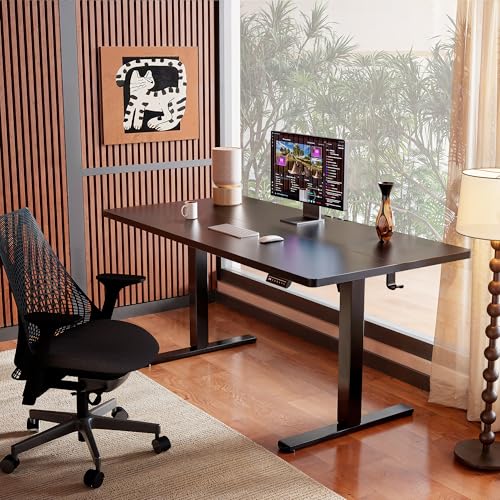
ErGear Height Adjustable Electric Standing Desk (Best Budget Standing Desk)

Quick Facts
- 🧱 Type: Electric height-adjustable standing desk
- 📏 Size: 47.2″ x 23.6″ workspace
- 🪵 Top Material: Engineered wood (laminated finish)
- 🧱 Frame: Heavy-duty carbon steel frame
- ⚙️ Height Range: ~28.3″ to 46.4″
- 💾 Memory Presets: 4 programmable height settings
- ⚖️ Load Capacity: Suitable for dual-monitor + laptop setups
- 🔌 Use Case: Home office, study, gaming, budget workstation
- 🧩 Assembly Style: Modular frame with pre-cut tabletop
Editor’s Note
The ErGear standing desk is one of the strongest entry-level electric standing desks, offering essential sit-stand functionality at a very accessible price point. It focuses on delivering the core experience—motorized height adjustment and memory presets—without adding complexity or premium extras.
In terms of assembly, this desk is moderately easy to set up, especially compared to more feature-heavy models. The structure follows a standard modular design, with separate frame and tabletop components, but the overall process remains manageable due to its simplified feature set and lighter build.
Most users can assemble it without difficulty, though some time is required for motor installation and frame alignment, which are typical for electric desks in this category. Overall, it strikes a good balance between affordability and usability, including a relatively beginner-friendly assembly process for a powered standing desk.
Pros
- Very affordable entry point for electric standing desks
- Smooth electric height adjustment with memory presets
- Stable enough for dual-monitor setups
- Simple design fits most home office environments
- Solid value for first-time standing desk users
Cons
- Basic tabletop finish compared to premium brands
- No built-in storage or accessories
- Slight flex at maximum height under heavier loads
Why We Liked It
The ErGear desk is appealing because it brings electric standing desk functionality into a budget-friendly range without removing essential features. It gives users access to sit-stand flexibility, which is often the biggest upgrade people want when switching from traditional desks.
Its motor system is smooth and practical, allowing users to switch positions without interrupting workflow. For home office or study use, this alone is a major productivity improvement over static desks.
While it doesn’t compete with premium models in terms of material quality or long-term rigidity, it still performs well in everyday productivity scenarios. For users who are new to standing desks or building a budget setup, it offers a very balanced entry point.
ErGear Height Adjustable Electric Standing Desk
Best For: Best suited for users who want a low-cost entry into electric standing desks for home office, study setups, or light productivity use.
Summary
The ErGear standing desk delivers a budget-friendly electric sit-stand experience with all essential functionality included. It provides smooth height adjustment and memory presets, making it practical for daily use in home office or study environments. While its materials and finish are more basic compared to premium models, it still offers solid stability for typical productivity setups. It is best suited for users who want ergonomic benefits without a high upfront cost. Overall, it is a strong entry-level option for anyone testing or starting with standing desks.
HUANUO 48″ x 24″ Electric Standing Desk with Drawers (Best Standing Desk with Storage)

Quick Facts
- 🧱 Type: Electric height-adjustable standing desk with storage
- 📏 Size: 48″ x 24″ workspace
- 🪵 Top Material: Engineered wood with laminated finish
- 🧱 Frame: Carbon steel frame with reinforced lifting columns
- ⚙️ Height Range: ~27.5″ to 46.4″
- 💾 Memory Presets: 4 programmable height settings
- 🗄️ Storage: 2 integrated desktop drawers + open storage cubby
- 🔌 Use Case: Home office, productivity setups, organized workspaces
- 🧩 Assembly Style: Modular frame + pre-drilled tabletop + drawer modules
Editor’s Note
The HUANUO standing desk is one of the more practical storage-focused electric desks, designed for users who want both ergonomic flexibility and built-in organization in a single setup. Unlike minimal standing desks, this model integrates dual drawers and a storage cubby, which significantly improves everyday usability for office supplies, notebooks, and accessories.
From a construction standpoint, HUANUO follows a modular assembly approach, which is common in this category. The frame, desktop, and drawer units are assembled separately before being combined into a single structure. While this improves packaging efficiency and shipping safety, it also means assembly requires more steps than a basic standing desk.
Based on common user feedback patterns across similar HUANUO models, the setup process is generally manageable but not “instant-build” friendly. Most users report that it takes longer than expected due to drawer alignment and frame calibration. However, once assembled correctly, the structure feels stable and functional for daily work use.
Pros
- Built-in storage drawers improve workspace organization
- Smooth electric height adjustment with memory presets
- Good ergonomic design with curved edges and monitor compatibility
- Stable enough for typical home office setups
- Clean, modern design suitable for professional environments
Cons
- Assembly is more complex than standard standing desks
- Drawer alignment can require extra time and precision
- Slightly heavier structure due to storage modules
Why We Liked It
The HUANUO desk stands out because it solves a real problem for home office users: workspace clutter. By integrating drawers directly into the standing desk structure, it reduces the need for additional storage furniture, which is especially useful in smaller rooms.
Its electric height adjustment system works smoothly, allowing users to switch between sitting and standing positions without disrupting workflow. The inclusion of memory presets also makes it convenient for multiple users or frequent posture changes throughout the day.
Where it really differentiates itself is in daily practicality. While many standing desks focus purely on ergonomics, this model adds a layer of organizational efficiency, making it more suitable for users who handle documents, accessories, or mixed work setups.

HUANUO 48″ x 24″ Electric Standing Desk with Drawers
Best For: Best suited for users who want a standing desk with built-in storage, ideal for organized home offices, compact workspaces, and users who prefer an all-in-one workstation solution.
Summary
The HUANUO standing desk combines ergonomic flexibility with practical storage functionality, making it a strong option for users who want an organized workstation. Its dual drawers and storage cubby help reduce desk clutter while maintaining a clean working surface. The electric lift system operates smoothly and supports regular sit-stand transitions throughout the day. However, assembly is more involved due to its modular storage components, requiring careful setup. Once assembled, it provides a stable and efficient workspace for everyday productivity. Overall, it is a well-balanced choice for users who prioritize both comfort and organization.
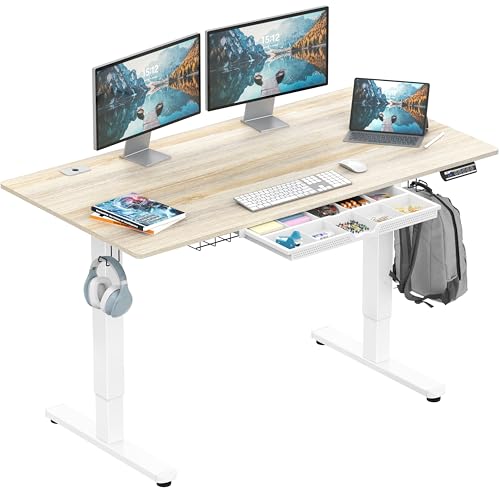
SHW 55″ Electric Height Adjustable Standing Desk (Best Large Desk)
Quick Facts
- 🧱 Type: Electric height-adjustable standing desk with storage drawer
- 📏 Size: 55″ x 28″ spacious desktop
- 🪵 Top Material: Engineered wood with laminated finish
- 🧱 Frame: Metal frame with reinforced stability structure
- ⚙️ Height Range: ~28″ to 45″
- 💾 Memory Presets: Multiple programmable height settings
- 🗄️ Storage: Integrated drawer for office essentials
- 🔌 Use Case: Large home office setups, dual monitors, productivity workstations
- 🧩 Assembly Style: Modular frame + full-size desktop + motor system
Editor’s Note
The SHW 55″ desk is positioned as a spacious, stability-oriented standing desk, designed for users who need more surface area than standard 48″ models. The extra width makes a noticeable difference in real-world setups, especially for users running dual monitors, laptop + monitor combinations, or document-heavy workflows.
From a construction perspective, SHW follows a typical modular electric desk design, where the steel frame, lifting columns, and desktop are assembled in stages. Based on common user experiences with similar SHW models, the assembly process is generally straightforward but physically demanding due to size and weight, especially when aligning the larger 55″ top panel.
One important practical detail is that larger desks like this often require more careful leg alignment and leveling adjustments to avoid slight wobble. SHW compensates for this with adjustable floor levellers, which help stabilize uneven surfaces once properly installed. This makes the final result more solid, but setup precision is important.
Pros
- Large 55″ x 28″ workspace suitable for multi-monitor setups
- Stable frame structure with reinforced support design
- Smooth electric height adjustment with memory presets
- Built-in storage drawer improves desk organization
- Comfortable ergonomic depth for extended work sessions
Cons
- Assembly is time-consuming due to larger desktop size
- Requires careful leveling to avoid minor wobble
- Drawer space is functional but limited in capacity
Why We Liked It
The SHW 55″ desk stands out primarily because of its expanded workspace depth, which significantly improves usability compared to smaller standing desks. The extra surface area allows users to comfortably position multiple monitors, laptops, and accessories without feeling constrained.
Its electric lift system performs reliably, enabling smooth transitions between sitting and standing positions. Combined with memory presets, it provides a practical workflow for users who frequently adjust posture throughout the day.
Where it becomes particularly useful is in productivity-heavy environments. The larger surface reduces clutter density and improves workflow organization, especially for users working with documents, creative tools, or multitasking setups.
SHW 55″ Electric Height Adjustable Standing Desk
Best For: Best suited for users who need a larger and more comfortable standing desk workspace, especially for dual-monitor setups, productivity workstations, and home office environments requiring extra surface area.
Summary
The SHW 55″ standing desk is a spacious and practical workstation designed for users who need extra surface area compared to standard standing desks. Its larger desktop makes it ideal for dual-monitor setups and productivity-focused workflows. The electric height adjustment system is smooth and reliable, supporting regular posture changes throughout the day. However, assembly requires extra care due to the size of the desktop and alignment needs. Once properly installed, it provides a stable and efficient working environment. Overall, it is a strong choice for users prioritizing workspace size and comfort.
AODK L-Shaped Gaming Desk (Best L-Shaped Gaming Desk)

Quick Facts
- 🧱 Type: L-shaped gaming / home office desk
- 📏 Size: 53″ reversible L-shape layout
- 🪵 Top Material: Engineered wood with powder-coated finish
- 🧱 Frame: Alloy steel frame for corner stability
- ⚙️ Design Feature: Reversible L-shape configuration (left or right setup)
- 🔌 Power System: Built-in power outlets + USB charging ports
- 💡 Lighting: RGB LED strip with multiple modes and brightness levels
- 🗄️ Storage: Shelves, CPU stand, storage bag, headphone hook
- 🧩 Assembly Style: Modular L-frame with multi-part shelving system
Editor’s Note
The AODK L-shaped desk is designed as a hybrid gaming and productivity workstation, combining workspace expansion with entertainment-focused features. The L-shape layout itself is the main advantage, offering significantly more usable surface area compared to standard rectangular desks, especially for users with multi-monitor or dual-device setups.
From a construction perspective, this desk follows a multi-module assembly structure, which is more complex than standard flat desks. Users typically assemble the frame, shelving system, and top surfaces separately before integrating them into the final L-shape configuration. Based on common user experiences in this category, the setup process is moderately time-consuming but straightforward if instructions are followed carefully.
One important real-world factor is that desks with built-in LED systems, shelves, and power modules naturally increase assembly complexity, even if they improve functionality. However, once fully assembled, the structure becomes highly practical for users who want a multi-purpose station combining work, gaming, and device charging in one setup.
Pros
- Large L-shaped workspace ideal for multi-monitor setups
- Built-in power outlets and USB charging ports
- Reversible design allows flexible room placement
- Integrated storage shelves and accessories hooks
- LED lighting system enhances gaming and ambiance setup
Cons
- Assembly is more complex due to multi-part structure
- LED and accessory features can feel unnecessary for pure office use
- Shelf system reduces open leg space in tighter rooms
Why We Liked It
The AODK L-shaped desk stands out because it delivers a complete workstation ecosystem rather than just a flat surface. The L-shape layout immediately improves productivity by separating work zones—for example, one side for monitors and the other for writing, gaming, or secondary devices.
Its built-in power outlets and USB ports are a major usability advantage, reducing cable clutter and making it easier to keep multiple devices charged without external extensions. This is particularly useful for gaming setups or hybrid workstations with laptops, consoles, and accessories.
The inclusion of storage elements like shelves and hooks also enhances practical organization, although it shifts the product slightly toward a feature-rich setup rather than a minimalist desk. For users who want a visually dynamic and functional workspace, this combination works very well.

AODK L-Shaped Gaming Desk
Best For: Best suited for users who want a multi-functional L-shaped desk for gaming, streaming, or dual-purpose home office setups with built-in power and storage features.
Summary
The AODK L-shaped gaming desk is a feature-rich workstation designed for users who need both space and functionality. Its corner-friendly layout provides significantly more usable surface area than standard desks, making it ideal for multi-monitor setups and multitasking environments. The built-in power outlets and USB ports improve everyday convenience by reducing cable clutter. However, its multi-component structure increases assembly complexity compared to simpler desks. Once assembled, it delivers a highly functional setup suitable for gaming, streaming, or hybrid home office use. Overall, it is a strong choice for users who prioritize versatility and integrated features over minimal design.
HOMCOM 360° Rotating L-Shaped Desk (Best Corner Space Saver)

Quick Facts
- 🧱 Type: Rotating L-shaped corner desk / workstation
- 📏 Size: 47.25″ x 43.25″ adjustable footprint
- 🪵 Top Material: Engineered wood with laminated finish
- 🧱 Frame: Engineered wood structure with reinforced shelving base
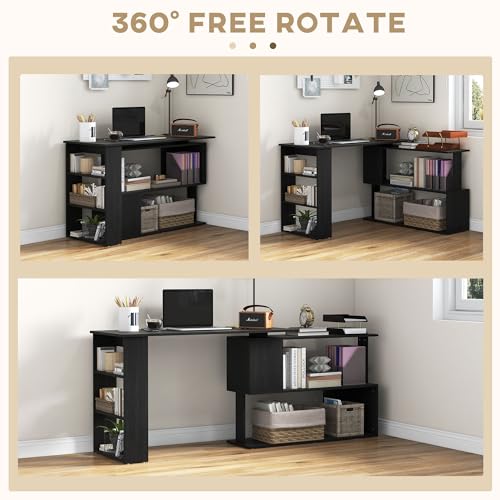
- 🔄 Special Feature: 360° rotating design (L-shape ↔ straight layout)
- 🗄️ Storage: Multi-tier side shelves for books, accessories, and devices
- 🔌 Use Case: Small rooms, apartments, corner office setups
- 🧩 Assembly Style: Multi-panel modular desk + rotating shelf system
Editor’s Note
The HOMCOM rotating desk is built around a space-efficiency concept rather than raw workstation size. Its defining feature is the 360-degree rotating structure, which allows users to switch between a compact straight desk and a wider L-shaped configuration depending on room layout and usage needs.
From a construction standpoint, this is a more mechanically complex design than standard L-shaped desks. The rotating mechanism adds flexibility but also introduces additional moving joints and alignment points during assembly. Based on common user experiences in similar rotating desk systems, setup is typically moderately challenging and requires careful alignment to ensure smooth rotation and stability.
Another important consideration is that while the rotating feature increases versatility, it can slightly reduce the overall rigidity compared to fixed-frame L-shaped desks. However, the trade-off is improved adaptability for users working in tight rooms, dorms, or multi-purpose living spaces where desk positioning changes frequently.
Pros
- 360° rotating design allows flexible layout configuration
- Space-saving footprint ideal for small rooms and corners
- Built-in multi-tier shelving system improves storage capacity
- Can switch between L-shape and straight desk layouts
- Easy-to-clean laminated surface for daily use
Cons
- More complex assembly due to rotating mechanism
- Slight reduction in stability compared to fixed L-shaped desks
- Shelf structure can limit legroom in tighter configurations
Why We Liked It
The HOMCOM rotating desk stands out because it solves a very specific problem: limited space with changing usage needs. Unlike fixed L-shaped desks, this model can adapt to different room layouts, making it particularly useful for users who frequently rearrange their workspace or live in compact environments.
The rotating mechanism is the key value feature, allowing users to switch between a compact straight desk for everyday tasks and a wider L-shape when more surface area is needed. This flexibility is especially useful in shared rooms or multipurpose spaces.
Its integrated shelving system also adds practical storage without requiring additional furniture, helping users keep essentials within arm’s reach. However, this added structure does introduce a trade-off in terms of overall rigidity and legroom flexibility compared to simpler desk designs.
HOMCOM 360° Rotating L-Shaped Desk
Best For: Best suited for users who need a highly flexible corner desk for small spaces, especially in apartments, dorms, or multi-purpose rooms where layout adaptability is important.
Summary
The HOMCOM rotating L-shaped desk is a space-optimization focused workstation designed for flexible room layouts. Its 360-degree rotation system allows users to switch between straight and L-shaped configurations depending on their needs. The built-in shelving system improves storage efficiency, making it suitable for compact living environments. However, the rotating mechanism introduces additional assembly complexity and slightly reduces overall structural rigidity compared to fixed desks. Despite this, it performs well in small spaces where adaptability is more important than maximum stability. Overall, it is a strong choice for users prioritizing flexibility and space efficiency.
Huuger 47″ Computer Desk with Drawers (Best Mid-Range Storage Desk)

Quick Facts
- 🧱 Type: Mid-range computer / gaming desk with storage
- 📏 Size: 47.3″ x 19.7″ compact-medium workspace
- 🪵 Top Material: Engineered wood with powder-coated finish
- 🧱 Frame: Metal frame with reinforced stability structure
- 🗄️ Storage: 4 fabric drawers + monitor shelf
- 🔌 Power System: Built-in AC outlets + USB + Type-C ports
- 💡 Lighting: RGB LED strip with multiple modes
- 🧩 Use Case: Home office, gaming setup, storage-focused workstations
- 🧩 Assembly Style: Modular frame + drawer units + accessory integration
Editor’s Note
The Huuger 47″ desk is designed as a feature-dense mid-range workstation, combining storage, power management, and lighting into a single compact structure. Its biggest strength is the integration of four fabric drawers, which significantly improves organization compared to typical minimalist desks in this price segment.
From an assembly perspective, this desk falls into the moderate complexity category. The frame itself is straightforward, but the inclusion of drawers, monitor shelf, and integrated power module increases the number of steps required during setup. Based on typical user feedback patterns for similar Huuger designs, most assembly challenges come from aligning drawer frames and securing accessory components rather than the main structure.
A key real-world advantage is its all-in-one functionality, but this also introduces trade-offs. While storage and built-in power features improve daily convenience, they slightly reduce open leg space and make cable routing more structured than flexible. Still, for users who value organization over minimalism, this design offers strong practicality.
Pros
- 4 built-in fabric drawers provide strong storage capacity
- Integrated power outlets + USB + Type-C charging
- Monitor shelf improves ergonomic posture
- Compact design fits small to mid-size rooms
- LED lighting adds optional gaming ambiance
Cons
- Assembly is more complex due to multiple integrated components
- Fabric drawers feel less premium than wooden alternatives
- Reduced legroom due to storage structure
Why We Liked It
The Huuger desk stands out because it packs a surprising amount of functionality into a mid-range price segment, especially with its combination of storage drawers and built-in power system. This makes it particularly appealing for users who want a clutter-free workstation without buying extra accessories.
Its four-drawer storage system is the main highlight, allowing users to separate documents, accessories, and daily office items efficiently. This is especially useful in home office environments where surface organization directly impacts productivity.
The inclusion of a monitor stand also improves ergonomics by helping users maintain a more natural viewing angle. While it is not a premium-grade ergonomic system, it still contributes meaningfully to comfort during long working sessions.

Huuger 47″ Computer Desk with Drawers
Best For: Best suited for users who want a storage-heavy, all-in-one desk for home office or gaming setups, especially in compact rooms where organization and functionality matter more than minimal design.
Summary
The Huuger 47″ desk is a feature-rich mid-range workstation designed for users who prioritize storage and convenience. Its combination of drawers, power outlets, and LED lighting creates a highly functional setup for home office or gaming use. The monitor stand improves ergonomics, while the compact design makes it suitable for smaller spaces. Assembly is moderately complex due to the number of integrated components. Once assembled, it offers strong day-to-day usability and excellent organizational benefits. Overall, it is a practical choice for users who want an all-in-one desk without moving into premium pricing territory.
DUMOS 32″ Computer Desk (Best Small Budget Desk)

Quick Facts
- 🧱 Type: Small budget writing / computer desk
- 📏 Size: 32″ compact desktop
- 🪵 Top Material: Wood surface (scratch + water-resistant finish)
- 🧱 Frame: Steel frame with X-shaped reinforcement bar
- ⚖️ Load Capacity: Suitable for light office, study, laptop setups
- 🧩 Structure: Minimal frame design with reinforced center support
- 🏠 Use Case: Small bedrooms, dorm rooms, tight spaces, minimal setups
- 🧩 Assembly Style: Very simple bolt-together frame (quick setup)
Editor’s Note
The DUMOS 32″ desk is a true entry-level minimalist workstation, designed for users who need a functional desk at the lowest possible cost without sacrificing basic structural stability. Unlike larger or feature-heavy desks, this model focuses on simplicity, speed of setup, and essential durability.
From an assembly perspective, this is one of the easiest desks in the entire lineup. The structure uses a straightforward bolt-and-frame system with an X-brace reinforcement design, which significantly reduces wobbling without adding complexity. Based on common user feedback patterns for similar DUMOS models, most users can complete assembly in a short time with minimal tools or technical experience, making it ideal for first-time desk buyers.
However, the simplicity also defines its limitations. There are no advanced features like storage systems, power modules, or adjustable height. It is designed purely as a stable flat surface for light workloads, which is exactly what keeps both cost and assembly difficulty extremely low.
Pros
- Extremely affordable entry price
- Very fast and simple assembly process
- X-brace design improves basic stability
- Compact size fits tight spaces and small rooms
- Scratch and water-resistant surface adds durability
Cons
- Very limited workspace (32″ only)
- No storage, no ergonomic features
- Not suitable for multi-monitor setups
- Basic materials compared to mid-range desks
Why We Liked It
The DUMOS 32″ desk stands out because it delivers exactly what a budget user needs: a stable, usable surface with almost zero complexity. There are no unnecessary features, which keeps both cost and setup time extremely low.
Its X-shaped reinforcement frame is the key structural advantage, helping reduce wobble despite the low price point. This makes it more reliable than many ultra-cheap flat-pack desks that tend to feel unstable over time.
Where it really excels is in accessibility. This is a desk you can set up quickly, place in a small room, and start using immediately, making it ideal for students, minimal setups, or temporary workstations.

DUMOS 32″ Computer Desk
Best For: Best suited for users who need a very affordable, compact desk for light work, studying, or small-space setups with minimal assembly effort.
Summary
The DUMOS 32″ desk is a simple and highly accessible entry-level workstation designed for users who prioritize affordability and ease of setup. Its compact size makes it ideal for small rooms or minimal setups where space is limited. The X-brace structure provides surprising stability for its price range, while the scratch-resistant surface adds basic durability. However, it lacks advanced features like storage or ergonomic adjustments, which limits its use to light workloads. Assembly is extremely easy, making it suitable for beginners or first-time desk buyers. Overall, it is a strong budget choice for basic everyday use.
Home Office Desk Buying Guide: What to Consider
Choosing the right home office desk isn’t just about looks—it directly impacts your comfort, productivity, and long-term health. Here are the key factors you should evaluate before making a decision:
1. Size & Dimensions (Most Important)
Desk size is the #1 factor that determines usability.
- Small desks (30–40″) → Ideal for laptops, writing, tight spaces
- Medium desks (47–55″) → Best for single monitor + accessories
- Large desks (55″+) → Perfect for dual monitors or multitasking setups
👉 Also consider depth (front-to-back):
- <20″ depth → Feels cramped
- 24″–28″ depth → Comfortable viewing distance (ideal range)
Pro Tip: Always measure your room and chair clearance before buying.
2. Material & Build Quality
Most desks use engineered wood (MDF) with a metal frame—but quality varies a lot.
- Budget desks → Lighter materials, thinner boards
- Mid-range → Better coatings, stronger frames
- Premium → Thicker tops, improved stability, better finishes
👉 Look for:
- Steel frames (more stable)
- Reinforcement bars (X-frame, T-frame) for wobble reduction
3. Stability & Weight Capacity
A desk may look good but feel unstable—especially at higher heights.
- For basic use → Stability is less critical
- For monitors/gaming → Very important
👉 Check for:
- Anti-wobble structure (dual motors, thicker legs, bracing)
- Weight support (especially for standing desks)
4. Assembly Difficulty (Often Overlooked)
This is one of the biggest real-world frustrations for buyers.
- Simple desks → 15–30 minutes setup
- Standing desks → 45–90 minutes
- Storage / L-shaped desks → 1–2+ hours
👉 What makes assembly harder:
- Drawers and storage units
- L-shaped or rotating designs
- Built-in electronics (LEDs, power outlets)
Pro Tip: If you want a hassle-free setup, go for minimal designs or one-piece desktops.
5. Ergonomics & Comfort
A desk should support long working sessions without strain.
- Ideal desk height → ~28–30″ (for sitting)
- Monitor should be at eye level
- Enough depth to avoid leaning forward
👉 Best upgrades:
- Standing desks → Reduce long-term sitting fatigue
- Monitor shelves → Improve neck posture
6. Features & Functionality
Modern desks often include extras—but not all are necessary.
Common features:
- Power outlets & USB ports → Great for cable management
- Drawers / shelves → Improve organization
- LED lighting → Mostly aesthetic (useful for gaming setups)
👉 Choose based on your workflow:
- Minimalist → skip extras
- Productivity → prioritize storage + cable management
7. Desk Type (Match Your Use Case)
Different desk styles serve different needs:
- Standard desk → Simple, affordable, easy setup
- Standing desk → Best for ergonomics and flexibility
- L-shaped desk → Great for multitasking and corner spaces
- Compact desk → Ideal for small rooms or dorms
8. Value for Money
Price doesn’t always equal quality—but extremes matter.
- Under $50 → Basic, limited durability
- $80–$150 → Best value range (most users should aim here)
- $150+ → Better materials, features, and stability
👉 The goal is balance:
- Don’t overpay for features you won’t use
- Don’t go too cheap if you need daily reliability
✅ Final Thoughts
The best home office desk is the one that fits your space, workflow, and comfort needs—not just your budget.
If you prioritize correctly:
- Size + ergonomics → Daily comfort
- Build quality + stability → Long-term reliability
- Assembly difficulty → Immediate user experience
👉 Get these right, and almost any desk in the right category will feel like a great upgrade.
Frequently Asked Questions (Home Office Desks)
What size desk is best for a home office?
The best desk size depends on your workspace and how you plan to use it.
For basic setups like a laptop or writing space, a 32″–40″ desk is usually enough and works well in small rooms. However, if you use a monitor (or dual monitors), you’ll want at least a 47″–55″ desk to avoid a cramped setup.
Depth is just as important as width. A desk with 24″–28″ depth allows for a comfortable viewing distance and better posture. Shallower desks (under 20″) often force you to sit too close to your screen, which can cause strain over time.
👉 In general:
- Multi-monitor setup → 55″+
- Small room → 32″–40″
- Standard home office → 47″–55″
Are standing desks really worth it?
Yes—for most users, standing desks are absolutely worth it, especially if you work long hours.
The biggest benefit is the ability to switch between sitting and standing, which helps reduce back pain, improve circulation, and keep energy levels more consistent throughout the day. Even standing for short periods can make a noticeable difference over time.
That said, standing desks are not a magic solution. You still need proper posture, and many users benefit from combining them with an anti-fatigue mat or ergonomic chair.
👉 If you work 6–8+ hours daily, a standing desk is one of the most impactful upgrades you can make.
How difficult is it to assemble a home office desk?
Assembly difficulty varies a lot depending on the desk type.
- Simple desks (like compact or basic models) are usually very easy and can be assembled in 15–30 minutes.
- Standing desks take longer, typically 45–90 minutes, because of motor components and frame alignment.
- L-shaped or storage desks are the most complex and can take 1–2 hours or more, especially with drawers or shelves.
The biggest factors that increase difficulty are:
- Multiple components (drawers, shelves)
- Built-in electronics (motors, LED, power outlets)
- Larger desk sizes
👉 If you want a stress-free setup, go for minimal designs or desks with fewer parts.
What material is best for a desk?
Most home office desks today use engineered wood (MDF) combined with a metal frame, and for most users, this is perfectly fine.
- MDF desks → Affordable, widely available, good for everyday use
- Solid wood desks → More durable and premium, but much more expensive
- Metal frames → Provide stability and reduce wobbling
What matters more than the material itself is build quality:
- Thicker desktop = more durability
- Strong steel frame = better stability
- Reinforcements = less wobble over time
👉 For most users, a well-built MDF + steel frame desk offers the best balance of price and performance.
Do I really need features like drawers, power outlets, or LED lights?
It depends entirely on your workflow.
- Drawers and shelves are very useful if you want a clean, organized workspace without extra furniture.
- Power outlets and USB ports help reduce cable clutter and are great for multi-device setups.
- LED lighting is mostly aesthetic but can improve ambiance, especially for gaming setups.
However, more features also mean:
- More complex assembly
- Less flexibility in layout
- Sometimes reduced legroom
👉 If you prefer a clean, minimal setup, a simple desk is often better.
👉 If you want an all-in-one workstation, feature-rich desks are worth it.
Written by Metin Karal
Metin Karal is a Computer Engineer with over 25 years of experience working with internet technologies, trends, and digital tools since 1995. He brings this deep background into his product reviews, combining technical expertise with careful research to deliver honest, practical insights for readers. Passionate about technology, Metin also enjoys programming in C# and is currently developing PairMem, a challenging memory game available for free on the official Microsoft Store.