Best Mac Mini M4 Docs

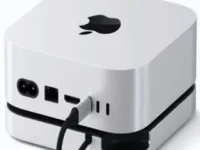
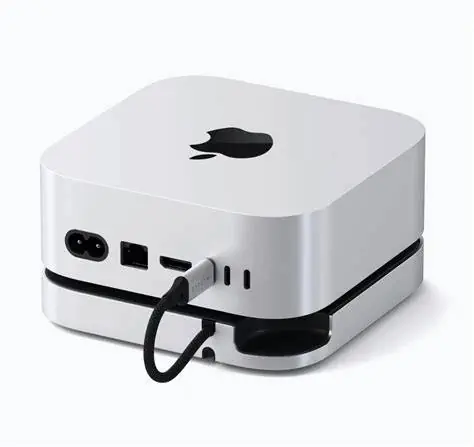
Satechi Mac Mini M4 Hub
✅ The Satechi Mac Mini M4 Hub is the top premium dock, combining elegant design, 10Gbps SSD expansion, and reliable everyday connectivity in one compact package.
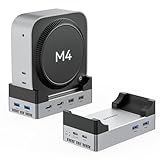
ANYOYO 40Gbps Mac Mini M4 Dock
✅ Delivering blazing‑fast 40Gbps transfer speeds with premium build quality, the ANYOYO Dock is the ultimate choice for power users who demand top‑tier performance from their Mac Mini M4

IVANKY 13‑in‑1 Dock
✅ The IVANKY 13‑in‑1 Dock is a versatile & budget‑friendly option for multi‑monitor Mac Mini users who want maximum connectivity and solid value.
The new Mac Mini M4 is fast and powerful, with Apple’s latest chip and a fresh design. But storage upgrades are still very expensive. Moving from 256GB to 512GB costs hundreds of dollars, far more than the real value. Expanding to 8TB inside Apple’s store would cost thousands. At the same time, the M4 Mac Mini drops useful ports. There are no USB‑A ports, no SD card slots, and only Type‑C and Thunderbolt connections. This makes daily use harder for many Mac owners.
Docking stations solve these problems. They add back missing ports, give you card readers, and let you use external NVMe SSDs. With a dock, you can upgrade to 8TB storage for a fraction of Apple’s price. Thunderbolt docks deliver the fastest speeds, while standard USB‑C docks are cheaper but still very useful. For most Mac Mini M4 users, a good docking station is the easiest way to get more storage and better connectivity without paying Apple’s upgrade premium.
| # | Dock | Why |
|---|---|---|
| 1 | Satechi Mac Mini M4 Hub | Premium Apple‑like design, reliable SSD enclosure, perfect fit. You will love aesthetics and stability. |
| 2 | ANYOYO 40Gbps Dock | Wi‑Fi friendly design, good cooling, dual HDMI. Real‑world speed difference from 40Gbps is minimal and good stability. |
| 3 | IVANKY 13‑in‑1 Dock | Feature‑rich with 13 ports and HDMI 4K@120Hz. Bulkier, but praised for versatility and ease of SSD install. |
| 4 | Qwiizlab USB4 Dock | Thunderbolt 4/5 future‑proofing with 40Gbps speed. Higher price and USB‑A limited to 2.0, so less practical despite specs. |
| 5 | Minisopuru MINI4PRO Dock | Compact and neat, but USB‑A 2.0 bottlenecks frustrate users. Good budget option, but limited. |
| 6 | RayCue Dock | Affordable entry‑level dock. Easy SSD install, but weaker cooling and fewer premium features. |
Technical Comparison — Mac Mini M4 Docking Stations
| Docking Station | Speed | HDMI | USB Ports | Features |
|---|---|---|---|---|
| Satechi Mac Mini M4 Hub | 10Gbps | 1 × HDMI (4K@60Hz) | 3 × USB‑A, 1 × USB‑C | Premium Apple‑like design, sleek fit |
| ANYOYO 40Gbps Dock | 40Gbps | 2 × HDMI (4K@60Hz) | 6 × USB‑A | Dual HDMI, fastest SSD speeds |
| IVANKY 13‑in‑1 Dock | 10Gbps | 2 × HDMI + 1 × DP | 5 × USB‑A, 2 × USB‑C | Triple‑monitor support, versatile connectivity |
| Qwiizlab Mac Mini Hub | 40Gbps (TB5) | 1 × HDMI (4K@60Hz) | 3 × USB‑A, 1 × USB‑C | Affordable expansion, balanced ports |
| Minisopuru Mac Mini Hub | 10Gbps | 1 × HDMI (4K@60Hz) | 2 × USB‑A, 1 × USB‑C | Budget‑friendly, simple expansion |
| RayCue Mac Mini M4 Dock | 10Gbps | 1 × HDMI (4K@60Hz) | 4 × USB‑A, 1 × USB‑C | Sleek stand, tool‑free SSD install |
How We Rated the Best Mac Mini M4 Docking Stations?
Performance
- NVMe/SATA speed (read/write benchmarks)
- Heat management & stability under load
- Video output quality (HDMI/USB4 refresh rates)
Design & Ease of Use
- Build quality, materials, aesthetics
- Fit under Mac Mini (stacking footprint)
- Wi‑Fi friendliness (no interference)
- SSD installation simplicity (tool‑free vs screws)
Ports & Connectivity
- Number and type of ports (USB‑A, USB‑C, HDMI, Thunderbolt, SD/TF, audio)
- Speed of ports (USB 2.0 vs 10Gbps vs 40Gbps)
- Multi‑monitor support and refresh rates
Value & Reliability
- Price vs features compared to Apple’s internal SSD upgrades
- Availability (Amazon.com vs EU/Asia stores)
- Brand trust, warranty, firmware updates
- Long‑term durability
#1 🥇 Satechi Mac Mini M4 Hub: The Premium Choice for Apple Purists

Quick Summary – Satechi Mac Mini M4 Hub
- 🖴 NVMe SSD Enclosure for fast external storage expansion
- 📺 HDMI 4K@60Hz output for crisp video on external displays
- 🔌 USB4 & USB‑C ports plus multiple USB‑A and SD/TF card slots for versatile connectivity
- ⚡ 10Gbps transfer speeds for smooth file handling and peripheral use
- 🛠️ Tool‑free SSD installation with a sleek aluminum design that matches the Mac Mini
- 📡 Stable Wi‑Fi performance thanks to interference‑friendly design
- ✅ Best for Mac Mini owners who want premium Apple‑style aesthetics with reliable storage expansion and everyday connectivity
📋 Specifications — Satechi Mac Mini M4 Hub
| Spec | Details |
|---|---|
| Storage Expansion | M.2 NVMe or SATA SSD enclosure, USB4 speeds up to 10Gbps |
| Video Output | HDMI port supporting 4K@60Hz external display |
| Connectivity | 1 × USB‑C (USB4 for SSD), 1 × USB‑C (10Gbps), 3 × USB‑A (10Gbps), SD & microSD slots, 3.5mm audio jack |
| Port Speeds | General USB ports at 10Gbps, dedicated SSD slot at 40Gbps |
| Installation | Tool‑free SSD setup, simple slide‑in design |
| Design & Build | Premium aluminum finish, compact footprint, matches Mac Mini aesthetics, passive cooling for SSD |
| Power | Bus‑powered via Mac Mini USB‑C connection (no external adapter required) |
| Best For | Mac Mini owners seeking premium Apple‑style aesthetics, reliable storage expansion, and versatile everyday connectivity |
See Satechi’s official page for specs

Pros
- Premium aluminum design that matches the Mac Mini aesthetic
- Integrated NVMe/SATA SSD enclosure (up to 8TB, 10Gbps)
- Tool‑free SSD installation for easy setup
- Reliable brand reputation with strong Apple accessory track record
- Compact footprint, sits neatly under Mac Mini
Cons
- Higher price compared to budget docks
- HDMI limited to 4K@60Hz (no 120Hz support)
Satechi Mac Mini M4 Hub
Verdict — Satechi Mac Mini M4 Hub
The Satechi Mac Mini M4 Hub is the clear premium choice for Mac Mini owners. It delivers flawless design integration, seamless SSD expansion with 10Gbps speeds, and a practical set of ports that cover everyday needs. While it comes at a higher price and lacks Thunderbolt‑level speeds on its general ports, its reliability and Apple‑like aesthetics make it the #1 dock for users who want both style and performance in one compact package.
Bottom Line: 🥇 The Satechi Mac Mini M4 Hub is the top premium dock, combining elegant design, 10Gbps SSD expansion, and reliable everyday connectivity in one compact package.
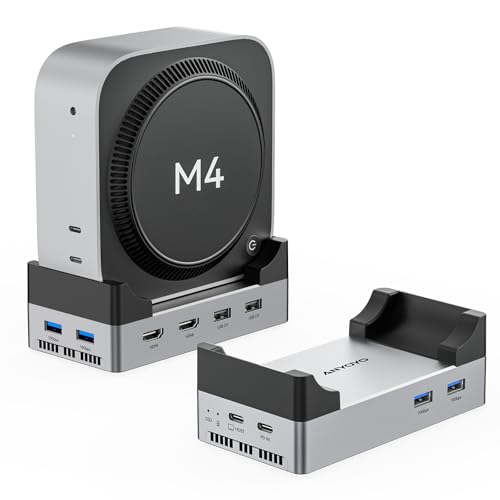
#2 🥈 ANYOYO 40Gbps Mac Mini M4 Dock: Dual HDMI Power with High-Speed Expansion
Quick Summary – ANYOYO 40Gbps Mac Mini M4 Dock
- 🖴 M.2 NVMe SSD Enclosure supporting up to 8TB with 40Gbps transfer speeds for ultra‑fast storage expansion
- 📺 Dual HDMI 4K@60Hz outputs for dual‑monitor setups and smooth external display performance
- 🔌 4 × USB‑A 3.1 (10Gbps), 2 × USB‑A 2.0, plus aluminum USB‑C hub design for versatile connectivity
- ⚡ 40Gbps SSD speeds ensure high‑performance file handling and multitasking
- 🛠️ Tool‑free SSD installation with aluminum stand design that matches the Mac Mini M4 aesthetic
- 📡 Wi‑Fi signal‑friendly design to avoid interference with wireless performance
- ✅ Best for power users who need dual HDMI outputs, faster SSD speeds, and maximum connectivity in one dock
📑 Specifications — ANYOYO 40Gbps Mac Mini M4 Dock
| Spec | Details |
|---|---|
| Storage Expansion | M.2 NVMe SSD enclosure, up to 8TB capacity, blazing 40Gbps transfer speeds |
| Video Output | Dual HDMI ports supporting 4K@60Hz for dual‑monitor setups |
| Connectivity | 4 × USB‑A 3.1 (10Gbps), 2 × USB‑A 2.0, aluminum USB‑C hub design |
| Port Speeds | SSD slot at 40Gbps, modern USB‑A at 10Gbps, legacy USB‑A at 2.0 |
| Installation | Tool‑free SSD setup, supports NVMe drives |
| Design & Build | Aluminum stand design, Wi‑Fi signal‑friendly |
| Power | Bus‑powered via Mac Mini USB‑C connection (no external adapter required) |
| Best For | Power users needing dual HDMI outputs and fast SSD speeds with maximum connectivity |

Pros
- Ultra‑fast 40Gbps NVMe SSD enclosure with up to 8TB capacity
- Dual HDMI outputs for dual‑monitor setups
- 4 × USB‑A 10Gbps ports for high‑speed peripherals
- Wi‑Fi signal‑friendly aluminum design
- Tool‑free SSD installation
Cons
- Bulkier design compared to sleeker docks like RayCue
- Higher cost due to premium features
- No SD/TF card slots or audio jack (less versatile for creators)
ANYOYO 40Gbps Mac Mini M4 Dock
Verdict — ANYOYO 40Gbps Mac Mini M4 Dock
The ANYOYO 40Gbps Mac Mini M4 Dock is a performance‑focused option built for power users who need dual HDMI outputs and ultra‑fast SSD speeds. While it excels in raw performance, its bulkier design, higher cost, and lack of creator‑friendly ports (like SD/TF) keep it below the Satechi dock.
Bottom Line: 🥈 The ANYOYO Dock is the best performance pick for Mac Mini owners who prioritize speed and dual‑monitor setups.
#3 🥉 IVANKY 13‑in‑1 Dock: Versatile Connectivity & Triple‑Monitor Power

Quick Summary – IVANKY Mac Mini M4 13‑in‑1 Dock
- 🖴 NVMe SSD Enclosure supporting up to 8TB for external storage expansion (10Gbps speeds)
- 📺 HDMI 4K@120Hz output plus DisplayPort for crisp video and triple‑monitor setups
- 🔌 USB‑C & USB‑A ports (10Gbps), SD/TF card slots, Ethernet, and dual audio ports for versatile connectivity
- ⚡ Stable 10Gbps transfer speeds for smooth file handling and peripheral use
- 🛠️ Tool‑free SSD installation with a larger white chassis design (less compact than Satechi)
- 🔋 External power adapter included for reliable multi‑device performance
- ✅ Best for productivity users who need triple‑monitor support, higher refresh rates, and maximum connectivity at solid value
📋 Specifications – IVANKY Mac Mini M4 13‑in‑1 Dock
| Spec | Details |
|---|---|
| Storage Expansion | M.2 NVMe SSD enclosure, up to 8TB capacity, 10Gbps transfer speeds |
| Video Output | HDMI supporting 4K@120Hz, plus DisplayPort for multi‑monitor setups |
| Connectivity | 2 × USB‑C (10Gbps), 5 × USB‑A, 2 × audio ports, SD/TF card slots, Ethernet |
| Port Count | 13 total ports (multi‑monitor + peripherals) |
| Installation | SSD slot with tool‑free setup |
| Design & Build | White finish, larger footprint than Satechi, includes external 20W PD adapter |
| Power | Comes with its own power adapter for stable multi‑device use |
| Best For | Users needing triple‑monitor setups, higher refresh rates, and versatile connectivity |

Pros
- Supports 4K@120Hz HDMI and triple‑monitor setups
- Integrated NVMe SSD enclosure (up to 8TB)
- Includes Ethernet and dual audio ports for broader connectivity
- Comes with its own power adapter for stable performance
- More affordable than premium Thunderbolt docks
Cons
- SSD enclosure limited to 10Gbps speeds
- Bulkier design compared to Satechi’s sleek aluminum stand
- White finish may not match Mac Mini aesthetics as seamlessly
IVANKY 13‑in‑1 Dock
Verdict — IVANKY 13‑in‑1 Dock
The IVANKY 13‑in‑1 Dock is the best choice for users who prioritize connectivity and display performance over premium aesthetics. With triple‑monitor support, 4K@120Hz HDMI, and a wide range of ports, it’s ideal for productivity setups, though its SSD speeds and design fall short of Satechi’s polish.
Bottom Line: 🥇 The IVANKY 13‑in‑1 Dock is a versatile, budget‑friendly option for multi‑monitor Mac Mini users who want maximum connectivity and solid value.
#4 Qwiizlab Mac Mini Hub: Affordable Expansion with Balanced Connectivity

Quick Summary – Qwiizlab Mac Mini Hub
- 📺 HDMI 4K@60Hz output for crisp video on external displays
- 🔌 USB‑C & USB‑A ports (10Gbps), SD/TF card slots, and audio jack for versatile connectivity
- ⚡ 40Gbps transfer speeds for smooth file handling and peripheral use
- 🛠️ Tool‑free SSD installation with a compact aluminum design that blends with the Mac Mini
- 📡 Stable Wi‑Fi performance thanks to interference‑friendly design
- ✅ Best for Mac Mini owners who want a balance of affordability, storage expansion, and everyday connectivity without premium pricing
📑 Specifications — Qwiizlab Mac Mini Hub
| Spec | Details |
|---|---|
| Storage Expansion | M.2 NVMe SSD enclosure, up to 8TB capacity, Thunderbolt 4/5 speeds up to 40Gbps |
| Video Output | HDMI port supporting 4K@60Hz external display |
| Connectivity | 2 × USB‑C (10Gbps), 1 × USB‑A (10Gbps), 2 × USB‑A (2.0), SD/TF 4.0 card readers, 3.5mm audio jack |
| Port Speeds | Thunderbolt 4/5 SSD slot at 40Gbps, general USB‑C/USB‑A ports at 10Gbps, legacy USB‑A at 2.0 |
| Installation | Tool‑free SSD setup, supports M.2 PCIe drives |
| Design & Build | Compact aluminum stand, designed to match Mac Mini M4/M4 Pro aesthetics |
| Power | Bus‑powered via Mac Mini USB‑C connection (no external adapter required) |
| Best For | Mac Mini owners seeking affordable storage expansion and versatile connectivity |

Pros
- 40Gbps NVMe SSD enclosure with up to 8TB capacity
- Compact aluminum design that blends seamlessly with Mac Mini aesthetics
- Includes SD/TF 4.0 card readers with fast 312MB/s speeds
- Balanced mix of modern (USB‑C 10Gbps) and legacy (USB‑A 2.0) ports
- Affordable compared to premium options like Satechi
Cons
- HDMI limited to 4K@60Hz (no 120Hz support)
- Fewer premium touches compared to higher‑end docks
Qwiizlab Mac Mini M4 Hub
Verdict — Qwiizlab Mac Mini M4 Hub
The Qwiizlab Mac Mini Hub strikes a strong balance between affordability and functionality. It offers fast SSD expansion, a practical mix of ports, and a compact design that matches the Mac Mini well. While it lacks Thunderbolt speeds and higher refresh HDMI, it’s a reliable mid‑tier option for users who want solid everyday connectivity without paying premium prices.
Bottom Line: The Qwiizlab Mac Mini Hub is the best value pick for Mac Mini owners who want affordable SSD expansion and versatile connectivity in a sleek, compact design.
#5 Minisopuru MINI4MAX Mac mini M4 Dock: Good Expansion with Everyday Connectivity

Quick Summary – Minisopuru MINI4MAX Mac mini M4 Dock
- NVMe/SATA SSD Enclosure supporting up to 8TB for external storage expansion (10Gbps speeds)
- 📺 HDMI 4K@60Hz output for crisp video on external displays
- 🔌 USB‑A ports, SD/TF card slots, and audio jack for versatile connectivity
- ⚡ 10Gbps transfer speeds for smooth file handling and peripheral use
- 🛠️ Tool‑free SSD installation with a compact aluminum design that matches the Mac Mini
- 📡 Stable Wi‑Fi performance thanks to interference‑friendly design
📑 Specifications — Minisopuru MINI4MAX Mac mini M4 Dock
| Spec | Details |
|---|---|
| Storage Expansion | M.2 NVMe/SATA SSD enclosure, up to 8TB capacity, 10Gbps transfer speeds |
| Video Output | HDMI port supporting 4K@60Hz external display |
| Connectivity | 3 × USB‑A, SD/TF card slots, 3.5mm audio jack |
| Port Speeds | SSD slot at 10Gbps, general USB‑C/USB‑A ports at 10Gbps, legacy USB‑A at 2.0 |
| Installation | Tool‑free SSD setup, supports NVMe and SATA drives |
| Design & Build | Compact aluminum design, matches Mac Mini aesthetics |
| Power | Bus‑powered via Mac Mini USB‑C connection (no external adapter required) |
| Best For | Budget‑minded Mac Mini owners seeking affordable SSD expansion and versatile connectivity |

Pros
- NVMe/SATA SSD enclosure with up to 8TB capacity
- Compact aluminum design that blends with Mac Mini aesthetics
- Tool‑free SSD installation for easy setup
Cons
- HDMI limited to 4K@60Hz (no 120Hz support)
Minisopuru MINI4MAX
Verdict — Minisopuru Mac Mini Hub
The Minisopuru Mac Mini Hub is a good option in this lineup. It delivers reliable SSD expansion, a practical mix of ports, and a compact design While it lacks the speed and polish of premium docks like Satechi, it’s a solid everyday choice for users who want good functionality.
Bottom Line: The Minisopuru Mac Mini Hub is one of the perfect pick for Mac Mini owners who want affordable SSD expansion and versatile connectivity in a compact design.
#6 RayCue Mac Mini M4 Dock: Sleek Stand with Balanced Everyday Connectivity

Quick Summary – RayCue Mac Mini M4 Dock
- 🖴 M.2 NVMe/SATA SSD Enclosure supporting up to 8TB for external storage expansion (10Gbps speeds)
- 📺 HDMI 4K@60Hz output for crisp video on external displays
- 🔌 USB‑C & USB‑A ports (10Gbps), 2 × USB‑A (5Gbps), USB‑C charging port, SD/TF card slots, and audio jack for versatile connectivity
- ⚡ 10Gbps transfer speeds for smooth file handling and peripheral use
- 🛠️ Tool‑free SSD installation with aluminum stand design that matches Mac Mini M4/M4 Pro aesthetics
- 📡 Stable Wi‑Fi performance thanks to interference‑friendly design
- ✅ Best for Mac Mini owners who want a sleek aluminum stand with balanced connectivity and charging support
📑 Specifications — RayCue Mac Mini M4 Dock
| Spec | Details |
|---|---|
| Storage Expansion | M.2 NVMe/SATA SSD enclosure, up to 8TB capacity, 10Gbps transfer speeds |
| Video Output | HDMI port supporting 4K@60Hz external display |
| Connectivity | 1 × USB‑C (10Gbps), 1 × USB‑A (10Gbps), 2 × USB‑A (5Gbps), USB‑C charging port, SD/TF card slots, 3.5mm audio jack |
| Port Speeds | SSD slot at 10Gbps, modern USB‑C/USB‑A at 10Gbps, additional USB‑A at 5Gbps |
| Installation | Tool‑free SSD setup, supports NVMe and SATA drives |
| Design & Build | Aluminum stand design, matches Mac Mini M4/M4 Pro aesthetics |
| Power | Bus‑powered via Mac Mini USB‑C connection (no external adapter required) |
| Best For | Mac Mini owners seeking sleek design with balanced connectivity and charging support |
Pros
- Sleek aluminum stand design that blends with Mac Mini aesthetics
- NVMe/SATA SSD enclosure with up to 8TB capacity
- Includes USB‑C charging port for added convenience
- Balanced mix of 10Gbps and 5Gbps USB ports
- Tool‑free SSD installation
Cons
- HDMI limited to 4K@60Hz (no 120Hz or dual HDMI support)
- Fewer high‑end features compared to Satechi or IVANKY
RayCue Mac Mini M4 Dock
Verdict — RayCue Mac Mini M4 Dock
The RayCue Mac Mini M4 Dock is a stylish mid‑tier option that emphasizes design and balanced everyday connectivity. It’s a good fit for users who want a dock that looks great under their Mac Mini and provides reliable storage expansion, but its slower SSD speeds and limited HDMI output keep it below the stronger performers in this lineup.
Bottom Line: The RayCue Mac Mini M4 Dock is the best mid‑tier choice for Mac Mini owners who value sleek design and charging support.
Best Mac Mini M4 Docking Stations with NVMe SSD Support: Summary
Choosing the right Mac Mini M4 docking station comes down to speed, ports, and design priorities. If you’re an Apple purist, the Satechi Hub delivers premium aesthetics. For everyday balanced expansion, Qwiizlab, Minisopuru, and RayCue hit the sweet spot at 10Gbps. And if you need maximum performance, ANYOYO’s 40Gbps dock stands out with dual HDMI and blazing SSD speeds.
No matter which dock you pick, all six options give you affordable, flexible storage expansion compared to Apple’s costly internal SSD upgrades — plus the bonus of extra ports that Apple simply doesn’t provide.
Written by Metin Karal
Metin Karal is a Computer Engineer with a passion for testing and reviewing tech products he personally uses. He combines his technical background with hands‑on experience to deliver honest, practical insights for readers. Beyond product reviews, he enjoys programming in C# and is currently developing PairMem, a challenging memory game available for free on the Microsoft Store.