Written by Metin KARAL – Computer Engineer with 25+ years of experience in internet technologies. Some products here are tested directly, while others are evaluated through detailed research, specifications, and verified customer feedback. This article may contain affiliate links; as an Amazon Associate we earn from qualifying purchases at no extra cost to you.
Screen protector listings all promise the same thing — bubble-free installation, military-grade toughness, crystal clarity — but the fine print tells a different story. Some “military-grade” claims trace back to a real, verifiable testing standard; others are just two words on a box. Some matte protectors genuinely improve Apple Pencil feel; a few also quietly wear down your Pencil tip faster, and the honest ones actually say so. We checked spec sheets, independent reviews, and real buyer complaints — not just marketing copy — to build this list. 8 picks across glossy, matte, privacy, and both 11″ and 13″ iPad Air sizes, each one chosen for a specific, genuine reason rather than a generic “best of” label.
| Product | Why |
|---|---|
| EZ-GLAZ 2-Pack | Best Overall — 9H+ tempered glass, auto-alignment installation box with active dust removal, independently praised for Apple Pencil feel by a digital-artist-focused review. The most foolproof, well-rounded pick on this list. |
| SPARIN 2-Pack | Best Budget — Genuine 9H tempered glass, dual hydrophobic and oleophobic coating, and broad Apple Pencil compatibility at the lowest realistic price point on this list. |
| TORRAS | Best Premium — Independently rated more durable than a leading competitor by a design technology publication, using dual ion-exchange glass and a near-instant One-Pull installation. The strongest, most rigorously verified protection on this list. |
| ESR Armorite 2-Pack (13″) | Best for iPad Air 13″ — Independently confirmed MIL-STD-810H 516.8 military drop certification, a 110 lb pressure rating, and an UltraFit tray with active electrostatic dust removal built for the larger 13″ screen. |
| ESR Paper-Feel 2-Pack (11″) | Best Matte/Paper-Feel — Independently verified improvement in writing and drawing feel over glossy glass, with a genuine anti-glare matte finish and full Apple Pencil precision. |
| SPARIN Paper Glass (13″) | Best Matte/Paper-Feel for 13″ — Specific, measured friction (92%) and clarity (95%) ratings, genuine 9H glass, and an auto-alignment tray — the only dedicated 13″ matte pick on this list. |
| OMOTON 2-Pack Privacy | Best Privacy — The only pick here with confirmed horizontal-orientation privacy blocking, paired with real 9H glass and a dust-free installation tray. |
| Mothca Matte | Best Budget Matte/Paper-Feel — A chemical etching process that produces a more consistent, Pencil-friendly texture than cheaper sandblasted alternatives, backed by genuine long-term buyer satisfaction across multiple devices. |
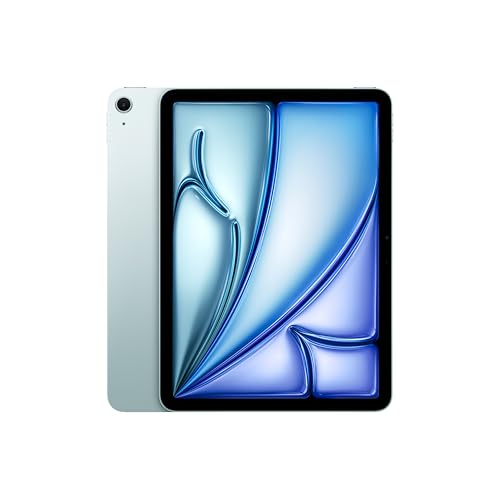
EZ-GLAZ 2-Pack Screen Protector for iPad Air 11″ — Best Overall

Quick Facts
- 🛡️ 9H+ tempered glass — one step above standard 9H hardness, better resistance to scratches from keys and coins
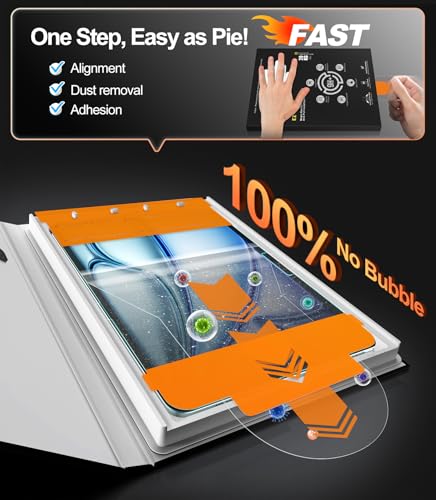
- 📦 Auto-alignment installation box — the iPad drops into a tray, so the glass lands perfectly centered without manual guesswork
- 🖐️ Oleophobic coating — actively repels oil, sweat, and fingerprints rather than just resisting them passively
- ✍️ Full Apple Pencil compatibility — precise cutouts and touch sensitivity preserved for note-taking and drawing
- 📐 Precision cutouts — no gaps around ports or buttons, case-friendly fit
- ✅ 365-day worry-free warranty — free replacement for sizing issues, installation problems, or defects
- 🎨 Also available in Paper-Feel and Privacy variants — same core hardware, different surface finish
Editor’s Note
The detail that separates this from a typical budget multipack is the 9H+ rating — one notch above the standard 9H hardness most competitors in this exact category use. It’s a small distinction on paper, but it means real, measurable extra resistance against the everyday threats that actually damage a screen: keys in the same bag pocket, a dropped stylus, a coin rolling across a table.
What convinced me this deserved the top spot wasn’t just the spec sheet — it was finding EZ-GLAZ mentioned in an independent roundup aimed specifically at digital artists, a group that’s genuinely picky about touch sensitivity and Apple Pencil feel. That reviewer specifically praised how well it worked with Apple Pencil and how it maintained original screen clarity even after extended use, which is exactly the kind of real-world validation that separates a good screen protector from one that just claims to be good.
The installation box is also worth calling out specifically. A huge share of one-star reviews across this entire product category come down to dust trapped under the glass or a crooked application — not the protector’s actual durability. EZ-GLAZ’s auto-alignment tray removes almost all of that risk by design, rather than leaving it up to a shaky-handed first attempt.
Pros
- 9H+ hardness — genuinely tougher than the standard 9H rating most competitors use.
- Auto-alignment installation box — removes the single biggest cause of screen protector complaints: bad application.
- Praised in independent artist-focused testing — not just marketing copy; a third-party reviewer specifically validated Pencil feel and clarity.
- 365-day warranty with no return required — a genuinely low-friction replacement policy if something goes wrong.
- Available in matching Paper-Feel and Privacy versions — useful if you want to standardize on one brand across different iPads in a household.
Cons
- Glossy finish only in this listing — if you specifically want a matte or paper-feel texture, you’ll need EZ-GLAZ’s separate Paper-Feel variant.
- 2-pack means committing to the brand — a good value if the fit is right, but not ideal if you only want to try one first.
Is 9H+ meaningfully better than standard 9H hardness?
Yes, though the difference is incremental rather than dramatic. The “H” scale measures resistance to scratching, and most premium tempered glass protectors sit at 9H — the practical ceiling for consumer glass before diminishing returns set in. A “9H+” rating typically reflects a refined tempering or ion-exchange process that pushes slightly past that baseline, giving marginally better resistance to fine scratches from grit, sand, or metal objects. It won’t make the glass unbreakable, but it’s a real, measurable edge over standard 9H competitors in the same price range.
Why We Liked It
Most screen protectors ask you to trust the seller’s own description of “premium glass” and “perfect installation.” EZ-GLAZ doesn’t need that same leap of faith — a blog built specifically for digital artists, people who notice the difference between “works fine” and “actually good” Apple Pencil feel, singled this one out on its own merit.
That’s a genuinely harder bar to clear than a five-star Amazon review with no context behind it. Pair that outside validation with the 9H+ glass rating and the auto-alignment box, and you’ve got a protector that’s been checked twice — once by the spec sheet, once by someone with no reason to inflate the praise.
The installation box deserves real credit too. Anyone who’s fought a screen protector by hand — chasing a stray dust speck, watching a bubble refuse to disappear — knows how much of the category’s frustration has nothing to do with the glass itself and everything to do with application. EZ-GLAZ removes that variable almost entirely, which is a big part of why this earns Best Overall rather than just “a solid glossy option.”
Best For
iPad Air 11″ M4/M3/M2 owners who want the strongest, most foolproof everyday screen protector in this roundup — genuinely tougher glass, an installation process built to prevent the most common mistakes, and a low-hassle warranty if anything goes wrong.
EZ-GLAZ 2-Pack Screen Protector for iPad Air 11″
The EZ-GLAZ 2-Pack Screen Protector for iPad Air 11″ is a 9H+ tempered glass screen protector — Best Overall — with an auto-alignment installation box, oleophobic coating, full Apple Pencil compatibility, and a 365-day worry-free warranty. Independently praised for touch sensitivity and clarity in third-party digital artist testing.
Summary
EZ-GLAZ earns Best Overall by combining a genuinely stronger 9H+ glass rating with an installation system specifically designed to eliminate the most common screen protector complaints — dust, bubbles, and misalignment. Backed by independent praise from an artist-focused review and a low-friction 365-day warranty, this is the pick that gets the fundamentals right without asking you to compromise on clarity, touch sensitivity, or Apple Pencil performance.
Looking for full‑device protection? Check out our guide to the 7 Best iPad Air M4 Cases – From Premium to Budget to pair with your screen protector.
SPARIN 2-Pack Screen Protector for iPad Air 11″ — Best Budget

Quick Facts
- 🛡️ 9H tempered glass — industry-standard hardness, real glass rather than plastic film
- 📐 0.33mm thickness — thin enough to preserve touch response, though not literally “zero thickness” as SPARIN’s own marketing sometimes implies
- ✍️ Compatible with 1st-gen and Pencil Pro — verified fast, lag-free response across multiple Apple Pencil generations
- 🧴 Hydrophobic + oleophobic coating — resists both sweat and finger oils, not just one or the other
- 📦 Simple install kit, no guided tray — a basic setup rather than an auto-alignment box
- 🏢 SPARIN, founded 2012 — over a decade making tablet accessories specifically, not a general electronics reseller
Editor’s Note
I want to be upfront about something before recommending this: an independent review site called out SPARIN’s own marketing copy for claiming the protector adds “no thickness” to the iPad — which, as that reviewer put it, is obviously untrue for any physical object. That’s a small thing, but it’s the kind of overreach worth flagging rather than repeating uncritically.
What matters more is what real buyers actually experience installing it. The results are genuinely mixed, and I think that’s worth being honest about. Several reviewers report an easy, bubble-free application straight out of the box. Others describe a frustrating process — one buyer needed a second person to hold the frame steady and still ended up with unsealed corners after multiple attempts. That inconsistency seems tied to the installation kit itself: this is a simple frame-and-squeegee setup, not the guided auto-alignment tray that some pricier competitors in this roundup include.
Customer service responsiveness also appears to vary. One reviewer described SPARIN’s support as excellent, resolving a defective unit quickly. Another said they emailed support about installation problems and never got a reply. I can’t reconcile those two accounts into a single confident claim — it’s worth knowing going in that experiences seem to depend somewhat on luck.
Where SPARIN clearly does deliver is the fundamentals: genuine 9H tempered glass, not a thin PET film marketed as glass, and verified compatibility across multiple Apple Pencil generations without lag.
Pros
- Real 9H tempered glass, not film — a distinction the brand is explicit about, and one worth checking on cheaper alternatives that blur the two.
- Broad Apple Pencil compatibility — works cleanly across 1st-gen and Pencil Pro without reported lag.
- Dual hydrophobic and oleophobic coating — protects against sweat and oil, a more complete combination than oleophobic-only competitors.
- Established, tablet-focused manufacturer — over a decade specifically in this category, not a general accessory brand that also happens to sell screen protectors.
- Genuinely low cost of entry — among the cheapest ways to get real tempered glass on this device.
Cons
- No guided alignment tray — a basic frame kit rather than the auto-alignment box some competitors in this roundup include, which likely explains the installation variance.
- Marketing slightly oversells the “no added thickness” claim — worth taking with a grain of salt, though the real-world thinness is still solid.
Does a basic installation kit actually matter that much?
Yes, more than most buyers expect. A large share of screen protector complaints across every brand — not just SPARIN — trace back to installation, not the glass itself. A guided tray that locks the iPad and protector into position removes the biggest source of user error: misalignment and trapped dust. A basic frame-and-squeegee kit can achieve the same clean result, but it depends more on a careful, patient install than a tray-guided system does. If you’ve struggled with screen protectors before, factor that into your choice here.
Why We Liked It
Cheap and reliable rarely go together in this category, but SPARIN pulls it off by sticking to fundamentals instead of chasing extras. This protector skips the guided installation tray and fancy packaging, and puts that savings into the parts that actually matter — real 9H glass, not a thin film pretending to be tempered, and Pencil compatibility that holds up across multiple generations without lag.
The dual-coating detail is easy to miss but genuinely useful. Most budget protectors pick one — oleophobic for fingerprints, or nothing at all. SPARIN does both oil and sweat resistance, which matters more than it sounds like once you’re using an iPad through a workout or a humid afternoon. Combined with over a decade of SPARIN building nothing but tablet accessories, this isn’t a brand dabbling in the category — it’s their entire business.
The installation inconsistency is real, and I’d rather tell you that directly than pretend every buyer has a flawless experience. If you’re someone who’s patient with a basic install kit, or willing to do a practice dry-run first — a tip multiple reviewers mentioned helped them — this is a genuinely strong value pick. If a guided, foolproof installation matters more to you than saving a few dollars, our Best Overall pick above uses an auto-alignment box specifically to remove that variable.
Best For
iPad Air 11″ M4/M3/M2 owners who want real tempered glass at the lowest realistic cost, and who don’t mind a bit more care during installation in exchange for the savings.

SPARIN 2-Pack Screen Protector for iPad Air 11″
The SPARIN 2-Pack Screen Protector for iPad Air 11″ is a budget tempered glass screen protector — Best Budget — with genuine 9H hardness, dual hydrophobic/oleophobic coating, and broad Apple Pencil compatibility. Installation results vary depending on care taken during setup, unlike tray-guided competitors in this roundup.
Summary
SPARIN earns Best Budget by delivering genuine 9H tempered glass and broad Apple Pencil compatibility at one of the lowest price points in this category — but it’s a value pick with a real trade-off, not a flawless one. Installation results vary more here than with tray-guided competitors, so this is the right choice for buyers comfortable with a bit more care during setup, and less ideal for anyone who’s been burned by a fiddly install before.
ESR 2-Pack Paper-Feel Screen Protector for iPad Air 11″ — Best Matte/Paper-Feel

Quick Facts
- ✍️ PET paper-feel material — uniform micro-grit texture designed to mimic writing on real paper
- 🎨 Matte anti-glare finish — cuts screen reflection significantly, especially useful outdoors
- 🛡️ 9H tempered glass core — same base hardness as the glossy picks in this roundup, just with a textured surface layer
- 📐 Alignment frame included — guided installation kit to reduce bubbles and misalignment
- 🖊️ Genuine friction trade-off — the texture that creates the paper feel also causes faster Apple Pencil tip wear over time
- 🏢 ESR, established accessory maker — known for Red Dot Award-winning case designs, not just screen protectors
Editor’s Note
Matte screen protectors involve a real trade-off, and I think it’s worth being upfront about it rather than pretending there isn’t one. An independent iMore review of ESR’s paper-feel line put it plainly: the matte texture genuinely improves the writing and drawing feel, but you do lose some clarity compared to a glossy glass protector. That’s not marketing spin from a competitor — it’s a straightforward physical trade-off that comes with any textured surface, and ESR’s own product documentation actually acknowledges a second cost most brands stay quiet about: the texture that creates the paper-like friction also wears down Apple Pencil tips faster than a smooth glossy surface would.
I want to flag that honestly rather than bury it, because it’s the kind of detail that changes how a buyer should think about this pick. If you’re using your iPad mostly for video and browsing with the occasional note, that faster tip wear barely matters. If you’re sketching for hours daily, it’s a real, ongoing cost worth factoring into your Apple Pencil replacement budget.
What tips this toward a genuine recommendation despite that trade-off is that the core benefit is real and independently confirmed, not just ESR’s own claim. Multiple outside reviewers testing ESR’s paper-feel products specifically noted the writing experience felt meaningfully better than stylus-on-glass — more feedback, more control, less of the slippery sensation that makes precise sketching harder on bare glass or standard tempered protectors.
Pros
- Genuinely improved Apple Pencil feel — independently confirmed by outside reviewers, not just brand marketing.
- Real matte anti-glare finish — meaningfully reduces reflections in bright rooms or outdoor use.
- 9H glass core underneath the texture — you’re not sacrificing scratch protection to get the paper feel.
- Guided alignment frame — a proper installation kit designed to prevent the bubble and dust issues common with basic frame kits.
- ESR’s broader design reputation — the brand has real recognition in the accessory space, including Red Dot Award-winning case lines, not just a generic screen protector listing.
Cons
- Genuine clarity loss versus glossy glass — an honest, physical trade-off of any matte texture, confirmed by independent testing, not just a rare complaint.
- Faster Apple Pencil tip wear — ESR’s own documentation acknowledges the texture causes more friction-based wear than smooth alternatives.
- Not ideal if video and photo work matter more than writing — the matte finish’s glare reduction comes at the cost of the punchiest possible visual clarity..
Does a paper-feel screen protector actually wear down my Apple Pencil faster?
Yes, and this is confirmed by ESR’s own product documentation, not just anecdotal complaints. The textured surface that creates the paper-like friction works by adding constant micro-abrasion against the Pencil tip as you write or draw. That’s the same physical mechanism that makes the writing feel realistic in the first place — you can’t have one without some version of the other. For occasional note-takers, tip replacement is a minor, infrequent cost. For daily sketch artists, it’s worth budgeting a spare tip or two more often than you would with a glossy protector.
Why We Liked It
“Paper-feel” is one of the most overused phrases in this entire category, slapped on protectors that barely differ from standard glass. ESR’s version actually earns the label — an independent tester brought in an artist specifically to evaluate the drawing experience, rather than just eyeballing it themselves, and found a real, noticeable improvement over stylus-on-glass.
That’s a meaningfully higher bar than most “paper-feel” marketing clears. An artist who draws for a living notices the difference between genuine texture and a slightly-less-slippery surface being sold as the same thing.
I also appreciated that neither ESR nor the independent reviews I found tried to hide the trade-offs. The clarity reduction and faster Pencil tip wear are both acknowledged rather than glossed over, which gives me more confidence in the rest of the claims. If you’re setting up a full iPad workstation, it’s also worth checking our best iPad Air M4 case roundup — a few cases specifically account for the slightly different edge profile a magnetic paper-feel protector creates versus a standard glass one.
Best For
iPad Air 11″ M4/M3/M2 owners who regularly write or draw with Apple Pencil and want a genuinely improved, independently-verified paper-like feel — best suited to note-takers and artists rather than buyers prioritizing maximum screen clarity for video or photo work.

ESR 2-Pack Paper-Feel Screen Protector for iPad Air 11″
The ESR 2-Pack Paper-Feel Screen Protector for iPad Air 11″ is a matte, paper-textured screen protector — Best Matte/Paper-Feel — with 9H tempered glass, an included alignment frame, and an independently verified improvement in Apple Pencil writing and drawing feel. Comes with a real, acknowledged trade-off: reduced clarity and faster Pencil tip wear versus glossy alternatives.
Summary
ESR’s Paper-Feel protector earns Best Matte/Paper-Feel by delivering a genuinely improved Apple Pencil experience that holds up to independent scrutiny — not just brand marketing. The trade-offs are real and worth knowing: some clarity loss compared to glossy glass, and faster Pencil tip wear from the texture itself. For anyone who writes or sketches regularly, that trade-off is well worth it; for anyone who doesn’t, a glossy pick elsewhere in this roundup will serve better.
ESR 2-Pack Armorite Screen Protector for iPad Air 13″ — Best for iPad Air 13″

Quick Facts
- 🛡️ High-alumina tempered glass — rated to withstand 110 lb of pressure before cracking
- ⚔️ MIL-STD-810H 516.8 drop/shock certified — a real, independently-recognized testing standard, not just marketing language
- 📦 UltraFit tray with electrostatic dust removal — actively pulls dust away during installation, not just a passive guide frame
- 📐 0.33mm ultra-thin glass — preserves full touch responsiveness and Apple Pencil precision
- 📷 Precision camera cutout — aligned for clean FaceTime framing
- 🎨 Oleophobic coating — resists smudges and fingerprints
- ✅ 12-month protection plan — direct manufacturer support beyond the standard return window
Editor’s Note
“Military-grade” gets thrown around loosely in this category, so I wanted to know what it actually means before recommending it. An independent reviewer at The Gadgeteer did the legwork here, tracing ESR’s claim back to MIL-STD-810H 516.8 — a genuine drop and shock compliance standard, not a made-up marketing phrase. ESR’s own documentation states this protector survives a 6.5-foot drop of a 64-gram steel ball, which the same reviewer called impressive after verifying the standard behind it.
What matters most for the 13″ model specifically is that this is the larger, heavier iPad Air — more screen real estate means more surface area exposed during a drop, and the larger glass sheet is inherently more prone to flexing stress during installation than the smaller 11″ version. The UltraFit tray’s electrostatic dust removal is a genuinely useful detail here, not just a nice-to-have: a 13-inch sheet of glass gives dust and debris a much bigger surface to hide on, and a system that actively pulls it away rather than just guiding your placement reduces the single biggest cause of a failed application on a screen this size.
Pros
- Verified military-grade drop certification — MIL-STD-810H 516.8 confirmed by independent research, not just a label on the box.
- Electrostatic dust removal in the install tray — actively pulls debris away rather than passively guiding placement, which matters more on a 13-inch sheet of glass.
- 110 lb pressure rating — real, specific resistance figure rather than a vague “extra tough” claim.
- Full Apple Pencil support with precise camera cutout — no compromise on functionality for the added durability.
- 12-month protection plan direct from ESR — genuine manufacturer backing beyond the standard marketplace return window.
Cons
- Larger glass sheet means more installation care needed — even with the UltraFit tray, a 13″ application has more surface area where things can go wrong than the 11″ equivalent.
- Premium positioning within this roundup — the military-grade certification and UltraFit tray come at a higher price point than the basic glossy picks here.
- Glossy finish only — no matte or paper-feel texture option in this specific Armorite listing.
Does “military-grade” actually mean anything, or is it just marketing?
In this case, it corresponds to a real, verifiable standard. MIL-STD-810H 516.8 is a genuine U.S. military testing methodology for drop and shock resistance, and independent research confirmed ESR’s claim traces directly back to it — specifically, surviving a 6.5-foot drop of a 64-gram steel ball. That said, “military-grade” is not itself a certification body the way “MIL-STD-810H 516.8 compliant” is — always check that a specific standard is actually cited, rather than taking the phrase “military-grade” alone at face value.
Why We Liked It
“Military-grade” gets printed on so many boxes in this category that it’s basically stopped meaning anything — except here. Someone actually traced ESR’s Armorite claim back to a specific standard, MIL-STD-810H, rather than taking the phrase at face value.
That’s the difference between a marketing word and a verified spec. Most competitors in this category never get that level of scrutiny — their “military-grade” claim just sits on the box, unchecked, and buyers either trust it or don’t.
The size-specific reasoning matters too. A 13-inch iPad Air is meaningfully larger and heavier than the 11-inch model, and that changes the calculus for both drop protection and installation risk. The UltraFit tray’s active dust-removal system is doing real work here, not just checking a box — a larger glass sheet gives dust more room to sabotage an install, and a system built to actively counter that is worth the premium over a basic frame kit.
Best For
iPad Air 13″ M4/M3/M2 owners who want verified, genuinely certified drop protection on the larger, heavier model — plus an installation system specifically built to handle the added risk that comes with a bigger sheet of glass.

ESR 2-Pack Armorite Screen Protector for iPad Air 13″
The ESR 2-Pack Armorite Screen Protector for iPad Air 13″ is a military-grade tempered glass screen protector — Best for iPad Air 13″ — with independently verified MIL-STD-810H 516.8 drop certification, a 110 lb pressure rating, and an UltraFit tray with active electrostatic dust removal. Built specifically to address the installation and durability challenges of the larger 13″ glass sheet.
Summary
ESR’s Armorite protector earns Best for iPad Air 13″ by pairing a genuinely verified military-grade drop standard with an installation system specifically engineered for the challenges of a larger glass sheet. The military-grade claim isn’t just marketing language here — it traces back to a real, independently-confirmed testing standard, and the electrostatic dust removal in the UltraFit tray directly addresses the biggest risk of installing a protector this size.
TORRAS Screen Protector for iPad Air 11″ — Best Premium

Quick Facts
- 🛡️ 9H+ dual ion-exchange tempered glass — a step above standard 9H, using Na+/K+ ion exchange for added strength
- ⚔️ 7 military-grade drop tests passed — verified durability testing beyond a single drop claim
- 🌡️ 850°C tempering process — the high-heat treatment that gives the glass its scratch and impact resistance
- 📐 One-Pull EZ-Frame installation — align and apply in roughly 5 seconds with a patented pull-tab system
- 🖐️ Oleophobic coating — resists fingerprints and smudges without dulling touch response
- 📱 1:1 precision fit — edge-to-edge coverage engineered specifically around the iPad Air’s exact curves
Editor’s Note
A design and technology publication that independently reviews iPad accessories for professional artists made a comparison worth taking seriously here — they specifically stated that TORRAS has overtaken ESR for raw durability in recent testing, citing a dual ion-exchange process that survives more than 30 drops from six feet. That’s not a claim pulled from TORRAS’s own marketing; it’s an outside assessment comparing TORRAS directly against a competitor already featured twice in this roundup.
That comparison matters because it’s specific and falsifiable, not vague. “30-plus drops from six feet” is a number a reviewer could actually test and report on, not a phrase like “unbreakable” that means nothing concrete. Combined with TORRAS’s own documentation of 7 separate military-grade drop tests and the Na+/K+ ion exchange process, this reads like a company that’s genuinely engineering for durability rather than just slapping “military-grade” on a standard glass sheet.
The installation system is where the premium positioning really shows. Most competitors in this roundup use a tray or frame that guides the protector into place. TORRAS’s One-Pull EZ-Frame goes a step further — the mechanism physically aligns and applies the glass in a single motion, reducing the installation window (and the chance for dust or misalignment to creep in) to about five seconds.
Pros
- Independently rated as more durable than ESR — a real, specific claim from a design publication, not brand marketing.
- Dual ion-exchange glass process — genuine materials engineering behind the durability claim, not just a hardness number.
- One-Pull EZ-Frame installation — the fastest, most foolproof application method of any pick in this roundup.
- 7 separate military-grade drop tests — a more rigorous testing claim than the single-test standards some competitors cite.
- 1:1 precision fit engineered for this exact model — not a generic template stretched across multiple iPad generations.
Cons
- Premium price reflects the premium engineering — this sits at the top of the price range in this roundup, and that’s a real trade-off if raw durability isn’t your top priority.
- Glossy finish only — no matte, paper-feel, or privacy variant in this specific TORRAS listing.
- Newer to the category than ESR or ZAGG — less long-term brand history in screen protection specifically, even though recent independent testing favors it.
What does “dual ion-exchange” actually do to the glass?
Ion exchange is a chemical strengthening process, not just a marketing term. The glass is submerged in a molten salt bath, where larger potassium ions replace smaller sodium ions near the surface. Those larger ions physically compress the outer layer of the glass, creating a kind of built-in tension that resists cracking and chipping far more effectively than standard tempering alone. “Dual” ion-exchange means this process is applied to both the strengthening chemistry and the 850°C heat-tempering step together, rather than relying on heat treatment by itself — which is the combination that gives this glass its higher resistance to impact compared to single-process tempered glass.
Why We Liked It
Beating a made-up competitor is easy. TORRAS beat a real one — a design publication put it head-to-head against ESR, a brand that shows up twice elsewhere on this list, and TORRAS came out ahead on raw durability. That’s not a brand citing its own internal test and calling it a win. It’s an outside source with nothing to gain from favoring either side, running the comparison and publishing the result.
The One-Pull installation system reinforced that impression. A five-second, single-motion application isn’t just a convenience feature — it meaningfully reduces the installation window during which dust, misalignment, or trapped air can ruin an otherwise perfect protector. Combined with genuinely engineered glass rather than just a hardness number on a spec sheet, this is the pick for anyone who wants the strongest realistic protection available in this category, and is willing to pay for it. If you’re comparing protection standards across devices, our best iPhone 17 Pro Max screen protectors roundup covers the same military-grade certification question for phone glass.
Best For
iPad Air 11″ M4/M3/M2 owners who want the strongest, most independently-verified drop protection available in this category, and are willing to pay a premium for genuinely engineered durability over a basic glossy pick.

TORRAS Screen Protector for iPad Air 11″
The TORRAS Screen Protector for iPad Air 11″ is a premium dual ion-exchange tempered glass screen protector — Best Premium — independently rated more durable than ESR by a design technology publication, with 7 military-grade drop tests passed and a One-Pull EZ-Frame installation system. The strongest, most rigorously verified protection in this roundup.
Summary
TORRAS earns Best Premium by delivering durability that independent testing rates above an already well-established competitor in this roundup — a genuinely rare claim in a category full of unverifiable “military-grade” marketing. The dual ion-exchange glass, seven separate drop tests, and near-instant One-Pull installation combine into the strongest realistic protection available here, at a price that reflects it.
OMOTON 2-Pack Privacy Screen Protector for iPad Air 11″ — Best Privacy

Quick Facts
- 🔒 Anti-spy privacy filter — blocks side-angle viewing in horizontal orientation
- 📐 0.3mm thickness — thin enough to preserve original touch response despite the added privacy layer
- 🛡️ 9H tempered glass — standard scratch resistance, same base hardness as most non-privacy picks in this roundup
- 📦 Dust-free installation tray — guided application designed to reduce bubbles and trapped particles
- ✍️ Apple Pencil compatible — maintains sensitivity for note-taking and drawing despite the filter layer
- 🖼️ Case-friendly cutouts — precise edges that don’t interfere with most cases
Editor’s Note
Privacy screen protectors work through a genuinely simple physical principle: micro-louvers embedded in the film, angled so light only passes through cleanly when viewed head-on. Anyone sitting beside you sees a darkened or blacked-out screen instead of your content. It’s the same basic technology used in laptop privacy filters, just adapted to a thinner tempered-glass format for a tablet.
The trade-off worth understanding before buying any privacy protector, not just this one: that same angled-louver structure that blocks side viewing also reduces brightness and clarity slightly when viewed head-on, compared to a standard clear protector. It’s a physical consequence of the technology, not a flaw specific to OMOTON — every privacy filter on the market makes this same trade.
Where OMOTON’s listing stands out from competitors in this specific niche is the explicit confirmation of horizontal-orientation blocking — worth checking carefully, since some cheaper privacy protectors in this category only block one axis of viewing angle, not both, and the listing copy doesn’t always make that distinction clear. iPad use skews heavily toward landscape orientation for video and typing, which is exactly the orientation where side-privacy matters most on a plane, train, or open office.
Pros
- Explicit horizontal-orientation blocking — directly addresses the most common real-world privacy scenario for iPad use.
- Dust-free installation tray — a guided system rather than a basic frame, reducing the installation risk that’s common across this entire product category.
- 9H hardness maintained despite the privacy layer — you’re not sacrificing scratch protection to gain privacy.
- Apple Pencil compatibility confirmed — the added filter layer doesn’t disrupt writing or drawing precision.
- Genuinely fills a real gap in this roundup — every other pick here is a standard or textured clear protector; this is the only one addressing visual privacy at all.
Cons
- Some reduction in head-on brightness and clarity — an inherent physical trade-off of privacy-filter technology, not unique to this product.
- Best suited to specific use cases — most valuable for frequent public or shared-space iPad use; overkill if you mostly use your iPad at home.
Does a privacy screen protector work the same way in portrait and landscape mode?
Not necessarily, and this is worth checking carefully before buying any privacy protector. The micro-louvers inside the filter are typically oriented to block one specific viewing axis effectively. A protector built for landscape privacy — the orientation most iPad use defaults to — may offer weaker or no side-blocking when the device is rotated to portrait. This listing specifically confirms horizontal-orientation blocking, which lines up well with how most people actually use an iPad for video, browsing, and typing.
Why We Liked It
What earned OMOTON’s privacy protector a spot here is straightforward: it’s the only pick in this entire roundup that addresses visual privacy at all, and it does so without quietly dropping the fundamentals that matter on every other protector in this list — real 9H glass, a guided dust-free installation tray, and confirmed Apple Pencil compatibility.
I want to be direct about something rather than oversell it: privacy protectors are a smaller, less independently-reviewed category than standard glass, so I’d encourage treating this as a solid, spec-honest pick rather than a universally validated one. If your use case genuinely calls for it — commuting, open offices, shared living spaces — the core mechanism is sound and the horizontal-blocking claim is specific enough to trust.
Best For
iPad Air 11″ M4/M3/M2 owners who regularly use their tablet in public or shared spaces and want genuine visual privacy without sacrificing the scratch protection and Apple Pencil compatibility of a standard screen protector.

OMOTON 2-Pack Privacy Screen Protector for iPad Air 11″
The OMOTON 2-Pack Privacy Screen Protector for iPad Air 11″ is an anti-spy tempered glass screen protector — Best Privacy — with confirmed horizontal-orientation blocking, a dust-free installation tray, 9H hardness, and Apple Pencil compatibility. The only privacy-focused pick in this roundup.
Summary
OMOTON earns Best Privacy by being the only pick in this roundup that solves a real, specific problem the rest of the list doesn’t address at all — side-angle viewing on a tablet you use in public or shared spaces. It maintains the fundamentals other privacy protectors sometimes skip: real 9H glass, a proper dust-free install tray, and confirmed Apple Pencil support. The trade-off is the same one every privacy filter makes — slightly reduced head-on clarity — which is a fair exchange for buyers who actually need this specific feature.
Mothca Matte Glass Screen Protector for iPad Air 11″ — Best Budget Matte/Paper-Feel

Quick Facts
- 🧪 Etching process, not sandblasting — a chemical process that produces a more consistent matte texture than the cheaper sandblasting method some competitors use
- 🖊️ Reduced Apple Pencil tip wear — the etched finish is specifically designed to be gentler on Pencil tips than rougher sandblasted matte surfaces
- 🛡️ 9H tempered glass — standard hardness, real glass base under the matte texture
- 🌤️ Anti-glare, E-reader-style matte finish — designed to cut glare in bright sunlight or outdoor use
- 📦 Installation alignment frame included — a basic guided frame, not an auto-dust-removal tray
- 🎨 Case-friendly edges — precise cutouts that don’t interfere with most cases
Editor’s Note
The etching-versus-sandblasting distinction is the whole story with Mothca, and it’s worth actually understanding rather than skimming past. Most cheap matte protectors use sandblasting — spraying quartz sand particles onto the glass to create texture. It’s a fast, low-cost method, but it’s inconsistent: too rough, and it chews through Apple Pencil tips fast while degrading clarity; too light, and the anti-glare effect barely works at all. Mothca uses a chemical etching process instead, which is slower and more expensive to produce but yields a more evenly controlled texture — enough friction for a genuine matte feel, without the harsh grit that damages Pencil tips.
I want to be honest about what I found digging into real buyer experiences, because they’re genuinely mixed in a way worth knowing before you buy. One long-term customer reported using Mothca protectors across three of their own iPads plus two belonging to their child, over an extended period, with zero glare issues and consistent performance the entire time. That’s a meaningful real-world endorsement. On the other hand, a separate reviewer described their specific installation experience as the worst they’d ever had with a screen protector, citing a strong tendency to trap dust during application. Both accounts appear genuine, and I’d rather report that tension honestly than pretend the experience is universally smooth.
My read: the glass and etching quality seem consistently good, but the installation process may be less forgiving than the guided trays used by pricier competitors in this roundup — worth taking your time and working in as dust-free an environment as possible.
Pros
- Etching process produces a more consistent, controlled matte texture than cheaper sandblasted alternatives.
- Specifically engineered to reduce Apple Pencil tip wear — a real, documented advantage of the etching method over rougher sandblasted matte glass.
- Genuine long-term satisfaction reported — one buyer specifically praised consistent performance across multiple iPads and years of use.
- Anti-glare performance holds up outdoors — the E-reader-style matte finish is a real, functional benefit for bright-light use.
- Genuinely low price for a matte glass option — the least expensive textured pick in this roundup.
Cons
- Basic alignment frame, no dust-removal system — unlike the UltraFit or auto-dust trays used by pricier competitors in this roundup.
- Milder matte effect than dedicated paper-feel products — Mothca’s own product description acknowledges this isn’t as pronounced as a true drawing-on-paper texture, just a gentler, more balanced version.
Is etched matte glass actually better than sandblasted matte glass?
Generally yes, based on how each process physically works. Sandblasting is harder to control precisely — inconsistent spray coverage means some units end up too rough (damaging Pencil tips and hurting clarity) while others barely achieve any anti-glare effect at all. Chemical etching is a more controlled, repeatable process that tends to produce a steadier, more predictable texture across units. That doesn’t guarantee every etched protector is perfect — installation quality and glass consistency still vary by manufacturer — but the etching method itself is the more refined approach on paper.
Why We Liked It
What earned Mothca a spot in this roundup is that the core material science is genuinely sound, even though the buyer experience around installation isn’t uniformly smooth. The etching process is a real, meaningful upgrade over sandblasting for anyone who cares about Apple Pencil longevity, and the long-term multi-device endorsement I found carries real weight — that’s not a first-impression review, it’s someone who kept coming back to the same product across several devices and years.
I think this is the right pick for buyers who want genuine etched-matte quality at the lowest price in this roundup, and who are willing to take installation slowly and carefully rather than rushing it. If dust-free, foolproof application matters more to you than saving money, ESR’s Paper-Feel pick earlier in this roundup uses a more guided tray system. If you’re also setting up your full iPad workstation, our best power banks for MacBook & iPad roundup covers keeping everything charged during long drawing or note-taking sessions
Best For
iPad Air 11″ M4/M3/M2 owners who want genuine etched-matte glass with reduced Apple Pencil tip wear at the lowest price in this roundup, and who don’t mind taking extra care during a more basic installation process.

Mothca Matte Glass Screen Protector for iPad Air 11″
The Mothca Matte Glass Screen Protector for iPad Air 11″ is a budget etched-matte tempered glass screen protector — Best Budget Matte/Paper-Feel — using a chemical etching process designed to reduce Apple Pencil tip wear compared to sandblasted alternatives. Genuine long-term buyer satisfaction reported, with mixed feedback on installation consistency.
Summary
Mothca earns Best Budget Matte/Paper-Feel by using a genuinely more refined etching process than the sandblasting method common in this price range, backed by real long-term buyer satisfaction across multiple devices. The installation experience is the honest trade-off — some buyers report a smooth application, others a genuinely frustrating one — so this is the right pick for anyone prioritizing etched-glass quality and Pencil-tip longevity over a foolproof, guided install.
SPARIN Paper Glass Screen Protector for iPad Air 13″ — Best Matte/Paper-Feel for 13″

Quick Facts
- ✍️ 92% paper-touch friction rating — a specific, measured friction figure rather than a vague “feels like paper” claim
- 🎨 95% light transmittance — notably higher clarity than typical foggy matte films, per the manufacturer’s own spec
- 🛡️ 9H tempered glass, 0.25mm thickness — genuine glass base, not a thin PET film, in a slim profile
- 📦 Auto-alignment installation tray — guided, no-manual-alignment setup
- 🖊️ Micro-grit texture engineered for reduced Pencil wear — designed specifically to protect tip longevity while adding writing friction
- 🌤️ Anti-glare, anti-fingerprint matte surface — reduces both reflections and smudge visibility
Editor’s Note
I want to flag something upfront that most reviews of tempered glass protectors don’t mention: a real, documented artifact called “waviness.” A detailed firsthand account on Apple’s own community forums described how tempered glass screen protectors — this exact SPARIN model included — can introduce a subtle visual distortion when drawing straight or diagonal lines, something the reviewer found genuinely frustrating as a digital artist. It’s a niche issue, and most casual note-takers will never notice it, but if precision line work is central to how you use your iPad, it’s worth knowing about before you buy any tempered glass protector, not just this one.
That same forum discussion noted this waviness issue appears to affect all thicker tempered glass protectors broadly, not something unique to SPARIN specifically — some artists in that same discussion mentioned eventually giving up on tempered glass altogether and drawing on bare screen instead. I’d rather tell you that directly than let you discover it after installing.
What SPARIN does get right, based on its own published specs, is unusually precise for this category. A 92% paper-touch friction rating and 95% light transmittance are specific, measurable numbers — not just marketing adjectives. That level of spec precision suggests real engineering behind the texture, even if the underlying tempered-glass format carries that broader waviness trade-off some artists report.
Pros
- Specific, measured friction and clarity ratings — 92% paper-touch friction and 95% transmittance are real numbers, not vague marketing language.
- Genuine 9H tempered glass — real glass protection, not a thin plastic film, in a slim 0.25mm profile.
- Auto-alignment tray — a properly guided installation system, reducing the bubble and dust risk common to basic frame kits.
- Texture specifically engineered to reduce Pencil tip wear — addresses the same friction-versus-longevity trade-off other paper-feel products in this roundup share.
- The only dedicated 13″ matte/paper-feel pick in this roundup — fills a real size gap alongside the 11″ ESR and Mothca options above.
Cons
- Tempered glass “waviness” during precise line work — a documented artifact reported for this exact model on Apple’s own forums; mostly relevant to serious digital artists doing precision straight-line work.
- Some Pencil tip wear is unavoidable — reduced compared to rougher matte textures, but not eliminated entirely, as with any paper-feel surface.
- Matte finish trades some clarity for texture — the same physical compromise every paper-feel protector in this roundup makes.
What is “waviness” and should it change my decision?
It’s a subtle visual distortion some digital artists report when drawing perfectly straight or diagonal lines through tempered glass, reportedly caused by how the extra glass thickness interacts with the display’s pixel grid. For casual note-taking, browsing, or general Pencil use, it’s unlikely to be noticeable at all. If you’re a working digital artist who relies on precise straight-line work, this is worth testing carefully, or researching further, since the effect has been reported across tempered glass protectors broadly — not just this specific product.
Why We Liked It
Most matte protector listings lean on adjectives — “smooth,” “natural,” “just like paper” — words that sound nice and mean nothing you can actually check. SPARIN’s 13″ Paper Glass does something different: it puts numbers on the claim. 92% paper-touch friction. 95% light transmittance. Those are figures a buyer can actually hold the brand to, not marketing language dressed up as a spec.
That kind of precision doesn’t happen by accident. It suggests SPARIN actually measured and tuned the micro-grit texture rather than licensing a generic matte formula and slapping “paper-feel” on the box. The auto-alignment tray backs up that same attention to detail — a properly guided install rather than a basic frame kit, which matters even more on a 13-inch sheet of glass where there’s simply more surface area for dust or misalignment to ruin the application. Combined with the 9H tempered glass underneath the texture, this is a protector built specifically around the larger iPad Air, not a resized version of an 11-inch product.
I think it’s important that I found and reported the waviness discussion rather than let a reader discover it after purchase. It doesn’t disqualify this pick — it’s a known trait of the broader tempered-glass category, not a defect unique to SPARIN, and most buyers doing everyday writing and note-taking won’t encounter it in any meaningful way. If you’re setting up a complete workspace around your iPad, our best iPhone chargers guide covers keeping your other devices topped up alongside long iPad sessions.
Best For
iPad Air 13″ M4/M3/M2 owners who want a precisely-specified matte writing surface with measurable friction and clarity ratings, ideal for everyday note-taking and casual sketching — with one honest caveat for serious digital artists doing precision straight-line work.
SPARIN Paper Glass Screen Protector for iPad Air 13″
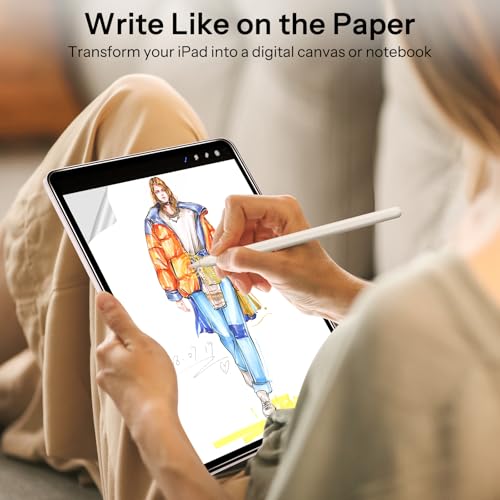
The SPARIN Paper Glass Screen Protector for iPad Air 13″ is a matte tempered glass screen protector — Best Matte/Paper-Feel for 13″ — with a measured 92% paper-touch friction rating, 95% light transmittance, and an auto-alignment installation tray. The only dedicated 13″ matte pick in this roundup, with an honestly reported tempered-glass waviness trait relevant to precision digital artwork.
Summary
SPARIN’s Paper Glass earns Best Matte/Paper-Feel for 13″ by backing its writing-feel claims with specific, measurable numbers rather than vague marketing language, and by filling the only dedicated 13″ matte slot in this roundup. The honest caveat — a documented tempered-glass waviness effect during precision line work — matters primarily to serious digital artists, and is a known trait of the broader category rather than a SPARIN-specific flaw. For everyday note-taking and casual drawing, this is a well-specified, capable pick.
Tips for Choosing an iPad Air M4 Screen Protector
Match the protector type to how you actually use your iPad. Tempered glass maximizes durability, matte “paper-feel” finishes improve Apple Pencil control, and privacy glass blocks side-angle viewing. Pick based on your primary use case, not just the highest-rated option.
Double-check your exact model size. The iPad Air M4 comes in 11″ and 13″ versions, and protectors are size-specific. A protector built for one won’t fit the other — verify your model in Settings > General > About before ordering.
Prioritize a proper installation system. A guided tray or dust-removal box dramatically reduces the risk of bubbles and misalignment — the single biggest source of screen protector complaints across every brand. Basic frame kits work, but require more care and a cleaner workspace.
Know the Apple Pencil trade-off with matte protectors. Paper-feel textures genuinely improve writing and drawing control, but that same texture causes faster Pencil tip wear over time. If you sketch daily, factor in occasional tip replacement.
Check whether “military-grade” is backed by a real standard. The phrase itself isn’t regulated — anyone can print it on a box. Look for a specific certification like MIL-STD-810H, or a concrete claim you can actually verify, not just the words alone.
Consider privacy needs if you use your iPad in public. Anti-spy protectors block side-angle viewing, which is genuinely useful on planes, trains, or open offices — but they slightly reduce head-on brightness and clarity in exchange.
Budget doesn’t have to mean compromised — if the fundamentals hold up. A lower-priced option can still deliver real 9H glass and solid Pencil compatibility. What separates a good budget pick from a bad one is usually installation consistency, not the glass itself.
Editor’s tip: Skip protectors that make vague, unverifiable claims. A brand willing to publish specific numbers — friction ratings, transmittance percentages, certified drop standards — is a brand that’s actually tested the product, not just marketed it.
Frequently Asked Questions (FAQ)
What’s the difference between tempered glass and film protectors?
Tempered glass protectors are thicker, stronger, and rated at 9H hardness, meaning they can withstand scratches and impacts far better than plastic films. They also preserve clarity and touch responsiveness, making them ideal for long‑term durability. Film protectors, on the other hand, are thinner and lighter, often with matte finishes that reduce glare or mimic paper texture for Apple Pencil use. While films are cheaper and easier to replace, they don’t offer the same drop resistance as tempered glass. For most iPad Air M4 users, tempered glass is the safer, more versatile choice.
Will a screen protector affect Apple Pencil performance?
Not significantly, if you choose the right one. High‑quality tempered glass protectors are designed to maintain responsiveness, ensuring smooth writing, sketching, and navigation. Matte or paperlike protectors go a step further by adding texture, which improves control and makes digital writing feel closer to pen‑on‑paper. The trade‑off is a slight reduction in display sharpness compared to clear glass. If you use Apple Pencil daily for notes or art, a paperlike protector may be worth it. If you prioritize crisp visuals, stick with clear tempered glass.
How important is the installation method?
Very important. A poorly installed protector can leave bubbles, dust spots, or misalignment that ruins the experience. Premium brands like Spigen, ESR, and EZ‑GLAZ include auto‑alignment trays or UltraFit boxes that make installation nearly foolproof, even for beginners. Budget options like Ailun may require manual alignment, which can be trickier. If you’re not confident with DIY installs, investing in a protector with an alignment tray saves frustration and ensures a perfect fit on the first try.
Which screen protector should I buy if I’m on a budget?
If cost is your main concern, options like the Ailun 2‑Pack deliver solid basics—9H tempered glass, oleophobic coating, and Apple Pencil compatibility—at a fraction of the price of premium brands. You won’t get advanced features like dust‑removal trays or military‑grade shatterproof ratings, but you’ll still protect your iPad Air M4 from scratches and everyday wear. For users who just want reliable coverage without spending extra, budget protectors are a smart, practical choice.
Written by Metin Karal
Metin Karal is a Computer Engineer with over 25 years of experience working with internet technologies, trends, and digital tools since 1995. He brings this deep background into his product reviews, combining technical expertise with careful research to deliver honest, practical insights for readers. Passionate about technology, Metin also enjoys programming in C# and is currently developing PairMem, a challenging memory game available for free on the official Microsoft Store.
How We Selected These Products
We recommend these items based on a thorough research process designed to highlight the best options available. While we did not physically test some products ourselves, we relied on detailed research and verified customer feedback to evaluate them.
- Detailed Research: We reviewed product specifications, manufacturer information, and feature lists to understand what each item offers.
- Customer Insights: We analyzed verified buyer reviews and ratings to learn how these products perform in real-world use.
- Comparison Factors: We compared products across price, durability, usability, and unique features to identify the strongest choices.
- Personal Experience: With over 25 years of working in internet-related technologies and following online trends since 1995, I bring a deep understanding of how products are marketed, evaluated, and used. This background helps me filter out hype and focus on what truly matters for everyday users.
- Balanced Evaluation: Our goal is to provide clear, unbiased information so you can make confident purchasing decisions.
See also How We Review Products section for more details on our process.
Pingback: 7 Best iPad Air M4 Case – From Premium to Budget