If you are reading this page, you probably have a problem with your iPhone/iPad safari: iPhone keeps refreshing web pages continuously while surfing! If so, keep reading! Solution is actually simple, and you can do it by yourself.
Solve iPhone Keeps Refreshing Web Pages Problem
Follow these simple steps!
- Open your iPhone/iPad Settings
- Scroll down and click Safari
- Now, you opened Safari related settings page. Now click “Advanced” as shown below.
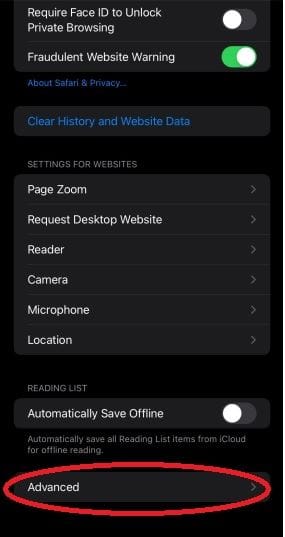
- Now, Toggle OFF “Privacy Preserving Ad Measurement”

Your iPhone reload problem must be solved now! Go back to your problematic pages and test it.
If your problem is solved or have meet something weird, leave a message below.
Written by Metin Karal
Metin Karal is a Computer Engineer with over 25 years of experience working with internet technologies, trends, and digital tools since 1995. He brings this deep background into his product reviews, combining technical expertise with careful research to deliver honest, practical insights for readers. Passionate about technology, Metin also enjoys programming in C# and is currently developing PairMem, a challenging memory game available for free on the official Microsoft Store.