You may see an IE error in your LG Washing Machine. Don’t panic! Reason of this warning is to warn you that washing machine is not taking enough water for washing. This procedure applies to LG F4J9JH2T model, but other models might be similar. It is best to check your LG washing machine’s user manual.
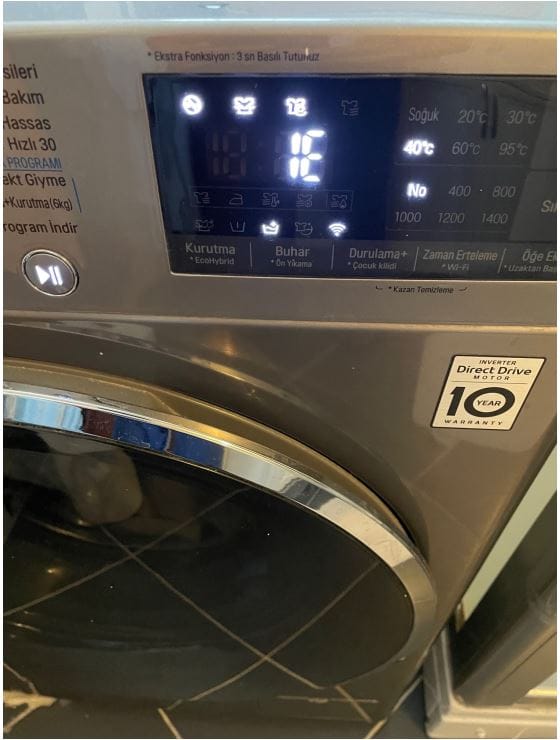
How to Fix LG Washing Machine IE Error?
- Power off your LG Washing machine, if running
- Check water outlet valves whether they are fully opened or not. That valves might be turned off accidently. This usually solves the problem.
- Check for the hose of the LG watching machine. That hose might be pinched and machine does not getting enough water.
- Check for your house’s municipal water. Is it normal or is there any pressure decrease?
- If still not solved, call a LG service. The problem might be a sensor or card problem in your LG Washing machine.
In addition, don’t forget to make a Tube Clean regularly in you LG washing machine.
- 9 Best Mac Mini Accessories (2026) — Everything You Need to Set Up Your Desk
- 9 Best Smartwatches for Women (2026) — Slim, Stylish & Long-Lasting Picks
- 10 Best Samsung Galaxy Watch 9, 8 & Ultra Bands (2026) — Every Style Ranked
- 7 Best Samsung Galaxy Watch 9 & Watch 8 Cases & Screen Protectors — 40mm & 44mm Picks Ranked
- 7 Best Google Pixel 11 Pro Fold Cases (2026) — Slim, Budget, Clear & Official Compared