Written by Metin KARAL – Computer Engineer with 25+ years of experience in internet technologies. Some products here are tested directly, while others are evaluated through detailed research, specifications, and verified customer feedback. This article may contain affiliate links; as an Amazon Associate we earn from qualifying purchases at no extra cost to you.
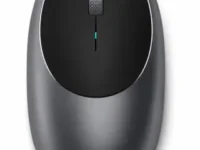
The Satechi M1 Wireless Bluetooth Mouse has been around since 2020, and it’s aged into something of a default recommendation for anyone who wants a mouse that actually looks like it belongs next to a MacBook — a curved aluminum body, an aluminum scroll wheel, and color options (Space Gray, Silver, Rose Gold) that line up almost exactly with Apple’s own hardware. It’s USB-C rechargeable, works across Mac, Windows, iOS, and Android, and has sat at roughly $30 for years.
What it doesn’t do is switch between multiple paired devices — a feature that’s become close to standard on competing mice at this price. This review covers what the M1 gets right, where its spec sheet genuinely varies depending on which retailer you check, and how it stacks up against two very different Logitech alternatives: the budget-focused Pebble 2 M350s and the larger, AA-powered Signature M650 L.
Quick Facts
- 🖱️ Design: ambidextrous, curved aluminum body with an aluminum scroll wheel; roughly 4.37 × 2.25 × 1.25 in and 176g
- 🔗 Connectivity: Bluetooth only — connects to one device at a time, with no multi-device switching; re-pairing is required to move between devices
- 🔋 Battery: USB-C rechargeable, usable while plugged in and charging, with a manufacturer-stated battery life of up to 45 days
- 🎯 Tracking: 1200 DPI optical sensor, a single fixed sensitivity level rather than adjustable steps
- 🎨 Colors: Space Gray, Silver, Blue, and Rose Gold
- 💻 Compatibility: Mac, Windows, iOS 13+, Android, Chrome OS — not recommended for 2011-and-earlier Mac hardware
- 📦 In the box: USB-C charging cable and a user manual
- 💵 Price: around $30, in the same bracket as its two closest Logitech competitors covered below
- ⭐ Amazon feedback: a strong, well-established rating from a large, mature review base spanning several years on the market
Editor’s Note
The single biggest thing to know about the M1 before buying it: it only connects to one device at a time. Unlike both Logitech mice compared later in this review, there’s no Easy-Switch button and no multi-device pairing memory — moving the M1 from your MacBook to an iPad means re-pairing it, not pressing a button. Satechi’s own listing doesn’t hide this, but it’s easy to miss if you’re comparing purely on price and design, since both Logitech alternatives at a similar price point handle multi-device switching as a headline feature.
It’s also worth flagging a genuine inconsistency across retailer listings: the Bluetooth version stated for this exact mouse isn’t consistent from source to source — some list Bluetooth 4.2, others list Bluetooth 5.0. That kind of discrepancy is common when a product has quietly gone through internal revisions without a name change, and it’s worth checking the listing you’re actually buying from rather than assuming a specific version.
One more honest note on the “compact and portable” framing: at around 176g, the M1 is not particularly light for a travel mouse — the aluminum body that gives it its premium feel also adds real weight compared to plastic-bodied competitors like the Pebble 2.

Why Design and Material Still Matter on a $30 Mouse
Most mice in this price range are injection-molded plastic, and for good reason — it’s cheap, light, and durable. The M1’s aluminum shell is a genuine departure from that, and it’s the entire reason the mouse gets compared to Apple’s own hardware as often as it does. Material choice isn’t just cosmetic here: an aluminum scroll wheel behaves differently under your finger than a rubberized plastic one, with a colder, more precise feel that some people specifically seek out and others find less comfortable over long sessions.
The trade-off is exactly what you’d expect from swapping plastic for metal: more weight, and a firmer, less forgiving feel in the hand. Neither is objectively better — it depends entirely on whether you want a mouse that feels substantial or one that disappears into a bag without you noticing it’s there.
Pros
- Genuinely premium, Apple-matching design — the curved aluminum body and matching color options are a real differentiator from the plastic mice that dominate this price range.
- Rechargeable via USB-C, usable while charging — no disposable batteries to buy, and you’re never fully without a mouse just because it’s plugged in.
- Long track record on the market — this design has been refined since 2020, with a large, mature review base behind it rather than an unproven new release.
- Broad cross-platform compatibility — Mac, Windows, iOS, Android, and Chrome OS are all officially supported, not just Apple hardware.
- Long battery life between charges — a manufacturer-stated 45 days per charge means charging is an occasional task, not a weekly one.
Cons
- No multi-device switching — the single biggest functional gap against similarly-priced competitors that treat this as a headline feature.
- Fixed single DPI level — no on-the-fly sensitivity adjustment, which some competing mice in this range offer as standard.
- Heavier than its “portable” framing suggests — the aluminum build adds real pocket/bag weight compared to plastic-bodied alternatives.

Things Buyers Should Know
You can’t switch between devices without re-pairing
This is worth repeating on its own because it changes the mouse’s fit for certain workflows entirely. If you regularly move between a laptop, a tablet, and a desktop through the day, the M1 will make you re-pair it each time, since it doesn’t retain multiple device connections the way Bluetooth Easy-Switch mice do. For a single-device desk setup, this is irrelevant. For anyone splitting time between devices constantly, it’s a real daily friction point worth weighing against the mouse’s design advantages.
“Up to 45 days” is a manufacturer figure, not a guarantee
Like almost any stated battery-life figure, this number represents ideal or average conditions rather than a hard guarantee — actual runtime depends on how much you use the mouse daily, and whether it’s frequently going in and out of sleep mode. Treat it as a useful ballpark for comparing against competitors rather than a number you should expect to hit exactly.
A single, fixed DPI means no on-the-fly sensitivity switching
The M1’s 1200 DPI sensor is fixed rather than adjustable, which is a meaningful difference from mice that offer multiple selectable sensitivity levels for switching between precise editing work and fast general navigation. For most everyday use, one well-tuned DPI level is genuinely enough — but if you specifically want to toggle sensitivity depending on the task, this isn’t the mouse for that.
Looking specifically for a MacBook-optimized pick? Dedicated roundups exist
This review evaluates the M1 as a standalone product against two general-purpose competitors. If you specifically want the best mouse for a MacBook Neo, our 6 Best Mouse for MacBook Neo (2026) roundup narrows the field to that exact hardware. For a broader look across the whole MacBook lineup — Neo, Air, and Pro — our 10 Best Mouse for MacBook Neo, Air & Pro (2026) roundup covers more ground.
Build, Feel & Everyday Ergonomics
The curved, ambidextrous shape is designed to work for both left- and right-handed users without a dedicated version for each, which is a genuine convenience if a mouse gets shared or handed off. The aluminum scroll wheel is the standout tactile detail — it has a distinctly different feel from the rubberized wheels on most mice in this price bracket, with a slightly heavier, more deliberate click as you scroll.
Size is worth checking against your own hand before buying, since the M1’s compact footprint that makes it travel-friendly can feel small for anyone with larger hands used to a full-size mouse. This is one of the more common trade-offs of the “matches your MacBook” aesthetic — a slimmer profile that prioritizes looking the part over accommodating every hand size.

Battery, Charging & Daily Convenience
The ability to keep using the mouse while it’s plugged in and charging is a small but genuinely useful detail — you’re never stuck without a working mouse mid-charge the way you would be with some rechargeable peripherals. The trade-off against a replaceable-battery mouse is the usual one: you’ll never need to buy AA batteries, but you’re also dependent on a USB-C cable being available when the charge does eventually run low, rather than being able to swap in a spare battery from a drawer.
How It Compares
Satechi M1 vs Logitech Pebble 2 M350s
The Logitech Pebble 2 M350s undercuts the M1 meaningfully on price while adding the exact feature the M1 lacks: genuine multi-device switching across up to three devices via a dedicated Easy-Switch button. It runs on a replaceable battery rated for roughly two years rather than USB-C charging, and its plastic body (made partly from recycled material) is noticeably lighter than the M1’s aluminum shell.
Where the M1 pulls ahead is build material and overall feel — the aluminum body and scroll wheel read as more premium than the Pebble 2’s soft-touch plastic, and that difference is immediately obvious in hand. If multi-device switching and a lower price matter most, the Pebble 2 is the more practical pick. If a premium, Apple-matching aesthetic is the priority and you’re only ever pairing to one device at a time, the M1 remains the more distinctive choice.
Satechi M1 vs Logitech Signature M650 L
The Logitech Signature M650 L is a genuinely different category of mouse — full-size, built specifically for larger hands, with a SmartWheel that auto-switches between precise line-by-line scrolling and fast free-spin scrolling, plus customizable side buttons. It runs on a single AA battery rated for roughly two years rather than USB-C charging, and connects via Bluetooth Low Energy or an included Logi Bolt USB receiver — giving it a wired-receiver fallback option the M1 doesn’t have.
It’s also the most expensive of the three mice in this review, and its official listing doesn’t advertise multi-device Bluetooth switching as a feature the way the Pebble 2 does, despite offering two separate connection methods. The M650 L makes the most sense for a stationary desk setup where hand size and scrolling comfort matter more than portability — it’s a larger, heavier mouse than either the M1 or the Pebble 2, and isn’t really competing for the same “travels in a bag” use case.

Who Should Buy the Satechi M1?
This mouse makes the most sense for buyers who:
- Use one primary device most of the time — the lack of multi-device switching is a non-issue if you’re not constantly hopping between a laptop, tablet, and desktop.
- Want a mouse that visually matches Apple hardware — the aluminum finish and color options are built specifically around that aesthetic.
- Prefer USB-C rechargeable over replaceable batteries — one less thing to buy separately, at the cost of needing a cable on hand eventually.
- Have average-to-smaller hands — the compact form factor isn’t built with large-hand comfort as the priority.
Who should look elsewhere: if you regularly switch between multiple devices through the day, the Pebble 2’s Easy-Switch functionality solves a real problem the M1 doesn’t address, at a lower price. If you have larger hands and mostly use one device at a stationary desk, the Signature M650 L’s larger body and SmartWheel scrolling will likely be more comfortable over long sessions.
Final Verdict
The Satechi M1 has earned its long shelf life for a specific reason: it’s one of the few mice in this price range that actually looks and feels like it was designed to sit next to a MacBook, rather than just being marketed toward Mac owners. The aluminum build, the color matching, the curved scroll wheel — none of that is an accident, and it still holds up against newer competitors on pure design.
What it asks you to give up is flexibility. No multi-device switching is a real limitation in 2026, when even a $20 competitor treats that as a standard feature rather than a premium one. Whether that trade-off is worth it comes down entirely to how you actually use your devices day to day.
If a single-device desk setup and a genuinely premium aesthetic matter more to you than device-switching convenience, the Satechi M1 Wireless Bluetooth Mouse remains a well-built, good-looking pick that’s earned its long track record honestly.

Satechi M1 Wireless Bluetooth Mouse Review
Summary
The Satechi M1 is the most premium-feeling single-device pick of the three mice compared in this review — a genuinely Apple-matching aluminum build, a USB-C rechargeable battery rated up to 45 days, and broad cross-platform compatibility. The honest trade-off is real: no multi-device switching, a fixed single DPI level, and a Bluetooth version that isn’t consistently listed across retailers. For buyers on one primary device who want a mouse that actually looks like it belongs next to a MacBook — start here.
Written by Metin Karal
Metin Karal is a Computer Engineer with over 25 years of experience working with internet technologies, trends, and digital tools since 1995. He brings this deep background into his product reviews, combining technical expertise with careful research to deliver honest, practical insights for readers. Passionate about technology, Metin also enjoys programming in C# and is currently developing PairMem, a challenging memory game available for free on the official Microsoft Store.
How We Selected These Products
We recommend these items based on a thorough research process designed to highlight the best options available. While we did not physically test some products ourselves, we relied on detailed research and verified customer feedback to evaluate them.
- Detailed Research: We reviewed product specifications, manufacturer information, and feature lists to understand what each item offers.
- Customer Insights: We analyzed verified buyer reviews and ratings to learn how these products perform in real-world use.
- Comparison Factors: We compared products across price, durability, usability, and unique features to identify the strongest choices.
- Personal Experience: With over 25 years of working in internet-related technologies and following online trends since 1995, I bring a deep understanding of how products are marketed, evaluated, and used. This background helps me filter out hype and focus on what truly matters for everyday users.
- Balanced Evaluation: Our goal is to provide clear, unbiased information so you can make confident purchasing decisions.
See also How We Review Products section for more details on our process.