Written by Metin KARAL – Computer Engineer with 25+ years of experience in internet technologies. Some products here are tested directly, while others are evaluated through detailed research, specifications, and verified customer feedback. This article may contain affiliate links; as an Amazon Associate we earn from qualifying purchases at no extra cost to you.
Whether you’re transferring photos, videos, or important documents, having the right USB flash drive can make all the difference. From rugged metal drives built for durability to sleek, high-speed options for modern devices, this list covers the top flash drives for every need—budget-friendly, high-capacity, or USB-C ready. Each drive has been picked for real-world performance, reliability, and convenience, making it easier to find a storage solution that fits your workflow and lifestyle.
🏆 8 Best USB Flash Drive 2026 – Quick Comparison
| Model | Capacity Range | Max Speed | Key Feature |
|---|---|---|---|
| Samsung BAR Plus 3.1 | 64GB–512GB | Up to 400MB/s | Rugged metal casing; shock-, water-, temperature-, and X-ray-proof |
| SanDisk Ultra Flair | 16GB–1TB | Up to 150MB/s | Sleek metal casing; compact, stylish design |
| Lexar D40E Dual USB | 64GB–256GB | Up to 100MB/s | Dual USB-C + USB-A connectors; swivel metal design |
| Samsung Type-C USB Drive | 64GB–512GB | Up to 300MB/s | USB-C plug for modern laptops and phones; fast transfer speeds |
| SanDisk Ultra USB 3.0 | 16GB–1TB | Up to 100MB/s | Budget-friendly everyday storage for documents, photos, and media |
| Kingston DataTraveler Exodia | 32GB–256GB | Up to 200MB/s | Reliable daily use with practical, capless sliding design |
| PNY Attache 4 | 32GB–512GB | Up to 130MB/s | Sliding capless design; high-capacity budget-friendly option |
| ADATA UV128 | 16GB–128GB | Up to 90MB/s | Retractable capless connector; textured scratch-resistant body |
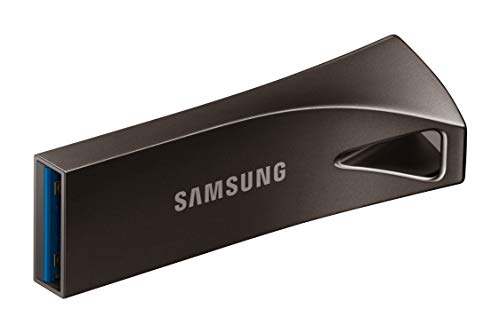
Samsung BAR Plus 3.1 USB Flash Drive — Best Budget Rugged USB Drive
Quick Facts
- 🔌 USB-A connector — plug directly into laptops, desktops, and compatible hubs
- ⚡ Up to 400MB/s read speed — fast transfers for everyday files
- 💾 128GB capacity — ample room for photos, videos, and documents
- 🛡️ Rugged metal casing — shock-, water-, temperature-, magnet-, and X-ray-proof
- 🔑 Integrated keyring — reduces risk of losing your drive
- 🧠 V-NAND 64-layer technology — reliable performance and durability
Specifications – Samsung BAR Plus 3.1 Premium USB Flash Drive
| Feature | Detail |
|---|---|
| Connector | USB‑A (USB 3.1 interface) |
| Capacity | 64GB, 128GB, 256GB, 512GB |
| Speed | Read up to 400MB/s |
| Dimensions | Sleek, durable design with integrated keyring |
| Material | Rugged metal casing (Titan Grey finish) |
| Compatibility | Windows, macOS, Linux, smart TVs, car stereos |
| Durability | Water‑proof, shock‑proof, temperature‑proof, magnet‑proof, X‑ray‑proof |
| Security | Optional password protection software |
| Warranty | 5‑year limited warranty |
📌 Samsung BAR Plus USB Flash Drive Specifications for Rugged, High‑Speed Storage in 2026
Editor’s Note
The Samsung BAR Plus 3.1 USB Drive is designed for users who want a simple, high-performance drive with serious durability at an affordable price. Its full-metal casing protects the drive from everyday mishaps, and the integrated keyring ensures it stays attached to your gear.
While primarily a USB-A drive, the BAR Plus delivers fast read speeds for smooth file transfers, making it ideal for photos, videos, and documents. The 128GB capacity covers most users’ everyday storage needs, and the rugged design provides peace of mind when carrying important files on the go.
Pros
- Excellent read/write speeds for its category (up to 400 MB/s read)
- Rugged metal casing – waterproof, shock‑proof, temperature‑proof, magnet‑proof, and X‑ray‑proof
- Premium design with integrated keyring for portability and style
- Trusted Samsung brand reputation backed by thousands of positive reviews
Cons
- Slightly higher price than budget USB options, but worth!
Why We Liked It
The BAR Plus shines as a budget-friendly drive that doesn’t compromise on durability. Users consistently praise the rugged metal casing, which protects files from everyday drops, spills, and temperature extremes. The integrated keyring is a small but meaningful touch for those prone to misplacing drives.
Performance-wise, the 400MB/s read speed (for 128GB and 256GB models) is excellent for typical file transfers, and the 200MB/s write speed handles large files reasonably well. While it doesn’t offer USB-C connectivity or advanced encryption software, its combination of speed, toughness, and affordability makes it a standout in its class.

Samsung BAR Plus 3.1
Verdict
Many people consistently praise the rugged metal build, fast transfer speeds, and premium design of the Samsung BAR Plus. Many highlight its durability — waterproof, shock‑proof, magnet‑proof, and X‑ray‑proof — making it a reliable choice for everyday use. The integrated keyring adds practicality, though some note it’s larger than ultra‑compact drives like the FIT Plus.
Real‑world performance shows read speeds up to 400 MB/s (128GB/256GB/512GB models), and 120 MB/s write speeds which makes moving large files quick and seamless. Combined with Samsung’s reputation for reliability, the BAR Plus stands out as a drive that balances speed, toughness, and style.
💡 Bottom Line: The Samsung BAR Plus is a dependable, high‑performance flash drive for users who value durability, premium design, and fast transfers. It’s slightly pricier than budget options, but the rugged build and speed make it worth the investment in 2026.
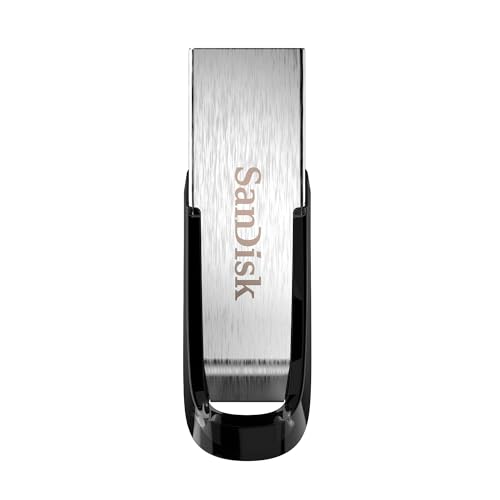
SanDisk Ultra Flair USB 3.0 Flash Drive — Best Stylish Speed at a Budget Price
Quick Facts
- 🔌 USB-A connector — plug directly into laptops, desktops, and compatible hubs
- ⚡ Up to 150MB/s read speed — fast enough for everyday files and media
- 💾 128GB capacity — ample space for documents, photos, and videos
- 🛡️ Durable metal casing — sleek design with scratch-resistant finish
- 🔑 Plug-and-play — simple setup, no software required
Specifications – SanDisk Ultra Flair USB Flash Drive (128GB)
| Feature | Detail |
|---|---|
| Connector | USB‑A (USB 3.0 interface) |
| Capacity | 16GB, 32GB, 64GB, 128GB, 256GB, 512GB, 1TB |
| Speed | Read up to 150MB/s |
| Material | Brushed metal casing |
| Dimensions | Slim, pocket‑friendly design |
| Security | SanDisk SecureAccess password protection software |
| Compatibility | Windows, macOS, Linux |
| Durability | Heat‑resistant metal body |
| Warranty | 5‑year limited warranty |
Editor’s Note
The SanDisk Ultra Flair is a budget-friendly flash drive that combines speed, style, and portability. Its slim metal casing not only protects the drive from everyday scratches but also gives it a polished, premium feel.
With up to 150MB/s read speed, it’s ideal for quickly transferring photos, videos, and documents without lag. Though write speeds are more modest, it’s sufficient for typical daily use. This drive is especially suited for users who value a compact, stylish design alongside reliable performance.
Pros
- Fast read/write speeds for budget range
- Sleek, stylish metal design
- Compact and portable
- Good balance of price and performance
Cons
- Can heat up during extended transfers
- Metal body may scratch easily
Why We Liked It
The Ultra Flair stands out for combining speed, durability, and a sleek design at a budget-friendly price. Users appreciate the metal casing, which resists scratches while giving the drive a premium feel. The compact, lightweight design makes it ideal for carrying on a keyring or in a bag.
While not the fastest drive in write-heavy tasks, the read performance is excellent for everyday file transfers, making it a practical choice for students, professionals, and casual users alike. Its simple plug-and-play usability adds to the convenience, with no setup or software required.

SanDisk Ultra Flair
Verdict
The SanDisk Ultra Flair delivers solid everyday performance, with read speeds around 150 MB/s and write speeds near 60 MB/s, and its sleek metal body makes it both stylish and portable. Many reviewers note that it can heat up during long transfers, but in my opinion the overall balance of speed, design, and affordability makes it a dependable choice for students, commuters, or anyone needing a reliable USB drive. I find it to be one of the better budget options that combines durability & practical performance with budget friendly price tag.
Lexar D40E Dual USB 3.2 Gen 1 Flash Drive — Best Dual USB-C + USB-A Flash Drive

Quick Facts
- 🔌 Dual USB-C and USB-A connectors — plug directly into phones, laptops, and desktops
- ⚡ Up to 100MB/s transfer speed — smooth everyday file moves
- 💾 128GB capacity — solid for photos, videos, and backups
- 🔄 360° swivel design — no cap to lose, easy connector switching
- 🧠 256‑bit AES encryption — optional file security with software support
- 🛡️ Metal housing — durable and lightweight (26g)
Specifications – Lexar D40E Dual USB Flash Drive (128GB)
| Feature | Detail |
|---|---|
| Connector | USB-C + USB-A (USB 3.2 Gen 1) |
| Capacity Options | 64GB / 128GB / 256GB |
| Speed | Up to 100MB/s (read), lower writes |
| Design | 360° swivel metal housing |
| Weight | ~26g |
| Compatibility | Phones, tablets, laptops, desktops |
| Security | 256‑bit AES encryption software |
| Warranty | 3‑year limited warranty |
Editor’s Note
The Lexar D40E Dual Drive targets users who live between smartphones/tablets and traditional computers — offering plug-and-play compatibility with USB-C and USB-A without adapters. Its swivel metal housing adds a practical, no-cap-to-lose design while protecting the drive during daily use.
Though not the fastest on paper, it delivers smooth everyday performance with commonly used file sizes and formats, making it a practical middle ground between budget and premium options.
Pros
- Dual USB-C + USB-A support — great cross-device compatibility
- Swivel connector — no caps, smooth switching
- 256‑bit encryption support — enhanced software security
- Durable metal build — premium feel and toughness
- Lightweight and compact — travel‑friendly design
Cons
- Modest transfer speeds — not ideal for large video libraries
- Limited warranty (3 years) — shorter than some competitors
Why We Liked It
What stands out with the Lexar D40E is practical versatility across devices. Real user reviews consistently highlight the convenience of being able to plug into both USB‑C phones/tablets and traditional USB‑A laptops without adapters — a key advantage for users who juggle multiple platforms daily. Many reviewers call the swivel design “simple but exactly the design feature I needed”, noting that it eliminates cap loss and streamlines everyday use.
Performance-wise, while 100MB/s isn’t the fastest among flash drives, tester feedback shows it is plenty fast for photos, documents, and typical multimedia files, with stable real‑world transfer rates and no major hiccups reported even under extended use. The secure encryption option, though software‑based, also earns praise from users who appreciate having an extra layer of protection for sensitive files.
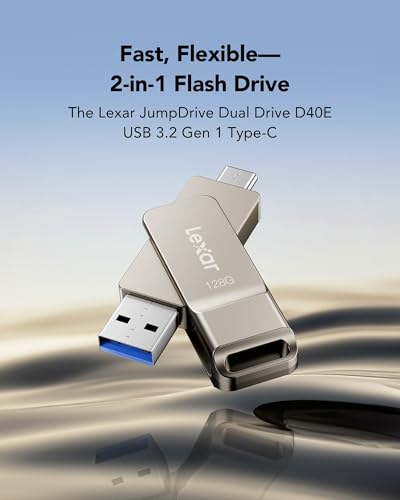
Lexar D40E Dual USB 3.2 Gen 1 Flash Drive
Best For: Cross‑platform users who want a single flash drive for phones, tablets, and computers — without carrying adapters or multiple drives.
Summary
The Lexar D40E Dual USB Flash Drive is a versatile and practical storage solution for anyone switching between USB‑C and USB‑A devices. Its dual connectors, secure encryption support, and rugged metal design make it a standout choice for daily use.
While it’s not the fastest drive in our lineup, its cross‑device convenience and reliable performance make it one of the most useful flash drive — especially for mixed‑ecosystem users.
Samsung Type-C USB Flash Drive — Best USB-C Flash Drive for Modern Devices

Quick Facts
- 📦 2 chargers + 2 cables — home and travel covered in one purchase
- ⚡ 45W GaN per unit — exceeds MacBook Neo’s confirmed 30W peak charging speed
- 🔌 Single USB-C port — dedicated, focused MacBook Neo charging per unit
- 📏 5ft USB-C cables included — 10,000+ bend-tested, no extra cable purchase needed
- 🧠 PPS + PD certified — intelligent power delivery across all USB-C devices
- 🛡️ 18-month warranty per unit — Anker worry-free coverage on both chargers
Specifications – Samsung Type-C USB Flash Drive (256GB)
| Feature | Detail |
|---|---|
| Connector | USB-C (USB 3.2 Gen 1 interface) |
| Capacity | 64GB, 128GB, 256GB, 512GB |
| Speed | Read: up to 400MB/s • Write: up to ~300MB/s |
| Dimensions | Ultra-compact, low-profile thumb design |
| Material | Reinforced plastic with metal internal shielding |
| Compatibility | USB-C laptops, Android phones, tablets, cameras |
| Backward Compatibility | USB 3.0 / 2.0 (via adapters if needed) |
| Durability | Water-proof, shock-proof, temperature-proof, magnet-proof, X-ray-proof |
| Security | Optional software-based file protection |
| Warranty | 5-year limited warranty |
Editor’s Note
Samsung’s Type-C flash drive is built for the USB-C-first ecosystem, eliminating the need for adapters across modern laptops, tablets, and smartphones. It delivers consistently fast performance in real-world use, especially when transferring large files like 4K video.
Instead of chasing peak benchmark numbers, it focuses on stability and long-term reliability — making it a safer choice for storing important data.
Pros
- True USB-C compatibility — direct connection without adapters
- Consistent real-world speeds — handles large files efficiently
- Excellent durability — built for everyday use and travel
- Compact and lightweight — highly portable design
- Reliable NAND memory — stable long-term performance
Cons
- No USB-A connector — requires adapter for older devices
- Very small size — easy to misplace
- No hardware encryption — relies on software security
Why We Liked It
What stands out most is performance consistency, not just peak speed claims. Independent testing shows that while the drive is rated up to 400MB/s read, the real advantage is how stable it remains during sustained transfers, rather than dropping off sharply like many budget drives.
User and reviewer feedback consistently highlight its reliability and ease of use, especially for everyday file transfers between phones and laptops. Many users describe it as “simple, fast, and highly portable”, with strong satisfaction around its compact size and usability.
Another key strength is durability. Samsung’s multi-proof protection isn’t just marketing — it’s designed to handle real-world conditions like temperature changes, drops, and travel use, which makes it a dependable carry-everywhere drive.
That said, it’s important to understand its limits: this is not a high-end write-performance drive. Write speeds are noticeably lower, which aligns with both technical testing and user expectations for this category. But for reading, transferring, and accessing files quickly across devices, it performs exactly where it needs to.

Samsung Type-C USB Flash Drive
Best For: USB-C users who want a compact, durable, and reliable flash drive for laptops, phones, and tablets — without compatibility issues.
Summary
The Samsung Type-C USB Flash Drive is a modern, reliable storage solution built for USB-C devices. It combines fast performance, strong durability, and ultra-portability in a compact form.
While not the fastest in write speeds, its stability, build quality, and native USB-C support make it one of the most practical flash drives for 2026.
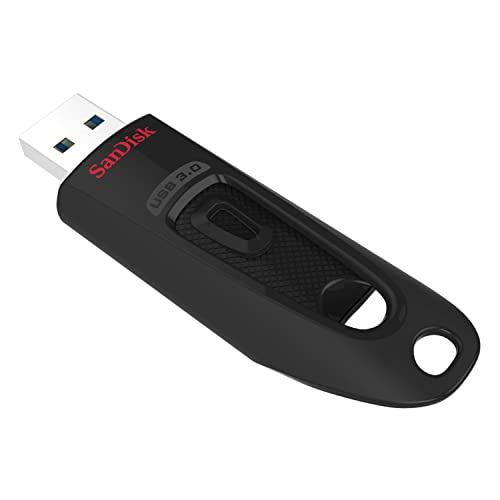
SanDisk Ultra USB 3.0 Flash Drive — Best Budget USB Flash Drive for Everyday Storage
Quick Facts
- ⚡ Up to 130MB/s read speed — significantly faster than USB 2.0 drives
- 💾 128GB capacity — ideal for photos, videos, and daily file storage
- 🔌 USB 3.0 interface — backward compatible with USB 2.0
- 🔐 Built-in encryption support — secure file protection with password software
- 📏 Lightweight plastic design — simple, functional, and portable
- 💸 Budget-friendly option — strong value for everyday use
Specifications – SanDisk Ultra USB 3.0 Flash Drive (128GB)
| Feature | Detail |
|---|---|
| Connector | USB-A (USB 3.0) |
| Capacity Options | 32GB / 64GB / 128GB / 256GB / 512GB / 1TB |
| Speed | Up to 130MB/s read |
| Design | Sliding (retractable) connector, plastic body |
| Compatibility | Windows, macOS, USB 2.0 / 3.0 ports |
| Security | 128-bit AES encryption (software-based) |
| Warranty | 5-year limited warranty |
Editor’s Note
The SanDisk Ultra USB 3.0 remains one of the most widely used options in the budget flash drive category, offering a solid balance between price and performance. It’s not designed to compete with high-end models, but it delivers reliable everyday speeds for basic storage tasks.
For users searching for the best USB flash drive under $30 or simply a dependable daily-use option, this model continues to be a practical and accessible choice.
Pros
- Affordable and widely available — excellent entry-level option
- Faster than USB 2.0 drives — noticeable upgrade in everyday use
- Simple plug-and-play design — easy for all users
- Retractable connector — no cap to lose
- Built-in encryption support — adds basic file security
Cons
- Write speeds are relatively slow — not ideal for large file transfers
- Plastic build quality — less durable than metal alternatives
- Can heat up during extended use — common in budget drives
Why We Liked It
What makes this drive stand out is its real-world usability at a low price point. Independent testing and user feedback consistently show that while it doesn’t reach high-end speeds, it still delivers a clear improvement over USB 2.0 drives, especially for transferring photos, documents, and everyday files. For many users, that jump alone is enough to make it feel like a major upgrade.
Another key factor is accessibility. This is one of the most commonly recommended options when people search for the best USB flash drives for storage, simply because it’s easy to use, widely compatible, and reliable for basic tasks. While it’s not the fastest USB flash drive, it does exactly what most users need — simple, dependable storage without overpaying.

SanDisk Ultra USB 3.0 Flash Drive
Best For: Everyday users who want a budget-friendly USB flash drive for storing documents, photos, and media — without needing high-end performance.
Summary
The SanDisk Ultra USB 3.0 Flash Drive is a reliable, budget-focused storage solution that prioritizes accessibility and ease of use. It’s not built for heavy workloads, but it delivers solid everyday performance at a very competitive price.
If you’re looking for a simple and affordable flash drive for daily storage, this remains one of the most practical choices in 2026.
Kingston DataTraveler Exodia USB 3.2 Flash Drive — Best Reliable Everyday USB Drive

Quick Facts
- 🔌 USB-A connector — plug directly into laptops, desktops, and hubs
- ⚡ Up to 100MB/s REAL LIFE read speed — smooth performance for documents and media
- 💾 128GB capacity — plenty of room for files, photos, and videos
- 🛡️ Durable plastic casing — lightweight yet sturdy for daily use
- 🔑 Capless sliding design — no risk of losing a cap
- 🧠 Plug-and-play — easy setup, no extra software needed
Specifications – Kingston DataTraveler Exodia USB Flash Drive
| Feature | Detail |
|---|---|
| Connector | USB‑A (USB 3.2 Gen 1 interface) |
| Capacity | 32GB, 64GB, 128GB, 256GB |
| Speed | Read up to 100MB/s |
| Material | Plastic body with protective cap |
| Dimensions | Lightweight, pocket‑friendly |
| Compatibility | Windows, macOS, Linux |
| Durability | Shock‑resistant design |
| Warranty | 5‑year limited warranty |
Editor’s Note
The Kingston DataTraveler Exodia is designed for users who need a reliable, everyday USB drive without frills. Its capless sliding mechanism protects the connector while eliminating the risk of losing a cap.
With up to 100MB/s real life read speed, the Exodia handles everyday file transfers efficiently. Its lightweight plastic casing is practical for carrying in pockets or bags, and plug-and-play functionality ensures it works seamlessly on most devices. This drive is ideal for anyone who wants reliable performance with simple, no-nonsense design.
Pros
- Solid everyday read/write speeds
- Durable build quality from Kingston
- Lightweight, practical design with keyring loop
- Affordable and widely available
Cons
- Write speeds slower than premium competitors
- Bulkier than ultra-compact drives

Why We Liked It
The Exodia stands out for its reliability and simplicity. Users consistently highlight the sliding, capless design, which is both convenient and protective. The drive’s read speed is more than adequate for documents, photos, and smaller media files, making it ideal for daily tasks.
While write-heavy tasks are slower, the Exodia’s lightweight design, plug-and-play functionality, and affordability make it one of the best choices for students, office workers, and casual users who need a practical everyday USB drive.

Kingston DataTraveler Exodia
Verdict
Kingston DataTraveler Exodia offers dependable performance with read speeds around 100 MB/s and write speeds near 15 MB/s. Its sturdy build and practical design make it a reliable everyday drive. Affordable and consistent, it’s a safe choice for users who value reliability over cutting-edge speed.
Editor’s Note: I’m using and testing Kingston DataTraveler Exodia for around 3-years without problem. Its read speeds are fairly good, but write speeds are fair. I think, it is an excellent USB driver for everyday jobs at that price range. You can check our detailed Kingston DataTraveler Exodia review also.
PNY Attache 4 USB 3.2 Flash Drive — Best Affordable Big Storage Option

Quick Facts
- 🔌 USB-A connector — plug directly into laptops, desktops, and hubs
- ⚡ USB 3.2 speeds — up to 10× faster than standard USB 2.0 PNY drives
- 💾 128GB capacity — store thousands of songs, HD videos, photos, and documents
- 🛡️ Sliding capless design — protects the connector, no lost caps
- 🔑 Lightweight and portable — easy to carry on keyrings or in bags
- 🧠 Plug-and-play — no software installation required
Specifications – PNY Attache 4 USB Flash Drive (2026)
| Feature | Detail |
|---|---|
| Connector | USB‑A (USB 2.0/3.0 interface) |
| Capacity | 32GB, 64GB, 128GB, 256GB, 512GB |
| Speed | Read up to 130MB/s |
| Material | Plastic body with sliding cap |
| Dimensions | Lightweight, portable design |
| Compatibility | Windows, macOS, Linux |
| Durability | Everyday use, less rugged than premium models |
| Warranty | 1‑year limited warranty |
Editor’s Note
The PNY Attache 4 is designed for users who need affordable, high-capacity storage with solid performance. Its capless sliding design keeps the connector safe while eliminating the risk of losing a cap, and the lightweight body makes it ideal for on-the-go use.
With USB 3.2 performance, it offers significantly faster file transfers than older USB 2.0 PNY drives. This makes it a practical choice for storing and moving large documents, HD videos, and high-resolution photos. The plug-and-play design ensures seamless usability across most devices without additional software.
Pros
- Good read/write speeds for everyday use
- Large capacity options (up to 1TB)
- Affordable price for big storage
- Reliable brand
Cons
- Bulkier design compared to rivals
- Durability not as strong as metal-bodied drives
Why We Liked It
The PNY Attache 4 is perfect for users who need high-capacity, reliable storage without spending a lot. Users appreciate the capless sliding design for convenience and protection. Its USB 3.2 performance ensures faster transfers compared to older drives, making everyday file management smoother.
While it doesn’t have a premium metal casing or advanced security features, its balance of affordability, capacity, and portability makes it an excellent option for students, casual users, and anyone who wants big storage on a budget.

PNY Attache 4
Verdict
The PNY Attache 4 is often noted by reviewers as a practical choice for those needing large storage, with capacities up to 1TB and read speeds around 130 MB/s plus write speeds near 40 MB/s. Its bulkier design and average durability make it less sleek compared to rivals, but in my opinion the affordability makes it appealing for anyone who values big storage over style. I find it to be a straightforward, budget‑friendly option that delivers decent performance without stretching your wallet.
Editor’s Note: The PNY Attache 4 gives Shorter Warranty – Only 1‑year limited coverage compared to rivals’ 5 years.
ADATA UV128 USB 3.0 Flash Drive — Best Compact Capless Flash Drive
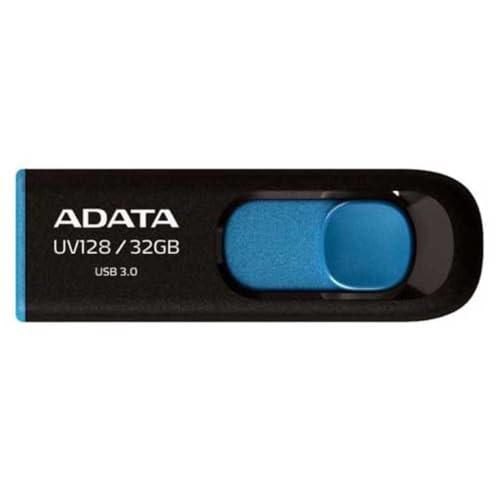
📋 Quick Summary – ADATA UV128 Balanced USB Flash Drive
- 🔌 USB-A connector with retractable design — protects the connector when not in use
- ⚡ Up to 90MB/s read, 40MB/s write — faster than standard USB 2.0 drives
- 💾 128GB capacity — plenty of space for photos, documents, and media
- 🛡️ Capless, retractable mechanism — eliminates lost caps and accidental connector damage
- 🎨 Vibrant color options — Blue-on-Black or Yellow-on-Black to match your style
- 🧠 Driver-free, multi-platform support — works with Windows, macOS, and Linux
Specifications – ADATA UV128 USB Flash Drive
| Feature | Detail |
|---|---|
| Connector | USB‑A (USB 3.1 interface) |
| Capacity | 16GB, 32GB, 64GB, 128GB, 256GB |
| Speed | Read up to 100MB/s |
| Material | Plastic body with slide‑cap design |
| Dimensions | Lightweight, portable |
| Compatibility | Windows, macOS, Linux |
| Durability | Everyday use, dust‑protected connector |
| Warranty | Lifetime warranty (varies by region) |
Editor’s Note
The ADATA UV128 is ideal for users who need a compact, lightweight USB drive that’s easy to carry anywhere. Its retractable, capless design protects the connector while preventing accidental damage, making it a practical solution for everyday storage.
With up to 90MB/s read and 40MB/s write speeds, it provides adequate performance for documents, photos, and light media transfers. Its textured body reduces scratches and dirt, helping maintain the drive’s durability over time. Driver-free, multi-platform compatibility makes it simple to use across a variety of devices.
Pros
- Decent read/write speeds for daily use
- USB 3.2 support for modern systems
- Affordable price point
- Sliding cap design prevents loss
Cons
- Average durability with plastic body
- Bulkier than ultra-compact rivals
- Write speeds slower than upper competitors
Why We Liked It
The UV128 stands out for its compact, lightweight, and capless design, making it highly portable and practical for everyday use. Users appreciate the retractable connector that prevents damage and eliminates the frustration of lost caps.
While it doesn’t deliver the fastest speeds, its read/write performance is solid for everyday file transfers, and the driver-free compatibility across Windows, macOS, and Linux adds convenience. The scratch-resistant body and lifetime warranty make it a dependable choice for casual users who want compact, reliable storage.

ADATA UV128
Verdict
The ADATA UV128 is often described by reviewers as a solid all‑rounder, offering read speeds near 100 MB/s and write speeds around 30 MB/s, with a sliding design that makes it convenient to use. The plastic build feels basic compared to sleeker competitors, but in my opinion it still delivers dependable everyday performance at an affordable price. I find it to be a balanced option that covers most needs without standing out in any single category.
Verdict
From rugged metal designs built to withstand drops and spills, to ultra-compact capless drives for on-the-go convenience, today’s USB flash drives offer something for every user. Whether you prioritize speed, durability, capacity, or cross-device compatibility, there’s a model on this list to fit your needs. By focusing on real-world performance, portability, and value, these drives make it easy to find the right storage solution for work, school, or personal media. No matter your workflow, one of these top picks will keep your files safe, accessible, and ready whenever you need them.
What to Look for in a USB Flash Drive – Buyer’s Guide
Speed — Match It to Your Workflow
Not all USB drives are created equal. Real-world testing shows that read speed impacts everyday transfers—opening photos, documents, and media is noticeably faster on drives rated 150–400MB/s compared to older USB 2.0 drives. Write speeds matter too: large video files or backups benefit from drives with higher sustained write performance, though most casual users will find even mid-range drives sufficient. Focus on matching speed to your typical file sizes: small files and documents rarely need blazing-fast write speeds, but photographers and video editors should prioritize drives that can handle bulk transfers efficiently.
Connector Type — USB-A, USB-C, or Both
Your devices dictate the connector. Traditional laptops and desktops mostly use USB-A, while modern phones, tablets, and some ultrabooks rely on USB-C. If you juggle multiple devices, a dual USB-C + USB-A drive like the Lexar D40E saves you from carrying adapters. For single-device setups, a USB-C-only drive might be ideal for faster modern-device transfers, while USB-A remains the most compatible option for legacy systems.
Build Quality — Metal, Plastic, or Rugged
Durability isn’t just about aesthetics. Metal drives like Samsung BAR Plus or Lexar D40E offer shock, water, and temperature resistance, making them ideal for everyday commuting or travel. Plastic drives, like the PNY Attache 4 or ADATA UV128, are lightweight and portable but may scratch or crack more easily. Capless, retractable, or swivel designs add convenience and reduce lost parts—consider how often you’ll carry your drive in a pocket, bag, or keychain.
Capacity — Choose What Fits Your Needs
Flash drives now range from 16GB up to 512GB, but bigger isn’t always better. For storing documents, photos, and casual media, 128GB is often sufficient. Content creators, gamers, or anyone managing large video libraries may benefit from 256GB or 512GB drives. Make sure the capacity matches your typical use case—don’t overspend for storage you won’t use.
Security Features — Optional but Valuable
Some drives include hardware- or software-based encryption, like the Lexar D40E’s 256-bit AES support. These features are important if you carry sensitive files but require extra setup and software installation. For everyday file transfers where security is less critical, simple plug-and-play drives suffice. Always weigh convenience against the need for security.
Portability — Size and Form Factor
Consider how you’ll carry the drive. Ultra-compact drives like the ADATA UV128 slide easily into pockets, while slightly larger metal drives offer rugged protection. Some designs include keyring loops, retractable connectors, or swivel mechanisms to prevent loss and simplify daily use. Portability is especially critical if you travel frequently or move files between multiple locations.
Price vs. Value — Don’t Overspend
High-end drives with metal casings, dual connectors, or premium speeds cost more, but many mid-tier options, like the SanDisk Ultra Flair or PNY Attache 4, offer excellent speed, capacity, and durability at budget-friendly prices. Know what features truly matter for your workflow, and avoid paying extra for high-end specs you won’t use.
Compatibility — Check Your Devices
Finally, ensure the drive works with all your devices. Most drives are backward-compatible with USB 2.0, but for USB-C laptops, tablets, and phones, make sure the connector matches your device. Cross-platform compatibility is a bonus if you frequently switch between Windows, macOS, or Linux systems.
Tips for Getting the Most from Your USB Flash Drive
Don’t Rely on Old USB Ports — Upgrade Where It Counts
Even the fastest flash drive is limited by the port it’s plugged into. USB 2.0 ports cap speeds around 30MB/s, while USB 3.0/3.1/3.2 ports unlock the full potential of your drive—up to 400MB/s on models like the Samsung BAR Plus. If you want faster transfers, plug into a compatible USB 3.x port; it’s the single biggest factor in real-world speed.
Match Connector Type to Your Devices
USB-C and USB-A drives aren’t interchangeable without adapters. If you switch between phones, tablets, and laptops frequently, consider a dual USB-C + USB-A drive like the Lexar D40E. For single-device setups, USB-C-only or USB-A-only drives are fine, but don’t buy a drive that won’t fit your devices without extra dongles.
Bigger Isn’t Always Better — Capacity Smartly
It’s tempting to go for the largest drive on the shelf, but most users don’t need 512GB unless storing 4K videos or massive photo libraries. A 128GB or 256GB drive is often plenty for daily documents, photos, and casual media. Overspending on unused storage is wasted money.
Design Matters — Protect Your Investment
Capless, retractable, or swivel designs prevent connector damage and lost caps. Metal drives like Samsung BAR Plus or Lexar D40E provide extra durability, while plastic drives like PNY Attache 4 and ADATA UV128 are lightweight and portable. Think about how often you’ll carry it, and in what conditions.
Speed Isn’t the Whole Story
High read speeds make file access fast, but write speeds are what matter for large file transfers. If you move huge videos or backups frequently, prioritize drives with higher sustained write speeds. For casual users, even mid-range drives like SanDisk Ultra Flair or ADATA UV128 deliver perfectly adequate daily performance.
Keep Security in Mind
Some drives offer encryption support or password protection, which is useful for sensitive files. If your files aren’t private, a simple plug-and-play drive works fine. But for work documents or personal media you can’t risk losing, consider drives with AES encryption or secure software support.
Portability and Everyday Convenience
Small, lightweight drives are easier to carry, but may feel less premium. Keyring loops, sliding mechanisms, and swivel designs help prevent loss and accidental damage. Think about where and how you’ll use the drive daily, and choose a design that fits your lifestyle.
Editor’s Tip — Balance Speed, Durability, and Portability
For most users, a mid-range metal drive like the Samsung BAR Plus or Lexar D40E hits the sweet spot: fast enough for daily files, durable for travel, and compatible with multiple devices. Pair it with a smaller, lightweight drive for on-the-go backups—this two-drive strategy covers both performance and convenience without overspending.
Frequently Asked Questions
Are USB flash drives still worth buying in 2026?
Absolutely. While cloud storage dominates for everyday syncing, USB flash drives remain unmatched for fast offline transfers, secure backups, and portability. They don’t rely on internet access, making them ideal for travel, classrooms, and workplaces with limited connectivity. Modern drives also offer hardware encryption, water/shock resistance, and warranties up to 5 years or lifetime, giving peace of mind for sensitive data. For students, professionals, and creators handling large media files, a USB drive is still the most practical “pocket‑sized hard drive.”
What’s the difference between USB 2.0, USB 3.0, and USB 3.1/3.2?
The difference is mainly speed and efficiency:
USB 3.1 Gen 2 / USB 3.2 → 200–400MB/s or more. Ideal for professionals moving large 4K/8K video files, software builds, or bulk backups. Beyond speed, newer standards also improve power efficiency, durability, and compatibility with modern devices. In practice, upgrading from USB 2.0 to USB 3.1/3.2 can cut transfer times from minutes to seconds.
USB 2.0 → Max transfer ~30MB/s. Fine for small documents, but painfully slow for videos or backups.
USB 3.0 (aka USB 3.1 Gen 1) → Up to ~100–150MB/s. A big leap in speed, suitable for everyday use.
What’s the difference between USB‑A and USB‑C flash drives?
USB‑A is the traditional rectangular connector found on most laptops, desktops, TVs, and car stereos. It’s been the standard for decades, which makes it highly compatible but physically larger. USB‑C, on the other hand, is the newer, smaller, reversible connector that plugs in either way and is now common on modern smartphones, tablets, and ultrabooks.
From a performance perspective, both USB‑A and USB‑C drives can support USB 3.1/3.2 speeds (up to hundreds of MB/s), but USB‑C is often paired with newer devices that support faster protocols like USB 4.0 or Thunderbolt 3/4, enabling even higher transfer rates.
In practice:
Dual‑interface drives (USB‑A + USB‑C) → Offer maximum flexibility, letting you use one drive across old and new devices.
USB‑A drives → Best for compatibility with older devices and everyday use.
USB‑C drives → Best for future‑proofing, modern laptops, and mobile devices.
How long do USB flash drives actually last?
Most USB flash drives can handle thousands of write/erase cycles before wearing out. In practice, that means several years of everyday use. The lifespan depends on build quality, usage habits, and storage conditions. Drives with rugged casings and longer warranties (5 years or lifetime) tend to last longer. To extend life, avoid leaving them plugged in constantly, eject safely, and keep them away from extreme heat or moisture.
What are the best FREE backup softwares to back up my data to a USB drive?
Several reliable free tools let you back up files to a USB drive without hidden restrictions:
- SyncBackFree → Lightweight, flexible, and supports scheduled backups, file versioning, and detailed rules. Great for everyday USB backups. (Editor’s Choice)
- AOMEI Backupper Standard → Free edition allows full system, disk, and file backups with incremental/differential options. No restore limits.
- Cobian Backup → Long‑standing freeware, supports compression, encryption, and scheduled backups. A bit more technical but very powerful.
- Iperius Backup Free → Simple interface, supports scheduled file/folder backups to USB. No restore restrictions, though advanced features are paid.
- Mac Users → Built‑in Time Machine is completely free and works seamlessly with USB drives for automatic backups.
✅ Key Notes
Always test your restore process occasionally to ensure backups are working correctly.
These tools are truly usable in their free versions — they don’t cripple restore functions or force upgrades for basic USB backups.
For ease of use, SyncBackFree and AOMEI are the most beginner‑friendly.
For advanced control, Cobian Backup is excellent if you’re comfortable with more technical setup.
Written by Metin Karal
Metin Karal is a Computer Engineer with over 25 years of experience working with internet technologies, trends, and digital tools since 1995. He brings this deep background into his product reviews, combining technical expertise with careful research to deliver honest, practical insights for readers. Passionate about technology, Metin also enjoys programming in C# and is currently developing PairMem, a challenging memory game available for free on the official Microsoft Store.
How We Selected These Products
We recommend these items based on a thorough research process designed to highlight the best options available. While we did not physically test some products ourselves, we relied on detailed research and verified customer feedback to evaluate them.
- Detailed Research: We reviewed product specifications, manufacturer information, and feature lists to understand what each item offers.
- Customer Insights: We analyzed verified buyer reviews and ratings to learn how these products perform in real-world use.
- Comparison Factors: We compared products across price, durability, usability, and unique features to identify the strongest choices.
- Personal Experience: With over 25 years of working in internet-related technologies and following online trends since 1995, I bring a deep understanding of how products are marketed, evaluated, and used. This background helps me filter out hype and focus on what truly matters for everyday users.
- Balanced Evaluation: Our goal is to provide clear, unbiased information so you can make confident purchasing decisions.
See also How We Review Products section for more details on our process.
Disclosure: This article may contain affiliate links. As an Amazon Associate, we earn from qualifying purchases at no additional cost to you. For more details, please see our [Privacy Policy]