
Written by Metin KARAL – Computer Engineer with 25+ years of experience in internet technologies. Some products here are tested directly, while others are evaluated through detailed research, specifications, and verified customer feedback. This article may contain affiliate links; as an Amazon Associate we earn from qualifying purchases at no extra cost to you.
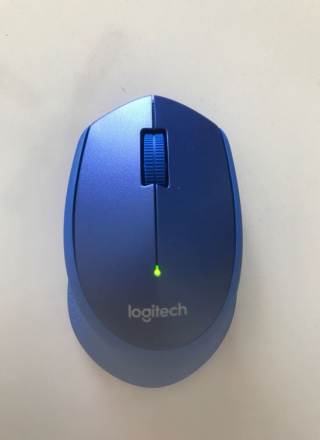
I have been using my Logitech M330 silent mouse for more than 4 years. Recently, its right click stopped clicking! This time, I decided to give a chance to Logitech M220 Silent mouse. Here is the detailed Logitech M220 Silent mouse review.
Top 5 Best Silent Mouse – 2026
| Mouse Model | Best For | Connection | Key Features |
|---|---|---|---|
| Logitech MX Master 3S | Professionals, power users | Wireless (Bluetooth/USB receiver) | Ergonomic design, ultra-quiet clicks, multi-device switching, customizable buttons |
| Logitech M330 Silent Plus | Everyday office use | Wireless (USB receiver) | Compact size, reliable sensor, very quiet click mechanism |
| Logitech Pebble Mouse 2 | Students, casual users | Wireless (Bluetooth/USB receiver) | Slim and stylish, portable, silent clicks, multiple color options |
| HP 280 Silent Mouse | Office workers | Wireless (USB receiver) | Durable build, ergonomic shape, reduced click noise |
| Mojo Performance Silent | Gamers | Wired/ Wireless options | Silent gaming switches, performance-focused sensor, ergonomic grip |
🔎 Quick Guidance
- MX Master 3S → premium productivity mouse with advanced features.
- M330 Silent Plus → simple, quiet, and reliable for office use.
- Pebble Mouse 2 → stylish, portable, and budget-friendly.
- HP 280 Silent → durable and ergonomic for long office hours.
- Mojo Performance Silent → tailored for gamers who want silence with performance.
Logitech M220 Silent Mouse: Pros, Cons & Who Should Buy It?
Pros
- Silent clicks reduce noise
- Compact, ambidextrous design
- Lightweight and portable
- Reliable wireless connection
- Long battery life
Cons
- Limited extra features
- No advanced customization
- Small size may feel cramped for large hands
- Not ideal for gaming
- Basic build quality.
Logitech M220 Silent Wireless Mouse – Key Features & Specs Explained
Logitech m220 is a silent mouse. According to Logitech, it reduces mouse click noise up to %90 compared Logitech M170 model. Now, let’s make Logitech m220 silent click technology explained. I think they made a good job, because m220 click noise is very low compared to standard mouse. You usually “feel” the noise, not “hear”!
Logitech m220 has 1.000 DPI optical tracking which is enough for daily use. It has 2.4 GHz wireless USB dongle for communication. No Bluetooth, as expected. It has also a 2D and mechanical Scroll Wheel which is also fairly silent.
Logitech m220 Specs
| Connection | 2.4GHz Wireless | |
| Wireless Range | 10m | |
| Optical Tracking | 1.000 DPI | |
| Battery Life | 18 month | |
| Battery | 1 AA Battery (Included) | |
| Weight | 75 gr (With battery) | |
| Dimensions | 39 x 60 x 99 mm | |
| Number of Buttons | 2 + Middle | |
| Scroll Wheel | Yes | |
| Power On/Off | Yes | |
| Works on | Windows, Linux, MacOS, ChromeOS | |
 |

What’s Inside the Logitech M220 Quite Wireless Mouse Box?
M220 is packaged with a small green box. The box has invisible protective tapes. For this reason, you can understand whether it is new or returned item. As expected, Logitech M220 box contains everything you need:
- Logitech M220 Silent Mouse
- Nano USB Receiver (USB-A)
- 1x AA Battery
- User Manual
Logitech M220 Silent Mouse Design – Comfort, Build & Everyday Use
Logitech M220 Silent mouse is a quality office mouse for daily use just like M330. It is not designed for gaming purposes. You can play games, but don’t expect much. Of course, no macro etc. Its 1000 DPI resolution is enough for office work.
Logitech m220 is a small sized mouse. I used M330 model for more than 4 years. I can clearly conclude that, m330 is a bit bigger, and I think it fits better to my hand. But if your hands are small, m220 would be better choice for you. On the other hand, big handed people may use m220 also without any hassle.
Contrary to Logitech M330, M220 is designed to work with both right and left hand. Default is right hand but can be changed from OS. This is a plus.
I think, only bad thing with m220 is build quality. I feel, as if it has a cheap plastic build. I used m330 model and its material quality is much better than m220. In addition, on top of mouse, there is a “logi” brand logo, instead Logitech.

Style & Ergonomics: How the Logitech M220 Fits Your Setup
Logitech m220 is a classical Logitech home/office mouse. Not intended for gaming and does what it is intended for. Its size is a bit small but a big problem. You can use without problem for hours. But if you are specifically love and looking for a big mouse, look for something else. Its design lets you easily grab and use it. Actually, it’s very lightweight also (Only 75 gr). Left, right and middle scroll clicks are very silent and convenient. In addition, it does not have RGB lightning, as expected.

Is the Logitech M220 Right for Your Hand Size?
Small Hand: Yes
Medium Hand: Yes
Large Hand: No
X-Large Hand: No

Logitech M220 Battery Life – How Long Does It Really Last?
Logitech M220 has an 18-month battery life label, but this is surely theoretical. It is, most probably measured at lab conditions which are not possible at real life use. According to my M330 experiences, Logitech M330’s battery life is around 8-10 month. Consequently, M220 battery life will be around 6-7 month. This time is also very good! In addition, quality of the battery is very important! If you use a quality battery, working time will also increase. My new m220 came with a GP Alkaline Battery.
Update: After 7 months, my Logitech m220 battery lasted, as expected. As I said before, “18-month battery life” is an on-paper, theoretical estimation. In real life, m220 battery life is around 7 months. Actually, this is not bad and acceptable.
M220 has auto on/off feature. If you don’t use mouse for a while, it goes to sleep mode for battery saving purposes. In addition, it has a physical on/off switch at the bottom. You can use this switch while travelling.

Logitech M220 vs M330 – Which Silent Mouse Should You Choose?
Which one is better? Logitech M330 or M220?
M220 is a cheap alternative to M330 model. Both of them is really silent, but M330 has much better material. In addition, if your hands are big, M330 would be a better choice. On the other hand, Logitech M220 is a good silent mouse with better price. It does everything that you are expecting from a home/office mouse!
 |  | |
| Logitech M330 | Logitech M220 | |
| Dimension | 3.84 x 6.79 x 10.54 cm | 3.9 x 6.0 x 9.9 cm |
| Weight | 91 gr | 75 gr |
| Battery Life | 24 Months | 18 Months |
| Hand | Right | Right + Left |
| Upper Material | Quality Soft Rubber | Plastic |
| |

Key Highlights for Logitech M220
- Silent operation: Click noise reduced by about 90%, earning a Quiet Mark certification.
- Wireless convenience: Uses a nano receiver with up to 10 meters range, compatible with Windows, Mac, ChromeOS, and Linux.
- Battery life: Runs on a single AA battery with up to 18 months of usage.
- Design: Lightweight (75g) and suitable for both left- and right-handed users.
- Portability: Smaller size makes it easy to carry, though extended use may feel less comfortable for larger hands.
- Build: Plastic construction with rubberized scroll wheel and smooth glide feet for quiet movement.
- Colors: Available in black, red, and blue.
Logitech M220 Silent Wireless Mouse Review Summary
The Logitech M220 Silent is good if you want a cheap, simple and quiet mouse for everyday tasks. It’s not designed for gaming or professional design work, but for office, study, or travel use, it’s a silent and affordable choice. On the other hand, I used both m330 and m220 and I can clearly conclude that, m220 is not as good as m330. M330 has better build quality. If there is no big price difference between Logitech m330 vs m220, I definitely go with m330. I would choose m220 only if i had very tight budget.
Best Places to Buy Logitech M220 Silent Mouse
The Siemens EQ500 is available from major retailers, but Amazon usually offers the best deals and fastest delivery. [Check price on Amazon] to see if there’s a discount right now.
Alternatively, buy From Producer, Logitech
Logitech M220 Quiet Wireless Mouse Review
Summary
Logitech M220 delivers quiet, reliable performance with a compact, ambidextrous design. Its silent clicks reduce noise without effecting responsiveness, which makes it ideal for shared spaces. Lightweight, wireless, and energy-efficient, it’s a budget-friendly choice for everyday use. However, limited extra features may not satisfy power users seeking advanced customization.
How We Selected These Products
We recommend these items based on a thorough research process designed to highlight the best options available. While we did not physically test some products ourselves, we relied on detailed research and verified customer feedback to evaluate them.
- Detailed Research: We reviewed product specifications, manufacturer information, and feature lists to understand what each item offers.
- Customer Insights: We analyzed verified buyer reviews and ratings to learn how these products perform in real-world use.
- Comparison Factors: We compared products across price, durability, usability, and unique features to identify the strongest choices.
- Personal Experience: With over 25 years of working in internet-related technologies and following online trends since 1995, I bring a deep understanding of how products are marketed, evaluated, and used. This background helps me filter out hype and focus on what truly matters for everyday users.
- Balanced Evaluation: Our goal is to provide clear, unbiased information so you can make confident purchasing decisions.
See also How We Review Products section for more details on our process.
Written by Metin Karal
Metin Karal is a Computer Engineer with over 25 years of experience working with internet technologies, trends, and digital tools since 1995. He brings this deep background into his product reviews, combining technical expertise with careful research to deliver honest, practical insights for readers. Passionate about technology, Metin also enjoys programming in C# and is currently developing PairMem, a challenging memory game available for free on the official Microsoft Store.
Disclosure: This article may contain affiliate links. As an Amazon Associate, we earn from qualifying purchases at no additional cost to you. For more details, please see our [Privacy Policy]
