Written by Metin KARAL – Computer Engineer with 25+ years of experience in internet technologies. Some products here are tested directly, while others are evaluated through detailed research, specifications, and verified customer feedback. This article may contain affiliate links; as an Amazon Associate we earn from qualifying purchases at no extra cost to you.
Best USB-C Hubs For Mac Mini & MacBook Pro
If your MacBook or Mac Mini feels constrained by a single port, the right adapter turns it into a full workstation without compromise. This guide highlights the best usb c hub for macbook across categories— versatile all‑rounders, stylish multiport adapters, premium mid‑range picks, budget bestsellers, and NVMe‑ready docks—so you can match ports, power delivery, and display performance to your workflow. Whether you need a compact travel companion or a heavy‑duty dock with extra storage, these selections focus on real‑world performance, reliable 4K video, fast data transfers, and enough wattage to keep your Mac charged under load.
Editor’s Recommendation ⭐
Anker 555 USB-C Hub (8-in-1) – If you are looking for the most reliable desk companion for your Mac Mini, the Anker 555 is the gold standard for 2026. It delivers full 10Gbps data speeds (essential for external SSDs) and crystal-clear 4K@60Hz HDMI output, avoiding the lag found in cheaper alternatives. Its aluminum build handles heat perfectly for 24/7 desktop use, bringing your most-needed ports—like the SD card slot and high-speed USB-A—right to the front of your workstation. For a “set it and forget it” solution that matches Apple’s performance, this is the one to buy.
Quick Pick
| My Mac is… | Best Pick |
|---|---|
| Mac Mini | Anker 555 8-in-1 |
| MacBook Air | Satechi 7-in-1 |
| MacBook Pro | UGREEN Revodok Pro 9-in-1 |
| I just need a budget giant! | Hiearcool 8-in-1 |
| Need extra SSD disk | UGREEN NVMe Docking Station |
Top 5 USB-C Hubs for Mac Mini & MacBook (2026 Comparison)
| Dock | Why |
|---|---|
| Anker 555 8‑in‑1 | Top Pick for Mac Mini. A trusted premium choice that supports 10Gbps data speeds and 4K@60Hz. Ideal for users who want to bring fast ports to the front of their desk. |
| Satechi 7‑in‑1 | Best for Aesthetics. Matches Apple’s space gray perfectly. Includes 100W PD and 4K@60Hz. A high-end choice for MacBook Air users who want a sleek, “native” look. |
| UGREEN Revodok Pro 9‑in‑1 | Best All-Rounder. A powerhouse with Gigabit Ethernet and 4K@60Hz. Offers the best balance of price and pro-grade ports for MacBook Pro workstation setups. |
| Hiearcool 8‑in‑1 | Best Budget / Travel Pick. Extremely popular and affordable with 4K@60Hz support. Great for quick office meetings or travel |
| UGREEN Revodok NVMe SSD Dock | Best for Storage. A unique hybrid that includes a 10Gbps NVMe enclosure. The perfect “hidden” storage upgrade for Mac Mini M4 users who didn’t want to pay Apple’s high SSD prices. |
Technical Comparison — Mac USB‑C Hubs (2026)
| Docking Station | Ports | Key Features |
| Anker 555 8-in-1 | 2 × USB-A, 1 × USB-C, Ethernet, SD/TF | 10Gbps high-speed data and 4K@60Hz. The most reliable pick for Mac Mini desk setups. |
| Satechi 7-in-1 (Silver) | 2 × USB-A, 1 × USB-C, SD/microSD | Apple-matched aesthetics with 100W PD. Best for MacBook Air users who want a “native” look. |
| UGREEN Revodok Pro 9-in-1 | 2 × USB-A, 2 × USB-C, Ethernet, SD/TF | True 4K@60Hz support and stable Gigabit Ethernet. The best performance-to-price ratio for pros. |
| Hiearcool 8-in-1 | 3 × USB-A, 1 × USB-C (PD), SD/TF, Ethernet | Budget-friendly bestseller. Note: No Ethernet and limited to 4K@60Hz (best for travel/office). |
| UGREEN Revodok NVMe Dock | 2 × USB-A, 1 × USB-C, Ethernet, M.2 Slot | Built-in 10Gbps SSD enclosure. Ideal for expanding Mac Mini storage without paying Apple’s high prices. |
Anker 555 8‑in‑1 USB‑C Hub – Best Mac Mini M4 Hub for Desk Use

🎯 85W PD Charging | 📺 4K@60Hz HDMI
Quick Summary
- ⚡ Fast 10Gbps USB‑C + 5Gbps USB‑A ports for quick data transfers
- 📺 HDMI 4K@60Hz output for smooth external display performance
- 🌐 Gigabit Ethernet for stable wired internet connections
- 🎯 85W Power Delivery
- 📸 SD/microSD card readers for creators and photographers
Specifications – Anker 555 8‑in‑1 USB‑C Hub
| Feature | Details |
|---|---|
| Power Delivery | Up to 85W passthrough |
| HDMI Output | 4K@60Hz |
| USB Ports | 2× USB‑A (5Gbps), 1× USB‑C (10Gbps) |
| Ethernet | Gigabit |
| Card Readers | SD + microSD |
| Compatibility | Mac Mini, MacBook Pro/Air, Windows laptops, ChromeOS |
Pros
- Fast 10Gbps USB‑C + 5Gbps USB‑A ports
- HDMI supports 4K@60Hz (better than older 30Hz hubs)
- Gigabit Ethernet adds reliable wired networking
- Compact, premium aluminum design with good spacing
- Comes with carrying pouch + 18‑month warranty
Cons
- PD passthrough capped at 85W (not full 100W)
- Slightly heavier than ultra‑compact hubs
Why We Liked It / User Experience
If you’re tired of reaching around to the back of your Mac Mini every time you need to plug in a thumb drive or SD card, the Anker 555 is the most reliable way to bring those ports to the front of your desk. Unlike budget hubs that limit your workflow, this model supports full 10Gbps data transfer, ensuring your external drives and SSDs run at their maximum rated speeds.
Users consistently praise the premium metallic finish, which acts as a heat sink to keep the hub cool even when connected 24/7. The HDMI 4K@60Hz output is a critical upgrade over older 30Hz models, providing the smooth, lag-free cursor movement essential for a primary desktop display.
I found the Anker 555 to be a much more “future-proof” choice than Anker’s basic 7-in-1 model, primarily due to the addition of Gigabit Ethernet and the faster USB-C data port. I highly recommend this hub for Mac Mini M4 users who want a dependable, high-speed desk companion. The SD card readers are a lifesaver for photographers, and while it supports 85W Power Delivery for MacBooks, for the Mac Mini, it simply serves as a rock-solid, high-performance port expansion that feels like a natural part of your workspace.
If you are a Mac Mini M4 user and want a more professional USB‑C hub with the added benefit of NVMe SSD upgrades, don’t miss our Best Mac Mini M4 Dock Stations with NVMe SSD Support (Affordable Disk Upgrade Options for Mac Users in 2026) review.
Editor’s Note
Anker is one of the most trusted names in consumer tech accessories, often praised for premium build quality and long‑term reliability. The 555 8‑in‑1 is a mid‑range hub that upgrades Anker’s earlier 7‑in‑1 model by adding Gigabit Ethernet and HDMI 4K@60Hz. It’s a refined, compact option that feels elegant yet practical, making it a safe recommendation for MacBook users who value design and dependability.

Anker 555 8‑in‑1 USB‑C Hub
Summary
The Anker 555 8-in-1 USB-C Hub is the ultimate desk companion for Mac Mini owners who are tired of reaching behind their machine for every connection. It brings high-speed 10Gbps USB-C and USB-A ports directly to your fingertips, ensuring your external SSDs and peripherals run at full throttle. With 4K@60Hz HDMI support and a rock-solid Gigabit Ethernet port, it transforms your Mac Mini into a high-performance workstation without the cable clutter. It is easily the most dependable, “set-it-and-forget-it” mid-range hub for Mac Mini setups in 2026.
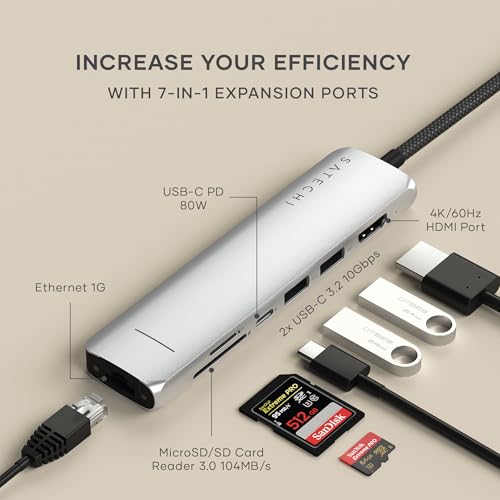
Satechi 7‑in‑1 Multiport Adapter – Best USB C Hub for MacBook Air

🎯 100W PD Charging | 📺 4K@60Hz HDMI
Quick Summary (2026 Update)
- ⚡ Upgraded Dual USB-A 3.2 Gen 2 (10Gbps): Now supports ultra-fast data transfers—perfect for high-speed external SSDs and large file backups.
- 📺 HDMI 4K@60Hz Output: Delivers a crisp, lag-free visual experience on modern 4K monitors (essential for Mac Mini desktops).
- 🌐 Gigabit Ethernet: Provides a rock-solid, 1Gbps wired connection for stable video calls and high-speed downloads.
- 🎯 100W Power Delivery: Supports up to 100W input (80W to host), ensuring even power-hungry MacBook Pros stay charged.
- 📸 UHS-I Card Readers: Dedicated SD and microSD slots (up to 104MB/s) for quick photo and video offloads.
Specifications – Satechi 7‑in‑1 USB‑C Hub
| Feature | Details |
|---|---|
| Power Delivery | Up to 100W passthrough |
| HDMI Output | 4K@60Hz |
| USB Ports | 2× USB‑A |
| USB‑C Data Port | 10Gbps |
| Ethernet | Gigabit |
| Card Readers | SD + microSD |
| Compatibility | Mac Mini, MacBook Air/Pro M4–M5, iPad, Windows laptops |
Pros
- Full 100W PD passthrough for charging high‑power laptops
- HDMI supports 4K@60Hz for smooth external display
- Sleek silver design matches MacBook aesthetics
- SD/microSD card readers add versatility for creators
- Reliable Satechi build quality with strong user feedback
Cons
- Slightly higher price compared to budget hubs
Why We Liked It / User Experience
Many reviewers states the stylish design and premium feel of the Satechi 7‑in‑1, praising how it blends seamlessly with MacBook aesthetics. It gives all missing connection elements of MacBook Air M5.
I liked integration of the Satechi hub like a natural extension of the MacBook Air M5 itself. It has a perfect balance of design and functionality — it doesn’t overload with ports, but instead delivers the essentials in a sleek, compact form factor. I advise this hub for MacBook Air M5/M4 users who value both style and everyday usability. Overall, it’s a dependable accessory that combines performance, elegance, and durability, making it one of the most attractive hubs for Apple users.
Editor’s Note
Satechi has built a reputation as the Apple‑style accessory brand, often praised for hubs and adapters that match MacBook aesthetics while delivering reliable performance. The 7‑in‑1 Multiport Adapter (Silver) is one of their most popular models, designed specifically for MacBook Air users who want a hub that looks as good as it performs. With HDMI 4K@60Hz, 100W PD, Gigabit Ethernet, and card readers, plus 10Gbps USB‑C data transfer speeds, it reflects Satechi’s focus on premium design and practical usability. In addition to that Type-C HUB, Satechi has many similar well designed products.
Satechi 7‑in‑1 USB‑C Hub
Summary
The Satechi 7‑in‑1 USB‑C Hub Multiport Adapter ) is a stylish, well‑built hub that combines 100W PD charging, HDMI 4K@60Hz, Gigabit Ethernet, 10Gbps USB‑C data transfer, and SD/microSD card readers in a compact design that complements MacBook Air M5 aesthetics.
If you’re using a MacBook Air and want a clean, minimal desk setup without sacrificing functionality, the Satechi 7-in-1 USB-C Hub is a strong choice. It adds all the essential ports in a compact form, helping you expand connectivity without clutter. You get reliable HDMI 4K@60Hz output for smooth external display performance—ideal for creative work, multitasking, or a dual-screen setup—while high-speed USB ports handle everyday peripherals with ease.
Compared to budget hubs, the Satechi stands out for its premium build quality and seamless Apple‑style integration. While it doesn’t offer dual HDMI or extra USB‑C data ports, it’s an excellent choice if you want a hub that looks elegant, performs reliably, and matches your MacBook’s design.
UGREEN Revodok Pro 9‑in‑1 USB‑C Hub – Best All‑Rounder for MacBook Pro

🎯 100W PD Charging | 📺 4K@60Hz HDMI
Quick Summary (2026 Update)
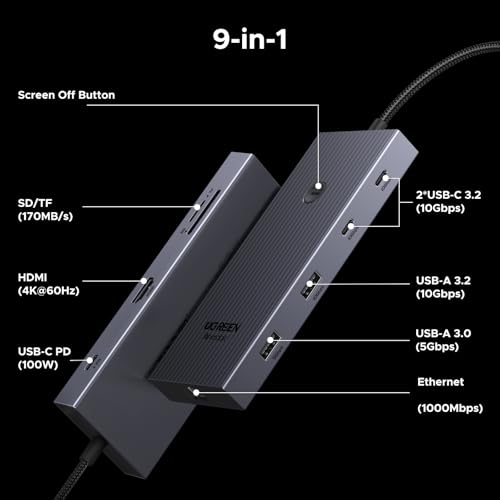
- 🚀 10Gbps Data Duo: Includes 1× USB-C and 1× USB-A port at 10Gbps (USB 3.2 Gen 2)—ideal for fast file transfers from the latest iPhones and SSDs.
- 📺 HDR-Ready 4K@60Hz: The HDMI port now supports HDR10, providing much better color depth for Mac Mini users on high-end monitors.
- 🌐 Gigabit Reliability: Features a shielded Ethernet port that reduces interference with 2.4GHz wireless mice (a frequent Mac Mini complaint).
- ⚡ Smart PD Charging: 100W input with 85W pass-through, optimized for the power curves of the M4 MacBook Pro.
- 🛠️ Thermal Management: The updated aluminum shell is 10% thicker, acting as a more efficient heat sink for 24/7 desktop use.
Specifications – UGREEN Revodok Pro 9-in-1 USB-C Hub
| Feature | Details |
| Power Delivery | Up to 100W input (85W pass-through to Mac) |
| HDMI Output | 4K@60Hz (with HDR support) |
| USB Data Ports | 1× USB-C (10Gbps), 1× USB-A (10Gbps), 2× USB-A (5Gbps) |
| Ethernet | Gigabit (1000Mbps) RJ45 |
| Card Readers | SD + TF (UHS-I, up to 104MB/s) |
| Compatibility | MacBook M1–M4, Mac Mini, iPad Pro, Windows/ChromeOS |
Pros
- Full 100W PD passthrough for charging high‑power laptops
- HDMI supports 4K@60Hz for smooth external display
- Gigabit Ethernet ensures stable wired networking
- SD/TF card readers add versatility for creators
- Compact design with reliable UGREEN build quality
Cons
- Limited number of USB‑C data ports
- No dual HDMI or multi‑display support
- Slightly bulkier than ultra‑compact hubs
Why We Liked It / User Experience
Many user liked the reliability and versatility of the UGREEN Revodok Pro 9‑in‑1, praising how it delivers the essential ports without unnecessary extras. Users love the full 100W PD passthrough, which ensures their MacBook stays powered even during heavy workloads, and how the HDMI 4K@60Hz output makes external monitors feel seamless. You will appreciate the Gigabit Ethernet port, noting that it provides stable connections for video calls and large file transfers.
I liked how the UGREEN Revodok Pro feels like a true all‑rounder hub. What we most liked was its balance of power delivery, display support, and connectivity, which makes it suitable for both casual and professional MacBook users. I advise this hub for anyone who wants a dependable everyday solution without overpaying for niche features. Overall, it’s a versatile accessory that combines performance, usability, and durability, making it one of the most practical hubs for MacBook Pro and Mac Mini setups.
Editor’s Note
UGREEN has built a strong reputation as one of the most reliable accessory brands in the USB‑C hub market, often positioned as a premium yet affordable alternative to Anker and Satechi. The Revodok line is UGREEN’s flagship series, designed specifically for professionals who need dependable connectivity with modern laptops like the MacBook Pro and Mac Mini.
The Revodok Pro 9‑in‑1 sits at the heart of this lineup, offering a carefully balanced mix of ports — HDMI 4K@60Hz, Gigabit Ethernet, 100W PD, USB‑A, and SD/TF card readers — without unnecessary extras. It’s widely regarded as UGREEN’s “all‑rounder” hub, combining premium build quality with everyday usability. I think Revodok Pro 9‑in‑1 combines good price with connectivity features.
UGREEN Revodok Pro 9‑in‑1 USB‑C Hub
Summary
The UGREEN Revodok Pro 9‑in‑1 USB‑C Hub is a versatile all‑rounder that combines 100W PD charging, HDMI 4K@60Hz, Gigabit Ethernet, 10Gbps USB‑C data transfer, and SD/TF card readers in a compact, premium design. With strong user feedback, it’s one of UGREEN’s most trusted hubs for MacBook Pro and Mac Mini owners.
If you’re a MacBook user who needs a dependable everyday hub, this model delivers the essentials without overcomplicating things. The 100W PD passthrough ensures your laptop stays powered during demanding tasks, while the HDMI 4K@60Hz output provides smooth external display performance for productivity or creative work. The Gigabit Ethernet port is especially valuable for professionals who rely on stable connections for video calls or large file transfers.
Compared to budget hubs, the Revodok Pro stands out for its premium build quality and balanced port selection. It’s an excellent choice if you want a hub that’s reliable, future‑proof, and designed for everyday MacBook and Mac Mini setups.
If you are looking for a quick storage upgrade, See our guide : Best External SSD for MacBook Pro 2026
Hiearcool 8-in-1 Review: The Most Affordable “Essential” Hub for Mac Mini

🎯 100W PD Charging | 📺 4K@60Hz HDMI
Hiearcool 8-in-1 (2026 Upgraded) – Quick Summary
- 📺 HDMI 4K@60Hz: Finally brings buttery-smooth display performance to the budget category (no more mouse lag).
- 🌐 1Gbps Gigabit Ethernet: Adds the dedicated wired internet port that Mac Mini users need for stable Zoom calls and gaming.
- ⚡ 3 × USB 3.0 (5Gbps): Provides an extra USB port compared to the 7-in-1, perfect for connecting a mouse, keyboard, and external drive simultaneously.
- 🎯 100W Power Delivery: High-speed pass-through charging for MacBooks while the hub manages all other connections.
- 📸 SD/TF Card Slots: Integrated UHS-I readers for quick photo offloads at up to 104MB/s.
Specifications – Hiearcool 8-in-1 USB-C Hub (UCN3610)
| Feature | Details |
| Power Delivery | Up to 100W (Supports MacBook Pro/Air charging) |
| HDMI Output | 4K@60Hz (Upgraded from 30Hz) |
| USB Data Ports | 3 × USB-A 3.0 (5Gbps) |
| Ethernet | 1Gbps (Gigabit) RJ45 Port |
| Card Readers | SD + microSD (TF) |
| Best For | Budget-conscious Mac Mini users who need Ethernet. |
Pros
- Full 100W PD passthrough for charging MacBooks
- HDMI supports 4K@60Hz for smooth external display
- Compact and lightweight — ideal for travel setups
- SD/microSD card readers add versatility for creators
Cons
- Build quality less premium compared to Anker or Satechi
Why We Liked It / User Experience
Many reviewers highlight the value and reliability of the Hiearcool 8‑in‑1, praising how it delivers the essential ports at a budget‑friendly price. Many people appreciated its compact, travel‑ready design, which makes it easy to carry for office, meetings, or home setups. Professionals liked the HDMI 4K@60Hz output, noting that it works seamlessly with MacBook external displays, while creators rely on the SD/microSD card readers for quick photo and video transfers.
I liked how the Hiearcool hub proves that you don’t need to spend a premium to get dependable performance. What I most liked was its balance of affordability and functionality — it covers the basics (HDMI, PD, USB‑A, RJ-45 Ethernet, card readers) without unnecessary extras. I advise this hub for MacBook users who want a budget‑friendly, proven quality that’s backed by tens of thousands of positive reviews. Overall, it’s the kind of hub that delivers everyday usability at a price point that makes sense.
Editor’s Note
Hiearcool has become one of the top‑selling brands on Amazon, largely due to its focus on affordability and practicality. The 8‑in‑1 USB‑C Hub is one of the most widely trusted hubs on the market. While it doesn’t premium finishes, its combination of HDMI 4K@60Hz, 100W PD, USB‑A ports, and card readers makes it a reliable everyday choice for MacBook and Mac Mini users who prioritize value.

Hiearcool 8‑in‑1 USB‑C Hub
Summary
The Hiearcool 8‑in‑1 USB‑C Hub is a proven Amazon bestseller that combines 100W PD charging, HDMI 4K@60Hz, USB‑A ports, and SD/microSD card readers in a compact, travel‑friendly design. If you’re a MacBook or Mac Mini user looking for a budget‑friendly hub with strong reliability, this model is hard to beat. It does include 1G Ethernet but not premium finishes. It’s one of the most trusted everyday hubs for office, meetings, travel, and home setups.
Quick Comparison: Anker 555 vs. Hiearcool 8-in-1 (2026 Edition)
With Hiearcool’s latest 8-in-1 update, the gap between “Budget” and “Premium” has narrowed. Both now offer smooth 60Hz video and wired internet, but there is still a major difference in data performance.
| Feature | Anker 555 (The Performance King) | Hiearcool 8-in-1 (The Value Champ) |
| HDMI Output | 4K @ 60Hz (HDR Support) | 4K @ 60Hz (New Upgrade) |
| Max Data Speed | 10Gbps (USB 3.2 Gen 2) | 5Gbps (USB 3.0) |
| Ethernet | 1Gbps Gigabit | 1Gbps Gigabit |
| Build Quality | Premium Aluminum (High Heat Dissipation) | Standard Aluminum (Travel-Ready) |
| Price | Mid-Range ($$$) | Budget ($) |
The Verdict:
- Choose the Anker 555 if you use External SSDs. The 10Gbps ports mean you can move files at 1000MB/s. If you’re a video editor or power user on a Mac Mini, the extra speed is worth every penny.
- Choose the Hiearcool 8-in-1 if you just need a Reliable Desk Setup on a budget. Now that it supports 60Hz and Ethernet, it provides the same smooth desktop experience as the Anker for a fraction of the cost. It’s the ultimate “Smart Buy” for 2026.
UGREEN Revodok NVMe Docking Station 10‑in‑1 USB‑C Hub – Best Extra Storage Hub for MacBook Pro & Power Users

🎯 100W PD Charging | 💾 NVMe SSD Enclosure
UGREEN Revodok NVMe Dock – Quick Summary
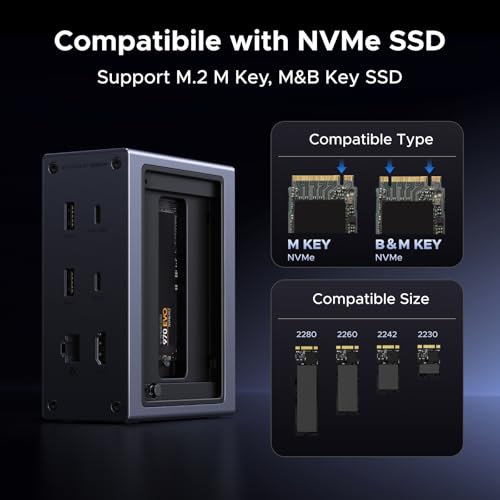
- 💾 Integrated M.2 NVMe Slot: Add up to 8TB of ultra-fast storage (speeds up to 10Gbps). It turns a base-model Mac Mini into a pro-tier workstation.
- 📺 Dual Monitor Brilliance: Supports 4K@60Hz across two displays (HDMI + DisplayPort), a rarity in this price bracket.
- 🚀 10Gbps Data Ports: Features dedicated USB-C and USB-A 3.2 Gen 2 ports, perfect for moving large video files or photo libraries instantly.
- 🌐 Gigabit Ethernet: Provides the rock-solid, 1000Mbps wired connection that desktop Mac Mini users rely on.
- 🌡️ Pro Thermal Design: The aluminum shell and included thermal pads keep your internal SSD cool during long render sessions or backups.
Specifications – UGREEN Revodok NVMe Dock
| Feature | Details |
| Storage Expansion | M.2 NVMe Slot (Supports M-Key / B&M Key SSDs) |
| SSD Speed | 10Gbps (Approx. 1000MB/s real-world read/write) |
| Video Output | Dual 4K@60Hz (HDMI + DisplayPort) |
| USB Ports | 1 × USB-C (10Gbps), 1 × USB-A (10Gbps), 2 × USB-A (5Gbps) |
| Power Delivery | 100W PD Input (85W pass-through to Mac) |
| Best For | Mac Mini M4 Power Users who need both ports and storage. |
Pros
- Unique NVMe SSD enclosure for portable storage expansion
- Full 100W PD passthrough for charging high‑power laptops
- HDMI supports 4K@60Hz for smooth external display
- Gigabit Ethernet ensures stable wired networking
- Premium build quality with versatile port selection
Cons
- Higher price compared to standard hubs
- Bulkier design due to integrated SSD enclosure
- Limited availability
Why We Liked It / User Experience
Many reviewers highlight the innovation and versatility of the UGREEN Revodok NVMe Docking Station, praising how it combines a hub and SSD enclosure in one device. Users love the 10Gbps NVMe transfer speeds, which make it ideal for video editing, large file backups, and professional workflows. That 10 Gbps speed corresponds to a 800-850 MB/s transfer speeds and this is enough for must daily works. In addition, it has a Gigabit Ethernet port for stable connections, while creators rely on the SD/TF card readers for quick media transfers.
I liked this docking station which goes beyond being “just a hub.” It has dual functionality — it’s both a connectivity hub and a portable storage solution. ou can expand storage for a fraction of the price of Apple’s upgrade path. I advise this hub for MacBook Pro power users, developers, and video editors who need reliable ports plus fast external storage. Overall, it’s a premium accessory that delivers advanced usability, making it one of the most future‑proof hubs in UGREEN’s lineup.
Editor’s Note
UGREEN’s Revodok series is their premium line, and the NVMe Docking Station 10‑in‑1 is a standout model that pushes the boundaries of what a hub can do. By integrating an M.2 NVMe SSD enclosure, it offers both connectivity and storage expansion in one compact device. This makes it especially appealing to professionals who work with large files or need portable backup solutions. While it’s less mainstream than the Revodok Pro 9‑in‑1, it reflects UGREEN’s commitment to innovation, reliability, and premium design.
Revodok NVMe Docking Station 10‑in‑1
Summary
The UGREEN Revodok NVMe Docking Station 10‑in‑1 USB‑C Hub is a premium solution that combines 100W PD charging, HDMI 4K@60Hz, Gigabit Ethernet, 10Gbps USB‑C/A ports, SD/TF card readers, and an integrated NVMe SSD enclosure. If you’re a MacBook Pro power user, developer, or video editor, this hub is ideal for expanding both connectivity and storage in one device. While it’s bulkier and more expensive than standard hubs, its dual functionality and premium build quality make it one of the most advanced and future‑proof hubs available today.
Why Mac Users Need a USB‑C Hub
Apple’s modern Macs — whether it’s the MacBook Air, MacBook Pro, or Mac Mini — are sleek, powerful, and built for performance. But they all share one limitation: fewer ports than most people actually need. Gone are the days of built‑in USB‑A, HDMI, or SD card slots. Instead, Apple has streamlined everything into USB‑C and Thunderbolt.
That design choice looks elegant, but it creates everyday challenges:
- Limited Ports on Modern Macs Apple’s MacBook Air, MacBook Pro, and Mac Mini models rely heavily on USB‑C/Thunderbolt ports. That means no built‑in USB‑A, no HDMI, and no SD card slots. A hub restores those missing connections so you can plug in older devices, external monitors, and memory cards without juggling adapters.
- Affordable Storage Expansion Apple’s internal SSD upgrades are notoriously expensive. A hub with NVMe SSD support lets you expand storage externally at a fraction of the cost, while still enjoying fast transfer speeds.
- Better Connectivity for Work & Play Many hubs add Gigabit Ethernet, which is critical for stable video calls, gaming, or large file transfers. They also provide multiple USB‑A ports for peripherals like keyboards, mice, and external drives.
- Power Delivery (PD) Passthrough With 85W–140W PD passthrough, hubs keep your MacBook fully charged while you use multiple devices. This avoids the common frustration of choosing between charging and connecting accessories.
- Travel & Productivity A compact hub makes it easy to set up anywhere — office, meetings, coffee shops, or travel. Instead of carrying multiple dongles, one hub covers everything.
- Future‑Proofing USB‑C hubs evolve with faster standards (USB 3.2 Gen 2, USB4, Thunderbolt 4). Choosing the right hub ensures your Mac can handle new devices and higher speeds without needing a full dock upgrade.
A good TYPE‑C hub solves all of this in one device:
- Adds back missing ports (USB‑A, HDMI, Ethernet, card readers).
- Keeps your Mac charged with Power Delivery passthrough.
- Expands storage affordably with external SSDs.
- Future‑proofs your setup with faster USB‑C and Thunderbolt standards.
In short: Mac users need a USB‑C hub to unlock the full potential of their devices — adding back missing ports, expanding storage affordably, ensuring stable connectivity, and keeping everything powered. It’s the simplest way to make a sleek but limited Mac setup truly versatile.
Summary: The Best Mac USB-C Hubs & Docking Stations (2026 Edition)
1. UGREEN Revodok Pro 9-in-1 (15532)
- Best For: Mac Mini M4 users who need a permanent, high-performance desktop anchor.
- The Hook: If you are setting up a dedicated workstation, this is the one. It’s the most balanced desk dock, offering 4K@60Hz HDR for your monitor and 10Gbps data for fast file transfers, all wrapped in a thick aluminum shell that handles 24/7 heat better than slimmer travel hubs.
2. UGREEN Revodok NVMe Dock (10-in-1)
- Best For: Mac Mini M4 users who bought the base 256GB/512GB model and need a “Storage Rescue.”
- The Hook: This isn’t just a hub; it’s an internal storage upgrade. It is specifically designed for users who want to hide an 8TB NVMe SSD inside their dock to avoid Apple’s expensive storage prices. It’s the “Creative Professional’s Choice” for video editing and massive photo libraries.
3. Anker 555 (8-in-1)
- Best For: MacBook Pro M4 users who demand maximum reliability and “Full-Speed” SSD performance.
- The Hook: Unlike hubs that mix slow and fast ports, the Anker 555 provides 10Gbps on every data port (both USB-C and USB-A). It’s for the user who doesn’t want to guess which port is the “fast one”—everything you plug in here runs at the M4’s peak efficiency.
4. Satechi Slim 7-in-1 (ST-P7SM)
- Best For: MacBook Air M3/M5 users who prioritize a “Zero-Bulk” travel setup that matches Apple’s aesthetic.
- The Hook: This is the most “Apple-like” hub on the list. With its new braided cable and 10Gbps refresh, it’s for the minimalist who wants their accessories to look original to the laptop. It’s the lightest 10Gbps hub available, making it the king of coffee shop workstations.
5. Hiearcool 8-in-1 Ethernet (UCN3610)
- Best For: Budget-conscious Mac Mini M4 users who want a “Lag-Free” display without the $100 price tag.
- The Hook: This is the “Smart Buy.” It’s for the user who needs the essentials—4K@60Hz for a smooth mouse and Gigabit Ethernet for stable internet—but doesn’t necessarily need 10Gbps data speeds. It provides a “Pro” desktop feel for the price of a basic adapter.
Overall Takeaway
- The “Speed” Tier: Choose Anker 555 or UGREEN Pro if you move large files daily (10Gbps).
- The “Storage” Tier: Choose the UGREEN NVMe if your Mac’s internal drive is already full.
- The “Utility” Tier: Choose the Hiearcool 8-in-1 if you just want a smooth 60Hz monitor and a wired internet connection for your desk.
Before You Buy: The 30-Second Checklist
- Check the Refresh Rate: If you’re using a 4K monitor as your main screen, ensure the hub says 4K@60Hz. (Avoid 30Hz for desktop use!)
- Verify Your Drive Speed: If you own a fast external SSD (Samsung T7/T9, etc.), choose a 10Gbps hub (Anker 555 or UGREEN Pro) so you don’t cut your transfer speeds in half.
- Power Delivery (PD): If you’re using a MacBook, make sure your hub supports at least 85W–100W PD so your laptop stays charged while you work.
- The “Braided” Factor: For the best durability in 2026, look for the braided cable versions of the Satechi and UGREEN hubs—they handle desk bends much better over time.
How We Rated the Best Mac Docking Stations
To keep things consistent and fair, we judged every hub and dock against four main dimensions. Each one reflects what matters most to Mac users in daily use.
1. Ports & Connectivity
We looked at the range and speed of ports — from USB‑A and USB‑C to HDMI, Ethernet, and card readers. The ability to handle multiple displays, fast data transfers, and legacy devices all factored into this score.
2. Design & Build Quality
This category covers materials, durability, and aesthetics, but also practical details like how neatly a dock stacks under a Mac Mini, whether it interferes with Wi‑Fi, and how easy it is to install an SSD. A hub should feel solid and integrate smoothly into your setup.
3. Performance & Speed
Here we measured real‑world throughput and stability. That includes NVMe/SATA read/write speeds, how well the dock manages heat under load, and the quality of video output (refresh rates, resolution). A dock that looks good but throttles performance won’t score highly.
4. Value & Reliability
Finally, we compared price against features, especially versus Apple’s costly internal SSD upgrades. We also considered availability across regions, brand reputation, warranty support, and long‑term durability. A dock should be both a smart investment and a dependable tool.
Tips for Choosing and Using a USB-C Hub for Mac Mini & MacBook (Pro, Air & Neo)
Match the Hub to Your Workflow — One Size Doesn’t Fit All
Not every hub needs all the ports. For basic setups—keyboard, mouse, single monitor—a compact 7-in-1 hub like the Satechi 7-in-1 is enough. Power users who need Ethernet, multiple displays, or external SSDs should consider 9- or 10-in-1 hubs like the UGREEN Revodok Pro. Choosing the right hub for your workflow saves money, desk clutter, and frustration. This applies equally to MacBook Neo users looking for high-performance portability.
Power Delivery — Know When It Matters
- MacBook Pro, Air & Neo: Look for at least 85–100W passthrough to keep your laptop fully powered under load.
- Mac Mini M4: PD is optional for the computer itself, but useful for charging accessories like iPhone or iPad.
Understanding which devices actually need PD prevents overspending on unnecessary wattage.
HDMI Output — 4K@60Hz Is Essential
Some hubs limit external displays to 4K@30Hz, which can feel choppy. All picks here support 4K@60Hz, ensuring smooth video, creative work, or dual-screen productivity. MacBook Neo users working on external monitors will especially appreciate lag-free 60Hz output.
NVMe Storage — Only if You Need It
Hubs like the UGREEN Revodok NVMe Dock 10-in-1 allow you to install your own SSD, delivering fast external storage. Standard hubs only expand ports. NVMe docking hubs are ideal for editors, photographers, and power users—including MacBook Neo users—who need extra storage without external drives cluttering the desk.
USB Speed — Don’t Overlook It
- USB 3.2 Gen 1 (5Gbps): Fine for peripherals and small files
- USB 3.2 Gen 2 (10Gbps): Needed for SSDs and large media transfers
If you move large files frequently, prioritize hubs with faster ports for real-world efficiency—important for MacBook Pro&Air users working with large projects on the go.
Build Quality & Design — Keep Your Desk Clean
Mac Mini and MacBook Neo users benefit from hubs that match Apple’s minimalist aesthetic:
- Aluminum construction for heat dissipation and durability
- Compact, stackable designs for cable management
Brands like Satechi and Anker combine performance with premium looks.
Don’t Overbuy — More Ports ≠ More Value
Buying a hub with 12 ports when you only use 5 creates extra expense and desk clutter. Focus on the ports you actually use. Maximum utility comes from matching hub features to your workflow, whether it’s a Mac Mini, MacBook Air, Pro, or Neo.
Editor’s Tip — Focus on Practical Daily Use
The best hub isn’t the one with the most ports or highest PD. Look for:
- Build quality
- Heat management
- Reliable port performance
- Desk-friendly design
Matching these features to your actual use case ensures your USB-C hub is a true productivity tool for Mac Mini and all MacBook models, including Neo.
Frequently Asked Questions (FAQ)
Do I need a different USB-C hub for Mac Mini vs MacBook (Pro, Air, Neo)?
While the core USB-C functionality is the same across Mac Mini and MacBook models, your workflow determines the hub you need. Mac Mini M4 users generally don’t need Power Delivery (PD) for the computer itself, since it has its own power supply, but PD can be useful for charging accessories like iPhone or iPad directly from the hub. MacBook Pro, Air, and Neo users must consider PD, especially if they run demanding applications like video editing or design software. Hubs that support 85–100W passthrough ensure your laptop stays powered during heavy workloads. Additionally, MacBook users often benefit from portable, compact hubs that travel with the device, whereas Mac Mini users can prioritize desk-friendly designs with more connectivity options.
How many ports do I actually need on a USB-C hub?
The number of ports is less important than the type and quality. For most users, a 7-in-1 hub covers essentials: HDMI for external displays, USB-A for peripherals, USB-C for data, and SD/microSD slots. If you regularly connect Ethernet, multiple displays, or external SSDs, a 9–10-in-1 hub like the UGREEN Revodok Pro or NVMe docking hubs is more suitable. Overbuying ports can lead to cluttered desks, tangled cables, and wasted money. Focus on what you actually use daily, matching port selection to your workflow, whether you’re using a Mac Mini, MacBook Pro, Air, or Neo. This ensures maximum efficiency without unnecessary bulk.
Are all USB-C hubs the same speed?
No, USB-C hubs differ significantly in data transfer speeds. Most hubs include USB 3.2 Gen 1 (5Gbps) ports, which are adequate for everyday peripherals and small file transfers. If you handle large media files, high-speed SSDs, or external drives, look for hubs with USB 3.2 Gen 2 (10Gbps) ports to maximize performance. NVMe docking hubs, like the UGREEN Revodok NVMe 10-in-1, deliver blazing-fast external storage, ideal for video editors, photographers, or Neo users working on large projects. Ignoring port speed can create frustrating bottlenecks in real-world use, even if a hub appears feature-packed on paper.
Do all hubs support external displays well?
No. HDMI output quality varies between hubs. Cheaper or older hubs often limit external displays to 4K at 30Hz, which can feel sluggish for multitasking or video playback. For smooth performance, look for 4K@60Hz support, which all our recommended hubs deliver. This ensures fluid scrolling, accurate video playback, and a responsive experience for creative work, presentations, or dual-screen setups. MacBook Neo users, in particular, will notice the difference when connecting to high-refresh monitors or running professional applications.
How important is build quality and design?
Extremely important, especially for long-term reliability. Aluminum or metal hubs dissipate heat better, protect internal components, and often match Apple’s minimalist aesthetic. Cheap plastic hubs may overheat under load, throttle performance, or fail after repeated use. Desk-friendly design is also critical for Mac Mini users who want a clean, low-clutter setup, while MacBook and Neo users benefit from portable, lightweight hubs that can travel without breaking or rattling. Brands like Satechi and Anker combine performance, durability, and design, making them worth the investment for everyday use.
Which ports matter most for Mac Mini users?
The essential ports for most Mac Mini setups are:
- HDMI 4K@60Hz for smooth external displays
- USB-A for keyboards, mice, printers, or drives
- USB-C for high-speed data and accessory charging
- SD/microSD for media transfer, if you work with photos or video
Optional ports like Ethernet, extra HDMI, or NVMe slots are valuable for power users, creatives, or anyone expanding storage, but most casual setups don’t need all the bells and whistles. Choosing the right hub depends on how you actually use your Mac Mini.
Is 10Gbps really that much faster than 5Gbps for my Mac?
Yes, significantly. While 5Gbps is fine for a mouse or keyboard, it creates a massive bottleneck for external SSDs. In real-world testing on the Mac Mini M4, the difference is clear:
| File Type | 5Gbps Hub (Standard) | 10Gbps Hub (Anker/UGREEN) |
| 10GB Video File | ~35 Seconds | ~12 Seconds |
| 100GB Photo Library | ~6 Minutes | ~2 Minutes |
| Real-World Speed | ~450 MB/s | ~1,050 MB/s |
Note: To hit these speeds, you must use a 10Gbps-rated USB-C cable and a fast NVMe external drive.
Why does my mouse feel “laggy” when plugged into a 4K monitor?
This is usually because your hub is limited to 4K@30Hz. At 30Hz, your screen only refreshes 30 times per second, making your cursor look “choppy.” To get the smooth, native Mac experience, always choose a hub that supports 4K@60Hz (like the Anker, Satechi, or the upgraded Hiearcool 8-in-1).
Can I boot my Mac from an SSD inside the UGREEN NVMe Dock?
Yes. Mac macOS allows booting from external USB-C drives. This is a popular “hack” for users who want a high-capacity startup drive without paying for Apple’s internal storage upgrades. Just ensure you use a high-quality NVMe SSD for the best performance.
How We Selected These Products
We recommend these items based on a thorough research process designed to highlight the best options available. While we did not physically test some products ourselves, we relied on detailed research and verified customer feedback to evaluate them.
- Detailed Research: We reviewed product specifications, manufacturer information, and feature lists to understand what each item offers.
- Customer Insights: We analyzed verified buyer reviews and ratings to learn how these products perform in real-world use.
- Comparison Factors: We compared products across price, durability, usability, and unique features to identify the strongest choices.
- Personal Experience: With over 25 years of working in internet-related technologies and following online trends since 1995, I bring a deep understanding of how products are marketed, evaluated, and used. This background helps me filter out hype and focus on what truly matters for everyday users.
- Balanced Evaluation: Our goal is to provide clear, unbiased information so you can make confident purchasing decisions.
See also How We Review Products section for more details on our process.
Written by Metin Karal
Metin Karal is a Computer Engineer with over 25 years of experience working with internet technologies, trends, and digital tools since 1995. He brings this deep background into his product reviews, combining technical expertise with careful research to deliver honest, practical insights for readers. Passionate about technology, Metin also enjoys programming in C# and is currently developing PairMem, a challenging memory game available for free on the official Microsoft Store.
Disclosure: This article may contain affiliate links. As an Amazon Associate, we earn from qualifying purchases at no additional cost to you. For more details, please see our [Privacy Policy]
- 5 Best USB-C Hub for MacBook Neo (2026) — Complete Buyer’s Guide

- 7 Best MacBook Neo Case & Sleeve (2026) — Complete Buyer’s Guide
- Best iPhone 17e Screen Protectors – 2026
- 6 Best iPad Air M4 Screen Protectors (11″ & 13″) – Top Tempered Glass & Privacy Options
- 7 Best MacBook Pro & Air M5 Charger (2026) — Ranked by Model